Awesome: Switching monitor causes clients to move to the first tag
Output of awesome --version:
awesome v4.0 (Harder, Better, Faster, Stronger)
 • Compiled against Lua 5.2.4 (running with Lua 5.2)
 • D-Bus support: ✔
 • execinfo support: ✔
 • RandR 1.5 support: ✘
 • LGI version: 0.9.0
How to reproduce the issue:
- attach another monitor to your machine
- switch to it using
xrandr
Actual result:
All of the tags are moved to the first client. All layouts are as configured, but rules didn't apply.
Expected result:
Clients stay where they're.
 p-himik
All 39 comments
Could you change your config to have fewer tags, if possible (feel free to skip this if you have some reason to do so), open just one terminal and run the following script, then add a new monitor and run the script again?
It dumps information about screens, clients and tags. I am sorry, but your description does not help me a lot and hopefully this would make things clearer.
echo 'local result = {screens={}, tags={}, clients={}} for s=1, screen.count() do result.screens[s] = {screen[s], screen[s].geometry } end for _, t in pairs(root.tags()) do result.tags[t] = { name = t.name, screen = require("awful.tag").getscreen(t) } end for _, c in pairs(client.get()) do result.clients[c] = { name=c.name, tags = c:tags() } end return require("gears.debug").dump_return(result)' | awesome-client
 psychon
on 10 Jan 2017
psychon
on 10 Jan 2017
Oh and: Are you using the default config of awesome v4.0? If not, could you also show your config?
psychon
on 10 Jan 2017
I used the default config (moved from /usr/local/... as per the other issue) where I left only two tags.
Before switch the single terminal window was on the second tag.
DP1_clients.txt - before switch
eDP1_clients.txt - after switch
Also, interesting - when I restarted Awesome with my custom config (which have the issue as well), the terminal appeared on the third tag for some reason. And I don't have any rules related to terminals.
p-himik
on 10 Jan 2017
Ahh. When you say switch to it using xrandr, you mean "disable the existing screen and enable a new screen. So I guess you are using xrandr --output eDP1 --off --output DP1 --auto, or something like that. I thought that you were enabling a new screen without disabling the existing one.
From the point of awesome, eDP1 and DP1 are completely unrelated. The only reason why all clients end up on tag 1 is that when the screen DP1 goes away, we have some code that tries to "save" existing clients to make sure they do not get lost. I guess we never considered this kind of screen replacement as a use case.
@Elv13 Any idea on how to handle this without stepping on your toes with your dynamic tagging?
We could just use tag indicies to figure out which tag a client should be moved to on the new screen, but somehow I feel like you would not like that. (Awesome 3.5 did something similar: It restarted and afterwards clients got tagged based on some tag indicies logic)
psychon
on 10 Jan 2017
Is it really an enhancement and not a regression, given that it was working as expected on Awesome 3.5? I don't really know your labeling scheme - I'm just curious.
p-himik
on 10 Jan 2017
@p-himik Add the following to your config
screen.connect_signal("removed", awesome.restart)
screen.connect_signal("added", awesome.restart)
You should get the old behaviour of restarting when a screen is removed/added back.
Yes, I guess that this is a regression when comparing 3.5 to 4. Pity that it was not noticed before a release (I only ever add/remove extra screens, but do not "swap" screens). For the "enhancement" label: Dunno. No really systematic behind it.
psychon
on 10 Jan 2017
Thanks for the workaround! I have to switch between screens a few times a day, so having clients remembering their tag definitely helps.
p-himik
on 10 Jan 2017
Running into something similar to this, just to add another use case into the mix. I add a screen in a sort of "plugging a laptop into a dock station" type scenario; the new monitor becomes primary, and the laptop becomes a secondary screen without going away. Using xrandr --output HDMI1 --auto --primary, previously awesome would restart and move everything to the new screen, keeping tags intact but losing some contextual information like tiling modes.
For now I'll go back to the old behaviour, but a welcome enhancement would be the ability to migrate a screen configuration to another such that all window positioning, tiling modes, etc. are retained and transferred to the new screen.
 arcnmx
on 23 Jan 2017
arcnmx
on 23 Jan 2017
The current API allows it, you can use the request::screen handler to give a new home to tags about to be deleted. As for adding new screens, if the xrandr command is "good", then the existing clients should not move.
 Elv13
on 23 Jan 2017
Elv13
on 23 Jan 2017
As for adding new screens, if the xrandr command is "good", then the existing clients should not move.
Mm, I guess my issue is that I do want them to move. Would be the API allow swapping two screens; all clients moved, with positioning and tags maintained, etc. that could be triggered on screen connect?
arcnmx
on 23 Jan 2017
Would be the API allow swapping two screens; all clients moved, with positioning and tags maintained, etc. that could be triggered on screen connect?
Yes, it does, but you have to use 2 xrandr command to have 1 screen -> 2 screen -> swap -> 1 screen.
But the request::screen handler does what you want in a single step. The default behavior is "delete all tags". Change it to "move all tags to the new screen"
Elv13
on 23 Jan 2017
Does anybody have the code for request::screen handler that moves all tags to the new screen? I'm still not familiar with the new API.
 hrnr
on 28 Jan 2017
hrnr
on 28 Jan 2017
@hrnr: I am using the following code to resolve this issue. First, I check if it finds a tag with the same name on any other screen and moves it there. Otherwise, it will use awful.tag.find_fallback to find a suitable alternative.
I am not sure if this is the best way to solve it as I am not really familiar with the awesome API. However, it resolves the issue for me, but I haven't tested it with more than two monitors. Maybe this could be the default strategy for awesome, instead of the 'delete all tags' behavior and move all tags to the first tag of another screen.
tag.connect_signal("request::screen",
  function(t)
    local fallback_tag = nil

    -- find tag with same name on any other screen
    for other_screen in screen do
      fallback_tag = awful.tag.find_by_name(other_screen, t.name)
      if fallback_tag ~= nil then
        break
      end
    end

    -- no tag with same name exists, chose random one
    if fallback_tag == nil then
      fallback_tag = awful.tag.find_fallback()
    end

    -- delete the tag and move it to other screen
    t:delete(fallback_tag, true)
  end)
 mlq
on 24 Mar 2017
mlq
on 24 Mar 2017
I suggest adding if t.screen ~= other_screen then in the right place so that other_screen really is another screen.
psychon
on 24 Mar 2017
Thanks for your suggestions. I will try that.
hrnr
on 25 Mar 2017
@psychon: Thanks, I've added that. I thought that at that point in time the 'current' screen does not exist anymore.
Updated version:
tag.connect_signal("request::screen",
  function(t)
    local fallback_tag = nil

    -- find tag with same name on any other screen
    for other_screen in screen do
      if other_screen ~= t.screen then
        fallback_tag = awful.tag.find_by_name(other_screen, t.name)
        if fallback_tag ~= nil then
          break
        end
      end
    end

    -- no tag with same name exists, chose random one
    if fallback_tag == nil then
      fallback_tag = awful.tag.find_fallback()
    end

    -- delete the tag and move it to other screen
    t:delete(fallback_tag, true)
  end)
Thanks @psychon and @mlq that works perfectly.
 kwisatz
on 2 Oct 2017
kwisatz
on 2 Oct 2017
While this thread is still open...
Hi guys,
like others I swtich screens quite often. I don't understand the differences between 3.5 and 4 in this particular topic nor I understand Awesome API not I'm Lua developer.....
... but I would be totally happy with a script/function that I can bind under a command/key shortcut that saves all my windows on all my tags. By saving I mean a list of tags where each tag has the list of windows. I would run this before screen switch and then another, "restore command", that would place all those windows from the first tag according to saved "map".
Any ideas?
 im-n1
on 18 May 2018
im-n1
on 18 May 2018
@grafa Why that key combination instead of the code from https://github.com/awesomeWM/awesome/issues/1382#issuecomment-289378695 ? Your save/restore scheme would be a bit harder to implement than this.
psychon
on 30 May 2018
I've tried that snipper but it doesn't work. Even when I try to put awful. before the first line I got error.
What I'm missing?
Also I do think that walikng thru all windows and storing their ID/name to a file and then walk thru that file and restore windows accoring that is pretty simple. I'm not Lua dev tho...
im-n1
on 30 May 2018
Well, what's the error message? What is your awesome version?
psychon
on 30 May 2018
well it just magicaly started working.... never mind, probably my bad
anyway thank u for the snippet and for the help :+1:
im-n1
on 31 May 2018
I'm having the same problem, of often switching between monitor setups.
I tried saving and restoring the tags, but it didn't work:
local tag_store = {}
screen.connect_signal("removed", function(s)
  local output = next(s.outputs)
  local tags = {}
  for key, tag in ipairs(s.tags) do
    tags[tag.index] = tag:clients()
  end
  tag_store[output] = tags
end)
screen.connect_signal("added", function(s)
  local output = next(s.outputs)
  tags = tag_store[output]
  if not (tags == nil) then
    for key, tag in ipairs(tags) do
      for key2, client in ipairs(tag) do
        client:move_to_screen(s)
      end
    end

    for key, tag in ipairs(s.tags) do
      if not (tags[tag.index] == nil) then
        tag:clients(tags[tag.index])
      end
    end
  end
end)
It seems like the tags are already gone, when these signals are emitted. Any idea how to restore client-tag assignment when the screen is reconnected?
Also the function suggested above, that listens to "request::screen" does not seem to work. All the tags are still send to tag "1"...
 bodograumann
on 17 Oct 2018
bodograumann
on 17 Oct 2018
I did a little more research. The above request::screen listener can not work, because tag:delete only moves sticky clients. My own error was using screen::removed, which is only called after all the tags are already gone and listening to screen::added before calling awful.screen.connect_for_each_screen, which by itself also listens to screen::added and creates the screens tags in the first place. So there weren’t any tags to restore.
So with this information I was able to create a working solution:
-- Save and restore tags, when monitor setup is changed
local naughty = require("naughty")
local tag_store = {}
tag.connect_signal("request::screen", function(t)
  local fallback_tag = nil

  -- find tag with same name on any other screen
  for other_screen in screen do
    if other_screen ~= t.screen then
      fallback_tag = awful.tag.find_by_name(other_screen, t.name)
      if fallback_tag ~= nil then
        break
      end
    end
  end

  -- no tag with same name exists, chose random one
  if fallback_tag == nil then
    fallback_tag = awful.tag.find_fallback()
  end

  if not (fallback_tag == nil) then
    local output = next(t.screen.outputs)

    if tag_store[output] == nil then
      tag_store[output] = {}
    end

    clients = t:clients()
    tag_store[output][t.name] = clients

    for _, c in ipairs(clients) do
      c:move_to_tag(fallback_tag)
    end
  end
end)

screen.connect_signal("added", function(s)
  local output = next(s.outputs)
  naughty.notify({ text = output .. " Connected" })

  tags = tag_store[output]
  if not (tags == nil) then
    naughty.notify({ text = "Restoring Tags" })

    for _, tag in ipairs(s.tags) do
      clients = tags[tag.name]
      if not (clients == nil) then
        for _, client in ipairs(clients) do
          client:move_to_tag(tag)
        end
      end
    end
  end
end)
I think it would make sense to incorporate this into the default configuration.
bodograumann
on 18 Oct 2018
@bodograumann The code in https://github.com/awesomeWM/awesome/issues/1382#issuecomment-289378695 works fine for me when I just switch to another monitor.
However, it does send some clients to the first tag when I restart Awesome. Note that only some clients - most of them still stay where they were. Not sure what's going on here.
$ awesome --version
awesome v4.2-489-g99fbe2ae (Human after all)
 • Compiled against Lua 5.2.4 (running with Lua 5.2)
 • D-Bus support: ✔
 • execinfo support: ✔
 • xcb-randr version: 1.6
 • LGI version: 0.9.2
Does the code in https://github.com/awesomeWM/awesome/issues/1382#issuecomment-271616493 work for you? Is there any reason you don't want to use it?
p-himik
on 18 Oct 2018
It seems the above issue with moving some clients to the first tag on Awesome restart can be fixed by adding nil, {} arguments to the awful.tag.find_fallback call.
Update: nope, not fixed. I couldn't reproduce it initially, but after some time some clients started to move to the first tag when Awesome is restarted.
p-himik
on 18 Oct 2018
I have not tried that approach, because It seems unclean and most probably will not help me to restore my tags (and clients assigned to them) after I reattach a screen.
The solution I posted above works wonderfully though.
bodograumann
on 18 Oct 2018
I think it would make sense to incorporate this into the default configuration.
I don't think so. It fixes the consequences of the problem and not the problem itself. It also have corner cases where new bugs will sneak in. Don't get this wrong, that kind of workaround is the best there is right now.
The problem is that it's missing a layer of abstraction. At some point I wrote a patch that added the area concept to the Core API and removed the code to add and remove screens. But then I never finished the part where Awesome Lua layer add and remove virtual screens placed on the "monitor areas" provided by the core API.
Once you decouple the physical screen areas being added and removed from the screen objects being created and destroyed under your feet, #1382 cannot be solved. Every workaround using request:: and the screen signals are just trying to clean the state after it was changed instead of having nice APIs to handle the events then change the state accordingly (or even ignore the event in the case of the suspend bug)
Elv13
on 18 Oct 2018
I noticed that floating clients are still offscreen after moving to another screen (#2317). So I thought this might be a good place to solve that and added the following to the end of the https://github.com/awesomeWM/awesome/issues/1382#issuecomment-289378695 snippet:
local clients = fallback_tag:clients() or {}
gears.timer.delayed_call(function()
    for _,c in pairs(clients) do
        awful.placement.no_offscreen(c)
    end
end)
The whole snippet now becomes (I took the freedom to rewrite it just a little bit):
-- Handle clients when screen is removed
tag.connect_signal("request::screen", function(t)
    local fallback_tag

    -- Find tag with same name on any other screen
    for s in screen do
        if s ~= t.screen then
            fallback_tag = awful.tag.find_by_name(s, t.name)
            if fallback_tag then break end
        end
    end

    -- Delete the tag and move clients to other screen
    t:delete(fallback_tag or awful.tag.find_fallback(), true)

    -- Make sure clients are onscreen
    local clients = fallback_tag:clients() or {}
    gears.timer.delayed_call(function()
        for _,c in pairs(clients) do
            awful.placement.no_offscreen(c)
        end
    end)
end)
Not sure if this is the best way to do it, but it seems to work.
 warptozero
on 6 Jan 2019
warptozero
on 6 Jan 2019
I have tried all of the scripts on this page. They all work when I go from
- laptop as primary
- laptop as secondary + external monitor as primary
But, when I go back to only laptop as primary, all windows end up moving to Tag 1.
 senorsmile
on 11 Mar 2019
senorsmile
on 11 Mar 2019
@bodograumann You script is a saviour. I have been struggling with putting back clients each time I disconnect and reconnect the laptop literally for months. Thank you very much it works flawlessly.
 srosato
on 21 Nov 2019
srosato
on 21 Nov 2019
@srosato Please note that if you wish to try git-master, there is now an API to control how screens are added and removed. This requires Awesome to be started with a new command line flag because it breaks the behaviour, but it helps a lot to cleanly handle many corner cases. It mostly allows to avoid using a script for common add/remove case.
Another pull request I have been working on for some months now will fully fix the root issues that cause such a script to be necessary. It will make plugging and unplugging screens something you don't even have to think about anymore. It will just work as the activity (new concept) and screen rules (like awful.rules, but for screens and activities) will define how it should behave.
Anyhow, with the current API, it is now possible to set a business logic handler to handle how the to behave before the screen object gets destroyed.
Elv13
on 23 Nov 2019
Hey, I'm adding some of my interesting findings to this issue as the root-cause seems to point to external screens. Perhaps my findings will help someone.
I've noticed a memory usage issue with awesome - the process RSS just keeps growing into gigabytes and performance starts to degrade as well. It does not seem to be traditional memory leak but more like LUA issue as collectgarbage("count") keeps increasing and increasing while the amount of windows is pretty constant (~100 according to xwininfo). Obviously the window count goes up and down during normal usage but it's not constantly increasing.
I did some quick and dirty logging and plotted the data:
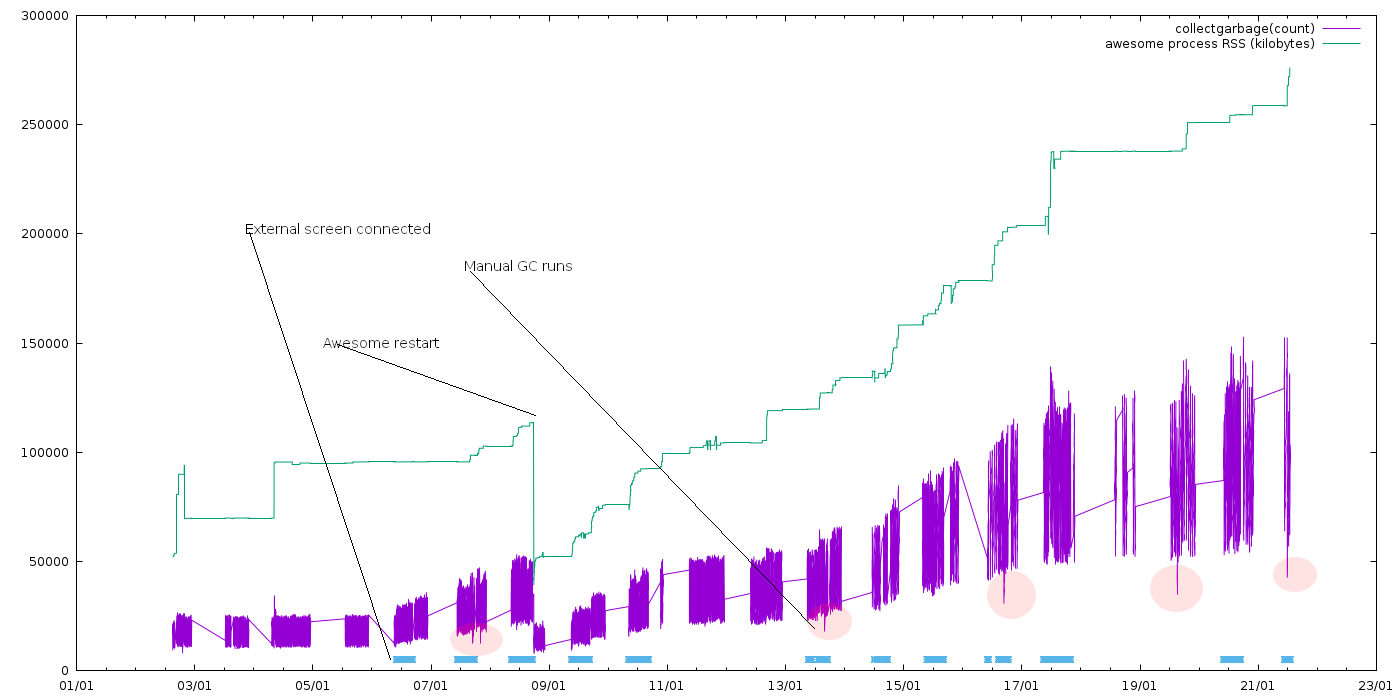
- You can see awesome process RSS (that keeps increasing) and reported
collectgarbage("count") - The timeperiods where external screen is connected are highlighted with blue markers
- Skips in data are laptop sleep periods
- I also restarted awesome once (with all windows remaining) and count went down dramatically
- I've also ran
collectgarbage("collect")couple of times to see if it makes any difference. It does reduce object count dramatically but only for very short period.
To me it looks like it's triggered by connecting external screen. Without any external screens connected ever, the count is pretty stable and memory usage is stable as well.
I'm using https://github.com/awesomeWM/awesome/issues/1382#issuecomment-289378695 (previous comment in here) script to remap the windows to external screen (and back again).
I don't have much LUA debugging experience, I tried to peek around in awesome datastructures to find if there are any stale windows or something like that but couldn't find anything interesting.
 tarko
on 21 Jan 2020
tarko
on 21 Jan 2020
@tarko Really sounds like you should just open a new issue. "Memory leak" and "switching monitor causes clients to move to the first tag" sounds quite unrelated.
Usually, I ask people for their config when they report memory leaks. Does it also happen with the default config? Could you try adding something like gears.timer.start_new(60, function() collectgarbage("collect") return true end) to your config and see if that helps? LGI creates some data structures that causes Lua GC not to do enough work (basically). The usual suspect for triggering this is widgets that spawn external processes and read their output. Hence, my question of "does this also happen with the default config"?
Random other debug idea:
$ awesome-client 'return require("gears.debug").dump_return{ button = button.instances(), client=client.instances(), drawable=drawable.instances(), drawin=drawin.instances(), key=key.instances(), screen=screen.instances(), tag=tag.instances() }'
psychon
on 21 Jan 2020
@psychon I agree and I will open a new issue. I just wanted to post this here first to see if there are anyone else with similar problem. Because it very much looks like external screen triggered and only thing that is happening (in my config) is window remapping.
Thanks for the tips, I'll do some more digging. I also thought running GC in a timer might be worth a shot but it hangs the whole UI for the duration of the GC so not really ideal.
tarko
on 21 Jan 2020
@tarko Try something like collectgarbage("step", 40) instead. Or alternatively play with setpause and setstepmul (also arguments to collectgarbage) to make the GC more aggressive. (The latter might also be a better idea than using a timer... or in addition to it?)
Lua 5.1 docs for collectgarbage, but you might to look at your specific version: https://www.lua.org/manual/5.1/manual.html#pdf-collectgarbage
psychon
on 21 Jan 2020
@psychon thanks, I already tried step GC with different timers in a loop but it did seem to GC anything at all.
tarko
on 21 Jan 2020
Hello @Elv13, thanks for the reply! I should look at my notifications more often as I did not recognise you had answered nicely about this, sorry about that. I have currently compiled awesome from the master branch, but I am a bit at a loss on how I could use the API in order to not use any custom script.
Is this the PR we are talking about? https://github.com/awesomeWM/awesome/pull/2790
On the initial comment of this PR, you provide a basic implementation of using fake screens, but I am left to wonder if this script will address the issue that all tags gets forwarded to the first tag and then re-plugging screen will put back the clients to their respective tags on their respective screens instead of keeping them all on tag 1. From what I read through the PR and commits is that adding fake screen supports remembering screens that were disconnected, which seems to be very nice.
I am just a bit lost on how I would go and implement this "remember clients on tags when disconnecting and reconnecting a screen" feature in my rc.lua. Could you shed some light and maybe provide a simple implementation which I could try in order to support this? I am using a kvm to switch between computers and also my laptop with multiple different screens and this is seems to be the feature I need! Thanks :)
I have tried this in my rc.lua
screen.connect_signal("scanning", function()
    screen.automatic_factory = false
end)

client.connect_signal("property::viewports", function()
    for _, viewport in ipairs(screen.viewports()) do
        if not find_existing_screen_function(viewport) then
            local geo = viewport.geometry
            screen.fake_add(geo.x, geo.y, geo.width, geo.height)
        end
    end

    --TODO Check for dead screens.
end)

-- Should never happen, but just in case.
screen.connect_signal("scanned", function()
    if screen.count() == 0 then
        screen.fake_add(0, 0, 640, 480)
    end
end)
Maybe I need to add the logic in the else of the if not find_existing_screen_function(viewport) so that it puts back clients on their respective tags?
srosato
on 16 Apr 2020
Hi,
First of all, make sure your Awesome is started with the correct options. If not, none of that will work. This is documented here: https://awesomewm.org/apidoc/documentation/09-options.md.html
Second, you need to disconnect the handlers I added later on:
screen.disconnect_signal("request::create", awful.screen.dpi.create_screen_handler)
screen.disconnect_signal("request::remove", awful.screen.dpi.remove_screen_handler)
screen.disconnect_signal("request::resize", awful.screen.dpi.resize_screen_handler)
From there, the path is less clear. I am currently not making much progress on the final patchset which would "really" fix this. With the COVID-19 pandemic and all, I shifted my personal project free time back toward my telecom/remote_work tools rather than AwesomeWM, which will obviously delay everything. For now you can look at https://github.com/awesomeWM/awesome/blob/master/lib/awful/screen/dpi.lua and create a similar version which fits your need better. It can be closer to the code above and doesn't need all the DPI stuff you see in that file.
The most simple implementation is to not delete the fake screens for a minute and hope it comes back.
edit: maybe just changing request::remove will be enough for you, it depends.
Elv13
on 16 Apr 2020
Related issues
 vonpupp
·
5Comments
vonpupp
·
5Comments
 SethBarberee
·
3Comments
SethBarberee
·
3Comments
 bew
·
5Comments
bew
·
5Comments
 philer
·
3Comments
philer
·
3Comments
 elyoas
·
5Comments
elyoas
·
5Comments
Most helpful comment
@p-himik Add the following to your config
You should get the old behaviour of restarting when a screen is removed/added back.
Yes, I guess that this is a regression when comparing 3.5 to 4. Pity that it was not noticed before a release (I only ever add/remove extra screens, but do not "swap" screens). For the "enhancement" label: Dunno. No really systematic behind it.