How do I turn off auto-play in the embed code? It wasn't there before and popped in during an update this past week or so.
 fakeologist
All 28 comments
Check this https://github.com/WWBN/AVideo/wiki/Autoplay-and-Browser-Policies#enable-or-disable-the-autoplay
 DanielnetoDotCom
on 24 Sep 2020
DanielnetoDotCom
on 24 Sep 2020
I bet this is regarding the last update same problem I am still seeing. In incognito non logged watches video then it sometimes will show video ad then go to next video when autoplay is turned off.
THis one was reported 6 days ago https://github.com/WWBN/AVideo/issues/3673
 JoshWho
on 24 Sep 2020
JoshWho
on 24 Sep 2020
Autoplay/nextvideo/loop
I was playing with it and my last update (few minutes ago) may resolve that.
But ads this is new for me. I guess it is something in your side that is blocking the VMAP
DanielnetoDotCom
on 24 Sep 2020
Mine is set to off. The sharing embed code has it set to on. Autoplay is the scourge of the internet. It must always be off by default.
fakeologist
on 24 Sep 2020
Ads is working fine now. Everything looks good now after the latest git pull.
JoshWho
on 24 Sep 2020
Still there 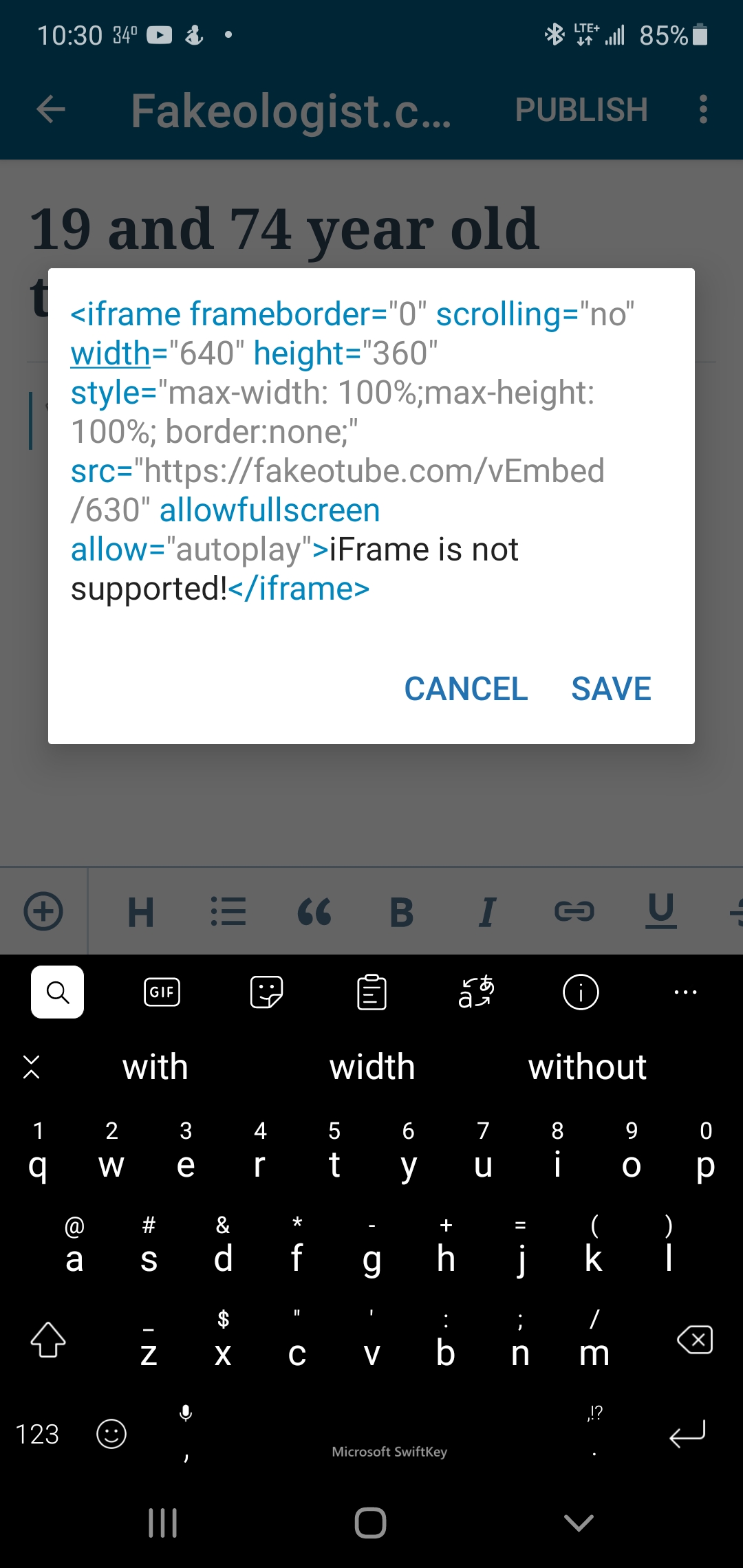
fakeologist
on 24 Sep 2020
Turn off the master switch in the main configurations
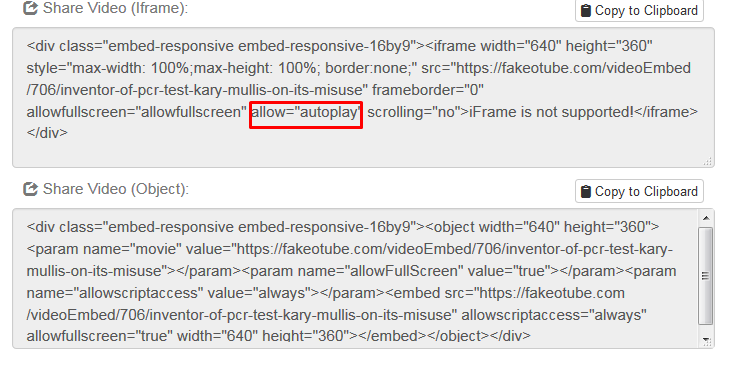
The code in the Iframe no longer controls it anymore ever since html5 took over. It is actually a redundant string that can be deleted because it does not function. String allow="autoplay"

JoshWho
on 24 Sep 2020
Mine is off.
fakeologist
on 24 Sep 2020
What about Ajax Auto Switch in Advance Config

JoshWho
on 24 Sep 2020
Do not forget to purge the sites cache after turning those off also purge cloudflare if you are using that as well
JoshWho
on 24 Sep 2020
What about Ajax Auto Switch in Advance Config
Sorry where is that setting?
fakeologist
on 24 Sep 2020

JoshWho
on 24 Sep 2020
@fakeologist I just update your streamer, check it now.
DanielnetoDotCom
on 25 Sep 2020
Still has autoplay. Literally all 6 videos on my blog page start playing at once, with audio. I have to manually take out the autoplay from code. I copy the iframe link from the my videos menu.
fakeologist
on 25 Sep 2020
I see you are talking about embed content.
you need to update your streamer and clear your cache with this new update
DanielnetoDotCom
on 25 Sep 2020
Yes the embed. Sorry how to update streamer - cache is cleared on browser.
fakeologist
on 25 Sep 2020
this is how to update https://github.com/WWBN/AVideo/wiki/How-to-Update-your-AVideo-Platform
DanielnetoDotCom
on 26 Sep 2020
Autoplay is still in the embed code. Can you please get it out or make it an option to turn off.
fakeologist
on 28 Sep 2020
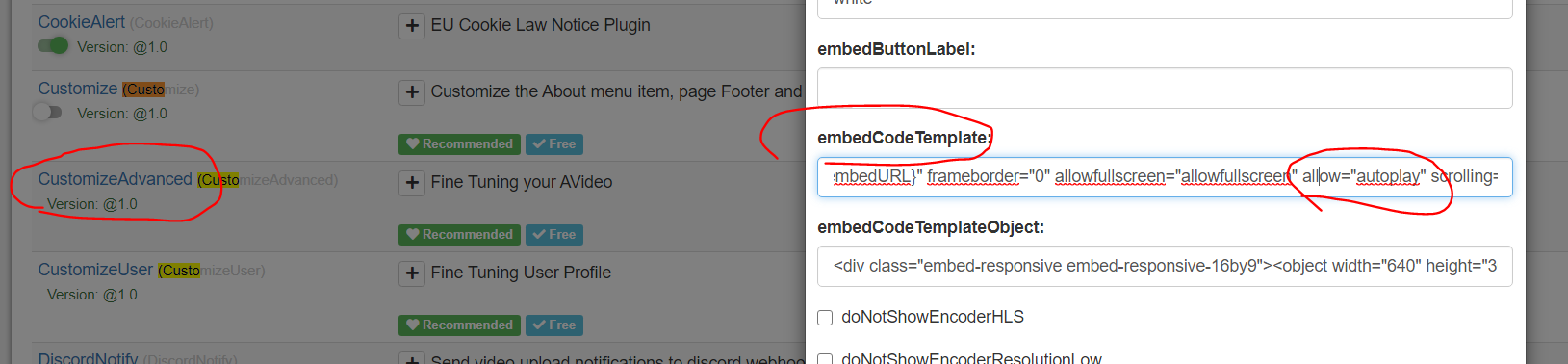
If you want to remove it you can do it here
DanielnetoDotCom
on 28 Sep 2020
Thank you.
fakeologist
on 28 Sep 2020
Changed that setting and it still shows.
fakeologist
on 28 Sep 2020
Did you clear the cache?
DanielnetoDotCom
on 28 Sep 2020
Browser cache clear.
fakeologist
on 28 Sep 2020
Do not forget to purge the sites cache after turning those off also purge cloudflare if you are using that as well
How to purge site cache?
fakeologist
on 28 Sep 2020
@fakeologist did you update your site with git pull?
DanielnetoDotCom
on 29 Sep 2020
Just now. Autoplay still there. How do I purge the site cache?
fakeologist
on 29 Sep 2020
If you want to remove it you can do it here
I just went to your site and I removed the autoplay form the plugin above
Clear the cache and now the autoplay is removed from the iframe instructions.
DanielnetoDotCom
on 29 Sep 2020
Thank you. I also removed the autoplay but did not know how to clear the site cache.
fakeologist
on 29 Sep 2020
Related issues
 CorpCaleCloud
·
4Comments
CorpCaleCloud
·
4Comments
 gujarraju
·
4Comments
gujarraju
·
4Comments
 gamersalpha
·
3Comments
gamersalpha
·
3Comments
 wetubeclub
·
3Comments
JoshWho
·
3Comments
wetubeclub
·
3Comments
JoshWho
·
3Comments