hello @DanielnetoDotCom this code distorts the footer


there is a problem when you scroll the page, the whole page is shaking
see the video
 syldri
All 35 comments
CONFIRMED Footer seems to be really high up for some reason It is covering the body
 JoshWho
on 13 Sep 2020
JoshWho
on 13 Sep 2020
Any temp solutions for now?
Currently I just added a 1 in front of the 0 and it is hiding the footer for now.
JoshWho
on 13 Sep 2020
Same problem here.. I think it should stay bottom of the site, now I'm having difficulties to access some functions, because footer hides them..
 tonuzo
on 13 Sep 2020
tonuzo
on 13 Sep 2020
footer style="position: relative;
This works, but still footer "auto hides" from the bottom of the page.
Can "auto hide" be removed somehow?
tonuzo
on 13 Sep 2020
@DanielnetoDotCom will fix it soon. I would just let it stay hidden for now just for a few more hours
JoshWho
on 13 Sep 2020
@tonuzo what features is it hiding?
 DanielnetoDotCom
on 13 Sep 2020
DanielnetoDotCom
on 13 Sep 2020
The whole footer is showing in the bottom of the body of the website
I just switched it back on my site so u can see it
JoshWho
on 13 Sep 2020
@JoshWho can you please screenshot?
also if you disable the menu autohide it will also not autohide the footer
DanielnetoDotCom
on 13 Sep 2020
I didn't know autohide was a thing LOL
JoshWho
on 13 Sep 2020
Hoo I see, you do not have the autohide active. hold on
DanielnetoDotCom
on 13 Sep 2020
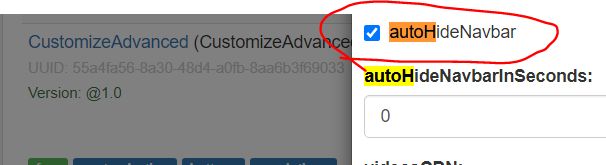
DanielnetoDotCom
on 13 Sep 2020

JoshWho
on 13 Sep 2020
when footer position is fixed, it will hide things. But it should be relative so it works right.
Autohide deactive works.
tonuzo
on 13 Sep 2020
Body just needs to be little more taller
JoshWho
on 13 Sep 2020
hello how ugly on your site @JoshWho
syldri
on 13 Sep 2020
IKR I see some people accidently clicking the about page for a video. FOr now I just put a one in the
<footer style="position: fixed;
    bottom: 1;
@JoshWho if @DanielnetoDotCom does not solve this problem with each update it will be necessary to edit the file
I don't understand why he added this code
syldri
on 13 Sep 2020
He is working on it. Im sure it will be fixed soon.
JoshWho
on 13 Sep 2020
Please check if it is better now
DanielnetoDotCom
on 13 Sep 2020
My footer seems bouncy now.
JoshWho
on 13 Sep 2020
sometimes it disappears sometimes it doesn't. I liked it when it was static.
JoshWho
on 13 Sep 2020
The footer just seems like it is to high up when it is visible
JoshWho
on 13 Sep 2020
I looked at @JoshWho website the problem has not been changed
look where the footer is

syldri
on 13 Sep 2020
Added 2 options
footerStyle = remove the default style, so you can put back the old style
autoHideFooter = you can disable the autohide feature
DanielnetoDotCom
on 13 Sep 2020
I disabled the Auto hide look where the footer shows.
JoshWho
on 13 Sep 2020
How do I lower that down? SHould I just add a whole bunch of <br>on top to make it go below the body?
JoshWho
on 13 Sep 2020
if you disable it you MUST edit the style
at least put position relative
DanielnetoDotCom
on 13 Sep 2020
I changed it to this
position: relative;bottom: 0;width: 100%; z-index: -1;
Still shows the footer in the body of the website
JoshWho
on 13 Sep 2020
I confirm from my side too
syldri
on 13 Sep 2020
Sorry, I forgot to send one file to the commit
DanielnetoDotCom
on 13 Sep 2020
Now it is perfect. Thank you @DanielnetoDotCom
JoshWho
on 13 Sep 2020
Awesome, I also just send a new update, that the autohide does not exist anymore.
I am trying to keep the footer on the bottom even in small height pages.
I guess the last update does that, and do not need to change the style anymore
DanielnetoDotCom
on 13 Sep 2020
Sweeeeeeeeeeeet
JoshWho
on 13 Sep 2020
hello, @JoshWho if you want to withdraw or I put a red

/var/www/html/AVideo/view/bootstrap/css/ bootstrap.min.css
research .list-group-item
who should this find on line 88937
add
margin-top: -39px;

I took an example from your site look at the end result

syldri
on 13 Sep 2020
This issue has been automatically marked as stale because it has not had recent activity. It will be closed if no further activity occurs. Thank you for your contributions.
![stale[bot] picture](https://avatars3.githubusercontent.com/in/1724?v=4&s=40) stale[bot]
on 13 Oct 2020
stale[bot]
on 13 Oct 2020
Related issues
 hrt644
·
3Comments
hrt644
·
3Comments
 willpower68
·
3Comments
willpower68
·
3Comments
 shebanet
·
4Comments
shebanet
·
4Comments
 wetubeclub
·
3Comments
wetubeclub
·
3Comments
 alejandrolidon
·
3Comments
alejandrolidon
·
3Comments
Most helpful comment
Now it is perfect. Thank you @DanielnetoDotCom