Avideo: how do i update the plugin i already purchased?
how do i update the plugin i already purchased?
 vraghavans
All 8 comments
1- Visit the website
2- Log in
3- Re-download the plugin
4 - Log on your website
5- Plugins , and upload it .
PS : If your plugin requires update , you should be able to see it on the plugin dahsboard like this :
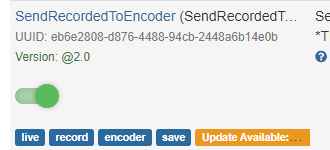
If you click on the orange button , should take you to the market place .
 akhilleusuggo
on 20 Aug 2020
akhilleusuggo
on 20 Aug 2020
You should be able to download all the purchased plugin from the same account you made the payment on the marketplace site. https://youphp.tube/marketplace/
Just go back there and log in again, you will see the download button.
If you are facing any problem please email [email protected] and inform your User # (the one below your Log off button)

 DanielnetoDotCom
on 20 Aug 2020
DanielnetoDotCom
on 20 Aug 2020
Dear All,
Thanks for your inputs.
However my challenge is am not able to login and dont remember i logged in while buying the plugins,
there is not forgot password option for me to check if i did login to download the plugins.
Please assist
rgds
Vijay
vraghavans
on 21 Aug 2020
@vraghavans
If you are facing any problem please email [email protected] and inform your User # (the one below your Log off button)
Send an email with what you remember . ( hopefully the email you've used )
akhilleusuggo
on 22 Aug 2020
Dear All,
Thanks for your inputs.
However my challenge is am not able to login and dont remember i logged in while buying the plugins,
there is not forgot password option for me to check if i did login to download the plugins.
Please assist
rgds
Vijay
You can just create an account and email me, we will add the purchased plugins.
DanielnetoDotCom
on 22 Aug 2020
1- Visit the website
2- Log in
3- Re-download the plugin
4 - Log on your website
5- Plugins , and upload it .PS : If your plugin requires update , you should be able to see it on the plugin dahsboard like this :
If you click on the orange button , should take you to the market place .
I did all this for SendRecordedToEncoder , and it still shows update available.
 fakeologist
on 23 Aug 2020
fakeologist
on 23 Aug 2020
Hi
If you still having a problem on update your paid plugins, please email [email protected]
DanielnetoDotCom
on 27 Aug 2020
This issue has been automatically marked as stale because it has not had recent activity. It will be closed if no further activity occurs. Thank you for your contributions.
![stale[bot] picture](https://avatars3.githubusercontent.com/in/1724?v=4&s=40) stale[bot]
on 26 Sep 2020
stale[bot]
on 26 Sep 2020
Related issues
 gujarraju
·
4Comments
gujarraju
·
4Comments
 syldri
·
3Comments
syldri
·
3Comments
syldri
·
3Comments
syldri
·
3Comments
 mikweb2017
·
4Comments
mikweb2017
·
4Comments
 gamersalpha
·
3Comments
gamersalpha
·
3Comments
Most helpful comment
1- Visit the website
2- Log in
3- Re-download the plugin
4 - Log on your website
5- Plugins , and upload it .
PS : If your plugin requires update , you should be able to see it on the plugin dahsboard like this :
If you click on the orange button , should take you to the market place .