While I configuring in the admin panel and save the settings. When I check the changes later my changes disappear.
This will change from this
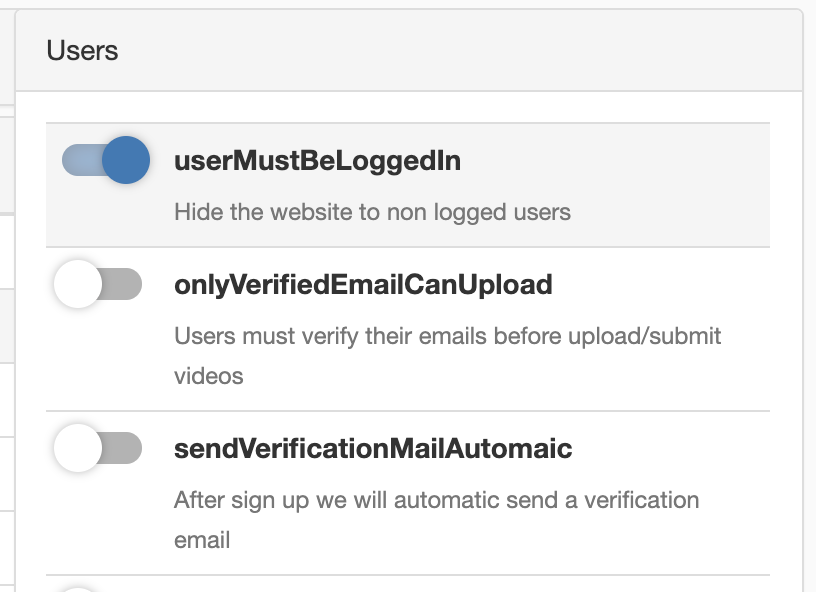
to this
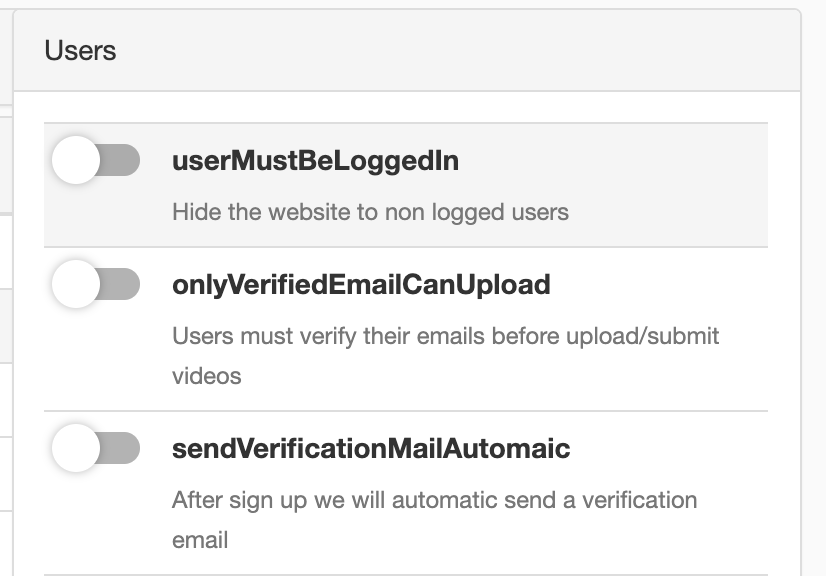
 NAndras95
All 9 comments
there are no errors in logs or in the chrome console
NAndras95
on 4 Jun 2020
Usually, I see this type of error when you are using centos or an Nginx proxy.
I have never seen this happen on a clean apache Ubuntu Installation
 DanielnetoDotCom
on 4 Jun 2020
DanielnetoDotCom
on 4 Jun 2020
Also don't use the admin panel , use instead plugin section . You should not see this happening .
Also go to cd /var/www/html
chown www-data:www-data -R *
 akhilleusuggo
on 4 Jun 2020
akhilleusuggo
on 4 Jun 2020
Usually, I see this type of error when you are using centos or an Nginx proxy.
I have never seen this happen on a clean apache Ubuntu Installation
I use this docker image php:7.2-apache it uses apt so it's an ubuntu or debian without nginx proxy
NAndras95
on 5 Jun 2020
Also don't use the admin panel , use instead plugin section . You should not see this happening .
Also go to
cd /var/www/html
chown www-data:www-data -R *
Already did this.
NAndras95
on 5 Jun 2020
I use this Dockerfile:
FROM php:7.2-apache

RUN apt-get update && \
    apt-get install -y wget git zip default-libmysqlclient-dev libbz2-dev libmemcached-dev libsasl2-dev libfreetype6-dev libicu-dev libjpeg-dev libmemcachedutil2 libpng-dev libxml2-dev mariadb-client ffmpeg libimage-exiftool-perl python curl python-pip libzip-dev && \
    docker-php-ext-configure gd --with-freetype-dir=/usr/include --with-jpeg-dir=/usr/include && \
    docker-php-ext-install -j$(nproc) bcmath bz2 calendar exif gd gettext iconv intl mbstring mysqli opcache pdo_mysql zip && \
    rm -rf /tmp/* /var/lib/apt/lists/* /var/tmp/* /root/.cache && \
    a2enmod rewrite

# patch to use non-root port
RUN sed -i "s|Listen 80|Listen 8000|g" /etc/apache2/ports.conf && \
    sed -i "s|:80|:8000|g" /etc/apache2/sites-available/* && \
    echo "post_max_size = 10240M\nupload_max_filesize = 10240M" >> /usr/local/etc/php/php.ini

RUN pip install -U youtube-dl

RUN rm -rf /var/www/html/*
COPY . /var/www/html

# fix permissions
RUN chown -R www-data:www-data /var/www/html

# create volume
RUN install -d -m 0755 -o www-data -g www-data /var/www/html/videos

# set non-root user
USER www-data

EXPOSE 8000
I cannot figure out where you have the commands to get the source for the web site and where do you host the mysql ? This only the docker file for the website.
I tested your settings on a fresh install there it works ok. It has something to do with how you installed it.
 ronaldod
on 5 Jun 2020
ronaldod
on 5 Jun 2020
I cannot figure out where you have the commands to get the source for the web site and where do you host the mysql ? This only the docker file for the website.
I tested your settings on a fresh install there it works ok. It has something to do with how you installed it.
I just cloned from the main git repository from github and changed the basic image in the Dockerfile to run the application in Openshift.
NAndras95
on 8 Jun 2020
@akhilleusuggo your suggestion worked, if I configure from the plugin menu it works.
NAndras95
on 8 Jun 2020
Related issues
 Powerbock
·
3Comments
Powerbock
·
3Comments
 syldri
·
3Comments
syldri
·
3Comments
 CorpCaleCloud
·
4Comments
CorpCaleCloud
·
4Comments
 mikweb2017
·
4Comments
mikweb2017
·
4Comments
 alejandrolidon
·
3Comments
alejandrolidon
·
3Comments
Most helpful comment
Also don't use the admin panel , use instead plugin section . You should not see this happening .
Also go to
cd /var/www/htmlchown www-data:www-data -R *