Avideo: Chromecast plugin enabled so... where is it?
Chromecast plugin is enabled, so I was expecting to see a button somewhere in the video player. Where is it?
The question has already been submitted in #1750 as a bug, and it provides screenshots. The issue was closed by stating that it is not a bug, but the question remains unanswered.
 jfcolom
All 6 comments
Hi, I only have this button active if there is a cast object detected in Chrome. If it is off the browser has not detected the chrome cast device.
Chrome : standard no extra needed but opening the cast button in the option menu.
MS Edge you need to enable it first :
type in the URL bar :edge://flags
It opens a page that says : "Experiments"
paste in the search pane :#load-media-router-component-extension
It will give you something like :
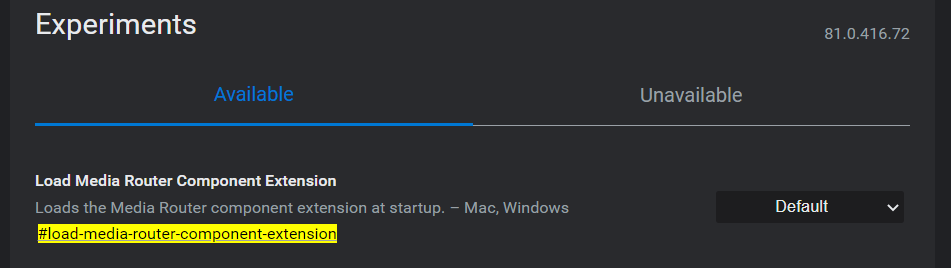
Change default to enabled. It will prompt to restart to activated the changes.
Restart the browser and go to the three dots in right side top. and go to the following menu:
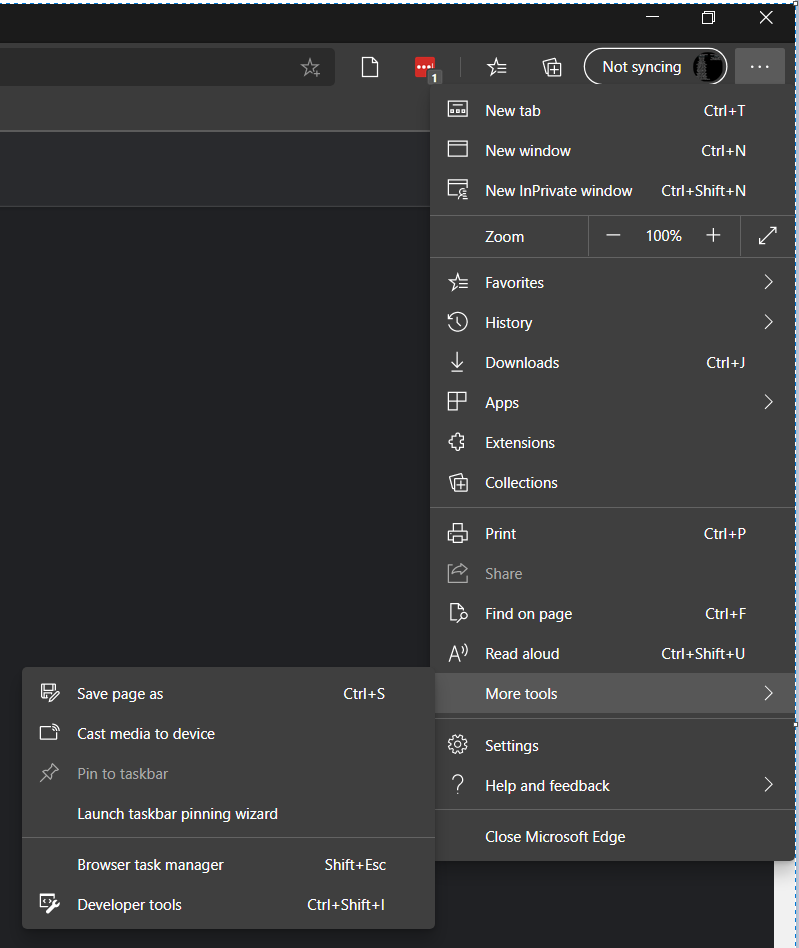
Select "Cast media to device"
It will search for your chrome cast and from that moment the chrome cast button is active after on the page.

Firefox has as far i know no built in support for chrome cast.
I hope this answers your question.
Tested and confirmed working on the latest git pull
 ronaldod
on 15 May 2020
ronaldod
on 15 May 2020
Thanks for your answer
I have just pulled the last version. In Chrome browser (81.0), the chromecast button is shown in youtube.com site. Unfortunately, it does not appear in AVideo platform.
jfcolom
on 16 May 2020
Then try the next steps to determine if everything is correctly loaded.
- Look for lines with :
silvermine-videojs-chromecast.jsin the page. - Check with the console (f12) for errors if everything is loaded.
If yes
- Ask a 3th party to test your site outside of your home network to be sure it is not a local pc/network or also other people have this problem.
It for me enabled on AVideo.com
I mean the button.
ronaldod
on 16 May 2020
This issue has been automatically marked as stale because it has not had recent activity. It will be closed if no further activity occurs. Thank you for your contributions.
![stale[bot] picture](https://avatars3.githubusercontent.com/in/1724?v=4&s=40) stale[bot]
on 16 Jun 2020
stale[bot]
on 16 Jun 2020
Thanks for your answer
- The script
silvermine-videojs-chromecast.jsappears linked from the page's source code - I see the following warnings in the js console, but I think they are not related to the plugin
video.min.js:12 VIDEOJS: WARN: videojs.plugin() is deprecated; use videojs.registerPlugin() instead
(anonymous) @ video.min.js:12

DevTools failed to load SourceMap: Could not load content for http://gontube.com/AVideo/videos/cache/js/bootstrap-select.js.map: HTTP error: status code 404, net::ERR_HTTP_RESPONSE_CODE_FAILURE
- Same problem with different clients inside my network. The chromecast device is shown in youtube.com videos. Unfortunately, I cannot test it from outside my network.
jfcolom
on 17 Jun 2020
This issue has been automatically marked as stale because it has not had recent activity. It will be closed if no further activity occurs. Thank you for your contributions.
stale[bot]
on 17 Jul 2020
Related issues
 mikweb2017
·
4Comments
mikweb2017
·
4Comments
 gamersalpha
·
3Comments
gamersalpha
·
3Comments
 shebanet
·
4Comments
shebanet
·
4Comments
 matthall1998
·
4Comments
matthall1998
·
4Comments
 wetubeclub
·
3Comments
wetubeclub
·
3Comments
Most helpful comment
Hi, I only have this button active if there is a cast object detected in Chrome. If it is off the browser has not detected the chrome cast device.
Chrome : standard no extra needed but opening the cast button in the option menu.
MS Edge you need to enable it first :



type in the URL bar :
edge://flagsIt opens a page that says : "Experiments"
paste in the search pane :
#load-media-router-component-extensionIt will give you something like :
Change default to enabled. It will prompt to restart to activated the changes.
Restart the browser and go to the three dots in right side top. and go to the following menu:
Select "Cast media to device"
It will search for your chrome cast and from that moment the chrome cast button is active after on the page.
Firefox has as far i know no built in support for chrome cast.
I hope this answers your question.
Tested and confirmed working on the latest git pull