Describe the question
Greetings.
i configured my encoder on a separate server but the encoder is not uploading the video to my streamer site, instead it sends the image

please how can i work around this?
 WGtechy
All 51 comments
I see that the encoder tries to send it to mysite.com. How do you login into the encoder ?
 ronaldod
on 13 May 2020
ronaldod
on 13 May 2020
php fatal error uncaught error call to undefined function utf8_encode()
Try to update php . What version are you using ? What version of ubuntu are you using ?
sudo apt-get install php-xml
sudo service apache2 restart
 akhilleusuggo
on 13 May 2020
akhilleusuggo
on 13 May 2020
php fatal error uncaught error call to undefined function utf8_encode()Try to update php . What version are you using ? What version of ubuntu are you using ?
sudo apt-get install php-xml
sudo service apache2 restart
its still not working
WGtechy
on 14 May 2020
undefined error is from that it cannot connect to the server as it tries to connect with the url mysite.com. Is the video site hosted under that domain ? Or is that to anonymize the logging ?
ronaldod
on 14 May 2020
undefined error is from that it cannot connect to the server as it tries to connect with the url mysite.com. Is the video site hosted under that domain ? Or is that to anonymize the logging ?
i have encoder on my streamer server and i setup another encoder on another server but i am having the same issue. when i share video with youtube link, it will only upload and get the images of the videos but it wont download the main videos to the streamer site.
Hope you understand the situation now?
Thanks i'm awaiting your quick response.
WGtechy
on 14 May 2020
It reads now that @akhilleusuggo is correct. It is not finding that function. He sended an instruction to restart apache in the idea your using standard php.
If you use FPM/FastCGI. Then you need to restart the php7.4-fm service module. Based on your version you need to tweak the command sudo service php7.4-fpm restart To get the php-xml activated this service needs to be restarted. And as it is just an external encoder just reboot the encoder if your not sure how to do it.
ronaldod
on 14 May 2020
It reads now that @akhilleusuggo is correct. It is not finding that function. He sended an instruction to restart apache in the idea your using standard php.
If you use FPM/FastCGI. Then you need to restart the php7.4-fm service module. Based on your version you need to tweak the commandsudo service php7.4-fpm restartTo get the php-xml activated this service needs to be restarted. And as it is just an external encoder just reboot the encoder if your not sure how to do it.
its still not working. I executed the commands sudo apt-get install php-xml
sudo service apache2 restart on both the streamer and encoder servers separately and restarted them but no changes.
WGtechy
on 14 May 2020
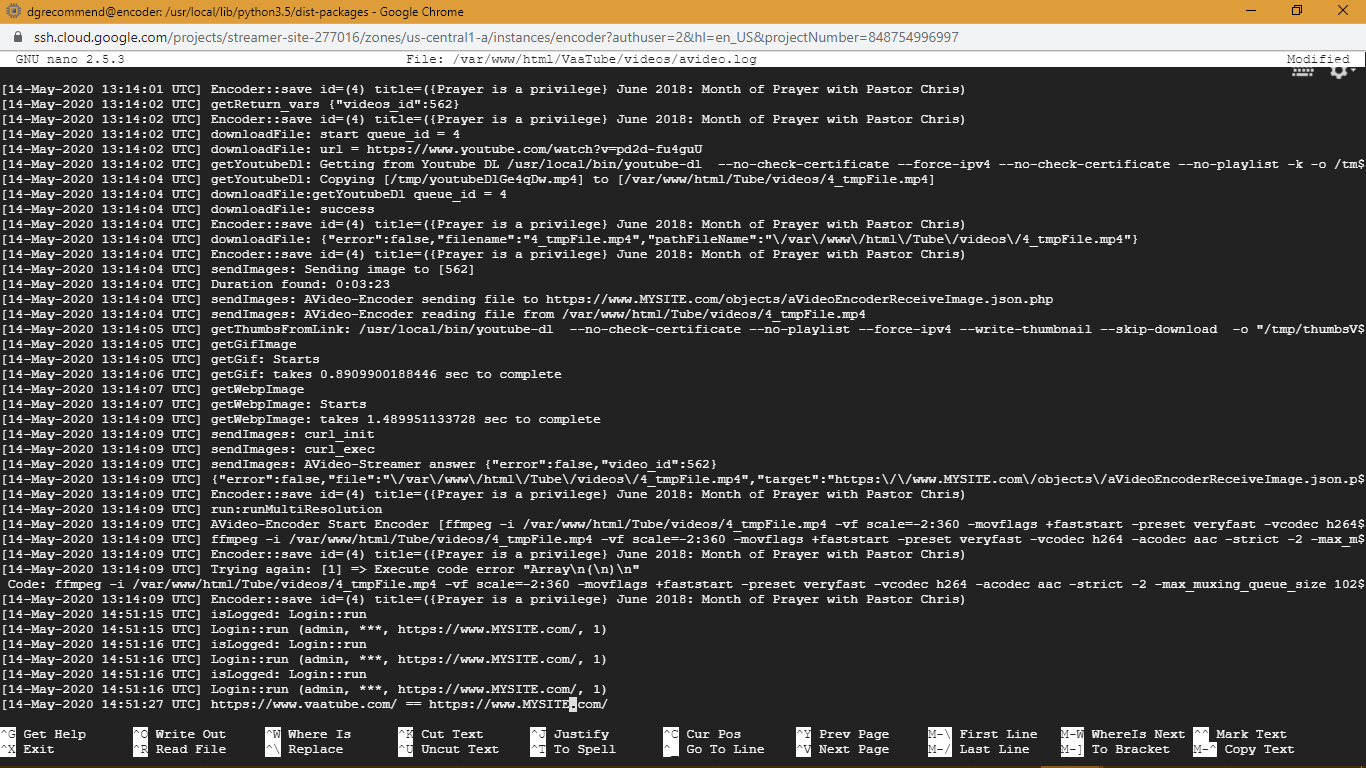
Same issue after trying the steps. Ill really love it to work, please take a look at the log file again
WGtechy
on 14 May 2020
php fatal error uncaught error call to undefined function utf8_encode()Try to update php . What version are you using ? What version of ubuntu are you using ?
sudo apt-get install php-xml
sudo service apache2 restart
i am using version 7.0
WGtechy
on 14 May 2020
php fatal error uncaught error call to undefined function utf8_encode()Try to update php . What version are you using ? What version of ubuntu are you using ?
sudo apt-get install php-xml
sudo service apache2 restart
php7.0 on the streamer site
WGtechy
on 14 May 2020
PHP 7.0.33-0ubuntu0.16.04.14 (cli) ( NTS )
Copyright (c) 1997-2017 The PHP Group
Zend Engine v3.0.0, Copyright (c) 1998-2017 Zend Technologies
with Zend OPcache v7.0.33-0ubuntu0.16.04.14, Copyright (c) 1999-2017, by Zend Technologies
i tried sudo apt-get update it didnt update
WGtechy
on 14 May 2020
Did you tried also with another video because the description

is having {} and those characters can messup.
Trying to replay your thing with your video.
No error found.
ronaldod
on 14 May 2020
Did you tried also with another video because the description
is having{}and those characters can messup.
Yes i tried another video still the same
WGtechy
on 14 May 2020
i aslo use thissudo apt-get upgrade to upgrade it and its php7.0
WGtechy
on 14 May 2020
sudo apt-get install php7.0-xml
followed with sudo service apache2 restart
Interested in the answer of the first command.
ronaldod
on 14 May 2020
sudo service apache2 restart
i did for both server its still not working. Only the picture is sent to the streamer site but the video upload always fails
WGtechy
on 14 May 2020
I need only the output from sudo apt-get install php7.0-xml
ronaldod
on 14 May 2020
sudo apt-get install php7.0-xml
followed withsudo service apache2 restartInterested in the answer of the first command.
Reading package lists... Done
Building dependency tree
Reading state information... Done
php7.0-xml is already the newest version (7.0.33-0ubuntu0.16.04.14).
The following package was automatically installed and is no longer required:
  grub-pc-bin
Use 'sudo apt autoremove' to remove it.
0 upgraded, 0 newly installed, 0 to remove and 0 not upgraded.
thats the response
WGtechy
on 14 May 2020
this is from the encoder server
eading package lists... Done
Building dependency tree
Reading state information... Done
php7.0-xml is already the newest version (7.0.33-0ubuntu0.16.04.14).
0 upgraded, 0 newly installed, 0 to remove and 0 not upgraded.
WGtechy
on 14 May 2020
first you had :

now it is

Check rights and ownership of the maps.
Should be done like in the manual Ubuntu 16 manual
And check if all the listed packages are installed.
Something funky going on with this installation. Like there some packages missing or rights misplaced.
ronaldod
on 14 May 2020
this is from the encoder server
eading package lists... Done Building dependency tree Reading state information... Done php7.0-xml is already the newest version (7.0.33-0ubuntu0.16.04.14). 0 upgraded, 0 newly installed, 0 to remove and 0 not upgraded.
should i do this on the streamer site or the encoder?
if its going to be on the streamer site, should i follow all the instructions again and if i do hope it wont affect my current site content?
WGtechy
on 14 May 2020
Encoder only. And if you want to rebuild request the latest ubuntu. go to 20. And allways have a backup or snapshot before upgrading. Or rent somewhere an other VPS to test on for $4.
ronaldod
on 14 May 2020
Encoder only. And if you want to rebuild request the latest ubuntu. go to 20. And allways have a backup or snapshot before upgrading. Or rent somewhere an other VPS to test on for $4.
Okay let me do it on encoder
WGtechy
on 14 May 2020
But the link is not for encoder only. its for both encoder and streamer or only streamer
if i use it that means im going to be installing streamer also on the encoder server.
Shoud i use the Encoder instructions instead ?
WGtechy
on 14 May 2020
Just a question what did you change before this all happened ? New installation or an old one ?
ronaldod
on 14 May 2020
old installation. lol i cant do new installation on my streamer server, i have good content on it already but i can format and reinstall the encoder server if its necessary
WGtechy
on 14 May 2020
As this in an encoder issue do the encoder. But still weird as things do not break just by nothing happening.
ronaldod
on 14 May 2020
so i should run sudo git clone https://github.com/WWBN/AVideo-Encoder
WGtechy
on 14 May 2020
Depends only if you erased the old server. Else i would skip it.
ronaldod
on 14 May 2020
If you have doubts dont do it and contact @DanielnetoDotCom by notification and mail [email protected] for some direct (paid) support. As an older installation upgrading can give issues.
ronaldod
on 14 May 2020
okay
WGtechy
on 14 May 2020
If you have doubts dont do it and contact @DanielnetoDotCom by notification and mail [email protected] for some direct (paid) support. As an older installation upgrading can give issues.
see what i see when i tried this
sudo apt-get install apache2 php7.2 libapache2-mod-php7.2 php7.2-mysql php7.2-curl php7.2-gd php7.2-intl mysql-server mysql-client ffmpeg git libimage-e
xiftool-perl php7.2-xml && cd /var/www/html && sudo git clone https://github.com/WWBN/AVideo-Encoder.git && sudo apt-get install python && sudo curl -L https://yt-dl.org/downl
oads/latest/youtube-dl -o /usr/local/bin/youtube-dl && sudo chmod a+rx /usr/local/bin/youtube-dl
Reading package lists... Done
Building dependency tree
Reading state information... Done
E: Unable to locate package php7.2
E: Couldn't find any package by glob 'php7.2'
E: Couldn't find any package by regex 'php7.2'
E: Unable to locate package libapache2-mod-php7.2
E: Couldn't find any package by glob 'libapache2-mod-php7.2'
E: Couldn't find any package by regex 'libapache2-mod-php7.2'
E: Unable to locate package php7.2-mysql
E: Couldn't find any package by glob 'php7.2-mysql'
E: Couldn't find any package by regex 'php7.2-mysql'
E: Unable to locate package php7.2-curl
E: Couldn't find any package by glob 'php7.2-curl'
E: Couldn't find any package by regex 'php7.2-curl'
E: Unable to locate package php7.2-gd
E: Couldn't find any package by glob 'php7.2-gd'
E: Couldn't find any package by regex 'php7.2-gd'
E: Unable to locate package php7.2-intl
E: Couldn't find any package by glob 'php7.2-intl'
E: Couldn't find any package by regex 'php7.2-intl'
E: Unable to locate package php7.2-xml
E: Couldn't find any package by glob 'php7.2-xml'
E: Couldn't find any package by regex 'php7.2-xml'
WGtechy
on 14 May 2020
its readable this way: i run this installation code on the same encoder server
sudo apt-get install apache2 php7.2 libapache2-mod-php7.2 php7.2-mysql php7.2-curl php7.2-gd php7.2-intl mysql-server mysql-client ffmpeg git libimage-e
xiftool-perl php7.2-xml && cd /var/www/html && sudo git clone https://github.com/WWBN/AVideo-Encoder.git && sudo apt-get install python && sudo curl -L https://yt-dl.org/downl
oads/latest/youtube-dl -o /usr/local/bin/youtube-dl && sudo chmod a+rx /usr/local/bin/youtube-dl
Reading package lists... Done
Building dependency tree
Reading state information... Done
E: Unable to locate package php7.2
E: Couldn't find any package by glob 'php7.2'
E: Couldn't find any package by regex 'php7.2'
E: Unable to locate package libapache2-mod-php7.2
E: Couldn't find any package by glob 'libapache2-mod-php7.2'
E: Couldn't find any package by regex 'libapache2-mod-php7.2'
E: Unable to locate package php7.2-mysql
E: Couldn't find any package by glob 'php7.2-mysql'
E: Couldn't find any package by regex 'php7.2-mysql'
E: Unable to locate package php7.2-curl
E: Couldn't find any package by glob 'php7.2-curl'
E: Couldn't find any package by regex 'php7.2-curl'
E: Unable to locate package php7.2-gd
E: Couldn't find any package by glob 'php7.2-gd'
E: Couldn't find any package by regex 'php7.2-gd'
E: Unable to locate package php7.2-intl
E: Couldn't find any package by glob 'php7.2-intl'
E: Couldn't find any package by regex 'php7.2-intl'
E: Unable to locate package php7.2-xml
E: Couldn't find any package by glob 'php7.2-xml'
E: Couldn't find any package by regex 'php7.2-xml'
WGtechy
on 14 May 2020
your running ubuntu 16 as far i remember then only php 7.0 modules are possible. php 7.2 is for 18, php 7.4 for 20.
ronaldod
on 14 May 2020
okay
WGtechy
on 14 May 2020
your running ubuntu 16 as far i remember then only php 7.0 modules are possible. php 7.2 is for 18, php 7.4 for 20.
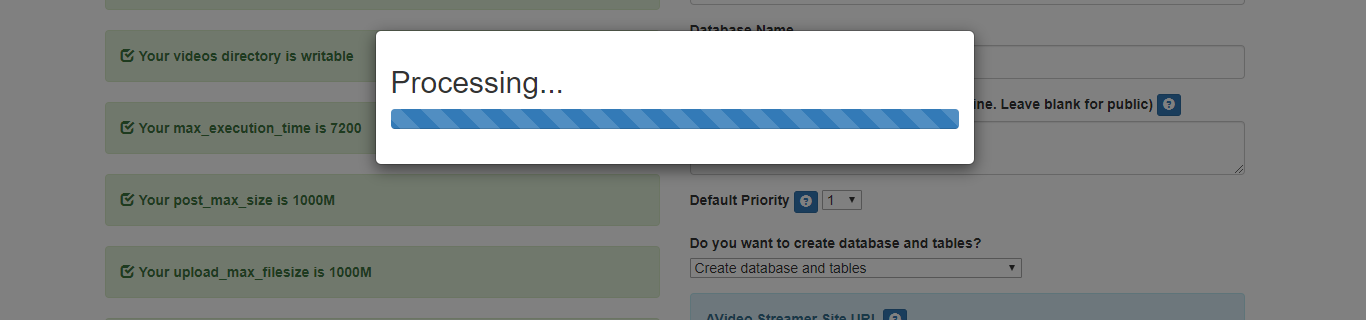
i installed the Encoder on another ubuntu 18. server but its processing nonstop. Please what can i do since there are no logs in the server?
WGtechy
on 22 May 2020
Biggest chance is that he can not reach your video server. Check the spelling of the url or that he can reach your video server.
If your server is running https make sure your url starts with that.
ronaldod
on 22 May 2020
@WGtechy
1) I'm confused , are you sure you're using ubuntu 18 ?
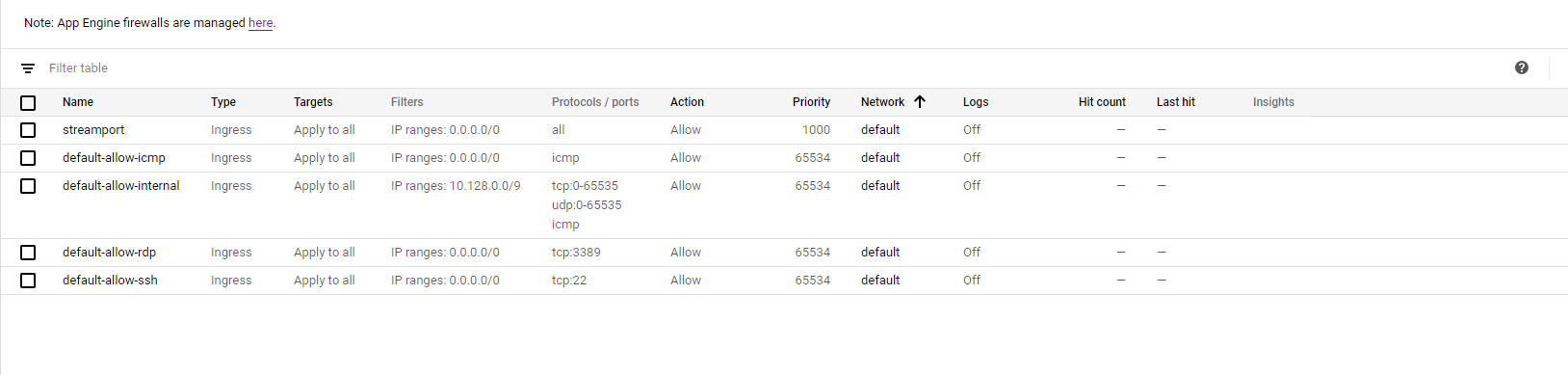
2) Are you using google cloud ? If yes , make sure to open the ports ( and configure the firewalls )
3) Make sure that the mod-rewrite is enabled
4) I'll write for you the step you do , 1 by one , not all on one line
1- sudo apt-get install apache2 php libapache2-mod-php php-mysql php-curl php-gd php-intl mysql-server mysql-client git (Most of them may be ignore , since you have them already installed)
2- cd /var/www/html
3- sudo git clone https://github.com/WWBN/AVideo-Encoder.git
4- sudo nano /etc/apache2/apache2.conf
5- Find <Directory /var/www/> and make sure that AllowOverride All is set to All
6- sudo a2enmod rewrite
7- service apache2 restart
8- cd /var/www/html
9- chown www-data:www-data -R *
You should be able to run without problems .
About the firewall , since you will have problems later for NGINX for live-streams , this is a demo if you want to open all ports .
akhilleusuggo
on 22 May 2020
i did follw the instructions again but the encoder is still processing
@WGtechy
- I'm confused , are you sure you're using ubuntu 18 ?
- Are you using google cloud ? If yes , make sure to open the ports ( and configure the firewalls )
- Make sure that the mod-rewrite is enabled
- I'll write for you the step you do , 1 by one , not all on one line
1-
sudo apt-get install apache2 php libapache2-mod-php php-mysql php-curl php-gd php-intl mysql-server mysql-client git(Most of them may be ignore , since you have them already installed)
2-cd /var/www/html
3-sudo git clone https://github.com/WWBN/AVideo-Encoder.git
4-sudo nano /etc/apache2/apache2.conf
5- Find<Directory /var/www/>and make sure thatAllowOverride Allis set to All
6-sudo a2enmod rewrite
7-service apache2 restart
8-cd /var/www/html
9-chown www-data:www-data -R *You should be able to run without problems .
About the firewall , since you will have problems later for NGINX for live-streams , this is a demo if you want to open all ports .
WGtechy
on 22 May 2020
Biggest chance is that he can not reach your video server. Check the spelling of the url or that he can reach your video server.
If your server is running https make sure your url starts with that.
Yes that is what i did and its still the same
WGtechy
on 22 May 2020
ok , let's try something different :
Try to change your host name :
sudo hostnamectl set-hostname server.wgtechy.com _Don't worry about this domain , is not for your site . Make sure is not the same as your domain name_ !!
sudo nano /etc/hosts
127.0.0.1 server.wgtechy.com
cd /var/www/html && chown www-data:www-data -R *
Try this , maybe you're issue is here .
PS !!! Chose a different database name !!!!! Default Avideo-Encoder or something like that , just chose a different one , Avideo-Encoder5 for example
akhilleusuggo
on 22 May 2020
i really want to thank @akhilleusuggo @ronaldod @DanielnetoDotCom for the timely concern and support. Encoder is working now perfectly. The next thing im dealing with now is the NGINX.
when i tried to restart nginx i got this error: nginx: [emerg] invalid port in url "https://www.MYSITE/plugin/Live/on_publish.php" in /usr/local/nginx/conf/nginx.conf:24
WGtechy
on 22 May 2020
So the hostname was the issue ? I'll apreciate the feed back . So we can close this issue and tag it as closed , so in future someone is having a similar problem , we can redirect it here .
For your nginx problem , please open a new issue .
akhilleusuggo
on 22 May 2020
Funny enough i switched to ubuntu 18+ for my encoder while following the prescribed instructions you gave and i also worked on the hostname on the streamer site.
WGtechy
on 22 May 2020
im not sure if the encoder can work on ubuntu 16+
WGtechy
on 22 May 2020
Encoder can work on Ubuntu 16
 DanielnetoDotCom
on 23 May 2020
DanielnetoDotCom
on 23 May 2020
we fixed this issue .
akhilleusuggo
on 23 May 2020
we fixed this issue .
Encoder can work on Ubuntu 16
Yes we fixed the issue but its on ubuntu 18+
I still have an encoder on same server with my streamer site that is still not working
WGtechy
on 27 May 2020
if you want a better support , don't bring 10 different issues into one . Open a new issue for each issue , so we can help you better , and redirect users to your issue in case they're having the same .
Not so hard to open a new issue , describing your details .
akhilleusuggo
on 27 May 2020
This issue has been automatically marked as stale because it has not had recent activity. It will be closed if no further activity occurs. Thank you for your contributions.
![stale[bot] picture](https://avatars3.githubusercontent.com/in/1724?v=4&s=40) stale[bot]
on 26 Jun 2020
stale[bot]
on 26 Jun 2020
Related issues
akhilleusuggo
·
3Comments
 mikweb2017
·
4Comments
mikweb2017
·
4Comments
 snowdream1985
·
3Comments
snowdream1985
·
3Comments
 matthall1998
·
4Comments
matthall1998
·
4Comments
 syldri
·
3Comments
syldri
·
3Comments