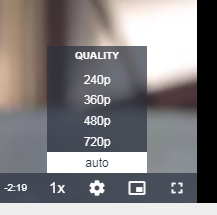
On the demo page there are 4 instead of the usual 3 resolutions, and the naming of these is not done in the HLS plugin.
How does that come?
 Donnerstein
All 17 comments
There's an automatic detection of quality . https://github.com/WWBN/AVideo/wiki/VideoHLS-Plugin#automatic-encoding-process-hls-only
On the hls /object/Format.php
If you delete the command line ( on your encoder configuration ) , will use the encoder automatic detection .
$command = 'ffmpeg -i {$pathFileName} ';
            $command .= ' -c:v h264 -vf scale=-2:240 -r 24 -g 48 -keyint_min 48 -sc_threshold 0 -bf 3 -b_strategy 2 -minrate '.(200).'k -crf 23 -maxrate '.(450).'k -bufsize '.(600).'k -c:a aac -b:a 128k -f hls -hls_time 6 -hls_list_size 0 -hls_key_info_file {$destinationFile}keyinfo {$destinationFile}res240/index.m3u8';

            foreach ($resolutions as $key => $value) {
                if ($height >= $value) {
                    $rate = $bandwidth[$key]/1000;
                    $command .= ' -c:v h264 -vf scale=-2:'.$value.' -sc_threshold 0 -bf 3 -b_strategy 2 -minrate '.($rate*0.5).'k -crf 23 -maxrate '.($rate*1.5).'k -bufsize '.($rate*2).'k -c:a aac -b:a '.($audioBitrate[$key]).'k -f hls -hls_time 6 -hls_list_size 0 -hls_key_info_file {$destinationFile}keyinfo {$destinationFile}res'.$value.'/index.m3u8';
                }
            }
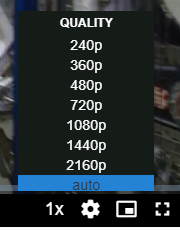
If your video is 1080 , then will transcode to 240,360,480,720 and 1080
This is an example of 4K video :
 akhilleusuggo
on 30 Apr 2020
akhilleusuggo
on 30 Apr 2020
There's an automatic detection of quality . https://github.com/WWBN/AVideo/wiki/VideoHLS-Plugin#automatic-encoding-process-hls-only
On the hls /object/Format.php
If you delete the command line ( on your encoder configuration ) , will use the encoder automatic detection .$command = 'ffmpeg -i {$pathFileName} '; $command .= ' -c:v h264 -vf scale=-2:240 -r 24 -g 48 -keyint_min 48 -sc_threshold 0 -bf 3 -b_strategy 2 -minrate '.(200).'k -crf 23 -maxrate '.(450).'k -bufsize '.(600).'k -c:a aac -b:a 128k -f hls -hls_time 6 -hls_list_size 0 -hls_key_info_file {$destinationFile}keyinfo {$destinationFile}res240/index.m3u8'; foreach ($resolutions as $key => $value) { if ($height >= $value) { $rate = $bandwidth[$key]/1000; $command .= ' -c:v h264 -vf scale=-2:'.$value.' -sc_threshold 0 -bf 3 -b_strategy 2 -minrate '.($rate*0.5).'k -crf 23 -maxrate '.($rate*1.5).'k -bufsize '.($rate*2).'k -c:a aac -b:a '.($audioBitrate[$key]).'k -f hls -hls_time 6 -hls_list_size 0 -hls_key_info_file {$destinationFile}keyinfo {$destinationFile}res'.$value.'/index.m3u8'; } }That piece of code you pasted is it already there or do we need to add this ?
 ronaldod
on 30 Apr 2020
ronaldod
on 30 Apr 2020
already there
akhilleusuggo
on 30 Apr 2020
Insane, can the automatic be limited? 1080p would be enough for me, otherwise people would destroy my memory and bandwidth.
Donnerstein
on 30 Apr 2020
@Donnerstein Well , first they need to have 4K videos to make the encoder go 4K .
I did not tested it , but you could remove some lines to do so .
Source : https://github.com/WWBN/AVideo-Encoder/blob/master/objects/Format.php#L234
static private function preProcessDynamicHLS($pathFileName, $destinationFile) {
            $height = self::getResolution($pathFileName);
            $resolutions = array(360, 480, 720, 1080, 1440, 2160);
            $bandwidth = array(600000, 1000000, 2000000, 4000000, 8000000, 12000000);
            //$videoBitrate = array(472, 872, 1372, 2508, 3000, 4000);
            $audioBitrate = array(128, 128, 192, 192, 192, 192);
            $parts = pathinfo($destinationFile);
You could try by removing
$resolutions 1440 , 2160
$bandwidth 8000000, 12000000
$audioBitrate 192, 192
Basically the last 2 variables of each line . Did not tested , Daniel need to answer to this @DanielnetoDotCom
akhilleusuggo
on 30 Apr 2020
You could try by removing
$resolutions 1440 , 2160
$bandwidth 8000000, 12000000
$audioBitrate 192, 192Basically the last 2 variables of each line . Did not tested , Daniel need to answer to this @DanielnetoDotCom
If that works make also then pulldown option in the encoder configuration to make it dynamic configurable.
ronaldod
on 30 Apr 2020
I don't think that's possible
It's hard-coded
akhilleusuggo
on 30 Apr 2020
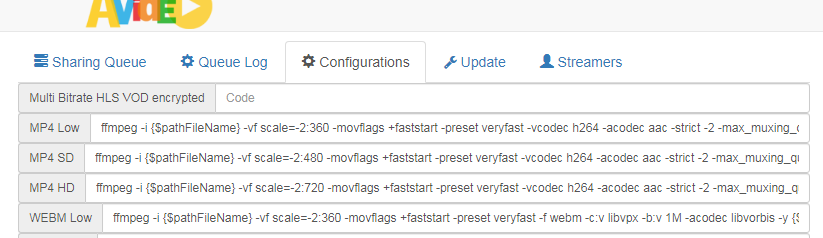
I understood that to remove it from the configuration.
But it does not work. The processing is then immediately finished without errors, but no video data is transferred to the streamer side.
The resolutions are recognized and also displayed in the player, but there is no video data.
Donnerstein
on 30 Apr 2020
I have it tested and it works good for me. And i tested it with youtube file on 4K coded in webm. After 2 seconds a crash. What was the resolution and type of the file you wanted to encode ?
ronaldod
on 30 Apr 2020
maybe it's because of the files, I've used different files. on the demo side, there is the same problem.
Mp4 files, but they are fine and can be played easily.
Donnerstein
on 30 Apr 2020
make sure it's not stuck at /tmp
Also , this could be unreal , but if hls can't detect the video's duration may not play properly .
Try by updating disk usage

Also clear the cache
akhilleusuggo
on 30 Apr 2020
154/5000
That does not change anything, but I also think that it is the encoder itself, the processing takes no more than 1 second. I don't think it will be encoded.
Donnerstein
on 30 Apr 2020
have you removed this lines ?
$resolutions 1440 , 2160
$bandwidth 8000000, 12000000
$audioBitrate 192, 192
akhilleusuggo
on 30 Apr 2020
not yet, I wanted to try it out first
Donnerstein
on 30 Apr 2020
have you removed this lines ?
$resolutions 1440 , 2160
$bandwidth 8000000, 12000000
$audioBitrate 192, 192
@akhilleusuggo is correct, it may do the trick. but you may have problems in future updates as long as you changed the code.
 DanielnetoDotCom
on 2 May 2020
DanielnetoDotCom
on 2 May 2020
Would be useful to make a max resolution. This also useful for starter sites with smaller storage or for site owners who prefer the message of the video above the quality.
ronaldod
on 4 May 2020
This issue has been automatically marked as stale because it has not had recent activity. It will be closed if no further activity occurs. Thank you for your contributions.
![stale[bot] picture](https://avatars3.githubusercontent.com/in/1724?v=4&s=40) stale[bot]
on 3 Jun 2020
stale[bot]
on 3 Jun 2020
Related issues
 mikweb2017
·
4Comments
mikweb2017
·
4Comments
 CorpCaleCloud
·
4Comments
CorpCaleCloud
·
4Comments
 willpower68
·
3Comments
willpower68
·
3Comments
 syldri
·
3Comments
syldri
·
3Comments
 gamersalpha
·
3Comments
gamersalpha
·
3Comments
Most helpful comment
There's an automatic detection of quality . https://github.com/WWBN/AVideo/wiki/VideoHLS-Plugin#automatic-encoding-process-hls-only
On the hls /object/Format.php
If you delete the command line ( on your encoder configuration ) , will use the encoder automatic detection .
If your video is 1080 , then will transcode to 240,360,480,720 and 1080
This is an example of 4K video :
