Under email configuration, after inputting smtp information and testing it’s not working. Getting error message saying “Your message could not be sent!
Message could not be sent (SMTP connect() failed.”
 shebanet
All 39 comments
Make sure you follow this https://github.com/WWBN/AVideo/wiki/Setting-up-AVideo-Platform-to-send-emails
and if fails also check this https://github.com/WWBN/AVideo/issues/2797
 DanielnetoDotCom
on 15 Apr 2020
DanielnetoDotCom
on 15 Apr 2020
Do I have to use Gmail server? I can’t use any other email service provider?
Thanks,
Joseph
202.746.9674
From: Daniel Neto notifications@github.com
Sent: Tuesday, April 14, 2020 8:27:36 PM
To: WWBN/AVideo AVideo@noreply.github.com
Cc: shebanet josephwoldesemait@outlook.com; Author author@noreply.github.com
Subject: Re: [WWBN/AVideo] Email configuration error (#2871)
Make sure you follow this https://github.com/WWBN/AVideo/wiki/Setting-up-AVideo-Platform-to-send-emailshttps://nam01.safelinks.protection.outlook.com/?url=https%3A%2F%2Fgithub.com%2FWWBN%2FAVideo%2Fwiki%2FSetting-up-AVideo-Platform-to-send-emails&data=02%7C01%7C%7C7206f0ffe6e74f8b7cd808d7e0d3cc7b%7C84df9e7fe9f640afb435aaaaaaaaaaaa%7C1%7C0%7C637225072572739682&sdata=dq41bK%2BEcqsH7VpBUY6AuaDWd3E%2BvJU9759iBqUvXew%3D&reserved=0
and if fails also check this #2797https://nam01.safelinks.protection.outlook.com/?url=https%3A%2F%2Fgithub.com%2FWWBN%2FAVideo%2Fissues%2F2797&data=02%7C01%7C%7C7206f0ffe6e74f8b7cd808d7e0d3cc7b%7C84df9e7fe9f640afb435aaaaaaaaaaaa%7C1%7C0%7C637225072572749684&sdata=z3YYPXiBX4bPapuJ07DNFXhQXipjUI%2FLIVX7XFFJEDM%3D&reserved=0
—
You are receiving this because you authored the thread.
Reply to this email directly, view it on GitHubhttps://nam01.safelinks.protection.outlook.com/?url=https%3A%2F%2Fgithub.com%2FWWBN%2FAVideo%2Fissues%2F2871%23issuecomment-613747404&data=02%7C01%7C%7C7206f0ffe6e74f8b7cd808d7e0d3cc7b%7C84df9e7fe9f640afb435aaaaaaaaaaaa%7C1%7C0%7C637225072572759681&sdata=B%2BQeK%2BqxzIG5GRvH4U2a%2F8E1xwALRoIXHwY52RIsVAw%3D&reserved=0, or unsubscribehttps://nam01.safelinks.protection.outlook.com/?url=https%3A%2F%2Fgithub.com%2Fnotifications%2Funsubscribe-auth%2FAPF4E2SRR6ATZK2UHYMOVOTRMT5PRANCNFSM4MIFBHNA&data=02%7C01%7C%7C7206f0ffe6e74f8b7cd808d7e0d3cc7b%7C84df9e7fe9f640afb435aaaaaaaaaaaa%7C1%7C0%7C637225072572769668&sdata=Q2JValFWSI269C73I3QXPT7ToR39tKr%2Fn3kcOaEpKrc%3D&reserved=0.
shebanet
on 15 Apr 2020
you can use any, as long they provide the SMTP to you.
DanielnetoDotCom
on 15 Apr 2020
I found that my installation needed postfix installed before it could send email.
 fvlasie
on 15 Apr 2020
fvlasie
on 15 Apr 2020
a postfix is an option. But for myself, I always set up the Gmail SMTP without postfix
DanielnetoDotCom
on 15 Apr 2020
Boss, you have to trust me here. I know how to setup smtp. I have setup smtp on numerous devices (phones, web apps ect.). However, I have tried hundreds of times to setup on this app and it is failing. I tried troubleshooting. I even tried other emails servers (I have several emails on different domains). It is still not working. I seriously believe there is a bug somewhere. Please trust me and dig a little further.
Sent from Mailhttps://go.microsoft.com/fwlink/?LinkId=550986 for Windows 10
From: Daniel Netonotifications@github.com
Sent: Wednesday, April 15, 2020 1:14 PM
To: WWBN/AVideoAVideo@noreply.github.com
Cc: shebanetjosephwoldesemait@outlook.com; Authorauthor@noreply.github.com
Subject: Re: [WWBN/AVideo] Email configuration error (#2871)
a postfix is an option. But for myself, I always set up the Gmail SMTP without postfix
—
You are receiving this because you authored the thread.
Reply to this email directly, view it on GitHubhttps://apc01.safelinks.protection.outlook.com/?url=https%3A%2F%2Fgithub.com%2FWWBN%2FAVideo%2Fissues%2F2871%23issuecomment-614166402&data=02%7C01%7C%7C9ff2eec7c8014d5d212808d7e16067bb%7C84df9e7fe9f640afb435aaaaaaaaaaaa%7C1%7C0%7C637225676476386953&sdata=FQwzIvj0nOK3%2BWA5blBww6CovUPfLE9dNe1A%2BSKeV8U%3D&reserved=0, or unsubscribehttps://apc01.safelinks.protection.outlook.com/?url=https%3A%2F%2Fgithub.com%2Fnotifications%2Funsubscribe-auth%2FAPF4E2WKXS2DEVTCDQ3XRV3RMXTNZANCNFSM4MIFBHNA&data=02%7C01%7C%7C9ff2eec7c8014d5d212808d7e16067bb%7C84df9e7fe9f640afb435aaaaaaaaaaaa%7C1%7C0%7C637225676476396952&sdata=tpodW7SBrPo%2BJ3UWCzE90VCXRjLWIjZeggqN%2FO3mA2I%3D&reserved=0.
shebanet
on 15 Apr 2020
Wait, so postfix installation is REQUIRED for the smtp settings to work?
From: fvlasienotifications@github.com
Sent: Wednesday, April 15, 2020 1:04 PM
To: WWBN/AVideoAVideo@noreply.github.com
Cc: shebanetjosephwoldesemait@outlook.com; Authorauthor@noreply.github.com
Subject: Re: [WWBN/AVideo] Email configuration error (#2871)
I found that my installation needed postfix installed before it could send email.
—
You are receiving this because you authored the thread.
Reply to this email directly, view it on GitHubhttps://nam10.safelinks.protection.outlook.com/?url=https%3A%2F%2Fgithub.com%2FWWBN%2FAVideo%2Fissues%2F2871%23issuecomment-614161396&data=02%7C01%7C%7C200c25e324ac418d522908d7e15f0e0b%7C84df9e7fe9f640afb435aaaaaaaaaaaa%7C1%7C0%7C637225670687501756&sdata=DFOgfGUzVCfDWqqamIs3%2FOfLouU3%2BsmTmzuUOMMY4SY%3D&reserved=0, or unsubscribehttps://nam10.safelinks.protection.outlook.com/?url=https%3A%2F%2Fgithub.com%2Fnotifications%2Funsubscribe-auth%2FAPF4E2R5ILOFNMWPDPOLVLDRMXSJVANCNFSM4MIFBHNA&data=02%7C01%7C%7C200c25e324ac418d522908d7e15f0e0b%7C84df9e7fe9f640afb435aaaaaaaaaaaa%7C1%7C0%7C637225670687511748&sdata=5Z90%2F4ny0mloVEqCu68ppICKIpeL6IJexnN68rNvFrk%3D&reserved=0.
shebanet
on 15 Apr 2020
postfix is NOT necessary!!!!
what SMTP server are you using?
check your streamer log files.
DanielnetoDotCom
on 15 Apr 2020
I am using Network Solutions
shebanet
on 15 Apr 2020
I do not know them, check your streamer log files.
DanielnetoDotCom
on 15 Apr 2020
Sorry, where do I find that?
shebanet
on 15 Apr 2020
DanielnetoDotCom
on 15 Apr 2020
[15-Apr-2020 18:45:39 UTC] updateFilesize: Not updated, this filetype is embed
[15-Apr-2020 18:45:39 UTC] updateFilesize: Not updated, this filetype is embed
[15-Apr-2020 18:45:39 UTC] updateFilesize: Not updated, this filetype is embed
[15-Apr-2020 18:45:39 UTC] updateFilesize: Not updated, this filetype is embed
[15-Apr-2020 18:45:39 UTC] updateFilesize: Not updated, this filetype is embed
[15-Apr-2020 18:45:39 UTC] updateFilesize: Not updated, this filetype is embed
[15-Apr-2020 18:50:16 UTC] sendEmail: Message could not be sent (SMTP connect() failed. https://github.com/PHPMailer/PHPMailer/wiki/Troubleshooting)
shebanet
on 15 Apr 2020
what is your SMTP server?
what ports are you using?
are you sure they are correct?
DanielnetoDotCom
on 15 Apr 2020
I have a new install 2 days ago and have tried to add my SMTP account settings and the site can't send out any email "FAILED"
I use SMTP2go and have checked all setting and tested the account settings and it works but does not work in youPHP.Tube new install?
Regards
Aaron
 abkiwi9
on 16 Apr 2020
abkiwi9
on 16 Apr 2020
make sure your server can connect in the SMTP server. use telnet in the SMTP port.
DanielnetoDotCom
on 16 Apr 2020
Hi Daniel, thanks, can you tell me how to do this? I paid to have my server installed so it would be all working to save me some time having to learn all this extra stuff. :)
abkiwi9
on 16 Apr 2020
@abkiwi9 what is your URL?
DanielnetoDotCom
on 16 Apr 2020
reelBox.net
@abkiwi9 what is your URL?
—
You are receiving this because you were mentioned.
Reply to this email directly, view it on GitHub, or unsubscribe.
abkiwi9
on 16 Apr 2020
I am in same situation as Aaron. Like I told you before I have numerous devices and web applications that are using the very same external SMTP settings. There’s nothing wrong with my settings. I spent eight hours yesterday fiddling and Tinkering and troubleshooting and I got nowhere. I eventually gave up. Just for curiosity I tried my personal Gmail and it worked. This is not what I expected. I certainly have no interest in using my personal Gmail account to run a business enterprise.
shebanet
on 16 Apr 2020
@abkiwi9 what is your SMTP server? what port are you using?
please screenshot your configuration screen.
DanielnetoDotCom
on 16 Apr 2020
SMTP Server: mail.smtp2go.com
Port: 465. SSL
@abkiwi9 what is your SMTP server? what port are you using?
please screenshot your configuration screen.
—
You are receiving this because you were mentioned.
Reply to this email directly, view it on GitHub, or unsubscribe.
abkiwi9
on 16 Apr 2020
@abkiwi9 yes, your smtp server is responding.
check the credentials, that is the only thing that may be failing.
DanielnetoDotCom
on 16 Apr 2020
@shebanet your SMTP is also responding.
you guys may check your credentials, and if still fail look into your SMTP server log, to see why it is not authenticating.
also try to change the authentication method from SSL to TLS and vice versa.
DanielnetoDotCom
on 16 Apr 2020
Nothing wrong with credentials as I’ve said multiple devices web apps are using the same credentials
shebanet
on 16 Apr 2020
I think I figured out the great mystery. Stand by
shebanet
on 16 Apr 2020
@shebanet I just look into your server and YES there is something on the log file that give us a clue
sendEmail: Message could not be sent (SMTP Error: data not accepted.SMTP server error: DATA END command failed Detail: STOREDRV.Submission.Exception:SendAsDeniedException.MapiExceptionSendAsDenied; Failed to process message due to a permanent exception with message Cannot submit message. 0.35250:FE0A0000, 1.36674:0A000000, 1.61250:00000000, 1.45378:02000000, 1.44866:3F020000, 1.36674:0E000000, 1.61250:00000000, 1.45378:44020000, 1.44866:80010000, 16.55847:2A040000, 17.43559:0000000024020000000000000000000000000000, 20.52176:140F698B1800001000000000, 20.50032:140F698B8817001000000000, 0.35180:F1030000, 255.23226:0 SMTP code: 554 Additional SMTP info: 5.2.0)
I am pretty sure it comes from your side
DanielnetoDotCom
on 16 Apr 2020
@abkiwi9 you please double check your SMTP credentials and look for a log in your SMTP server
DanielnetoDotCom
on 16 Apr 2020
I’ve narrow down the problem. Web client is using my personal email to send on behalf. Email server is rejecting because that personal email is not authorized to send on behalf. I have to either authorize that email in email server side or change sender email at web client side. I prefer the latter. Where can I update the senders email in the system?
shebanet
on 16 Apr 2020
don't use port 465 , instead use 587 tls , and on google security enable '' allow less secure application '' , add your server ip to white listed .
 akhilleusuggo
on 16 Apr 2020
akhilleusuggo
on 16 Apr 2020
I’m not using Google. If you can just tell me where I can change the system email used during install I will be happy.
shebanet
on 16 Apr 2020
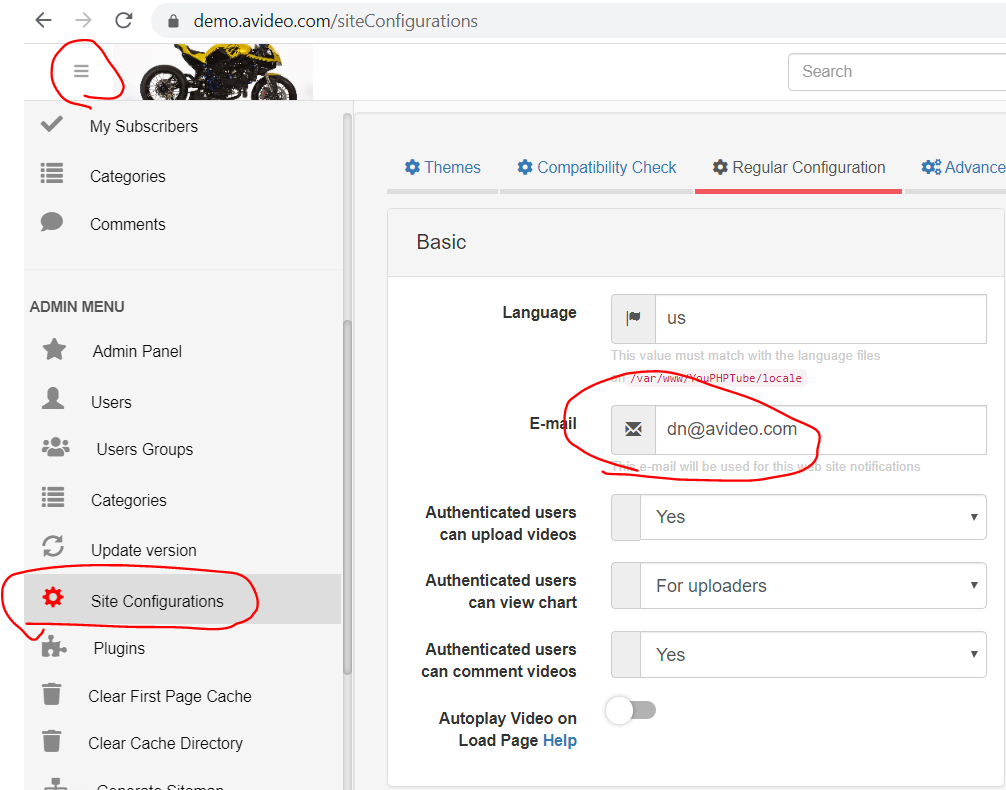
In other words, I need to change the sender’s (From) email
shebanet
on 16 Apr 2020
change the sender here
DanielnetoDotCom
on 16 Apr 2020
Oh sorry, I should have seen that. I was expecting to hardcode it. Fixed! Everything is working now.
shebanet
on 16 Apr 2020
Conclusion: If SMTP user email is different then sender (from) email than sender (from) email needs to be authorized by email server to send on behalf
shebanet
on 16 Apr 2020
Thanks, everyone for working this out and advising the best ports to use. Something so simple, maybe add this to your support instruction page :) it took hours of testing.
Regards
Aaron
abkiwi9
on 17 Apr 2020
@abkiwi9 does it works for you also?
what ports?
DanielnetoDotCom
on 17 Apr 2020
Hi Daniel, Yes it works if you make the email address the same as the domain name and port 587 tls works but port 465 does not work. I tested port 25 and 2525 with my first email address (different domain) and it does not work.
Hope this helps.
Regards
Aaron
abkiwi9
on 18 Apr 2020
This issue has been automatically marked as stale because it has not had recent activity. It will be closed if no further activity occurs. Thank you for your contributions.
![stale[bot] picture](https://avatars3.githubusercontent.com/in/1724?v=4&s=40) stale[bot]
on 18 May 2020
stale[bot]
on 18 May 2020
Related issues
 mikweb2017
·
4Comments
akhilleusuggo
·
3Comments
mikweb2017
·
4Comments
akhilleusuggo
·
3Comments
 JoshWho
·
3Comments
JoshWho
·
3Comments
 wetubeclub
·
3Comments
wetubeclub
·
3Comments
wetubeclub
·
3Comments
wetubeclub
·
3Comments