Tell me the encoder settings. I need HLS VOD multi-bitrate encoded only in 480, HD 720, HD 1080
screenshot: http://vfl.ru/fotos/39d87e4329947019.html
 palich91
All 16 comments
To do that you must understand the FFMPEG command. but I am pretty sure you can find where to change it.
ffmpeg -re -i {$pathFileName} -c:a aac -b:a 128k -c:v libx264 -vf scale=-2:360 -g 48 -keyint_min 48 -sc_threshold 0 -bf 3 -b_strategy 2 -b:v 800k -maxrate 856k -bufsize 1200k -b:a 96k -f hls -hls_time 15 -hls_list_size 0 -hls_key_info_file {$destinationFile}keyinfo {$destinationFile}low/index.m3u8 -c:a aac -b:a 128k -c:v libx264 -vf scale=-2:540 -g 48 -keyint_min 48 -sc_threshold 0 -bf 3 -b_strategy 2 -b:v 1400k -maxrate 1498k -bufsize 2100k -b:a 128k -f hls -hls_time 15 -hls_list_size 0 -hls_key_info_file {$destinationFile}keyinfo {$destinationFile}sd/index.m3u8 -c:a aac -b:a 128k -c:v libx264 -vf scale=-2:720 -g 48 -keyint_min 48 -sc_threshold 0 -bf 3 -b_strategy 2 -b:v 2800k -maxrate 2996k -bufsize 4200k -b:a 128k -f hls -hls_time 15 -hls_list_size 0 -hls_key_info_file {$destinationFile}keyinfo {$destinationFile}hd/index.m3u8
 DanielnetoDotCom
on 21 Mar 2020
DanielnetoDotCom
on 21 Mar 2020
ffmpeg -i {$pathFileName} -c:v h264 -vf scale=-2:480 -g 48 -keyint_min 48 -sc_threshold 0 -bf 3 -b_strategy 2 -b:v 1500k -maxrate 2000k -bufsize 3000k -c:a aac -b:a 128k -f hls -hls_time 15 -hls_list_size 0 -hls_key_info_file {$destinationFile}keyinfo {$destinationFile}low/index.m3u8 -c:v h264 -vf scale=-2:720 -g 48 -keyint_min 48 -sc_threshold 0 -bf 3 -b_strategy 2 -b:v 2500k -maxrate 3000k -bufsize 5000k -c:a aac -b:a 128k -f hls -hls_time 15 -hls_list_size 0 -hls_key_info_file {$destinationFile}keyinfo {$destinationFile}sd/index.m3u8 -c:v h264 -vf scale=-2:1080 -g 48 -keyint_min 48 -sc_threshold 0 -bf 3 -b_strategy 2 -b:v 4000k -maxrate 6000k -bufsize 8000k -c:a aac -b:a 128k -f hls -hls_time 15 -hls_list_size 0 -hls_key_info_file {$destinationFile}keyinfo {$destinationFile}hd/index.m3u8
I highly RECOMMEND you to remove the -re flag ( stand for real time ) , this will put your encoder on a speed of x1 ( made for livestreaming , not for VOD ) . Will drop your quality video .
Also you can set a -preset . By default FFMPEG uses -preset medium if no preset has been specified
You also use -crf 23 instead of -b:v to let the encoder decide , and limite the maximum bitrate keeping the -maxrate flag
This is a good option in case a section of the video has no animation , only image sliding , meaning that no much bitrate is needed , the encoder will drop down the bitrate and save you some space disk .
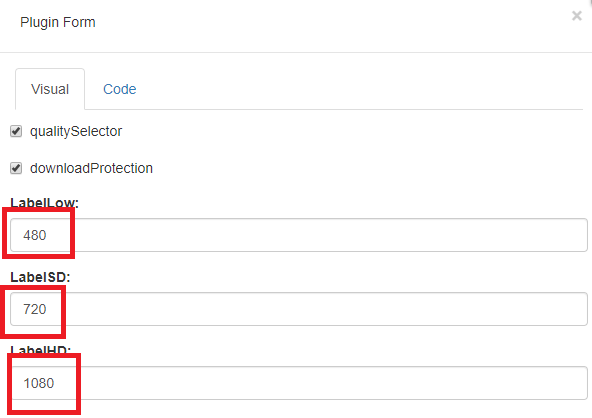
Now on plugin HLS , change :
 akhilleusuggo
on 21 Mar 2020
akhilleusuggo
on 21 Mar 2020
can you say that means scale = -2: in scale = -2:480
palich91
on 23 Mar 2020
yes
scale=-2 means Scale the video, keep aspect ratio so that height is adjusted to fit
DanielnetoDotCom
on 23 Mar 2020
And what will happen if I indicate this: scale = -1:480.
I want HLS encoded video quality to be excellent
palich91
on 23 Mar 2020
you should look into the FFMPEG documentations.
DanielnetoDotCom
on 23 Mar 2020
@palich91 HLS is not the encoder for excellent quality . Even tho any encoder and format could have an excellent quality .
You have to make choices to what you've got ( Hardware ) . Encoder VP9 ( by google ) , output webm for me is the best i've seen . With 1200k bitrate I was able to keep the same quality as source ( 1080p / 30FPS ) . But the time to encode is really slow compared to anything . It's like the x265 but the vp9 is supported on html5 .
You can always use -preset medium or slow and -crf 18 ( the output bitrate could be high )
There's no perfect formula , you need to test and find out what need for your platform .
akhilleusuggo
on 23 Mar 2020
@akhilleusuggo
I am trying to learn FFMPEG, but it’s hard for me to learn it, I can’t learn all the commands in one go. Advise me how to configure it for myself in accordance with my needs:
I have an VPS: SSD disk, 10 core processor, 60 GB of RAM.
what do I need to do so that the encoder encodes video in 480p, 720p50 and 1080p50?
You have a lot of experience that you can advise so that the video does not lose quality during encoding and takes less time and not much space
This is how i think:
480p: 854x480
-vf scale="'w=if(gt(a,16/9),854,-2):h=if(gt(a,16/9),-2,480)'" -ab 128k -maxrate 1200k -bufsize 4200k
720p: 1280x720
-vf scale="'w=if(gt(a,16/9),1280,-2):h=if(gt(a,16/9),-2,720)'" -ab 196k -maxrate 2000k -bufsize 6400k
1080p: 1920x1080
-vf scale="'w=if(gt(a,16/9),1920,-2):h=if(gt(a,16/9),-2,1080)'" -ab 320k -maxrate 2800k -bufsize 8200k
palich91
on 24 Mar 2020
@palich91 Let me guess ( contabo VPS )
I recommend not to set FPS ( -rflag ) . Why ?
If you upload a video with 30 fps , and on your command line you put -r 50 you will duplicate unnecessary frames
Bitrate depends on the video frames . If you gonna upload videos 50-60 fps , 2800k is low ( I recomend -crf 23 or lower to keep the quality of the original video . Audio bitrate 320k is overkilled . Try 192k maximum .
-preset slow
If you can upload a video to see it , would be better .
akhilleusuggo
on 24 Mar 2020
@ achilleosugo if you have a telegram messenger or any other I can contact you.
I did like this:
ffmpeg -i {$pathFileName} -c:v h264 -vf scale=-2:480 -g 48 -keyint_min 48 -sc_threshold 0 -bf 3 -b_strategy 2 -crf 23 -maxrate 2000k -bufsize 3000k -c:a aac -b:a 128k -f hls -hls_time 15 -hls_list_size 0 -hls_key_info_file {$destinationFile}keyinfo {$destinationFile}low/index.m3u8 -c:v h264 -vf scale=-2:720 -g 48 -keyint_min 48 -sc_threshold 0 -bf 3 -b_strategy 2 -crf 23 -maxrate 3000k -bufsize 5000k -c:a aac -b:a 128k -f hls -hls_time 15 -hls_list_size 0 -hls_key_info_file {$destinationFile}keyinfo {$destinationFile}sd/index.m3u8 -c:v h264 -vf scale=-2:1080 -g 48 -keyint_min 48 -sc_threshold 0 -bf 3 -b_strategy 2 -crf 23 -maxrate 6000k -bufsize 8000k -c:a aac -b:a 128k -f hls -hls_time 15 -hls_list_size 0 -hls_key_info_file {$destinationFile}keyinfo {$destinationFile}hd/index.m3u8
Here is the video I downloaded from youtube https://vicovi.ru/video/61/Другой-мир-в-4К-ultra-hd-3840-х-2160-?channelName=skriptcms
What else can I fix?
palich91
on 24 Mar 2020
I take this opportunity to ask if I can use the CUDA Nvidia or x264 for AMD GPU graphics acceleration for the encoder.
If one has a rig of 5 - 6 GPU ... how much would the conversion speed increase ... or maybe in this case if perhaps it is possible to have two or more simultaneous conversions.
 tgd1973
on 24 Mar 2020
tgd1973
on 24 Mar 2020
I ask for help, video encoding takes a long time but video quality is lost. tell me how to code better?
Tell me how to make H264 encoding
palich91
on 2 Apr 2020
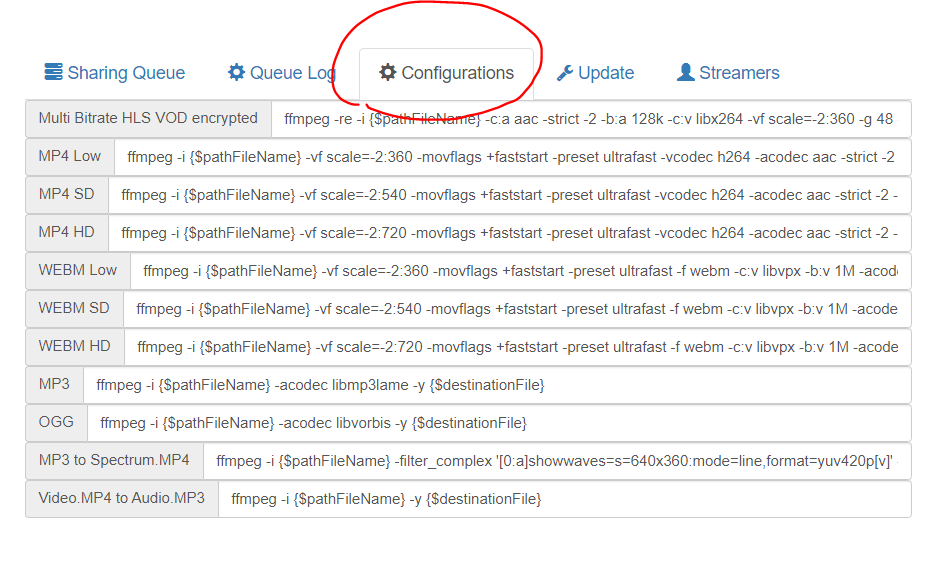
you can change and customize the FFMPEG commands in the encoder configuration
DanielnetoDotCom
on 2 Apr 2020
I know what I can change, but I don’t understand the FFMPEG commands and I ask you for help so that you give a set of commands that will not spoil the video quality and at the same time the video will not weigh much
palich91
on 3 Apr 2020
I can not help you with FFMPEG. I always use Google for myself
DanielnetoDotCom
on 3 Apr 2020
This issue has been automatically marked as stale because it has not had recent activity. It will be closed if no further activity occurs. Thank you for your contributions.
![stale[bot] picture](https://avatars3.githubusercontent.com/in/1724?v=4&s=40) stale[bot]
on 3 May 2020
stale[bot]
on 3 May 2020
Related issues
 hrt644
·
3Comments
hrt644
·
3Comments
 CorpCaleCloud
·
4Comments
CorpCaleCloud
·
4Comments
 snowdream1985
·
3Comments
snowdream1985
·
3Comments
 syldri
·
3Comments
syldri
·
3Comments
 KazeroG
·
4Comments
KazeroG
·
4Comments
Most helpful comment
ffmpeg -i {$pathFileName} -c:v h264 -vf scale=-2:480 -g 48 -keyint_min 48 -sc_threshold 0 -bf 3 -b_strategy 2 -b:v 1500k -maxrate 2000k -bufsize 3000k -c:a aac -b:a 128k -f hls -hls_time 15 -hls_list_size 0 -hls_key_info_file {$destinationFile}keyinfo {$destinationFile}low/index.m3u8 -c:v h264 -vf scale=-2:720 -g 48 -keyint_min 48 -sc_threshold 0 -bf 3 -b_strategy 2 -b:v 2500k -maxrate 3000k -bufsize 5000k -c:a aac -b:a 128k -f hls -hls_time 15 -hls_list_size 0 -hls_key_info_file {$destinationFile}keyinfo {$destinationFile}sd/index.m3u8 -c:v h264 -vf scale=-2:1080 -g 48 -keyint_min 48 -sc_threshold 0 -bf 3 -b_strategy 2 -b:v 4000k -maxrate 6000k -bufsize 8000k -c:a aac -b:a 128k -f hls -hls_time 15 -hls_list_size 0 -hls_key_info_file {$destinationFile}keyinfo {$destinationFile}hd/index.m3u8I highly RECOMMEND you to remove the
-reflag ( stand for real time ) , this will put your encoder on a speed of x1 ( made for livestreaming , not for VOD ) . Will drop your quality video .Also you can set a
-preset. By default FFMPEG uses-preset mediumif no preset has been specifiedYou also use
-crf 23instead of-b:vto let the encoder decide , and limite the maximum bitrate keeping the-maxrateflagThis is a good option in case a section of the video has no animation , only image sliding , meaning that no much bitrate is needed , the encoder will drop down the bitrate and save you some space disk .
Now on plugin HLS , change :
