I have reinstalled my server ( without any panel ) , since the last time you told me that something may be redirecting with .htaccess . Sadly the problem is still the same . I have followed the exact same step you showing on the video and on the wiki . I just can't find out what am missing here .
One thing for sure that is not what I see on your demo site is the rtmp stat . When typing www.domain.tld:444/stat , I can see the stats but the ID of the streamer doesn't show ( ID = Key ) . What I see is :
https://www.domain.tld/plugin/Live/on_publish.php | 1 | H264 Main 3.0 | 0 Kb/s | 818x460 | 23 | AAC LC | 0 Kb/s | 44100 | 2 | 640 KB | 0 KB | 6100 Kb/s | 0 Kb/s | active | 39s
-- | -- | -- | -- | -- | -- | -- | -- | -- | -- | -- | -- | -- | -- | -- | --
This time I'm sure that there's no .htaccess from any thing . Where do you think the problem is coming from ? Any suggestions ?
I have no problem to ask the nginx community about this , but i'm expecting the answer to be : This has nothing to do with nginx since it's working , go and ask the script developer .
Appreciate any help
 akhilleusuggo
All 35 comments
ru---Привет!вот как у меня отображает www.домен.tld: 444 / stat
 настраивал все по мануалу
 tiplovo
on 12 Aug 2019
tiplovo
on 12 Aug 2019
Если сертификат apache будет подтвержденый, а nginx нет,то видео не будет показывать по порту 444,только по 8080
tiplovo
on 12 Aug 2019
@akhilleusuggo , sorry but I also not sure where does it come from.
I just told you where I found the issue some time ago.
but I guess you have a redirect somewhere, maybe on nginx.conf, or when you install the SSL?
 DanielnetoDotCom
on 12 Aug 2019
DanielnetoDotCom
on 12 Aug 2019
@tiplovo Привет , спасибо за ответ . Не понял что ты подсказал про сертификат . У меня сертификать от летс энкрить у нормально работает, Проблема это на стриме и только на стриме.
@DanielnetoDotCom Hello Daniel , I'm really lost , here I link you the configuration of my Nginx , take a look .
worker_processes 1;
error_log logs/error.log debug;
events {
worker_connections 1024;
}
rtmp {
server {
listen 1935;
allow play all;
#creates our "live" full-resolution HLS videostream from our incoming encoder stream and tells where to put the HLS video manifest and video fragments
application live {
allow play all;
live on;
#record all;
#record_path /video_recordings;
#record_unique on;
hls on;
hls_nested on;
hls_path /HLS/live;
#hls_playlist_length 4s;
#hls_fragment 1s;
hls_fragment 10s;
on_publish http://domain.com/plugin/Live/on_publish.php;
on_play http://domain.com/plugin/Live/on_play.php;
on_record_done http://domain.com/plugin/Live/on_record_done.php;
}
}
}
http {
include mime.types;
default_type application/octet-stream;
server {
listen 8080;
listen 444 ssl;
server_name localhost;
ssl_certificate /etc/letsencrypt/live/domain.com/fullchain.pem;
ssl_certificate_key /etc/letsencrypt/live/domain.com/privkey.pem;
#creates the http-location for our full-resolution (desktop) HLS stream - "http://my-ip/live/my-stream-key/index.m3u8"
location /live {
# Disable cache
add_header 'Cache-Control' 'no-cache';
I am not so good on Nginx config, but it looks different then the ones I use
for example on the line server_name localhost; where did you specify the domain?
where is your SSL configuration?
here is an example of what I use:
worker_processes 1;
error_log logs/error.log debug;
events {
worker_connections 1024;
}
rtmp {
server {
listen 1935;
allow play all;
application live {
allow play all;
live on;
#record all;
#record_path /video_recordings;
#record_unique on;
hls on;
hls_nested on;
hls_path /HLS/live;
#hls_playlist_length 4s;
#hls_fragment 1s;
hls_fragment 10s;
on_publish http://localhost/YouPHPTube/plugin/Live/on_publish.php;
on_play http://localhost/YouPHPTube/plugin/Live/on_play.php;
on_record_done http://localhost/YouPHPTube/plugin/Live/on_record_done.php;
}
}
}
http {
include mime.types;
default_type application/octet-stream;
server {
listen 80;
server_name localhost www.mydomain.com;
location /live {
# Disable cache
add_header 'Cache-Control' 'no-cache';
# CORS setup
add_header 'Access-Control-Allow-Origin' '*' always;
add_header 'Access-Control-Expose-Headers' 'Content-Length';
# allow CORS preflight requests
if ($request_method = 'OPTIONS') {
add_header 'Access-Control-Allow-Origin' '*';
add_header 'Access-Control-Max-Age' 1728000;
add_header 'Content-Type' 'text/plain charset=UTF-8';
add_header 'Content-Length' 0;
return 204;
}
types {
application/vnd.apple.mpegurl m3u8;
}
alias /HLS/live;
}
#allows us to see how stats on viewers on our Nginx site using a URL like: "http://my-ip/stats"
#location /stats {
# stub_status;
#}
location /stat {
rtmp_stat all;
rtmp_stat_stylesheet stat.xsl;
}
location /stat.xsl {
root html;
}
location /control {
rtmp_control all;
}
#allows us to host some webpages which can show our videos: "http://my-ip/my-page.html"
location / {
root html;
index index.html index.htm;
}
listen 444 ssl; # managed by Certbot
ssl_certificate /etc/letsencrypt/live/xxx/fullchain.pem; # managed by Certbot
ssl_certificate_key /etc/letsencrypt/live/xxx/privkey.pem; # managed by Certbot
include /etc/letsencrypt/options-ssl-nginx.conf; # managed by Certbot
ssl_dhparam /etc/letsencrypt/ssl-dhparams.pem; # managed by Certbot
}
}
I see a lot of differences . You're right I didn't specify the domain this time . What should go there ? localhost www.domain.com ?
I'm missing this lines :
include /etc/letsencrypt/options-ssl-nginx.conf; # managed by Certbot
ssl_dhparam /etc/letsencrypt/ssl-dhparams.pem; # managed by Certbot
A part of this , you just jumped right to the end after the index.html and wrote the ssl ( but that should not affect )
I'll give a try and leave a feedback
akhilleusuggo
on 13 Aug 2019
Well , I don't have
include /etc/letsencrypt/options-ssl-nginx.conf; # managed by Certbot
ssl_dhparam /etc/letsencrypt/ssl-dhparams.pem; # managed by Certbot
And never seen them . No idea where I can make them . Any suggestions ?
akhilleusuggo
on 13 Aug 2019
Ну, у меня нет
включить /etc/letsencrypt / options-ssl-nginx.conf; # управляется Certbot
ssl_dhparam/etc/letsencrypt / ssl-dhparams.PEM; # управляется CertbotИ никогда их не видел . Понятия не имею, где я могу их сделать . Есть предложения ?
You need to install a certificate for nginx separately
tiplovo
on 14 Aug 2019
я понял спс , поищу как это делается , я просто с Nginxом не знакомый
akhilleusuggo
on 14 Aug 2019
I use letsencrypt for my self
DanielnetoDotCom
on 14 Aug 2019
@DanielnetoDotCom I actually don't get it . Installing a separated certificate one for apache and one for nginx , I don't see the goal of that :(
To secure what exactly ? In anyway , I don't think that this gonna fix my problem
akhilleusuggo
on 14 Aug 2019
BTW, for nginx the same apache certificate.
this is just a guess of what is changing your configuration.
DanielnetoDotCom
on 15 Aug 2019
And that's exactly what I'm using :
listen 444 ssl;
server_name www.domain.tld;
ssl_certificate /etc/letsencrypt/live/domain.com/fullchain.pem;
ssl_certificate_key /etc/letsencrypt/live/domain.com/privkey.pem;
I'm using let's encrypt as well . But there's no
include /etc/letsencrypt/options-ssl-nginx.conf;
ssl_dhparam /etc/letsencrypt/ssl-dhparams.pem;
But still , the certificate and the plugin itself should not affect to find the streamer key . On the DB , I have checked it and I can see the streamer key with no problems . I know you're not expert on Nginx , but do you think that the Nginx Community can help on this case ?
akhilleusuggo
on 15 Aug 2019
anyway, I do not think the problem is in your ssl certificate, I guess it is something when you force to redirect to https
what nginx version are you using?
FYI, for ubuntu 16 I use nginx-1.12.0
for Ubuntu 18 I use nginx-1.13.8
DanielnetoDotCom
on 16 Aug 2019
@DanielnetoDotCom The only redirection force is on let's encrypt . When installing it , it asks if you want to redirect all the traffic to https , and i said ''Yes''
EDIT : On /etc/apache2/sites-enabled
RewriteEngine on
RewriteCond %{SERVER_NAME} =www.domain.tld
RewriteRule ^ https://%{SERVER_NAME}%{REQUEST_URI} [END,NE,R=permanent]
About Nginx version:
On the /444:stat page : Generated by nginx-rtmp-module 1.1.4, nginx 1.16.0, pid 13387, built Aug 4 2019 02:27:28 gcc 7.4.0 (Ubuntu 7.4.0-1ubuntu1~18.04.1)
akhilleusuggo
on 16 Aug 2019
On apache the redirect is OK,
But for NGINX you should not redirect it.
DanielnetoDotCom
on 19 Aug 2019
@DanielnetoDotCom I don't even have nginx installed ...
# nginx -v
Command 'nginx' not found, but can be installed with:
apt install nginx-core
apt install nginx-extras
apt install nginx-full
apt install nginx-light
Could you tell me the location file config that you think is redirecting ? Thanks
akhilleusuggo
on 19 Aug 2019
I am not sure if the problem is in your config or it is a redirect issue, but my configuration file is located here: /usr/local/nginx/conf/nginx.conf
DanielnetoDotCom
on 20 Aug 2019
@DanielnetoDotCom I was hoping you link me something helpful :(
There's no redirect there / I made sure of that
akhilleusuggo
on 20 Aug 2019
@DanielnetoDotCom You know Daniel , you guessed right ! It was the Apache redirect that was causing this issue . I don't get it . After removing this lines ; it's working . The question is , how then do I redirect all the visitors to https automatically ?
RewriteEngine on
RewriteCond %{SERVER_NAME} =www.domain.tld
RewriteRule ^ https://%{SERVER_NAME}%{REQUEST_URI} [END,NE,R=permanent]
where were those rules?
O have the same rules on my virtual host configuration file, and it does not conflict with nginx.
DanielnetoDotCom
on 20 Aug 2019
@DanielnetoDotCom on the /etc/apache2/sites-enabled
Any where to add this into the .htaccess of the site ? or maybe I have to do this from the domain provider ?
akhilleusuggo
on 20 Aug 2019
For my self I do it on /etc/apache2/sites-enabled and I have no problem with that
DanielnetoDotCom
on 20 Aug 2019
@DanielnetoDotCom Do you have this same line ? I have re-wrote it and failed again :( , only removing it works . I don't really understand why re-directing does make it fails
akhilleusuggo
on 20 Aug 2019
@DanielnetoDotCom Ok , this is very strange . I found something more . If the page is loaded from HTTP = The site send the notification and shows the stream to be ONLINE .
HTTPS = The stream is playing but with the red color showing the stream is OFFLINE .
#
Has this something to do with the config file of the site ?
$global['webSiteRootURL'] = "http".(!empty($_SERVER['HTTPS'])?"s":"")."://".$_SERVER['SERVER_NAME'].$subDir;
}else{
    $global['webSiteRootURL'] = 'https://example.com/';
I really not sure, but I just can tell you I have the same lines on my apache configuration but it does not affect my NGINX server.
DanielnetoDotCom
on 21 Aug 2019
I am having the same issue as described, however removing the redirects in the sites-enabled did not fix the issue for me. I am really at a loss here. As described above the apache redirects should not affect this anyway. I would agree something is getting redirected as in the stats page it's showing the URL as https where it's supposed to show the stream key. I just don't get where the redirect is. I should also say I was experiencing the issue with the no SSL at all so no redirects on a clean server.
Any ideas would be very appreciated.
 TrippyTubeTV
on 5 Sep 2019
TrippyTubeTV
on 5 Sep 2019
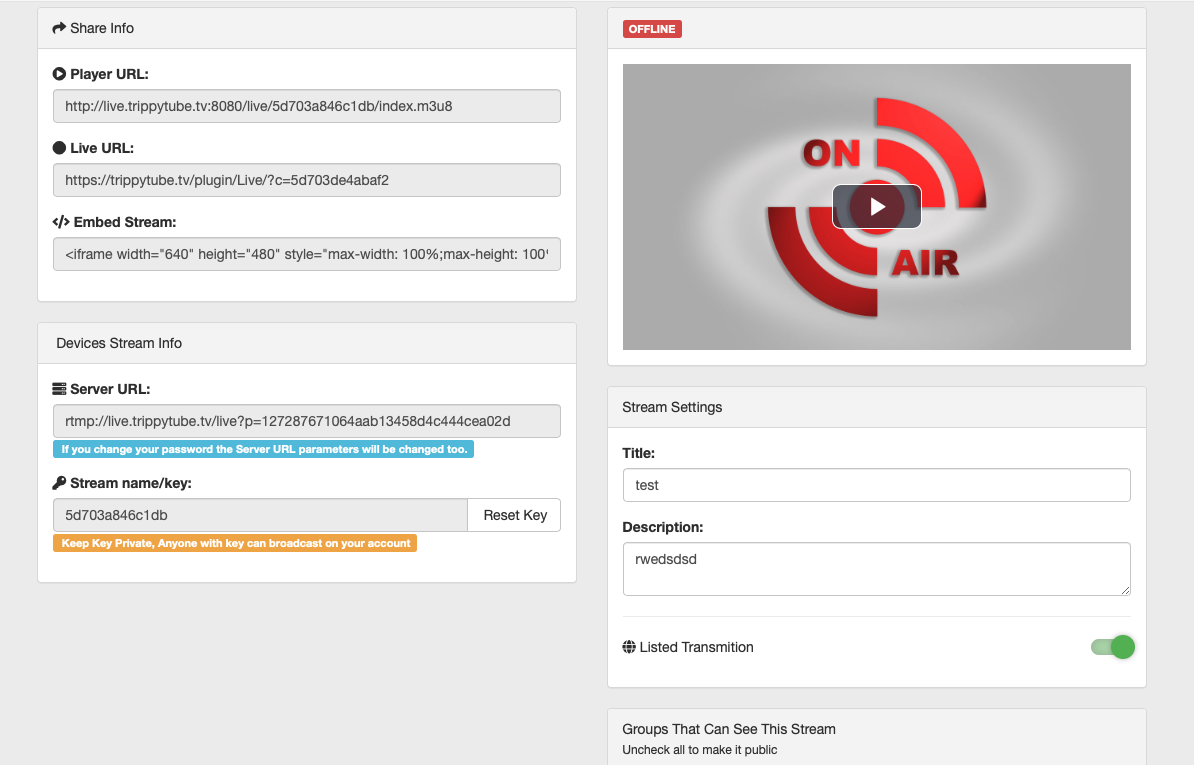
@TrippyTubeTV I have a stupid idea. Make sure that your stream is actually public. Make sure you have dragged to show to everybody ( green color )
akhilleusuggo
on 6 Sep 2019
@akhilleusuggo Its a listed transmission unless I am missing something.
TrippyTubeTV
on 6 Sep 2019
I am just surprised not more people are having this issue. I have done countless number of clean installs and the issue happens every time following the documentation perfectly. I have installed YouPHPTube in the past with no issues. This seems to be a new issue.
TrippyTubeTV
on 6 Sep 2019
@TrippyTubeTV Yes , maybe you're right . I'm also unhappy with the way I made it work , with non redirect https it's not what I want
akhilleusuggo
on 6 Sep 2019
@DanielnetoDotCom Any help would be appreciated.
TrippyTubeTV
on 7 Sep 2019
@TrippyTubeTV are you sure you checked the redirect for nginx?
make sure you do not have any redirect.
DanielnetoDotCom
on 9 Sep 2019
Also it is a problem on nginx RTMP, you may find more help on https://github.com/arut/nginx-rtmp-module
DanielnetoDotCom
on 9 Sep 2019
This issue has been automatically marked as stale because it has not had recent activity. It will be closed if no further activity occurs. Thank you for your contributions.
![stale[bot] picture](https://avatars3.githubusercontent.com/in/1724?v=4&s=40) stale[bot]
on 8 Apr 2020
stale[bot]
on 8 Apr 2020
Related issues
 shebanet
·
4Comments
shebanet
·
4Comments
 mikweb2017
·
4Comments
mikweb2017
·
4Comments
 willpower68
·
3Comments
willpower68
·
3Comments
 hrt644
·
3Comments
hrt644
·
3Comments
 JoshWho
·
3Comments
JoshWho
·
3Comments
Most helpful comment
@DanielnetoDotCom You know Daniel , you guessed right ! It was the Apache redirect that was causing this issue . I don't get it . After removing this lines ; it's working . The question is , how then do I redirect all the visitors to https automatically ?