I was just told I can't use Windows. What operating system must I use ? When will you build for Windows ?
 thereskinner
All 39 comments
You were never told to not use Windows, author cannot support windows installation of xAMP.
There is no build for specific OS, but each OS has specific settings when it comes to apache, php and what not.
Problem with your ticket was, that you actually dont know how to get (us) more info on error. Asking you to provide us errors from logs and you replying WHAT?!? simply shows us, that we cannot help you debugging your problem because it would take us a good amount of time only to teach you basics first.
On the other note, it works out of the box on Ubuntu 18.04LTS. It should work on WAMP too, but you have to have required extensions for PHP and Apache loaded for example.
Also, you need to create some stuff manually around DB too..
Author can provide you with support tho: https://www.youphptube.com/services
 SubjectXXX
on 4 Feb 2019
SubjectXXX
on 4 Feb 2019
Okay I just figured out how to get the errors this is what I got:
[02-Feb-2019 16:38:04 UTC] PHP Stack trace:
[02-Feb-2019 16:38:04 UTC] PHP 1. {main}() C:\wamp\wwwplaytube\install\index.php:0
[02-Feb-2019 16:39:21 UTC] PHP Notice: Undefined variable: global in C:\wamp\wwwplaytube\install\index.php on line 21
[02-Feb-2019 16:39:21 UTC] PHP Stack trace:
[02-Feb-2019 16:39:21 UTC] PHP 1. {main}() C:\wamp\wwwplaytube\install\index.php:0
[02-Feb-2019 16:39:38 UTC] PHP Notice: Undefined variable: global in C:\wamp\wwwplaytube\install\index.php on line 21
[02-Feb-2019 16:39:38 UTC] PHP Stack trace:
[02-Feb-2019 16:39:38 UTC] PHP 1. {main}() C:\wamp\wwwplaytube\install\index.php:0
[02-Feb-2019 17:15:39 UTC] PHP Warning: include(error.php): failed to open stream: No such file or directory in C:\wamp\wwwplaytube\videos\configuration.php on line 4
[02-Feb-2019 17:15:39 UTC] PHP Stack trace:
[02-Feb-2019 17:15:39 UTC] PHP 1. {main}() C:\wamp\wwwplaytube\view\index.php:0
[02-Feb-2019 17:15:39 UTC] PHP 2. require_once() C:\wamp\wwwplaytube\view\index.php:12
[02-Feb-2019 17:15:39 UTC] PHP Warning: include(): Failed opening 'error.php' for inclusion (include_path='.;C:phppear') in C:\wamp\wwwplaytube\videos\configuration.php on line 4
[02-Feb-2019 17:15:39 UTC] PHP Stack trace:
[02-Feb-2019 17:15:39 UTC] PHP 1. {main}() C:\wamp\wwwplaytube\view\index.php:0
[02-Feb-2019 17:15:39 UTC] PHP 2. require_once() C:\wamp\wwwplaytube\view\index.php:12
[02-Feb-2019 18:11:12 UTC] PHP Notice: Undefined variable: global in C:\wamp\www\YouPHPTube-master\install\index.php on line 21
[02-Feb-2019 18:11:12 UTC] PHP Stack trace:
[02-Feb-2019 18:11:12 UTC] PHP 1. {main}() C:\wamp\www\YouPHPTube-master\install\index.php:0
[02-Feb-2019 18:12:24 UTC] PHP Notice: Undefined variable: global in C:\wamp\www\YouPHPTube-master\install\index.php on line 21
[02-Feb-2019 18:12:24 UTC] PHP Stack trace:
[02-Feb-2019 18:12:24 UTC] PHP 1. {main}() C:\wamp\www\YouPHPTube-master\install\index.php:0
[02-Feb-2019 18:13:58 UTC] PHP Notice: Undefined variable: global in C:\wamp\www\YouPHPTube-master\install\index.php on line 21
[02-Feb-2019 18:13:58 UTC] PHP Stack trace:
[02-Feb-2019 18:13:58 UTC] PHP 1. {main}() C:\wamp\www\YouPHPTube-master\install\index.php:0
[02-Feb-2019 18:14:25 UTC] PHP Notice: Undefined variable: global in C:\wamp\www\YouPHPTube-master\install\index.php on line 21
[02-Feb-2019 18:14:25 UTC] PHP Stack trace:
[02-Feb-2019 18:14:25 UTC] PHP 1. {main}() C:\wamp\www\YouPHPTube-master\install\index.php:0
[02-Feb-2019 18:38:41 UTC] PHP Warning: mysqli::__construct(): (HY000/1049): Unknown database 'z-search' in C:\wamp\www\zsearch\main.php on line 43
[02-Feb-2019 18:38:41 UTC] PHP Stack trace:
thereskinner
on 5 Feb 2019
Like I said in previous thread: you WAMP is not configured correctly, you dont have your mysql database setup the correct way and you are missing php extensions.
This errors are out of scope of this application support. You are expected to have at least some knowledge how xAMP works..
SubjectXXX
on 5 Feb 2019
Ok but what is the correct way ? I've implemented plenty of projects and this is the only time this happened
thereskinner
on 5 Feb 2019
Start by examining your /videos/configuration.php file. It should have access data to your database (host, database name, user, pass)..
SubjectXXX
on 5 Feb 2019
Start by examining your /videos/configuration.php file. It should have access data to your database (host, database name, user, pass)..
Whenever I try it keeps on showing localhostc and my server is called localhost
thereskinner
on 5 Feb 2019
Again, you do not have basics on how to set up and config web application.
Open configuration.php in your text editor..
SubjectXXX
on 5 Feb 2019
It is open
thereskinner
on 5 Feb 2019
...
SubjectXXX
on 5 Feb 2019
What ?
thereskinner
on 5 Feb 2019
What what?
SubjectXXX
on 5 Feb 2019
I opened the file and everything seems fine
thereskinner
on 5 Feb 2019
Ohh, really, it seems fine?
Well, good for you.
Connect to your database with phpmyadmin with credentials that are written in this configuration.php.
SubjectXXX
on 5 Feb 2019
$mysqlHost = 'localhost';
$mysqlPort = '3306';
$mysqlUser = 'username';
$mysqlPass = 'password';
$mysqlDatabase = 'youphptube';
thereskinner
on 5 Feb 2019
That's my credentials. I changed my username and password
thereskinner
on 5 Feb 2019
Again
...
SubjectXXX
on 5 Feb 2019
What's the ... for ?
I checked my error log and it only showed errors for a different project. Even though that project is closed
thereskinner
on 5 Feb 2019
... means I'm waiting for you to do what I told you to do..
SubjectXXX
on 5 Feb 2019
Okay. I changed my PHPMYADMIN username and password. So I changed it from root and '' to what mine is. And I am in my database
thereskinner
on 5 Feb 2019
Do you want to see the whole file ?
thereskinner
on 5 Feb 2019
And I just logged in with root and '' as no password
thereskinner
on 5 Feb 2019
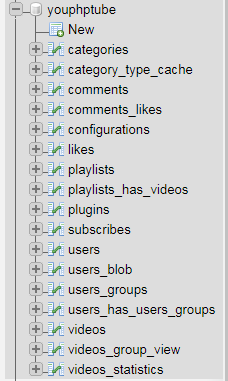
what tables do you have in youphptube database?
Write two or three..
SubjectXXX
on 5 Feb 2019
17
thereskinner
on 5 Feb 2019
thereskinner
on 5 Feb 2019
OK, they are all here..
I guess problem is going to be in apache or php now..
Which php version are you using?
SubjectXXX
on 5 Feb 2019
7.2.10
thereskinner
on 5 Feb 2019
can you copy paste whole configuration.php (omitting password ofc..)?
SubjectXXX
on 5 Feb 2019
$global['disableAdvancedConfigurations'] = 0;
$global['videoStorageLimitMinutes'] = 0;
// $global['webSiteRootURL'] = 'http://localhost/YouPHPTube-master/';
// get the subdirectory, if exists
$subDir = str_replace(array($_SERVER["DOCUMENT_ROOT"], 'videos/configuration.php'), array('',''), __FILE__);
$global['webSiteRootURL'] = "http".(!empty($_SERVER['HTTPS'])?"s":"")."://".$_SERVER['SERVER_NAME'].$subDir;
$global['systemRootPath'] = 'C:/wamp/www/YouPHPTube-master/';
$global['salt'] = '5c55de015fdee';
thereskinner
on 5 Feb 2019
$mysqlHost = 'localhost';
$mysqlPort = '3306';
$mysqlUser = 'root';
$mysqlPass = '';
$mysqlDatabase = 'youphptube';
/**
- Do NOT change from here
*/
require_once $global['systemRootPath'].'objects/include_config.php';
thereskinner
on 5 Feb 2019
delete /videos/youphptube.log file and refresh page, so that errors are written fresh, and then copy log here again..
SubjectXXX
on 5 Feb 2019
I just did that and i am getting the same errors
thereskinner
on 5 Feb 2019
...
SubjectXXX
on 5 Feb 2019
These are all of the errors
[05-Feb-2019 01:05:10 UTC] PHP Warning: require_once(dbconnect.php): failed to open stream: No such file or directory in C:\wamp\www\clipbucket-master\upload\includes\common.php on line 88
[05-Feb-2019 01:05:10 UTC] PHP Stack trace:
[05-Feb-2019 01:05:10 UTC] PHP 1. {main}() C:\wamp\www\clipbucket-master\upload\index.php:0
[05-Feb-2019 01:05:10 UTC] PHP 2. require() C:\wamp\www\clipbucket-master\upload\index.php:15
[05-Feb-2019 01:05:10 UTC] PHP 3. include() C:\wamp\www\clipbucket-master\upload\includes\config.inc.php:13
[05-Feb-2019 01:05:10 UTC] PHP Fatal error: require_once(): Failed opening required 'dbconnect.php' (include_path='.;C:phppear') in C:\wamp\www\clipbucket-master\upload\includes\common.php on line 88
[05-Feb-2019 01:05:10 UTC] PHP Stack trace:
[05-Feb-2019 01:05:10 UTC] PHP 1. {main}() C:\wamp\www\clipbucket-master\upload\index.php:0
[05-Feb-2019 01:05:10 UTC] PHP 2. require() C:\wamp\www\clipbucket-master\upload\index.php:15
[05-Feb-2019 01:05:10 UTC] PHP 3. include() C:\wamp\www\clipbucket-master\upload\includes\config.inc.php:13
thereskinner
on 5 Feb 2019
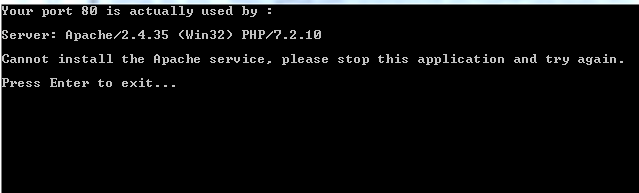
I think you have problems with virtual hosts in apache.
You are getting server wrong folder on port 80..
What is the exact URL that you are trying to access in browser?
SubjectXXX
on 5 Feb 2019
Yeah I just clicked install service and I got this
thereskinner
on 5 Feb 2019
http://localhost/YouPHPTube-master/
That's the name of the folder in my wamp/www folder
thereskinner
on 5 Feb 2019
I just tried to install ypt freshly on wamp and it went without a problem..
I did had to comment out $global['webSiteRootURL'] = "http".(!empty($_SERVER['HTTPS'])?"s":"")."://".$_SERVER['SERVER_NAME'].$subDir;
and uncomment $global['webSiteRootURL'] = 'http://localhost/YouPHPTube-master/';
SubjectXXX
on 5 Feb 2019
Okay thanks it's on now. Do I have to open another thread to ask a different question ?
thereskinner
on 5 Feb 2019
Yes, of course. And close this one, if its no longer needed.
SubjectXXX
on 5 Feb 2019
Related issues
 matthall1998
·
4Comments
matthall1998
·
4Comments
 ganddser
·
3Comments
ganddser
·
3Comments
 wetubeclub
·
3Comments
wetubeclub
·
3Comments
 syldri
·
3Comments
syldri
·
3Comments
 alejandrolidon
·
3Comments
alejandrolidon
·
3Comments
Most helpful comment
You were never told to not use Windows, author cannot support windows installation of xAMP.
There is no build for specific OS, but each OS has specific settings when it comes to apache, php and what not.
Problem with your ticket was, that you actually dont know how to get (us) more info on error. Asking you to provide us errors from logs and you replying WHAT?!? simply shows us, that we cannot help you debugging your problem because it would take us a good amount of time only to teach you basics first.
On the other note, it works out of the box on Ubuntu 18.04LTS. It should work on WAMP too, but you have to have required extensions for PHP and Apache loaded for example.
Also, you need to create some stuff manually around DB too..
Author can provide you with support tho: https://www.youphptube.com/services