Avideo: Error installing - Nginx and Nginx-RTMP for live streaming.
OS: Ubuntu 18.04 X64
RAM: 4GB
CPU: 2v cpu
SSD: 50GB
Currently installed: YouPHPTube & YouPHPTube-Encoder
Wanting to install : Live Streaming service --
Used: https://github.com/DanielnetoDotCom/YouPHPTube/wiki/Set-up-my-own-Stream-Server
Error at line ./configure --with-http_ssl_module --with-http_stub_status_module --add-module=../nginx-rtmp-module && make
root@vps197863: /build/nginx-1.12.0# make
make -f objs/Makefile
make[1]: Entering directory '/root/build/nginx-1.12.0'
cc -c -pipe -O -W -Wall -Wpointer-arith -Wno-unused-parameter -Werror -g -I src/core -I src/event -I src/event/modules -I src/os/unix -I ../nginx-rtmp-module -I objs \
-o objs/src/core/nginx.o \
src/core/nginx.c
cc -c -pipe -O -W -Wall -Wpointer-arith -Wno-unused-parameter -Werror -g -I src/core -I src/event -I src/event/modules -I src/os/unix -I ../nginx-rtmp-module -I objs \
-o objs/src/core/ngx_log.o \
src/core/ngx_log.c
cc -c -pipe -O -W -Wall -Wpointer-arith -Wno-unused-parameter -Werror -g -I src/core -I src/event -I src/event/modules -I src/os/unix -I ../nginx-rtmp-module -I objs \
-o objs/src/core/ngx_palloc.o \
src/core/ngx_palloc.c
cc -c -pipe -O -W -Wall -Wpointer-arith -Wno-unused-parameter -Werror -g -I src/core -I src/event -I src/event/modules -I src/os/unix -I ../nginx-rtmp-module -I objs \
-o objs/src/core/ngx_array.o \
src/core/ngx_array.c
cc -c -pipe -O -W -Wall -Wpointer-arith -Wno-unused-parameter -Werror -g -I src/core -I src/event -I src/event/modules -I src/os/unix -I ../nginx-rtmp-module -I objs \
-o objs/src/core/ngx_list.o \
src/core/ngx_list.c
cc -c -pipe -O -W -Wall -Wpointer-arith -Wno-unused-parameter -Werror -g -I src/core -I src/event -I src/event/modules -I src/os/unix -I ../nginx-rtmp-module -I objs \
-o objs/src/core/ngx_hash.o \
src/core/ngx_hash.c
cc -c -pipe -O -W -Wall -Wpointer-arith -Wno-unused-parameter -Werror -g -I src/core -I src/event -I src/event/modules -I src/os/unix -I ../nginx-rtmp-module -I objs \
-o objs/src/core/ngx_buf.o \
src/core/ngx_buf.c
cc -c -pipe -O -W -Wall -Wpointer-arith -Wno-unused-parameter -Werror -g -I src/core -I src/event -I src/event/modules -I src/os/unix -I ../nginx-rtmp-module -I objs \
-o objs/src/core/ngx_queue.o \
src/core/ngx_queue.c
cc -c -pipe -O -W -Wall -Wpointer-arith -Wno-unused-parameter -Werror -g -I src/core -I src/event -I src/event/modules -I src/os/unix -I ../nginx-rtmp-module -I objs \
-o objs/src/core/ngx_output_chain.o \
src/core/ngx_output_chain.c
cc -c -pipe -O -W -Wall -Wpointer-arith -Wno-unused-parameter -Werror -g -I src/core -I src/event -I src/event/modules -I src/os/unix -I ../nginx-rtmp-module -I objs \
-o objs/src/core/ngx_string.o \
src/core/ngx_string.c
cc -c -pipe -O -W -Wall -Wpointer-arith -Wno-unused-parameter -Werror -g -I src/core -I src/event -I src/event/modules -I src/os/unix -I ../nginx-rtmp-module -I objs \
-o objs/src/core/ngx_parse.o \
src/core/ngx_parse.c
cc -c -pipe -O -W -Wall -Wpointer-arith -Wno-unused-parameter -Werror -g -I src/core -I src/event -I src/event/modules -I src/os/unix -I ../nginx-rtmp-module -I objs \
-o objs/src/core/ngx_parse_time.o \
src/core/ngx_parse_time.c
cc -c -pipe -O -W -Wall -Wpointer-arith -Wno-unused-parameter -Werror -g -I src/core -I src/event -I src/event/modules -I src/os/unix -I ../nginx-rtmp-module -I objs \
-o objs/src/core/ngx_inet.o \
src/core/ngx_inet.c
cc -c -pipe -O -W -Wall -Wpointer-arith -Wno-unused-parameter -Werror -g -I src/core -I src/event -I src/event/modules -I src/os/unix -I ../nginx-rtmp-module -I objs \
-o objs/src/core/ngx_file.o \
src/core/ngx_file.c
cc -c -pipe -O -W -Wall -Wpointer-arith -Wno-unused-parameter -Werror -g -I src/core -I src/event -I src/event/modules -I src/os/unix -I ../nginx-rtmp-module -I objs \
-o objs/src/core/ngx_crc32.o \
src/core/ngx_crc32.c
cc -c -pipe -O -W -Wall -Wpointer-arith -Wno-unused-parameter -Werror -g -I src/core -I src/event -I src/event/modules -I src/os/unix -I ../nginx-rtmp-module -I objs \
-o objs/src/core/ngx_murmurhash.o \
src/core/ngx_murmurhash.c
src/core/ngx_murmurhash.c: In function ‘ngx_murmur_hash2’:
src/core/ngx_murmurhash.c:37:11: error: this statement may fall through [-Werror=implicit-fallthrough=]
h ^= data[2] << 16;
^~~~~
src/core/ngx_murmurhash.c:38:5: note: here
case 2:
^
src/core/ngx_murmurhash.c:39:11: error: this statement may fall through [-Werror=implicit-fallthrough=]
h ^= data[1] << 8;
^~~~~
src/core/ngx_murmurhash.c:40:5: note: here
case 1:
^~~~
cc1: all warnings being treated as errors
objs/Makefile:545: recipe for target 'objs/src/core/ngx_murmurhash.o' failed
make[1]: * [objs/src/core/ngx_murmurhash.o] Error 1
make[1]: Leaving directory '/root/build/nginx-1.12.0'
Makefile:8: recipe for target 'build' failed
make: * [build] Error 2
root@vps197863:~/build/nginx-1.12.0#
Could someone please provide me direction on the error? Also can I install this on the same vm as the YouPHPTube where apache2 is installed?
 sesipod
All 7 comments

sesipod
on 2 Aug 2018
On ubuntu 18 try to install nginx-1.13.8 instead nginx-1.12.*
 DanielnetoDotCom
on 2 Aug 2018
DanielnetoDotCom
on 2 Aug 2018
So the new command should be ?
apt-get install build-essential libpcre3 libpcre3-dev libssl-dev php7.0-xml && mkdir ~/build && cd ~/build && git clone git://github.com/arut/nginx-rtmp-module.git && wget http://nginx.org/download/nginx-1.13.8.tar.gz && tar xzf nginx-1.13.8.tar.gz && cd nginx-1.13.8 && ./configure --with-http_ssl_module --with-http_stub_status_module --add-module=../nginx-rtmp-module && make && make install && mkdir /usr/local/nginx/ssl/ && openssl req -x509 -nodes -days 365 -newkey rsa:2048 -keyout /usr/local/nginx/ssl/nginx.key -out /usr/local/nginx/ssl/nginx.crt && /etc/init.d/apache2 restart && mkdir /HLS && mkdir /HLS/live
sesipod
on 2 Aug 2018
I can not test it now, but looks like right for me
DanielnetoDotCom
on 2 Aug 2018
It seems to have completed with out an issue.
I did move into the *cd ~/build * dir and removed everything to do with nginx-1.12.8 version that was there.
I will post back here in a bit once I have a fresh server to restart on with the above correction.
sesipod
on 2 Aug 2018
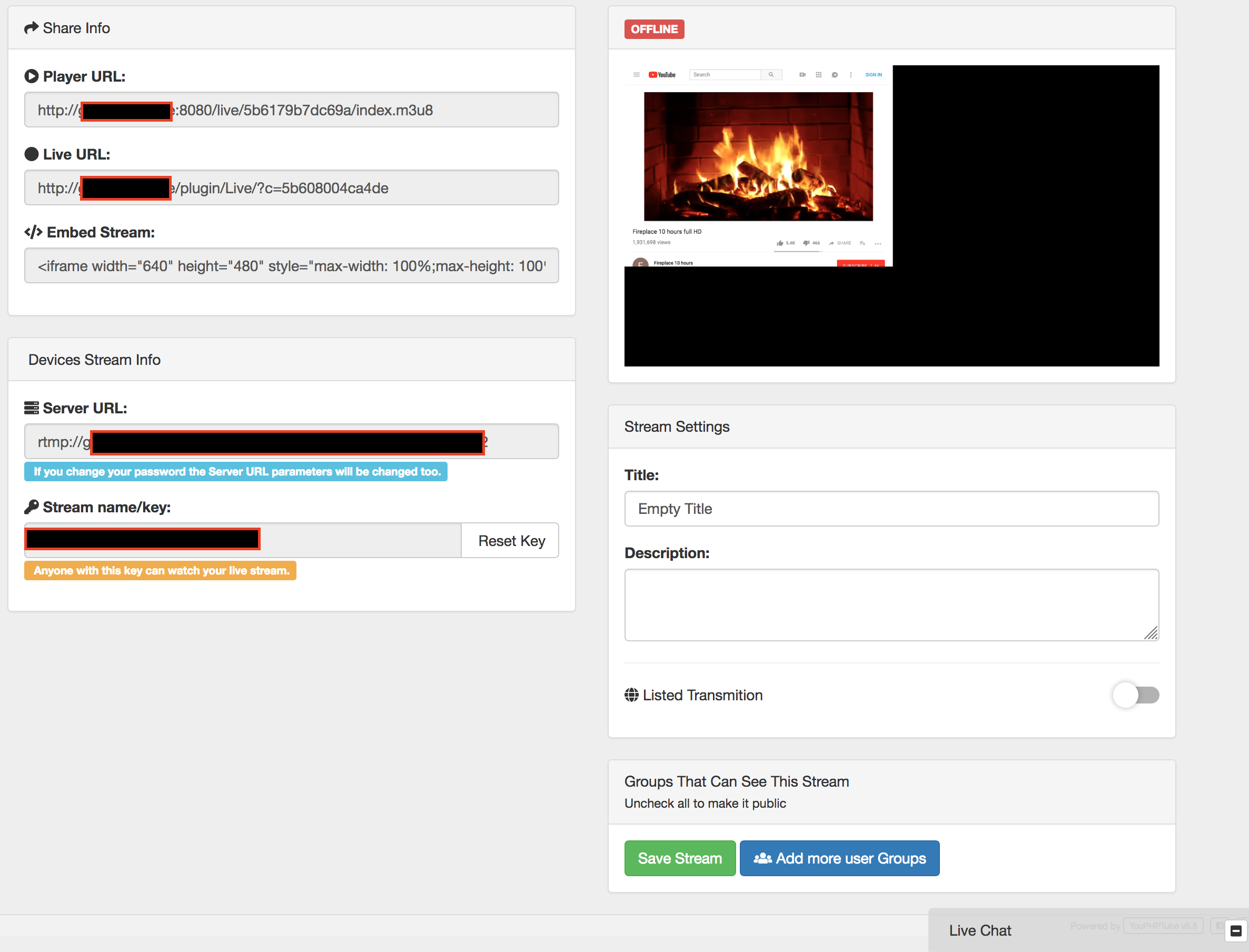
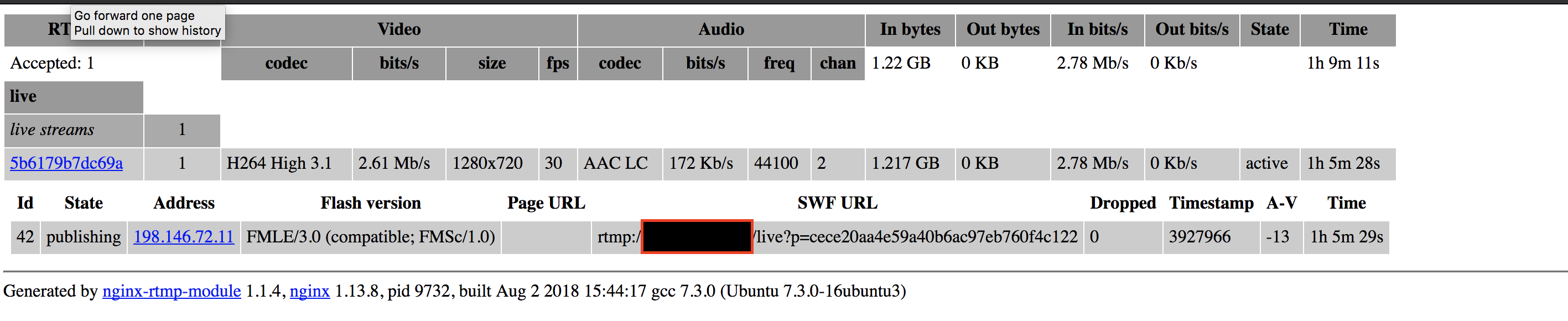
So it is allowing me to stream but it is not showing as ONLINE .. Only offline ?
sesipod
on 2 Aug 2018
OH! got it lmao the " Listed Transmition " derp me 😖
sesipod
on 2 Aug 2018
Related issues
 gujarraju
·
4Comments
gujarraju
·
4Comments
 mikweb2017
·
4Comments
mikweb2017
·
4Comments
 syldri
·
3Comments
syldri
·
3Comments
 matthall1998
·
4Comments
matthall1998
·
4Comments
 akhilleusuggo
·
3Comments
akhilleusuggo
·
3Comments