Avideo: YouphpTube last version Screen problem - flagStrap Error -- SSL-Not Signed probléme
Hello,
when i try to connect on youphptube i m stuck on this :

so the log files i have :
user[/var/www/html/YouPHPTube/videos] > tail -f youphptube.log
[26-Apr-2018 15:03:35 Europe/Berlin] PHP Warning:  file_get_contents(): Failed to enable crypto in /var/www/html/YouPHPTube/objects/functions.php on line 843
[26-Apr-2018 15:03:35 Europe/Berlin] PHP Warning:  file_get_contents(https://server.domaine.fr/YouPHPTube/css/flagstrap/js/jquery.flagstrap.min.js): failed to open stream: operation failed in /var/www/html/YouPHPTube/objects/functions.php on line 843
[26-Apr-2018 15:03:35 Europe/Berlin] PHP Warning:  file_get_contents(): SSL operation failed with code 1. OpenSSL Error messages:
error:14090086:SSL routines:ssl3_get_server_certificate:certificate verify failed in /var/www/html/YouPHPTube/objects/functions.php on line 843
[26-Apr-2018 15:03:35 Europe/Berlin] PHP Warning:  file_get_contents(): Failed to enable crypto in /var/www/html/YouPHPTube/objects/functions.php on line 843
[26-Apr-2018 15:03:35 Europe/Berlin] PHP Warning:  file_get_contents(https://server.domaine.fr/YouPHPTube/js/jquery.lazy/jquery.lazy.min.js): failed to open stream: operation failed in /var/www/html/YouPHPTube/objects/functions.php on line 843
[26-Apr-2018 15:03:35 Europe/Berlin] PHP Warning:  file_get_contents(): SSL operation failed with code 1. OpenSSL Error messages:
error:14090086:SSL routines:ssl3_get_server_certificate:certificate verify failed in /var/www/html/YouPHPTube/objects/functions.php on line 843
[26-Apr-2018 15:03:35 Europe/Berlin] PHP Warning:  file_get_contents(): Failed to enable crypto in /var/www/html/YouPHPTube/objects/functions.php on line 843
[26-Apr-2018 15:03:35 Europe/Berlin] PHP Warning:  file_get_contents(https://server.domaine.fr/YouPHPTube/js/jquery.lazy/jquery.lazy.plugins.min.js): failed to open stream: operation failed in /var/www/html/YouPHPTube/objects/functions.php on line 843
so i m using youphptube tube on my local network without internet acess so i m using ssl autosigned
so what is wrong please ?
 ghost
ghost
All 29 comments
i found this error in firefox dev :

with message :
TypeError: $(...).flagStrap is not a function[En savoir plus]
videoOnly:110:33
<anonyme>
https://serveur.domaine.fr/YouPHPTube/videoOnly:110:33
l
https://serveur.domaine.fr/YouPHPTube/js/jquery-3.3.1.min.js:2:29373
a/</c<
https://serveur.domaine.fr/YouPHPTube/js/jquery-3.3.1.min.js:2:29677
to fix the file_get_contents problem i do that :
https://github.com/DanielnetoDotCom/YouPHPTube-Encoder/issues/28
but now i don"t understand why flagStrap is not working ?
last things :
the encoder website works fines
ghost
on 26 Apr 2018
it looks like your ssl-certificate is not signed.
[26-Apr-2018 15:03:35 Europe/Berlin] PHP Warning: file_get_contents(): SSL operation failed with code 1. OpenSSL Error messages:
error:14090086:SSL routines:ssl3_get_server_certificate:certificate verify failed in /var/www/html/YouPHPTube/objects/functions.php on line 843
file_get_contents is used for making a single, cached file out of various javascript-file. flagstrap is also there included - when the method fails, no content is in the cached, nothing (example flagstrap) will be found.
i have rewritten the method, so it may work with
allow_furl_open=off
because it use curl then. i don't know how curl handles unsigned ssl-certificates.
another solution is to use https://letsencrypt.org/ for have a proper, signed certificate, i think.
edit: oh, i see, curl was a solution in https://github.com/DanielnetoDotCom/YouPHPTube-Encoder/issues/28
well, then just allow_furl_open=off should be enough (because it failback to curl now). i'm interessted in the feedback.
 hersche
on 27 Apr 2018
hersche
on 27 Apr 2018
Hello,
so to resum,
u can't use youphptube with a not signet ssl certicate, i m using it on my home not on internet why get a ssl-certifcated signed ?
i m stuck now,
can we have a theme who not using flagstrap ?
what this file_get_contents or curl, it's a first time i see a project who not working with not signed ssl certificate.
my last chance is to change allow_furl_open=off ?
where is this conf please ?
it's a big problem because i can't connect :
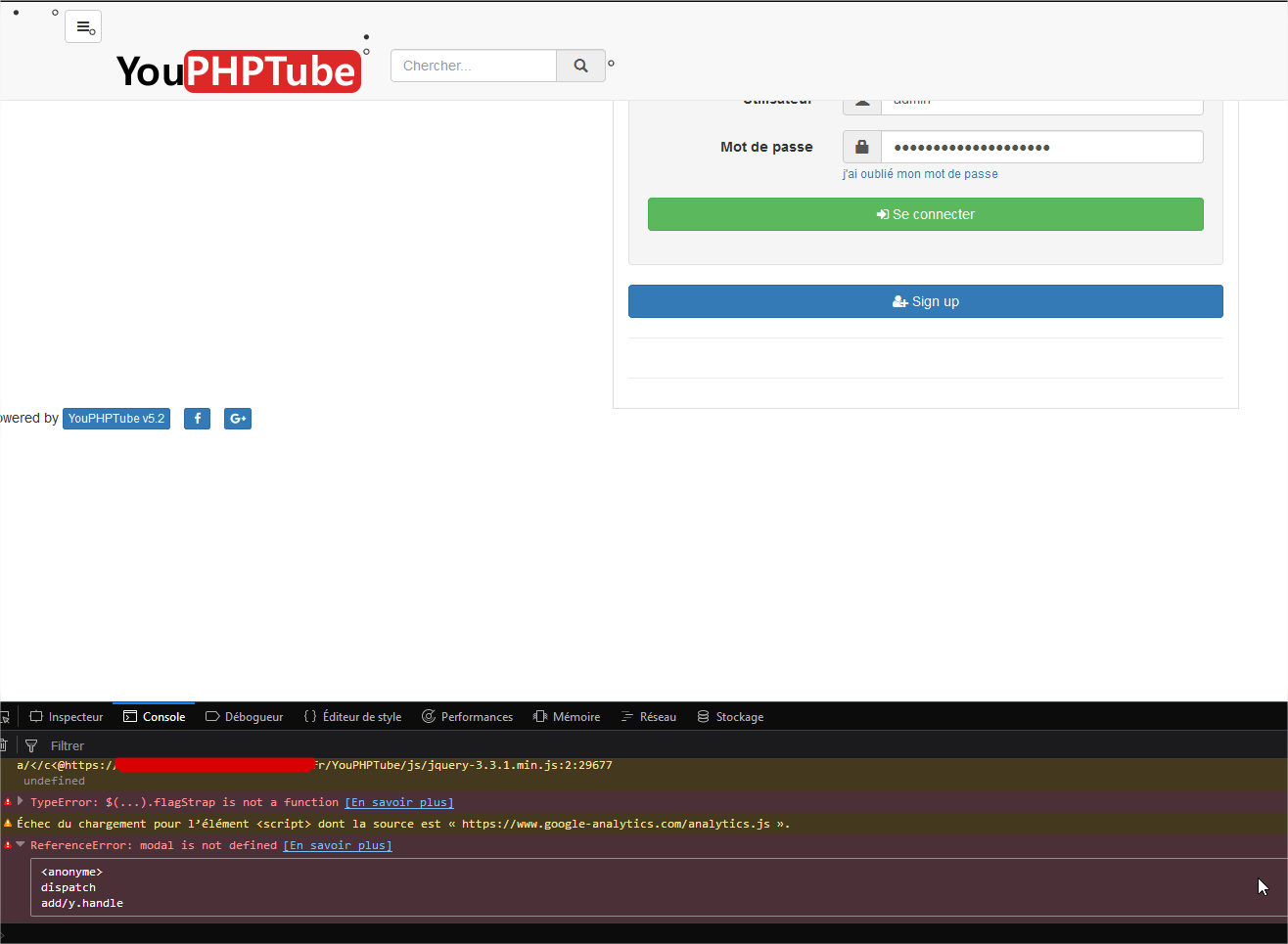
ReferenceError: modal is not defined[En savoir plus]
user:244:29
<anonyme>
you can find this option in php.ini which is most time in /etc/php/
i don't know if you can configure file_get_contents to accept unsigned ssl - can be. but because a lot of people and hosts have allow_furl_open=off (so file_get_contents don't work), i have made the fallback to curl.
but when curl solves the problem in the encoder, just disabling the option can maybe solve your problem.
hersche
on 27 Apr 2018
Hello,
so i change the allow_url_open= Off
on this files :
sudo nano /etc/php/7.0/apache2/php.ini
and
sudo nano /etc/php/7.0/cli/php.ini
i restart apache2
sudo service apache2 restart
so now i m stuck :/
and no solution :'(
 gamersalpha
on 28 Apr 2018
gamersalpha
on 28 Apr 2018
So i try in virtual machine :
1 - Install a frech ubuntun 16.04 lts install update.
2 - Install serveur apache2 + mysql and other stuff
sudo apt-get install apache2 php7.0 libapache2-mod-php7.0 php7.0-mysql php7.0-curl php7.0-gd php7.0-intl mysql-server mysql-client ffmpeg git libimage-exiftool-perl
3 - Working on https - disabled http and send all in https with sll-nocertified
cd /etc/apache2/sites-available
sudo nano youphptube.conf
and adding :
NameVirtualHost *:443
# Hôte virtuel qui écoute sur le port HTTPS 443
<VirtualHost *:443>
DocumentRoot /var/www/
# Activation du mode SSL
SSLEngine On
SSLOptions +FakeBasicAuth +ExportCertData +StrictRequire
# On indique ou est le certificat
SSLCertificateFile /etc/ssl/certs/youphptube.crt
SSLCertificateKeyFile /etc/ssl/private/youphptube.key
</VirtualHost>
https activation on Apache :
stagiaire@ubuntu:/etc/apache2/sites-available$ sudo a2enmod ssl
Considering dependency setenvif for ssl:
Module setenvif already enabled
Considering dependency mime for ssl:
Module mime already enabled
Considering dependency socache_shmcb for ssl:
Enabling module socache_shmcb.
Enabling module ssl.
See /usr/share/doc/apache2/README.Debian.gz on how to configure SSL and create self-signed certificates.
To activate the new configuration, you need to run:
  service apache2 restart
stagiaire@ubuntu:/etc/apache2/sites-available$ sudo a2ensite youphptube
Enabling site youphptube.
To activate the new configuration, you need to run:
  service apache2 reload


md5-e05fd5932fb5822db2aa17432d304ab1


root@ubuntu:/etc/apache2/CertYouPhptube# openssl genrsa -out youphptube.key 2048
Generating RSA private key, 2048 bit long modulus
.+++
.......................................................+++
e is 65537 (0x10001)


md5-55769232aaeb31773f93b23f7378dd08


root@ubuntu:/etc/apache2/CertYouPhptube# openssl req -new -key youphptube.key -out youphptube.csr
You are about to be asked to enter information that will be incorporated
into your certificate request.
What you are about to enter is what is called a Distinguished Name or a DN.
There are quite a few fields but you can leave some blank
For some fields there will be a default value,
If you enter '.', the field will be left blank.
-----
Country Name (2 letter code) [AU]:
State or Province Name (full name) [Some-State]:
Locality Name (eg, city) []:
Organization Name (eg, company) [Internet Widgits Pty Ltd]:
Organizational Unit Name (eg, section) []:
Common Name (e.g. server FQDN or YOUR name) []:
Email Address []:

Please enter the following 'extra' attributes
to be sent with your certificate request
A challenge password []:
An optional company name []:


md5-55769232aaeb31773f93b23f7378dd08


root@ubuntu:/etc/apache2/CertYouPhptube# openssl x509 -req -days 365 -in youphptube.csr -signkey youphptube.key -out youphptube.crt
Signature ok
subject=/C=AU/ST=Some-State/O=Internet Widgits Pty Ltd
Getting Private key


md5-c08efe93acbf731f6913728df662b863


root@ubuntu:/etc/apache2/CertYouPhptube# sudo a2enmod rewrite
Enabling module rewrite.
To activate the new configuration, you need to run:
  service apache2 restart


md5-c54b9dc786617e0155ea175f5c7d908c


<VirtualHost *:80>
        # The ServerName directive sets the request scheme, hostname and port that
        # the server uses to identify itself. This is used when creating
        # redirection URLs. In the context of virtual hosts, the ServerName
        # specifies what hostname must appear in the request's Host: header to
        # match this virtual host. For the default virtual host (this file) this
        # value is not decisive as it is used as a last resort host regardless.
        # However, you must set it for any further virtual host explicitly.
        #ServerName www.example.com

        ServerAdmin webmaster@localhost
        DocumentRoot /var/www/html

        # Available loglevels: trace8, ..., trace1, debug, info, notice, warn,
        # error, crit, alert, emerg.
        # It is also possible to configure the loglevel for particular
        # modules, e.g.
        #LogLevel info ssl:warn

        ErrorLog ${APACHE_LOG_DIR}/error.log
        CustomLog ${APACHE_LOG_DIR}/access.log combined

        # For most configuration files from conf-available/, which are
        # enabled or disabled at a global level, it is possible to
        # include a line for only one particular virtual host. For example the
        # following line enables the CGI configuration for this host only
        # after it has been globally disabled with "a2disconf".
        #Include conf-available/serve-cgi-bin.conf

Redirect permanent / https://192.168.50.42

</VirtualHost>
so now restart apache2
sudo service apache2 restart
ok go to http://192.168.50.42 and u will be automaticly redirect to https://192.168.50.42
ok now the server is OK with https redirect with ssl
Now will install youhptube :
sudo apt-get install apache2 php7.0 libapache2-mod-php7.0 php7.0-mysql php7.0-curl php7.0-gd php7.0-intl mysql-server mysql-client ffmpeg git libimage-exiftool-perl && cd /var/www/html && sudo git clone https://github.com/DanielnetoDotCom/YouPHPTube.git && cd /var/www/html && sudo git clone https://github.com/DanielnetoDotCom/YouPHPTube-Encoder.git && sudo apt-get install python && sudo curl -L https://yt-dl.org/downloads/latest/youtube-dl -o /usr/local/bin/youtube-dl && sudo chmod a+rx /usr/local/bin/youtube-dl && sudo a2enmod rewrite
go to :
https://192.168.50.42/YouPHPTube
and all of this to have the same bug :
so it's clear for me the framworks; we can't using it with ssl not valid.
so u have to change u framwork !!!
i mstill stuck to make my youphubt server works :'(
gamersalpha
on 28 Apr 2018
I found that if I put www as prefix, it works properly (for my site).
however, you have to change the configuration in videos/configuration.php from https://[yoursite].com to https://www.[yoursite].com
I tried with cloudflare SSL and it works.
 Chalermkiat
on 28 Apr 2018
Chalermkiat
on 28 Apr 2018
@gamersalpha and your logs says, when disabled?
hersche
on 28 Apr 2018
OK so on my virtual Machine :
i have two files :
stagiaire@ubuntu:/var/www/html/YouPHPTube/videos$ sudo find / -name "php.ini"
/etc/php/7.0/cli/php.ini
/etc/php/7.0/apache2/php.ini
i change on the two files :
the lines :
allow_url_fopen = On
by
allow_url_fopen = Off
i delette all cache and logs files from videos folders :
cd  /var/www/html/YouPHPTube/videos
sudo rm -R cache/ youphptube.log
restart apache2 service :
sudo service apache2 restart
and now got to my hhttps://192.168.50.42/YouPHPTube/ and reload page :
the web page is still broken with message :

and no log is created in the video directory :
stagiaire@ubuntu:/var/www/html/YouPHPTube/videos$ ls
cache  configuration.php
mh, i was able to reproduce this.. i will have a look at this these days. i think a lot of files also can get localy, when they are on the same server.. curl and file_gets_content get it via url..
hersche
on 29 Apr 2018
Hello so i upload my vm if u want to get it and try youphptube with https auto-signed :
to download it : https://mega.nz/#!OOYVVLbA!ER-LucGvaFJV1dppZqxl04uTJHKKPr3EHztue1303qM
Import the VM with virtual box :

and import him.
ok so connect on it with :
user : stagiaire
Password : password
take the ip with command :
ifconfig
and connect on it :
and that's it
the code is on /var/www/html/YouPHPTube
hope u can found what is wrong
thanks to u
gamersalpha
on 29 Apr 2018
well well well
i m really stuck with this
i think my last chance to make youphptube works without https signed is using it in http
not cool to do that
but it's my last chance i think
gamersalpha
on 1 May 2018
well well well.. a PR or git-repo would show much faster what is wrong.
on your site, even a git status or git diff would be usefull. would be less heavy than a complete vm..
i had not yet the time to have a look, because i am also a bit busy. but i thinked, you already solved this in your download?
anyway, there are 2 or even more options and ideas, to fix this. i was hunting this bug out of another reason and for this it works.. soon i do it for yours..
hersche
on 1 May 2018
what is PR ?
git-repo ?
u want i upluad my install in git repo ? i can do that
well i m think the vm it's a good idea, but it's not, sorry
gamersalpha
on 1 May 2018
git-repository: the structure of all the files at github. all the files you see for youphptube, are in a git-repo.
PR=pull-request=after, you make a fork (a new, own version, where you have write-rights) and you make changes, you can bring them back to the official project by a PR.
on github you find maybe better explains, they have nice tutorials.
so, yeah, when you can make a fork, then a PR, that would be the best. then you are also in the official git-"history" (or: in the commits) :)
VM can be a good idea in diffrent situations, but this project is itself small, and a VM blow up the size. also, not everyone got processors supporting a VM.
hersche
on 1 May 2018
i have now fixed it (tested local via https:// unsigned, with cleared cache), and it seems to work.
@gamersalpha can you test it? my changes are not official yet, so you have to download from
https://github.com/hersche/YouPHPTube
commit: https://github.com/hersche/YouPHPTube/commit/cff5517cb5a2417e704b42a28dfcc1415a25771f
maybe also interessting for @DanielnetoDotCom to quick-test?
hersche
on 2 May 2018
even more edited.. there's a line on header of cached files now. this debug-information can be usefull in case of fail.
hersche
on 2 May 2018
yeaaaa
works again with ssl not signed so cool !!!

still have some warning in js, but now evrything looks works again !!
with u commit,
can u tell me please how activate the debug-information ?
because i work a little with symphony 3 , and the debug bar is so exelent in dev mod !
Hope u can add something like that to make more easy found bugs on the program
i really like youphptube
thanks to u
@DanielnetoDotCom hope u will integrate this comit who fix the ssl not signed bug
gamersalpha
on 2 May 2018
yeah, but i think the warnings about videojs-plugins is from these plugins direct and can be ignored for the moment..
the debug-info is always activated, but is a bit special placed. i have to explain a little:
the whole history make out of various js-files a single, cached one, you can find it in videos/cache
before adding a file to the single-cached file, it adds a comment-line like /* original-filename */
in these lines i have added a info if the file was added local or via url, and if url, if curl and or file_get_contents is enabled.
i already talked with daniel and a PR is no problem.. :)
but anyway, i would like to test this on other enviroments as well before adding it..
hersche
on 2 May 2018
Hello think we have the same problem on encoder site :
root [/var/www/html/YouPHPTube-Encoder/videos] > tail -f  youphptube.log
[03-May-2018 19:53:07 Europe/Berlin] PHP Warning:  file_get_contents(): Failed to enable crypto in /var/www/html/YouPHPTube-Encoder/view/index.php on line 181
[03-May-2018 19:53:07 Europe/Berlin] PHP Warning:  file_get_contents(https://pegasus.domaine.fr/YouPHPTube/plugin/CustomizeAdvanced/advancedCustom.json.php): failed to open stream: operation failed in /var/www/html/YouPHPTube-Encoder/view/index.php on line 181
[03-May-2018 19:53:23 Europe/Berlin] PHP Warning:  file_get_contents(): SSL operation failed with code 1. OpenSSL Error messages:
error:14090086:SSL routines:ssl3_get_server_certificate:certificate verify failed in /var/www/html/YouPHPTube-Encoder/view/index.php on line 181
[03-May-2018 19:53:23 Europe/Berlin] PHP Warning:  file_get_contents(): Failed to enable crypto in /var/www/html/YouPHPTube-Encoder/view/index.php on line 181
[03-May-2018 19:53:23 Europe/Berlin] PHP Warning:  file_get_contents(https://pegasus.domaine.fr/YouPHPTube/plugin/CustomizeAdvanced/advancedCustom.json.php): failed to open stream: operation failed in /var/www/html/YouPHPTube-Encoder/view/index.php on line 181
[03-May-2018 19:53:24 Europe/Berlin] PHP Warning:  file_get_contents(): SSL operation failed with code 1. OpenSSL Error messages:
error:14090086:SSL routines:ssl3_get_server_certificate:certificate verify failed in /var/www/html/YouPHPTube-Encoder/view/index.php on line 181
[03-May-2018 19:53:24 Europe/Berlin] PHP Warning:  file_get_contents(): Failed to enable crypto in /var/www/html/YouPHPTube-Encoder/view/index.php on line 181
[03-May-2018 19:53:24 Europe/Berlin] PHP Warning:  file_get_contents(https://pegasus.domaine.fr/YouPHPTube/plugin/CustomizeAdvanced/advancedCustom.json.php): failed to open stream: operation failed in /var/www/html/YouPHPTube-Encoder/view/index.php on line 181
basicly solved and in PR now, but for the encoder at least, enable allow_url_fopen again.
this should now also work with streamer (file_get_contents should allow unsigned certs)
hersche
on 8 May 2018
Hello,
and so what about the fix on the released branch ?
ghost
on 9 May 2018
released branch?
you mean the master-branch from daniel? the fix is merged to daniels repo and is in it's master-branch.. https://github.com/DanielnetoDotCom/YouPHPTube/pull/661
hersche
on 9 May 2018
@Spartacus2018 does it solve your problem?
if yes, can you close the issue?
hersche
on 10 May 2018
Hello i do a frech install from master brench and not working

so what is wrong ??
can the fix is on he released branch ?
ghost
on 15 May 2018
error logs?
what is "release branch"? it is in official branch..
when did you update?
hersche
on 15 May 2018
Hello,
ok so i remove all database files i have, and i reinstall all again :
user[/var/www/html] > uname -a
Linux serv01 4.4.0-91-generic #114-Ubuntu SMP Tue Aug 8 11:56:56 UTC 2017 x86_64 x86_64 x86_64 GNU/Linux
`
Type de serveur : MySQL
     Version du serveur : 5.7.22-0ubuntu0.16.04.1
````
`Version de PHP : 7.0.30-0ubuntu0.16.04.1
Install youphptube and youphptube-encoder :
sudo apt-get install apache2 php7.0 libapache2-mod-php7.0 php7.0-mysql php7.0-curl php7.0-gd php7.0-intl mysql-server mysql-client ffmpeg git libimage-exiftool-perl && cd /var/www/html && sudo git clone https://github.com/DanielnetoDotCom/YouPHPTube.git && cd /var/www/html && sudo git clone https://github.com/DanielnetoDotCom/YouPHPTube-Encoder.git && sudo apt-get install python && sudo curl -L https://yt-dl.org/downloads/latest/youtube-dl -o /usr/local/bin/youtube-dl && sudo chmod a+rx /usr/local/bin/youtube-dl && sudo a2enmod rewrite
ok with that all works again 👍

thanks thanks thanks !!!
ghost
on 16 May 2018
For those who want to use CDN/Cloudflare https://github.com/DanielnetoDotCom/YouPHPTube/wiki/Using-CDN-for-Videos-Only
 DanielnetoDotCom
on 10 Dec 2018
DanielnetoDotCom
on 10 Dec 2018
Related issues
 snowdream1985
·
3Comments
snowdream1985
·
3Comments
 Powerbock
·
3Comments
Powerbock
·
3Comments
 wetubeclub
·
3Comments
wetubeclub
·
3Comments
 willpower68
·
3Comments
willpower68
·
3Comments
 syldri
·
3Comments
syldri
·
3Comments