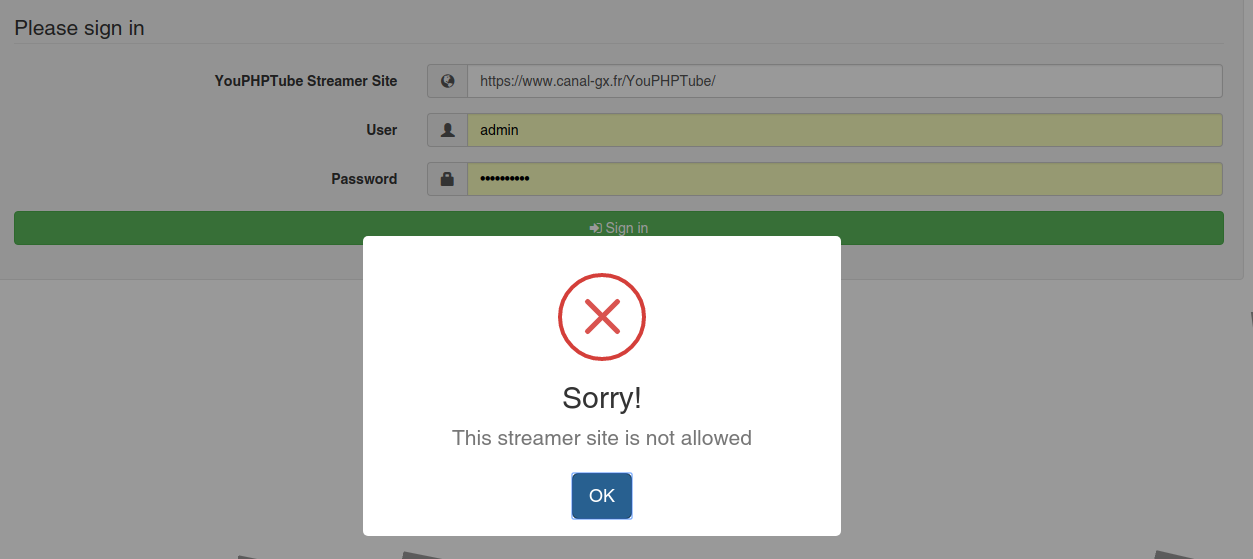
Avideo: Sorry ! This streamer site is not allowed
Hello,
First of all thank you DanielnetoDotCom for sharing your project, this is very appreciable and your explanation very clear !
But, since I added HTTPS with
sudo certbot --apache
I am unable to access the encoder, see the screenshot.
sudo /usr/local/nginx/sbin/nginx

Here is my nginx.conf file :
``` worker_processes 1;
error_log logs/error.log debug;
events {
worker_connections 1024;
}
rtmp {
server {
listen 1935;
allow play all;
#creates our "live" full-resolution HLS videostream from our incoming encoder stream and tells where to put the HLS video manifest and video fragments
application live {
allow play all;
live on;
#record all;
#record_path /video_recordings;
#record_unique on;
hls on;
hls_nested on;
hls_path /HLS/live;
#hls_playlist_length 4s;
#hls_fragment 1s;
hls_fragment 10s;
on_publish https://www..fr/YouPHPTube/plugin/Live/on_publish.php;
on_play https://www.fr/YouPHPTube/plugin/Live/on_play.php;
on_record_done https://www.*.fr/YouPHPTube/plugin/Live/on_record_done.php;
}
}
}
http {
include mime.types;
default_type application/octet-stream;
server {
listen 8080;
server_name localhost;
#creates the http-location for our full-resolution (desktop) HLS stream - "http://my-ip/live/my-stream-key/index.m3u8"
location /live {
# Disable cache
add_header 'Cache-Control' 'no-cache';
                        # CORS setup
                        add_header 'Access-Control-Allow-Origin' '*' always;
                        add_header 'Access-Control-Expose-Headers' 'Content-Length';

                        # allow CORS preflight requests
                        if ($request_method = 'OPTIONS') {
                                add_header 'Access-Control-Allow-Origin' '*';
                                add_header 'Access-Control-Max-Age' 1728000;
                                add_header 'Content-Type' 'text/plain charset=UTF-8';
                                add_header 'Content-Length' 0;
                                return 204;
                        }
                        types {
                                application/vnd.apple.mpegurl m3u8;
                        }
                        alias /HLS/live;
                }
                #allows us to see how stats on viewers on our Nginx site using a URL like: "http://my-ip/stats"
                #location /stats {
                #        stub_status;
                #}
                location /stat {
                        rtmp_stat all;
                        rtmp_stat_stylesheet stat.xsl;
                }
                location /stat.xsl {
                        root html;
                }
                location /control {
                        rtmp_control all;
                }
                #allows us to host some webpages which can show our videos: "http://my-ip/my-page.html"
                location / {
                        root   html;
                        index  index.html index.htm;
                }
        }
}`
Have I forgotten something ? I am a beginner but I try to learn everything correctly step by step, and https configuration is a problem for which I do not know the origin at the moment.
Yours,
Chris
 ChrisSlS
All 11 comments
Hi, check your encoder database, streamers and configuration tables
change all http to https on the lines
 DanielnetoDotCom
on 26 Mar 2018
DanielnetoDotCom
on 26 Mar 2018
Thanks it worked, I can access it again !
That said, I still have this problem:
If I remove the HTTPS and put HTTP instead, nginx returns this error:
Nginx: [error] open ("/usr/local/nginx/logs/nginx.pid") failed error
because of this, you can not use the live function (and chat). I checked the tutorial available, and the other issues but the error must come from elsewhere. Have I been unexpected somewhere ?
Yours,
Chris
ChrisSlS
on 27 Mar 2018
Ok, the problem has been fixed via the original nginx.conf file (HTTP, site is in HTTPS) :
    worker_processes  1;
    error_log  logs/error.log debug;
    events {
            worker_connections  1024;
    }
    rtmp {
            server {
                    listen 1935;
                    allow play all;
                    #creates our "live" full-resolution HLS videostream from our incoming encoder stream and tells where to put the HLS video manifest and video fragments
                    application live {
                            allow play all;
                            live on;
                            #record all;
                            #record_path /video_recordings;
                            #record_unique on;
                            hls on;
                            hls_nested on;
                            hls_path /HLS/live;
                            #hls_playlist_length 4s;
                            #hls_fragment 1s;
                            hls_fragment 10s;
                            on_publish http://www.***.fr/YouPHPTube/plugin/Live/on_publish.php;
                            on_play http://www.***.fr/YouPHPTube/plugin/Live/on_play.php;
                            on_record_done http://www.***.fr/YouPHPTube/plugin/Live/on_record_done.php;
                    }
            }
    }
    http {
            include       mime.types;
            default_type  application/octet-stream;
            server {
                    listen 8080;
                    server_name localhost;
                    #creates the http-location for our full-resolution (desktop) HLS stream - "http://my-ip/live/my-stream-key/index.m3u8"
                    location /live {
                            # Disable cache
                            add_header 'Cache-Control' 'no-cache';

                            # CORS setup
                            add_header 'Access-Control-Allow-Origin' '*' always;
                            add_header 'Access-Control-Expose-Headers' 'Content-Length';

                            # allow CORS preflight requests
                            if ($request_method = 'OPTIONS') {
                                    add_header 'Access-Control-Allow-Origin' '*';
                                    add_header 'Access-Control-Max-Age' 1728000;
                                    add_header 'Content-Type' 'text/plain charset=UTF-8';
                                    add_header 'Content-Length' 0;
                                    return 204;
                            }
                            types {
                                    application/vnd.apple.mpegurl m3u8;
                            }
                            alias /HLS/live;
                    }
                    #allows us to see how stats on viewers on our Nginx site using a URL like: "http://my-ip/stats"
                    #location /stats {
                    #        stub_status;
                    #}
                    location /stat {
                            rtmp_stat all;
                            rtmp_stat_stylesheet stat.xsl;
                    }
                    location /stat.xsl {
                            root html;
                    }
                    location /control {
                            rtmp_control all;
                    }
                    #allows us to host some webpages which can show our videos: "http://my-ip/my-page.html"
                    location / {
                            root   html;
                            index  index.html index.htm;
                    }
            }
    }
Livestreaming not working.
The plug in live does not seem to be correct:
(Do not pay attention to port 1935, I put it to try in "last resort" mode.)
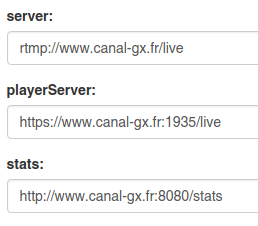
I watched #252 #363 #426 #138 #329 but without success after trying.
Another thing that has nothing to do, I would like to know how to modify the URL to display the page "www. *.fr/ YouPHPTube/" without "YouPHPTube". When I modify the .conf file from sites-enabled, I change root dir "var/www/htlm" to "var/www/htlm/YouPHPTube" page homepage correctly, but obviously by browsing the site the pages are not found. How to rewrite the URL properly ? mod_rewrite seems to do it, but in a tutorial you explained to use this option with caution.
Yours,
Chris
ChrisSlS
on 27 Mar 2018
Your Nginx must work on https on port 444
your parameters on nginx.conf on_publish , on_play and on_record_done must be http NOT https
Change the playerServer parameter, on plugin settings to https://canal-gx.fr:444/live
DanielnetoDotCom
on 27 Mar 2018
Thank you for your reply.
It does not work, and I have a new and more serious problem: It's impossible for a user to add video. Even me in admin mode I can not delete the videos, but they are posted publicly but everything is empty in "my videos".
Can I ask you for a way to contact please? I would like to hire you 1-2 hours, and you explain to me how to solve. I can give you SSH access, phpmyadmin.
Yours,
Chris
ChrisSlS
on 28 Mar 2018
Hi,
You can hire me thru https://www.youphptube.com/services
Or please send an email to danielneto.[email protected]
DanielnetoDotCom
on 28 Mar 2018
Thanks. I just sent you an email.
ChrisSlS
on 28 Mar 2018
Ok
DanielnetoDotCom
on 28 Mar 2018
I took the advanced service, was delivered in 30 minutes. We have to do to professionals. Do not waste time like me for days, use the services offered! it is true that if we have the time, it is always better to document it to make it even.
That YouPHPTube live long!
Thanks again,
Chris
ChrisSlS
on 29 Mar 2018
@DanielnetoDotCom how do i check encoder database?
 kemoi-kiptoo
on 9 Jun 2020
kemoi-kiptoo
on 9 Jun 2020
@kemoi-kiptoo If you can't manage mysql with command lines , use phpmyadmin ( less secure )
 akhilleusuggo
on 9 Jun 2020
akhilleusuggo
on 9 Jun 2020
Related issues
 matthall1998
·
4Comments
matthall1998
·
4Comments
 mikweb2017
·
4Comments
mikweb2017
·
4Comments
 wetubeclub
·
3Comments
wetubeclub
·
3Comments
 shebanet
·
4Comments
shebanet
·
4Comments
 alejandrolidon
·
3Comments
alejandrolidon
·
3Comments
Most helpful comment
I took the advanced service, was delivered in 30 minutes. We have to do to professionals. Do not waste time like me for days, use the services offered! it is true that if we have the time, it is always better to document it to make it even.
That YouPHPTube live long!
Thanks again,
Chris