Avideo: https live streaming configuration
I am presently working on a script to facilitate setting up YouPHPTube "completely" with one command including live stream. Your wiki makes install of everything necessary and configuration of most portions dead simple. Thanks for all your hard work on this project and the documentation you have provided. I also know you offer install assistance as a service, so you may or may not want to provide all details.
Without https I have everything working however with the site hosted with https I cannot get OBS to connect and stream data (live). Before anyone asks.... no firewall or anything simple and I think the error in configuration lies with the last step which is configuring the plugins.
Change the plugin variables to {"websocket":"wss://[yourServer]/wss/"}
Can you please provide details as to how this configuration works? I have tried with no success to get live stream working with https.
I was planning on building the working solution into a TurnKeyLinux Appliance https://www.turnkeylinux.org/ so that others could benefit from your hard work with a "one click deployment".
 ghost
ghost
All 28 comments
Worked through config to get ability to push stream to server with OBS. Stream is view-able through http url streamed to VLC, but will not load in https webpage. Any ideas what would prevent the video from loading in the https web page and how to fix it?
ghost
on 12 Mar 2018
you need to make NGINX work on https as well.
 DanielnetoDotCom
on 13 Mar 2018
DanielnetoDotCom
on 13 Mar 2018
Check here:
https://github.com/DanielnetoDotCom/YouPHPTube/issues/329
https://github.com/DanielnetoDotCom/YouPHPTube/issues/252
DanielnetoDotCom
on 13 Mar 2018
Okay got nginx working on https as well now and live stream works almost as designed. Live streams can be streamed via the webpage function now but do not appear as online. I reviewed https://github.com/DanielnetoDotCom/YouPHPTube/issues/252 which pertains to setting the stats url to http, but it did not solve the listing of the stream as live for me. Yes I did move the slider to listed under the live settings.
ghost
on 13 Mar 2018
The stats should be https (same as your site)
DanielnetoDotCom
on 14 Mar 2018
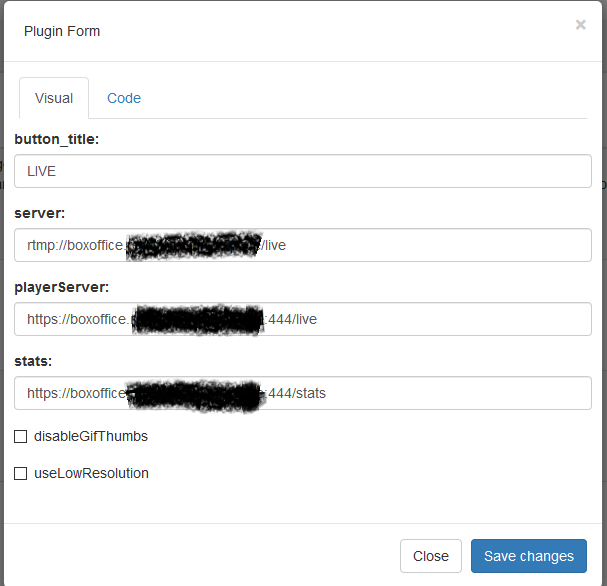
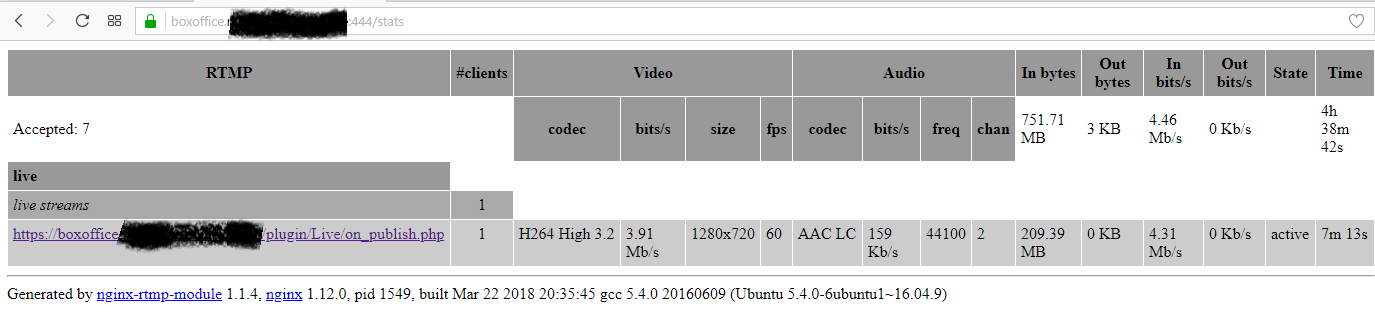
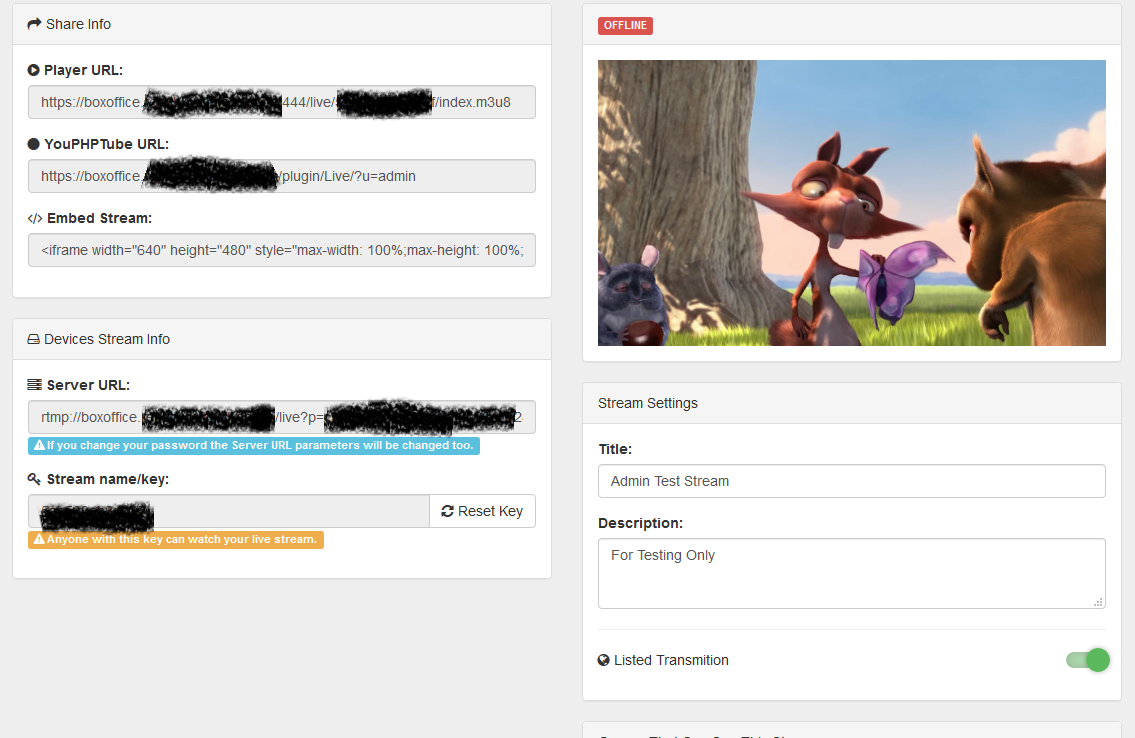
Streams will not appear as live even though they are live and accessible. nginx is listening https and stats page is accessible via https. Seems to be a bug somewhere here when it comes to https and the live counter. I have no issues under http with the live counter. Here are the relevant images of the config in case I am missing something simple here. Correct me if I am wrong, but it should be as simple as configure nginx to listen on https, and change the config of plugin to https://----:444/live and https://----:444/stats


ghost
on 23 Mar 2018
Hi, the only problem I see here is your Live stream name, it should be your livestream key
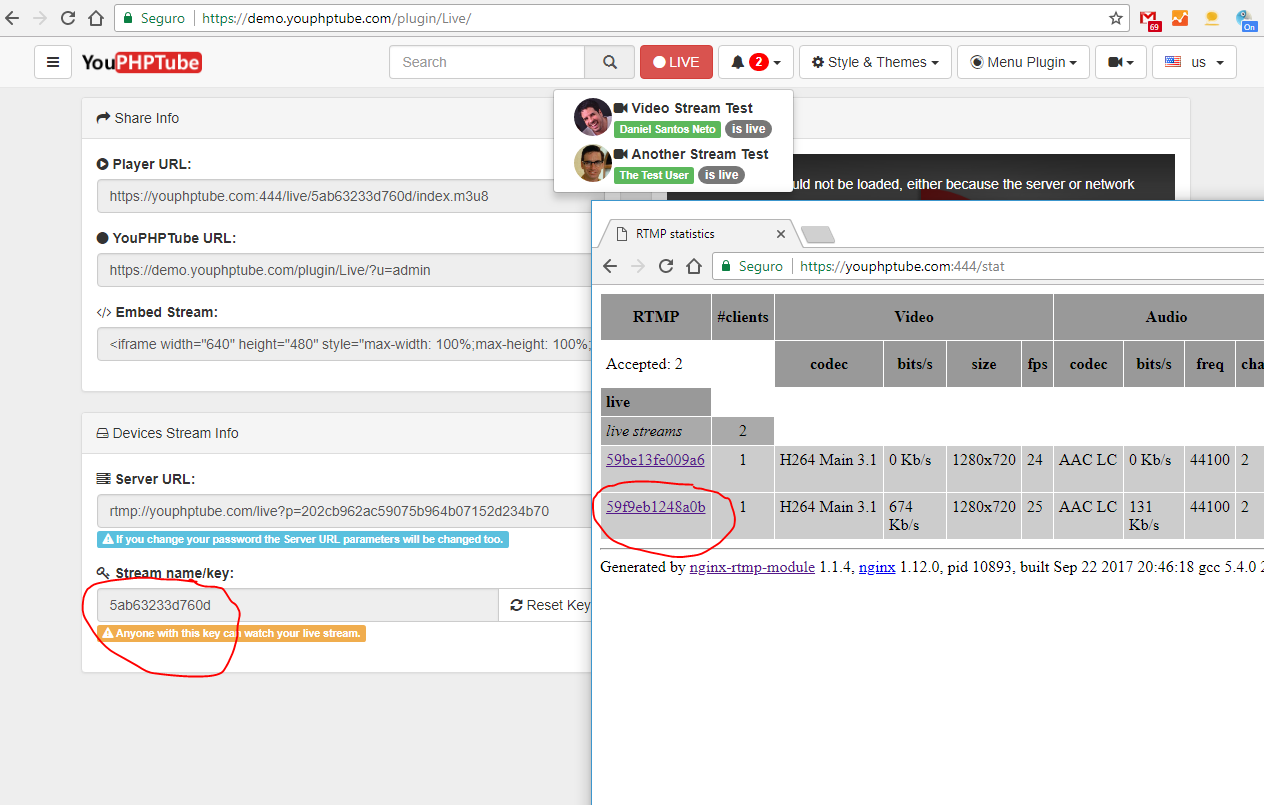
I don,t know why is like that, maybe something regarding your https configuration.
Are you using cloudflare? I think I saw it before and it was fixing disabling cloudflare
DanielnetoDotCom
on 24 Mar 2018
Seems there is some stuff hard coded as http in the Live plugin. This is a clip from https://github.com/DanielnetoDotCom/YouPHPTube
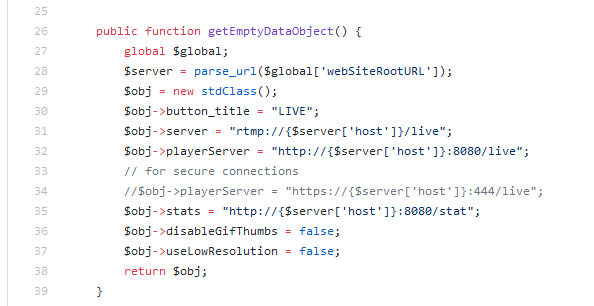
Is there something that needs to be changed here for https/ssl connections? As previously stated it is not registering live streamers as live streaming although the streams are viewable through direct link and YouPHPTube they are just indicated as offline.
My youphptube.log is empty so no hints there either.
ghost
on 24 Mar 2018
Not using cloud flare it is a direct connection from OBS to a VPS cheap virtual machine. That would definitely be the problem though that is keeping it from registering it as live if the stream keys don't match. I will work on this and respond back if I can figure out how to get it to register the stream properly.
ghost
on 24 Mar 2018
About the hard coded, this is only a default value in case you leave it blank on plugin config
I think you may miss something on NGINX configuration
DanielnetoDotCom
on 24 Mar 2018
I figured as much that is why I didn't mess with the code. The NGINX config is the cloned one from github with changes for server name as detailed in the instructions and the three lines for ssl connections in the image from earlier. Looking to see if something has changed in the stats page format such that it is displaying incorrectly.
ghost
on 24 Mar 2018
It has something to do with YouPHPTube interaction with NGINX when running in https. If I switch YouPHPTube to http it passes the information correctly to NGINX as the stream ID. When it is configured as https it passes the url for the live stream causing it to not be detected as live streaming. This includes connecting to the stats page via 8080 http or 444 https.
ghost
on 24 Mar 2018
This is something related your Nginx configuration and OBS, YouPHPTube (YPT) needs that your stream name be the stream key. with out it YPT cant identify your stream
DanielnetoDotCom
on 24 Mar 2018
Thank you for all your help on this I am trying to understand how it can be related to Nginx and OBS. There is no config change between Nginx and OBS when I switch YPT back to http yet the stream name becomes the stream key in this case and works correctly. When YPT is running on https stream name reverts to the URL as shown in images above. Is there a config change necessary in the RTMP section of the Nginx config file when YPT is on https?
From the tutorial obviously I changed the following three lines to reflect my URL/Config as it works for http
on_publish http://[YouPHPTubeURL]/plugin/Live/on_publish.php;
on_play http://[YouPHPTubeURL]/plugin/Live/on_play.php;
on_record_done http://[YouPHPTubeURL]/plugin/Live/on_record_done.php;
ghost
on 24 Mar 2018
Well I got it fixed but it is a weird one. The issue with the Nginx config was that I allowed it to listen on both 8080 http and 444 https simultaneously. I figured initially why not? It should produce the same result just one is secure and one is not. I.E. I could switch back and forth to test functionality with no change to Nginx config. Well somehow.... (and if you know why I would love to hear it) if I just disabled the http 8080 listen the stream name magically becomes the stream key and voila everything works as expected for https.
You should put this somewhere in the tutorial as it is possible to have a completely working Nginx SSL config that produces an erroneous stream name and is a huge gotcha. I saw a couple other issues related to this which is why I though there might be some bug related to https in YouPHPTube (although I see it working on your Demo Site).
Once again thank you for all your assistance on this issue and for creating YouPHPTube.
ghost
on 24 Mar 2018
One last question do you have any objection to me creating a pre-configured appliance for TurnkeyLinux https://www.turnkeylinux.org/ ? I am just waiting on them to transition from Debian Jessie to Stretch so I have to pull fewer things from back-ports.
ghost
on 24 Mar 2018
@MPTMG no objection, actually will be great
DanielnetoDotCom
on 24 Mar 2018
I discovered why the Nginx-rtmp server generates these problems inexplicably ...
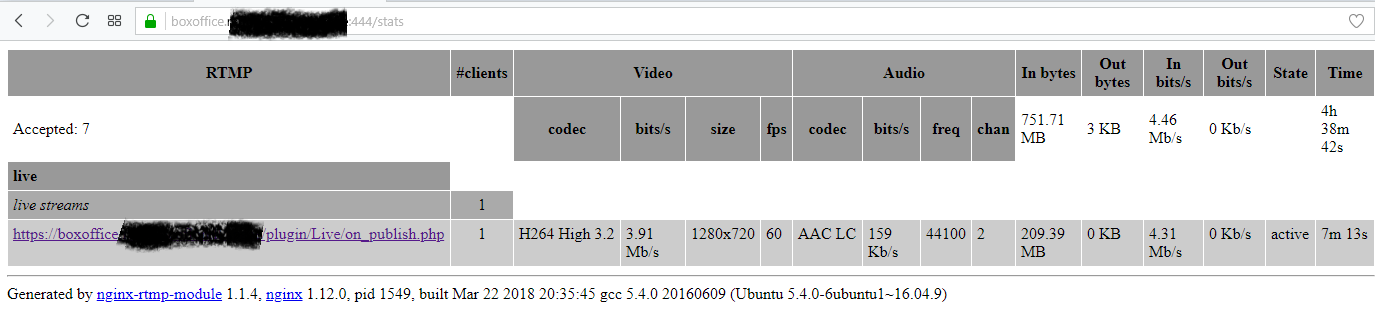
The Nginx-Rtmp server can not work with secure connections (https - so to speak) so if in some way with a directive in apache config or .htaccess we force to redirect incoming connections from http to https ... any connection then also nginx- rtmp was redirected, to a secure connection that unfortunately he can not read, and from here, the blocking of the online display of the LiveUser plug and the way in which you see the link instead of the transmission code in the stats menu of the Nginx-rtmp ...
Just do not force the incoming connections to a secure connection and everything is resolved.
 tgd1973
on 29 Mar 2018
tgd1973
on 29 Mar 2018
@tgd1973 why?
DanielnetoDotCom
on 29 Mar 2018
I just fix someone with this same problem, it was regarding a nginx.conf miss-configuration.
I replace the miss-configuration one with a brand new one and it works, below the one I used
worker_processes  1;
error_log  logs/error.log debug;
events {
        worker_connections  1024;
}
rtmp {
        server {
                listen 1935;
                allow play all;
                #creates our "live" full-resolution HLS videostream from our incoming encoder stream and tells where to put the HLS video manifest and video fragments
                application live {
                        allow play all;
                        live on;
                        #record all;
                        #record_path /video_recordings;
                        #record_unique on;
                        hls on;
                        hls_nested on;
                        hls_path /HLS/live;
                        #hls_playlist_length 4s;
                        #hls_fragment 1s;
                        hls_fragment 10s;
                        on_publish http://localhost/YouPHPTube/plugin/Live/on_publish.php;
                        on_play http://localhost/YouPHPTube/plugin/Live/on_play.php;
                        on_record_done http://localhost/YouPHPTube/plugin/Live/on_record_done.php;
                }
        }
}
http {
        include       mime.types;
        default_type  application/octet-stream;
        server {
                listen 8080;
                server_name localhost;
                #creates the http-location for our full-resolution (desktop) HLS stream - "http://my-ip/live/my-stream-key/index.m3u8"
                location /live {
                        # Disable cache
                        add_header 'Cache-Control' 'no-cache';

                        # CORS setup
                        add_header 'Access-Control-Allow-Origin' '*' always;
                        add_header 'Access-Control-Expose-Headers' 'Content-Length';

                        # allow CORS preflight requests
                        if ($request_method = 'OPTIONS') {
                                add_header 'Access-Control-Allow-Origin' '*';
                                add_header 'Access-Control-Max-Age' 1728000;
                                add_header 'Content-Type' 'text/plain charset=UTF-8';
                                add_header 'Content-Length' 0;
                                return 204;
                        }
                        types {
                                application/vnd.apple.mpegurl m3u8;
                        }
                        alias /HLS/live;
                }
                #allows us to see how stats on viewers on our Nginx site using a URL like: "http://my-ip/stats"
                #location /stats {
                #        stub_status;
                #}
                location /stat {
                        rtmp_stat all;
                        rtmp_stat_stylesheet stat.xsl;
                }
                location /stat.xsl {
                        root html;
                }
                location /control {
                        rtmp_control all;
                }
                #allows us to host some webpages which can show our videos: "http://my-ip/my-page.html"
                location / {
                        root   html;
                        index  index.html index.htm;
                }
        }
}
But I already have this conf ...
With this conf in nginx, I did some tests, and if you force a redirect in apache with auto redirect to https in the server streamer (not encoder) ... appears the error mentioned above ....
tgd1973
on 30 Mar 2018
I was working with an automatic redirect in Apache. I will test your recommendation and see if it holds true for my config.
ghost
on 30 Mar 2018
I can confirm the validity of @tgd1973 's statement regarding not automatically redirecting the YouPHPTube site to https via Apache .conf file allows the Live Stream Display to function properly.
Thanks @tgd1973 for finding this.
ghost
on 30 Mar 2018
Hi everyone
I could working with the streming
Is a great service... but in SSL I it no work...
In http is nice, all fine.
What Ive to do now, my nginx is configured following this guide
https://github.com/DanielnetoDotCom/YouPHPTube/wiki/Set-up-my-own-Stream-Server
https://www.youtube.com/watch?v=Cz8u1Su2L1k
This is my nginx conf...
worker_processes 1;
error_log logs/error.log debug;
events {
worker_connections 1024;
}
rtmp {
server {
listen 1935;
allow play all;
#creates our "live" full-resolution HLS videostream from our incoming encoder stream and$
application live {
allow play all;
live on;
#record all;
#record_path /video_recordings;
#record_unique on;
hls on;
hls_nested on;
hls_path /HLS/live;
#hls_playlist_length 4s;
#hls_fragment 1s;
hls_fragment 10s;
on_publish http://xxxx/plugin/Live/on_publish.php;
on_play http://xxxx/plugin/Live/on_play.php;
on_record_done http://xxxx/plugin/Live/on_record_done.php;
}
}
}
http {
        include       mime.types;
        default_type  application/octet-stream;
        server {
        listen 9090;
        server_name localhost;
                #creates the http-location for our full-resolution (desktop) HLS stream - "http://my-ip/live/my-stream-key/index.m3u8"
                location /live {
                        # Disable cache
                        add_header 'Cache-Control' 'no-cache';

                        # CORS setup
                        add_header 'Access-Control-Allow-Origin' '*' always;
                        add_header 'Access-Control-Expose-Headers' 'Content-Length';

                        # allow CORS preflight requests
                        if ($request_method = 'OPTIONS') {
                                add_header 'Access-Control-Allow-Origin' '*';
                                add_header 'Access-Control-Max-Age' 1728000;
                                add_header 'Content-Type' 'text/plain charset=UTF-8';
                                add_header 'Content-Length' 0;
                                return 204;
                        }
                        types {
                                application/vnd.apple.mpegurl m3u8;
                        }
                        alias /HLS/live;
                }
                #allows us to see how stats on viewers on our Nginx site using a URL like: "http://my-ip/stats"
                #location /stats {
                #        stub_status;
                #}
                location /stat {
                        rtmp_stat all;
                        rtmp_stat_stylesheet stat.xsl;
                }
                location /stat.xsl {
                        root html;
                }
                location /control {
                        rtmp_control all;
                }
                #allows us to host some webpages which can show our videos: "http://my-ip/my-page.html"
                location / {
                        root   html;
                        index  index.html index.htm;
                }
        }

}
How to enable SSL
There is some guide?
Please Help me to enable it.
thanks very much
 ldgv
on 15 Oct 2018
ldgv
on 15 Oct 2018
I use letsencrypt for myself. try to google for it.
DanielnetoDotCom
on 15 Oct 2018
For those who want to use CDN/Cloudflare https://github.com/DanielnetoDotCom/YouPHPTube/wiki/Using-CDN-for-Videos-Only
DanielnetoDotCom
on 10 Dec 2018
I just fix a very similar problem on a costumer.
the problem was because he added a redirect rule on .htaccess, so he redirects everything to his www URL.
After removing the redirect rule it starts to work perfectly
DanielnetoDotCom
on 3 Mar 2019
On a side note my work around for this issue in the TurnkeyLinux appliance is to simply have it connect to localhost/127.0.0.1 in the nginx.conf file and specify in the apache virtual-host to rewrite to https only when connection is not from localhost or 127.0.0.1. This alleviated the need to for a user to make edits to the nginx.conf file while ensuring redirect to https.
Apache Virtual-host:
https://github.com/MPTMG/TKL-YouPHPTube/blob/master/overlay/etc/apache2/sites-available/youphptube.conf
Nginx conf: https://github.com/MPTMG/TKL-YouPHPTube/blob/master/overlay/usr/local/src/nginx.conf
On a side note to auto start live chat easily via systemd:
https://github.com/MPTMG/TKL-YouPHPTube/blob/master/overlay/etc/systemd/system/youphptube-streamchat.service
ghost
on 3 Mar 2019
Related issues
 gamersalpha
·
3Comments
gamersalpha
·
3Comments
 KazeroG
·
4Comments
KazeroG
·
4Comments
 alejandrolidon
·
3Comments
alejandrolidon
·
3Comments
 JoshWho
·
3Comments
JoshWho
·
3Comments
 syldri
·
3Comments
syldri
·
3Comments