Hello,
maybe you can help me out.
My installation method was to upload all necessary files via ftp to my website.
Acutally I'm on version 4.3 and I want to update to version 4.8.
If I press the "Update Version" button, the systems informs me that I'm on the latest version 4.3 but acutally 4.8 is the newest one.
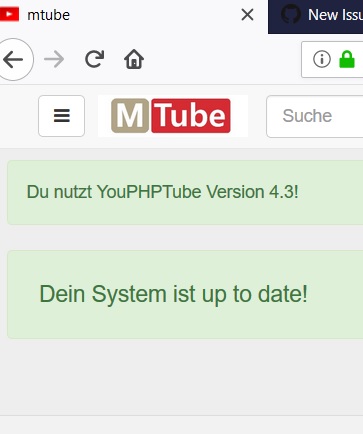
What can I do to solve this issue to get the updater working?
Many thanks and best regards
Stone
 stoneubi
All 15 comments
You may miss some files, (check update directory)
But is important you overwrite all files
 DanielnetoDotCom
on 16 Feb 2018
DanielnetoDotCom
on 16 Feb 2018
cd /var/www/html/YouPHPTube (edit ev. your path on server)
git pull
chown -R www-data:www-data /var/www/html/YouPHPTube
klick in your menu on "update version" - and update button
restart your webserver
 fwn0
on 16 Feb 2018
fwn0
on 16 Feb 2018
Many thanks for your answers. I don't have a own webserver. I'm on a shared / hosted server so I don't have the possibility to git pull.
My access to the server is therefore limited to a ftp connection.
I thought once I press on the "Update Version" button youphptube might check the version automatically and downloads the files from the github server. But seems that this is not the case.
Maybe you could be so kind and let me know how to update my version in this case.
Many thanks
Stone
stoneubi
on 16 Feb 2018
Check this https://github.com/DanielnetoDotCom/YouPHPTube/wiki/How to Update your YouPHPTube
DanielnetoDotCom
on 16 Feb 2018
@stoneubi download the latest files on GitHub and upload all of them again
DanielnetoDotCom
on 16 Feb 2018
OK thanks. I found the video with the git pull szenario but where not able to find the wiki entry. Thank you and best regards, Stone
stoneubi
on 16 Feb 2018
No, it does not work like for example nextcloud with update button.
You can DL sure zip file ( https://github.com/DanielnetoDotCom/YouPHPTube/archive/master.zip ) - unpack on you computer, and drag+drop replace all files in your YouPHPTube directory with the new version on your computer (for example with winscp or filezilla).
fwn0
on 16 Feb 2018
Thank you :-)
stoneubi
on 16 Feb 2018
And by the way - the youphptube and this forum is absolutely awesome. The speed of reaction is the best I ever experienced. Many thanks.
stoneubi
on 16 Feb 2018
Update went wrong :-(
What I did - I dowloaded a full new master.zip and uploaded the file to my webserver. After that I uncompressed the file and overwrite all exsiting files.
In my default settings the gallery plugin is selected and the main start screen.
After the update, the whole page was blank/white. I was not able to login to click the button "Update Version". I also tried the use the e.g. youphptube.com/user site to login but this site was also blank.
I checked the issue tracking on GitHub and found the "Update and got a Blank Screen" issue and the provided solution for uncommenting the last line. But this also didn't solve the problem.
Acutally I'm back on Version 4.3 as I packed the folder before the update.
Anyone else having this issue?
Best regards,
Stone
stoneubi
on 16 Feb 2018
Did you renamed YouPHPTube-master.zip to YouPHPTube.zip before you uploaded this ziped file ?
I wrote: unpack on you computer, and drag+drop replace all files in your YouPHPTube directory with the new version on your computer. I mean all files in unziped YouPHPTube directory - not the folder YouPHPTube = only all files from YouPHPTube directory.
Maybe you have cached old entries, you need restart your webserver.
Check all perms : ls -la in YouPHPTube directory and chown -R www-data:www-data /var/www/html/YouPHPTube.
Sometimes have i problems with cache and cookies with browser in chromium. After start of firefox can i see new changes in my YouPHPTube on my server.
fwn0
on 16 Feb 2018
DanielnetoDotCom
on 16 Feb 2018
You also need to update your plugins
DanielnetoDotCom
on 16 Feb 2018
Yes, I already tried to upgrade to version 4.8 by uploading all files via ftp filezilla client. I overwrote each file one by one and the result was still a white blank screen. Maybe my installation is corrupt.
Anyhow, I do have an active youphptube installation and therefore I cannot play around too much. Actually, for me it is important to have a running version.
I don’t how if there are any other users having youphptube installed on a shared / hosted server with no linux command access, but for me it would be great to have web installer and a web updater to install and to update to the latest version. This would be a milestone for users like me.
This thread can be closed.
Many thanks
Stone
stoneubi
on 20 Feb 2018
Agree with you a web installer will be great.
We will keep that in mind for future upgrades
DanielnetoDotCom
on 20 Feb 2018
Related issues
 gujarraju
·
4Comments
gujarraju
·
4Comments
 wetubeclub
·
3Comments
wetubeclub
·
3Comments
 CorpCaleCloud
·
4Comments
CorpCaleCloud
·
4Comments
 gamersalpha
·
3Comments
gamersalpha
·
3Comments
 JoshWho
·
3Comments
JoshWho
·
3Comments
Most helpful comment
No, it does not work like for example nextcloud with update button.
You can DL sure zip file ( https://github.com/DanielnetoDotCom/YouPHPTube/archive/master.zip ) - unpack on you computer, and drag+drop replace all files in your YouPHPTube directory with the new version on your computer (for example with winscp or filezilla).