Avalonia: How to align content of ComboBox by center?
Unlike different controls ComboBox doesn't have HorizontalContentAlignment property.
Is there is any replacement for this? If not can it be added then?
 FoggyFinder
All 8 comments
@FoggyFinder
You can set it with style
<Style Selector="ComboBox /template/ ContentControl">
   <Setter Property="HorizontalContentAlignment" Value="Right" />
</Style>
 maxkatz6
on 1 Jul 2020
maxkatz6
on 1 Jul 2020
@grokys @danwalmsley
WPF and UWP have HorizontalContentAlignment and VerticalContentAlignment for ComboBox.
Should we add it to Avalonia, even thought there is relatively easy way to set it with selector?
I can add it to my Fluent ComboBox PR.
maxkatz6
on 1 Jul 2020
@FoggyFinder
You can set it with style<Style Selector="ComboBox /template/ ContentControl"> <Setter Property="HorizontalContentAlignment" Value="Right" /> </Style>
Thank you, but can you give a full example?
I've added it like this and it doesn't work:
<ComboBox.Styles>
    <Style Selector="ComboBox /template/ ContentControl">
        <Setter Property="HorizontalContentAlignment" Value="Center" />
    </Style>
</ComboBox.Styles>

FoggyFinder
on 1 Jul 2020
@FoggyFinder sorry, I missed that default ComboBox style also defines HorizontalAlignment="Left", so HorizontalContentAlignment will not apply any visible changes.
Try code below:
<ComboBox Width="200">
  <ComboBox.Styles>
    <Style Selector="ComboBox /template/ ContentControl">
      <Setter Property="HorizontalContentAlignment" Value="Center" />
      <Setter Property="HorizontalAlignment" Value="Stretch" />
    </Style>
  </ComboBox.Styles>
It works for me with ControlCatalog
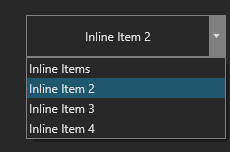
maxkatz6
on 1 Jul 2020
Still the same: text is pinned to the left. I tried on 0.9.999-cibuild0008887-beta version.
I'll try to test on ControlCatalog in the morning - maybe it is late and I'm missing something obvious.
FoggyFinder
on 1 Jul 2020
Uh, for some reason I can't build Avalonia from source anymore.
error cs0006 metadata file could not be found:
\Avalonia\src\Avalonia.DesktopRuntime\bin\Debug\netcoreapp2.0\Avalonia.DesktopRuntime.dll
\Avalonia\packages\Avalonia\bin\Debug\netcoreapp2.0\Avalonia.dll
        <ComboBox Width="200">
            <ComboBox.Styles>
                <Style Selector="ComboBox /template/ ContentControl">
                    <Setter Property="HorizontalContentAlignment" Value="Center" />
                    <Setter Property="HorizontalAlignment" Value="Stretch" />
                </Style>
            </ComboBox.Styles>
            <ComboBoxItem>Inline Items</ComboBoxItem>
            <ComboBoxItem>Inline Item 2</ComboBoxItem>
            <ComboBoxItem>Inline Item 3</ComboBoxItem>
            <ComboBoxItem>Inline Item 4</ComboBoxItem>
        </ComboBox>

Doesn't produce correct result, MCVE is attached:
FoggyFinder
on 2 Jul 2020
@FoggyFinder it seems like a problem with properties overriding - https://github.com/AvaloniaUI/Avalonia/issues/2098
HorizontalAlignment is defined in the template, so it can't be overridden with style.
I will implement ComboBox.HorizontalContentAlignment to avoid that problem.
For now you can only replace whole ComboBox template with alignment-center.
maxkatz6
on 2 Jul 2020
I'm closing the issue since PR is merged.
FoggyFinder
on 5 Jul 2020
Related issues
 MiKaMaru
·
4Comments
MiKaMaru
·
4Comments
 danwalmsley
·
4Comments
danwalmsley
·
4Comments
 Suriman
·
3Comments
Suriman
·
3Comments
 Urgau
·
3Comments
Urgau
·
3Comments
 GitHubington
·
3Comments
GitHubington
·
3Comments
Most helpful comment
@FoggyFinder it seems like a problem with properties overriding - https://github.com/AvaloniaUI/Avalonia/issues/2098
HorizontalAlignment is defined in the template, so it can't be overridden with style.
I will implement ComboBox.HorizontalContentAlignment to avoid that problem.
For now you can only replace whole ComboBox template with alignment-center.