Avalonia: Poor rendering performance of Image control
The following code arranges images in a scrollable list:
<Window xmlns="https://github.com/avaloniaui"
        xmlns:x="http://schemas.microsoft.com/winfx/2006/xaml"
        xmlns:vm="clr-namespace:ImageTest;assembly=ImageTest"
        x:Class="ImageTest.MainWindow">

  <ScrollViewer HorizontalScrollBarVisibility="Disabled" VerticalScrollBarVisibility="Auto">
    <ItemsRepeater Items="{Binding Pictures}">
      <ItemsRepeater.ItemTemplate>
        <DataTemplate>
          <Image Source="{Binding}" Width="250" Height="250" />
        </DataTemplate>
      </ItemsRepeater.ItemTemplate>
      <ItemsRepeater.Layout>
        <UniformGridLayout MinColumnSpacing="5" MinRowSpacing="5"/>
      </ItemsRepeater.Layout>
    </ItemsRepeater>
  </ScrollViewer>

</Window>
And this is how it looks like:

I've dropped 12 JPEG images in there, with resolutions of something on the order of 10-16 MPx.
When I'm using the Direct2D backend, I'm getting something like 4 FPS (interestingly, while the debug overlay claims it's 4 FPS, it is really more like 2 FPS). When using the Skia backend, it's ~1 FPS.
To compare my results, I created the very same application in WPF (substituting ItemsRepeater=>ItemsControl and UniformGridLayout=>WrapPanel). In WPF, this application runs at a smooth 60 FPS.
When profiling time spent in methods, these are the top methods for all threads:
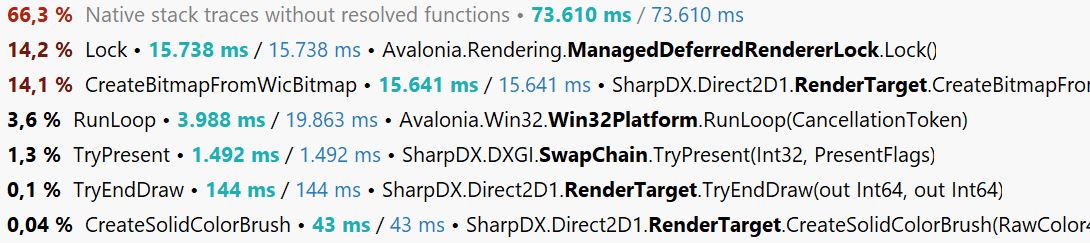
And this is only for the main thread:

I'm using the latest version of Avalonia from the master branch for this test.
 mstr2
mstr2
All 16 comments
The current Direct2D1 implementation doesn't reuse the loaded bitmap and instead recreates a copy each time it is drawn. https://github.com/AvaloniaUI/Avalonia/blob/master/src/Windows/Avalonia.Direct2D1/Media/DrawingContextImpl.cs#L114
This should be cached:
https://github.com/AvaloniaUI/Avalonia/blob/master/src/Windows/Avalonia.Direct2D1/Media/Imaging/WicBitmapImpl.cs#L118
Not sure why Skia is performing worse
 Gillibald
on 15 Aug 2019
Gillibald
on 15 Aug 2019
1)Hw-acceleration is still disabled for Win32+Skia by default. You need to reference https://www.nuget.org/packages/Avalonia.Angle.Windows.Natives/ and add
.With(new Win32PlatformOptions
{
     AllowEglInitialization = true
})
to your BuildAvaloniaApp().
2) You are downscaling 16MP images to 440x300 which is an expensive operation. Our Image currently does not cache scaled versions and always draws the original ones which results in downscaling on every frame. Consider manually downscaling images before feeding them to Image
 kekekeks
on 15 Aug 2019
kekekeks
on 15 Aug 2019
I suspect the 2fps vs reported 4fps is caused by the same feature of the deferred renderer that causes https://github.com/AvaloniaUI/Avalonia/issues/2792
 ahopper
on 15 Aug 2019
ahopper
on 15 Aug 2019
@kekekeks
There's no actual downscaling involved here (i.e. changing the number of physical pixels in the image). For GPU-accelerated rendering, drawing at different screen sizes is basically a free operation.
@Gillibald
I've implemented a simple caching system for the D2D1 backend. Basically, it keeps D2D bitmaps around and only disposes them if they haven't been used in the last frame. This bumps up the frame rate of my test application to 60 FPS (as reported by the overlay) and enables me to smoothly scroll through the list of images.
Resizing the app window is still painfully slow though, because the DeviceContext is disposed and recreated a lot.
mstr2
on 15 Aug 2019
I think we need some kind of throttleing when we resize the current surface. We can't avoid recreation. The hard thing about managing Direct2D1 resources is the fact that everything is bound to the current DeviceContext. I think there was no caching because we do not manage a resize explicitly. In theory we can hold onto resources until the DeviceContext gets destroyed.
Gillibald
on 15 Aug 2019
Avalonia currently doesn't cache resources bound to the render target. We need some strategy to reuse common resources like brushes etc. There is a PR that introduces resource pooling for Skia maybe we can unify this if Direct2D1 is still something we want to support.
SharpDX is basically dead so if things are not working we can't do anything about it. There are already issues with it that block us from introducing new features.
Gillibald
on 15 Aug 2019
Maybe improving the GPU-accelerated Skia backend makes more sense.
So far I've found that when a SKImage is created from a file in ImmutableBitmap, it will never have SKImage.IsTextureBacked == true even after it was rendered repeatedly. Maybe that's the reason for the poor performance?
mstr2
on 15 Aug 2019
Are you sure you have hardware acceleration enabled for Skia? When a GPU backed surface is used an raster image is automatically transfered to gpu and is held there for better performance. IsTextureBacked is something else.
Gillibald
on 15 Aug 2019
I checked that by calling AvaloniaLocator.Current.GetService<IWindowingPlatformGlFeature>(), which gives me an EglGlPlatformFeature. Also, the render target is GlRenderTarget. It seems like a considerable amount of time is spent in sk_canvas_draw_image_rect.
mstr2
on 15 Aug 2019
Hmm. I wonder why draw_image_rect is always used. If the image has exactly the size of the target area draw_image should be called. For SkiaSharp that means we would have to use the overload that takes only the x, y coordinates. Maybe it is worth a try. Downsampling is always costly. I could be wrong here.
https://skia.org/user/api/SkCanvas_Reference#SkCanvas_drawImageRect.
Caching the down sized image is preferred here.
Gillibald
on 15 Aug 2019
Again, why should the cost of rendering at the physical pixel size be any different than rendering at any other size? If indeed the drawing is done using the GPU, then it should be almost exactly the same. After all you're just changing the size of the emitted polys, but not the size of the texture. Drawing a sub-rect of an image should also not be any different than drawing the whole image.
Caching an image with a smaller number of physical pixels is a solution for a different problem. For example, you can't easily do smooth zoom animations with a physically downscaled image.
Since Direct2D can run my test application at 60 FPS, it's clearly not a _fundamental_ problem. Of course, I don't know how Skia actually implements its drawing operations with a GPU backend.
mstr2
on 16 Aug 2019
The image is still loaded into CPU bound RAM and needs to be transferred to GPU at some point. The transfererd image is usually reused but I don't know the actual mechanism. You are right that it doesn't matter which portion of the original pixels is being drawn. I can only imagine that something prevents proper caching.
This obviously needs some optimization.
Gillibald
on 16 Aug 2019
It looks like it is possible to transfer an image directly to GPU
using (var surface = SKSurface.Create(grContext, false, imageInfo, 1, GRSurfaceOrigin.TopLeft))
{
    surface.Canvas.DrawImage(rasterImg, 0, 0);
    surface.Canvas.Flush();
    var textureImage = surface.Snapshot()); //This should be texture backed
}
At least we could try if that works for us. This should be done if hardware acceleration is enabled. It could share the same caching logic as the Direct2D1 implementation.
Gillibald
on 16 Aug 2019
@Gillibald
Tried that, and it runs at a stable 60 FPS now. Also, resizing the app window is very smooth.
mstr2
on 16 Aug 2019
1)Hw-acceleration is still disabled for Win32+Skia by default.
Slightly off-topic, but is there any sort of hw-accel for macOS?
 mat1jaczyyy
on 16 Aug 2019
mat1jaczyyy
on 16 Aug 2019
@mat1jaczyyy hardware acceleration is the only option for Mac. It is always enabled.
@mstr2 That's good news. Thanks for investigating this.
Gillibald
on 16 Aug 2019
Related issues
 maxkatz6
·
3Comments
maxkatz6
·
3Comments
 ZZerker
·
4Comments
ZZerker
·
4Comments
 Urgau
·
3Comments
Urgau
·
3Comments
 akunchev
·
3Comments
akunchev
·
3Comments
 RUSshy
·
4Comments
RUSshy
·
4Comments
Most helpful comment
@Gillibald
Tried that, and it runs at a stable 60 FPS now. Also, resizing the app window is very smooth.