Avalonia: FontWeight=Bold doesn't work on macOS
Write the following program and run on macOS:
using Avalonia;
using Avalonia.Controls;
using Avalonia.Logging.Serilog;
using Avalonia.Media;

namespace avaloniatest
{
    class Program
    {
        public static void Main(string[] args) => BuildAvaloniaApp().Start(AppMain, args);

        public static AppBuilder BuildAvaloniaApp()
            => AppBuilder.Configure<App>()
                .UsePlatformDetect()
                .LogToDebug()
                .UseReactiveUI();

        private static void AppMain(Application app, string[] args)
        {
            var window = new Window() {Content = new TextBlock() {FontWeight = FontWeight.Bold, Text = "fooh"}};

            app.Run(window);
        }
    }
}
I expect that it will show a bold text, but the text in the TextBlock is rendered as normal. Works the same for TextBox.
 ForNeVeR
All 17 comments
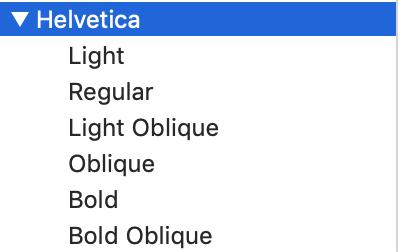
FontWeight=Bold does work if you explicitly specify a font family that provides bold font weight. I don't know if this is expected behavior though.
 x2bool
on 16 Jun 2019
x2bool
on 16 Jun 2019
If your FontFamily doesn't have a Typeface with a weight of Bold the render pipeline uses the nearest match. Make sure your FontFamily contains a Bold face.
 Gillibald
on 16 Jun 2019
Gillibald
on 16 Jun 2019
Should we maybe change the default font family on macOS, then? Or is it okay that the default font doesn't support bold?
ForNeVeR
on 16 Jun 2019
The default is the System's default. If that font doesn't fulfill your needs just change it on your Window to share the FontFamily on all children controls.
Gillibald
on 16 Jun 2019
According to the wiki, the default font on macOS should be Lucida Grande which should support bold.
ForNeVeR
on 16 Jun 2019
And what happens if you specify that font explicitly? Does it render correctly? I can't debug this because I do not own a Mac and that will never change.
Gillibald
on 16 Jun 2019
Well, I totally agree with ForNeVeR. If FontFamily=Bold does not work on "Hello, World" app then it creates a wrong impression that it doesn't work at all. It took me a while to figure out why it does not make font bold with default typeface.
x2bool
on 16 Jun 2019
BTW The primary system font in OS X El Capitan and above is San Francisco.
x2bool
on 16 Jun 2019
It works if I set FontFamily=FontFamily.Parse("Lucida Grande"), but I wasn't able to determine which is the default yet. FontFamily.Default returns a family with empty name in debugger.
Interestingly, FontFamily.SystemFontFamilies yields no font named "San Francisco" on my Mac, and even the Font Book list doesn't show it.
ForNeVeR
on 16 Jun 2019
Will have a look shortly. Could be that the default lookup isn't working for the System's default
Gillibald
on 16 Jun 2019
Should work when my fix is merged
Gillibald
on 16 Jun 2019
This issue still exists on 0.9.0-preview3 when running the original example on Mojave (10.14.6).
I have the following styles in App.xaml:
<StyleInclude Source="avares://Avalonia.Themes.Default/DefaultTheme.xaml" />
<StyleInclude Source="avares://Avalonia.Themes.Default/Accents/BaseLight.xaml" />
Please let me know if there is any other information I can provide that would be helpful.
 dtchepak
on 22 Oct 2019
dtchepak
on 22 Oct 2019
I can't reproduce this issue on Windows. Can't test on Mac. When I set FontWeight="Bold" on my window everything is rendered bold.
Gillibald
on 2 Nov 2019
@Gillibald Yes it works fine on Windows.
dtchepak
on 3 Nov 2019

Control catalog on OSX 10.14.6 bold font working?
 danwalmsley
on 6 Nov 2019
danwalmsley
on 6 Nov 2019
To repro this you have to set FontWeight to bold on the MainWindow
Gillibald
on 6 Nov 2019
The problem persist in 0.9.9 release in Mojave 10.14.6. I created a blank project and followed the steps in the styles section of the docs. The size of the text changes but not the weight. How can I provide you with more debugging information?
 Carlos487
on 3 May 2020
Carlos487
on 3 May 2020
Related issues
 ZZerker
·
4Comments
ZZerker
·
4Comments
 CreateLab
·
3Comments
CreateLab
·
3Comments
 RUSshy
·
4Comments
RUSshy
·
4Comments
 georgiuk
·
3Comments
georgiuk
·
3Comments
 TheColonel2688
·
3Comments
TheColonel2688
·
3Comments
Most helpful comment
Should work when my fix is merged