Avalonia: Strange interaction between Grid width and fixed size columns
Note: this problem was diagnosed after the changes in #2260 have been applied.
Given the following XAML in ControlCatalog.MainWIndow.xaml:
<Window xmlns="https://github.com/avaloniaui"
        xmlns:x="http://schemas.microsoft.com/winfx/2006/xaml"
        x:Class="ControlCatalog.MainWindow"
        Title="MainWindow" Width="880" Height="580">

    <Grid>
        <Grid.RowDefinitions>
            <RowDefinition Height="Auto" />
            <RowDefinition Height="Auto" />
        </Grid.RowDefinitions>

        <Grid.ColumnDefinitions>
            <ColumnDefinition Width="158" />
        </Grid.ColumnDefinitions>

        <Image Grid.Row="0" Source="/Assets/delicate-arch-896885_640.jpg" />
        <Image Grid.Row="1" Source="/Assets/hirsch-899118_640.jpg" />
    </Grid>
</Window>
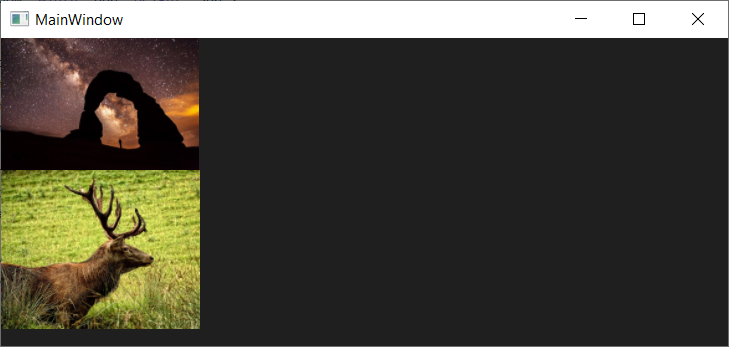
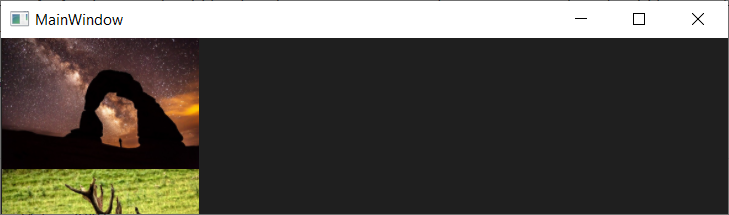
There is a strange interaction between the Window width and the image width:

From the single grid column of a fixed size, it should be that the images maintain the same size as they should be stretched to the column width of 158 and take up the height they need due to the row height of "Auto", however that's not happening.
I believe this is a bug in Grid.
cc: @walterlv
bug
 grokys
All 2 comments
Hello! Now I do not observe similar behavior. These lines were previously deleted

 rstm-sf
on 24 Jun 2020
rstm-sf
on 24 Jun 2020
This is probably fixed in my WPF Grid import...
 jmacato
on 24 Jun 2020
jmacato
on 24 Jun 2020
👍2
Was this page helpful?
0 / 5 - 0 ratings
Related issues
 ZZerker
·
4Comments
ZZerker
·
4Comments
 khoshroomahdi
·
4Comments
grokys
·
4Comments
khoshroomahdi
·
4Comments
grokys
·
4Comments
 MarchingCube
·
4Comments
MarchingCube
·
4Comments
 CreateLab
·
3Comments
CreateLab
·
3Comments
Most helpful comment
This is probably fixed in my WPF Grid import...