Avalonia: Touch input API proposal
Inspired by:
https://developer.mozilla.org/en-US/docs/Web/API/Touch_events
https://developer.mozilla.org/en-US/docs/Web/API/Touch
https://developer.mozilla.org/en-US/docs/Web/API/Touch_events/Using_Touch_Events
http://who-t.blogspot.com/2012/01/multitouch-in-x-touch-grab-handling.html
https://docs.microsoft.com/en-us/xamarin/xamarin-forms/app-fundamentals/gestures/
Touch events
struct Touch
{
    long Id;
    Point Position;
}


class TouchEventArgs : RoutedEventArgs
{
   int SequenceId;
   TouchEventType Type;
   ulong Timestamp;
   List<Touches> Touches;
   List<Touches> AddedTouches;
   List<Touches> ChangedTouches;
   List<Touches> RemovedTouches;

   IAcceptedTouchSequence AcceptTouches(IControl control);
}

TouchCancelledEventArgs : TouchEventArgs
{
   IControl AcceptorControl;
}
TouchesBegan(TouchEventArgs args) event
Triggered when the first touch point is activated
TouchesChanged(TouchEventArgs args) event
Triggered when a touch point is moved or when new touch point is added or when a touch point is removed but there is at least one left.
TouchesEnded(TouchEventArgs args) event
Triggered when the last touch point is removed. Both Touches and ChangedTouches are Empty.
TouchesCancelled(TouchCancelledEventArgs args) event
Triggered when touch sequence is cancelled due to platform-specific reasons or when touch sequence is accepted by another control.
Event flow
Touch events are triggered in a sequences. A sequence begins when first touch point is activated and bounds itself to the control determined by the hittest of the first touch point's position. TouchesChanged and TouchesEnded events are sent with that control being event target.
It's guaranteed that there is only one active touch sequence
Events follow the normal tunnel/bubble flow until some control accepts the sequence. After a control has accepted the sequence touch events from that sequence will only be sent to that control. Target control will be sent a TouchesCancelled event sent through the tunnel/bubble flow, ignoring the acceptor control.
This way we can have touch gesture recognition hierarchies when at the start every control in the tree can react to touch events, but once gesture is recognized events will only flow to the recognizer.
Gesture recognition
Each control will have AvaloniaList<IGestureRecognizer> GestureRecognizers property, default implementations of touch event handlers will delegate their work to gesture recognizers associated with the control. The end user API is similar to Xamarin.Forms.
Gesture recognizer can accept or reject the current touch sequence. When gesture recognizer rejects the sequence it won't be sent any further events from that sequence. If recognizer accepts the sequence, the control will accept the sequence and send events to acceptor recognizer. Recognizers can register themselves to run on tunnel, bubble or both stages of the event flow.
Example gesture recognizer:
class TapGestureRecognizer : IGestureRecognizer
{
    ulong _started;
    Point _startPoint;
    const double Distance = 20;
    const ulong MaxTapDuration = 500;
    GestureRecognizerResult.IGestureRecognizer Handle(TouchEventArgs args)
    {
       // Multi-touch sequence
       if(args.Touches.Count > 1)
           return GestureRecognizerResult.Reject;
       // Sequence started, save the start time
       if(args.Type == TouchEventType.TouchesBegan)
       {
           _started = args.Timestamp;
           _startPoint = ev.Touches[0].Position;
           return GestureRecognizerResult.Continue;
       }
       if(args.Type == TouchEventType.TouchesEnded)
       {
           var endPoint = args.RemovedTouches[0];
           if(Math.Abs(endPoint.X - _startPoint.X) < Distance
               && Math.Abs(endPoint.Y - _startPoint.Y) < Distance
               && (args.Timestamp - _started) < MaxTapDuration)
           {
               args.Source.RaiseEvent(new RoutedEventArgs(TappedEvent));
               return GestureRecognizerResult.Accept;
           }
           else
               return GestureRecognizerResult.Reject;
       }
       return GestureRecognizerResult.Continue;
    }
}
Touch event emulation
InputManager.EnableTouchEmulationViaMouse will enable touch emulation, so at least one-finger touch support could be developed and debugged on touch-incapable machines. Mouse pointer would behave like a single touch point when pressed.
Cancelling an accepted touch session
(this might not be required, we need to try other things before implementing)
Gesture recognizer (or control) can reject already accepted grab. In this case touch events that happened after the grab would be replayed.
interface IAcceptedTouchSequence
{
     void Cancel();
}
"Common" events
We are currently converting unhandled pointer events to Tapped and DoubleTapped here:
https://github.com/AvaloniaUI/Avalonia/blob/master/src/Avalonia.Input/Gestures.cs#L29
Same would happen in touch gesture recognizer. We would place TapGestureRecognizer to TopLevel's GestureRecognizers collection by default.
 kekekeks
All 24 comments
@AvaloniaUI/core @EndlessDelirium
Please, take a look at the touch API proposal. I think with this model we can implement all widely used gestures and allow things like scrolling in ScrollViewer when touches started on some button while allowing to handle the touch sequence by some child control that interprets it in completely different way.
kekekeks
on 14 Jan 2019
How would you support drag and drop with gesture recognizers? Are there any raw events? TouchDown, TouchUp, TouchMove? GestureRecognizers are like behaviors in my opinion. You implement them on top of raw touch events. Just my thoughts.
 Gillibald
on 14 Jan 2019
Gillibald
on 14 Jan 2019
@Gillibald
Are there any raw events? TouchDown, TouchUp, TouchMove?
TouchesBegan, TouchesEnded, TouchesChanged. See "Touch events" section of the proposal.
Also
default implementations of touch event handlers
"default" is the key here. You are free to override OnTouchesBegan/OnPreviewTouchesBegan and write your own handling logic.
The only difference between those events and mouse events is that touch events do an automatic "capture" on behalf of the target control.
kekekeks
on 14 Jan 2019
Why is ITouchGrab GrabSequence(IControl control) needed? Isn't e.Handled = true enough?
Gillibald
on 14 Jan 2019
It grabs events from both child and parent controls. Controls becomes the sole owner/target of that particular touch sequence. I think it should be named Accept instead of grab.
Please, follow the 4th link from the header.
kekekeks
on 14 Jan 2019
What is ITouchGrab for?
Gillibald
on 14 Jan 2019
Cancelling the grab, see the last section. Might be not even needed.
kekekeks
on 15 Jan 2019
I haven't done much work with touch APIs so I can't give a proper opinion, however it looks like you've done your research and thought a lot about the design, so it gets my 👍 !
 grokys
on 15 Jan 2019
grokys
on 15 Jan 2019
- Should touch inertia also be covered here, or would this be a separate issue?
- Maybe the events should be named TouchDown/TouchUp/TouchMove to align with KeyDown/KeyUp.
- A simple control might only listen to the _TouchesBegan_ and _TouchesEnded_ events, and it might expect that a touch sequence _ends_ at some point. If this is preempted by cancelling the sequence, will the _TouchesEnded_ event still be raised? If not, the information whether a sequence was cancelled might instead be offered as a value in the event args for the _TouchesEnded_ event (as compared to being exposed as a separate event).
 mstr2
on 15 Jan 2019
mstr2
on 15 Jan 2019
@mstr2
- Since raw touch events only provide touch contact positions for a particular time, I think it's the work of the particular gesture recognizer (PanGestureRecognizer in case of scrolling) to handle inertia.
- Events are tracking a touch session instead of a single touch point. Session starts when first touch point is activated and ends when the last one is gone. Naming is consistent with other frameworks too.
- At least Web, GTK and iOS have a separate cancellation event. There is also extra info about acceptor control if touch sequence was cancelled by accepting a sequence (there could be other reasons for sequence cancellation).
kekekeks
on 16 Jan 2019
If I understand you correctly, there can only be exactly one active touch sequence. This may be very limiting, since it will not allow for more advanced multi-touch interactions. For example, on the home screen in iOS, you can grab an app icon with one finger (assuming that you're in wiggle mode), and then use a second finger to scroll to another home screen page _while you are holding onto the app icon_.
Another example is the UIDatePicker control in iOS, which allows you to scroll the individual spinners simultaneously. There are several more examples of such interactions, so it's not a fringe feature (at least in iOS).
mstr2
on 16 Jan 2019
https://developer.apple.com/documentation/uikit/uiresponder/1621142-touchesbegan?language=objc
https://developer.apple.com/documentation/uikit/uiview/1622519-multipletouchenabled?language=objc
https://developer.apple.com/documentation/uikit/uiview/1622453-exclusivetouch?language=objc
It seems that iOS merges individual touch sequences triggered by different child views once they reach the common parent. Can anyone check that quickly?
kekekeks
on 17 Jan 2019
Merging touch sequences would be a bit complicated, but doable. Basically once a particular touch sequence is accepted, all merged sequences would be accepted as well. If acceptor control or its child triggers a new touch, it would be added to the merged sequence.
Any touch points from accepted sequences will be invisible to other controls.
That merging logic would be tricky for tunnel/bubble event flows, since it would require touch sequence state tracking for individual controls for both tunnel and bubble stages.
kekekeks
on 17 Jan 2019
I think we need some kind of scenario list that we need to support with our touch handling scheme:
- Basic gestures:
- Tap
- Double Tap
- Pan (scroll)
- Swipe
- Pinch (zoom and/or rotate)
- Touch and hold (either drag&drop or context menu)
- Handling separate touch interaction with different controls using different touch points
- Binding touch interaction to a particular control once it's recognized. E. g. when some control has accepted touch and hold gesture and started drag interaction we don't want the parent ScrollViewer to interpret it as a Pan gesture. We don't want child controls to interpret it in some other way as well.
That is the reason why we haveAcceptonTouchEventArgs - Uniformly handling touch points from different child controls. E. g. when control hierarchy looks like this
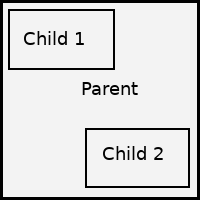
we want the parent element to be able to handle touch events started within the bounds of child controls as one touch sequence, so it could recognize Pinch gesture if child events haven't yet recognized it as other sequences. - We want a parent control to preview touches before passing them to children. The use case for it would be master-detail view with master being hidden. The swipe from the left side of the screen should show the master page.
kekekeks
on 17 Jan 2019
Please, add other scenarios you know of
kekekeks
on 17 Jan 2019
WPF has manipulations that are built on top of raw touches. If enabled, manipulation events provide information about multi-finger translation/rotation/scale manipulations of controls. This seems to almost map to the pinch gesture (except for providing translation info and maybe multi-finger support), should it be considered a generalized form of pinching?
mstr2
on 30 Jan 2019
I don't consider WPF's manipulations a good API. They aren't pluggable and they don't support scenarios listed above.
kekekeks
on 30 Jan 2019
Agree. It is complicated to use.
Idea with GestureRecognizers collection on control is much better.
Each gesture recognizer has its own event which you subscribe to. This way you don't enlarge control API area and save power on handling the only gestures for which you registered recognizers.
 xperiandri
on 9 Apr 2019
xperiandri
on 9 Apr 2019
Why not use ImmutableArray<Touches>?
``` C#
class TouchEventArgs : RoutedEventArgs
{
int SequenceId;
TouchEventType Type;
ulong Timestamp;
List
List
List
List
IAcceptedTouchSequence AcceptTouches(IControl control);
}
```
xperiandri
on 9 Apr 2019
any update about touch api?
 drearyrainDeng
on 23 Apr 2019
drearyrainDeng
on 23 Apr 2019
For now this proposal is pinned to gather opinions. Will probably take a shot at implementation this summer.
kekekeks
on 23 Apr 2019
I need to understand an issue I am having with an Avalonia simple app deployed to a Raspberry Pi. The UI works (enter text and enter on Buttons), however a mouse click does not bring TextBox into focus or fire a Button event. The same code deployed to Ubuntu linux works. What am I missing here?
 GadgetmanStewart
on 23 Apr 2019
GadgetmanStewart
on 23 Apr 2019
@GadgetmanStewart your issue probably doesn't have anything to do with "touch api proposal", since for now we are using mouse emulation (I have a touchscreen on my Linux laptop and can verify that everything works fine), please file a separate issue.
kekekeks
on 23 Apr 2019
Disregard that, we are doing pointer events UWP way. Gesture recognizers would have to track touch points separately and use explicit grabs. That would also unity it with regular mouse events and allow gesture recognition for mouse (slide/swipe)
kekekeks
on 28 May 2019
Related issues
 danwalmsley
·
4Comments
danwalmsley
·
4Comments
 Suriman
·
3Comments
Suriman
·
3Comments
 RUSshy
·
4Comments
RUSshy
·
4Comments
 GitHubington
·
3Comments
GitHubington
·
3Comments
 georgiuk
·
3Comments
georgiuk
·
3Comments
Most helpful comment
If I understand you correctly, there can only be exactly one active touch sequence. This may be very limiting, since it will not allow for more advanced multi-touch interactions. For example, on the home screen in iOS, you can grab an app icon with one finger (assuming that you're in wiggle mode), and then use a second finger to scroll to another home screen page _while you are holding onto the app icon_.
Another example is the UIDatePicker control in iOS, which allows you to scroll the individual spinners simultaneously. There are several more examples of such interactions, so it's not a fringe feature (at least in iOS).