Quick question: Is binding to ActualWidth supported?
  <StackPanel>
    <Grid ColumnDefinitions="300">
      <Button Name="Test" Content="Hello"></Button>
    </Grid>

    <Button Content="World" Width="{Binding #Test.ActualWidth}"></Button>
  </StackPanel>
The second button should have a width of 300 now, but it's NaN instead. What am I missing out?
 pr8x
pr8x
All 18 comments
Use Bounds.Width instead.
 wieslawsoltes
on 30 Nov 2018
wieslawsoltes
on 30 Nov 2018
Thanks, this works for the example above. But how about the following scenario:
<StackPanel>
    <Grid ColumnDefinitions="*" Margin="100">
      <local:UC Name="Test"></local:UC>
    </Grid>

    <ItemsControl Items="{Binding Items}" Background="#272727">
      <ItemsControl.ItemTemplate>
        <DataTemplate>
          <Button Content="World" Width="{Binding #Test.Bounds.Width}"></Button>
        </DataTemplate>
      </ItemsControl.ItemTemplate>
    </ItemsControl>
  </StackPanel>
Binding to controls inside a DataTemplate. Any ideas 😄 ?
pr8x
on 30 Nov 2018
I think # inside a template is broken, you could use parent[n] as a work around
 ahopper
on 30 Nov 2018
ahopper
on 30 Nov 2018
You mean like: {Binding $parent[3].Bounds.Width}? Because this does not work either.
pr8x
on 30 Nov 2018
Yep, that has worked for me, sometimes the number is not obvious. I noticed that the control you want to bind to is not a parent so it can't work perfectly. I have not tried the wpf ElementName syntax so that might just work.
ahopper
on 30 Nov 2018
Try {Binding $parent[StackPanel].Bounds.Width}.
wieslawsoltes
on 30 Nov 2018
Unfortunately, neither of this worked for me.
<Window xmlns="https://github.com/avaloniaui"
        xmlns:x="http://schemas.microsoft.com/winfx/2006/xaml"
        xmlns:sys="clr-namespace:System;assembly=mscorlib"
        Title="AvaloniaSandbox"
        xmlns:local="clr-namespace:AvaloniaSandbox">

  <StackPanel>
    <Grid ColumnDefinitions="*" Margin="100">
      <Button Content="World"></Button>
    </Grid>
    <ItemsControl Items="{Binding Items}" Background="#272727">
      <ItemsControl.ItemTemplate>
        <DataTemplate>
          <Button Content="World" Width="{Binding $parent[StackPanel].Bounds.Width}"></Button>
        </DataTemplate>
      </ItemsControl.ItemTemplate>
    </ItemsControl>
  </StackPanel>
</Window>
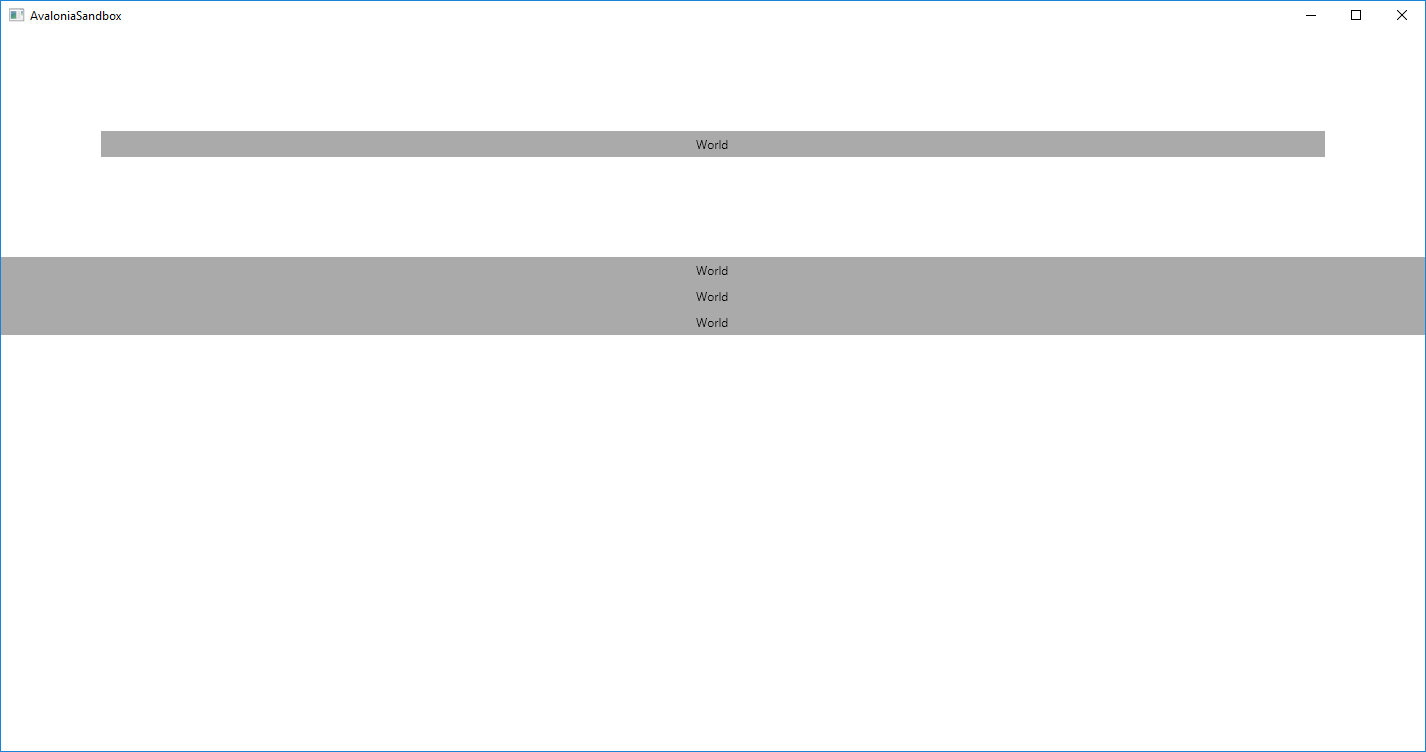
Edit: Same for {Binding $parent[3].Bounds.Width} or the Wpf ElementName syntax.
pr8x
on 30 Nov 2018
not sure what would happen if you bound the stackpanel width to the width of the world button.
ahopper
on 30 Nov 2018
Hi @toytonics,
Not 100% what you're trying to do here... You're binding the Button to the ancestor StackPanel but the ancestor StackPanel's width is determined by its contents, which are the Buttons!
Can you not just make the ItemsControl be the width that you want? That way the buttons can be made to fill it, and will be the correct size.
 grokys
on 30 Nov 2018
grokys
on 30 Nov 2018
I tried to to extract this snippet from a large project and condense it into a minimal example, so it's not so easy to explain. Yes, I could also make the ItemsControl the size I want. However, that doesn't solve the problem that - apparently - binding to controls from within a DataTemplate (See second example) is not supported/broken. I really need this functionality. Is there any workaround?
pr8x
on 30 Nov 2018
You mean within a DataTemplate? I think this should actually work, I'll take a look.
grokys
on 30 Nov 2018
Ups. Yes, a DataTemplate.
pr8x
on 30 Nov 2018
Ok, just took a quick look at this, and it seems to be because each ListBoxItem's child gets its own NameScope applied by the ListBoxItem's ContentPresenter:
I think this is probably wrong: I want to check against WPF to see what it does there.
grokys
on 30 Nov 2018
I think this is https://github.com/AvaloniaUI/Avalonia/issues/1572
ahopper
on 30 Nov 2018
@ahopper yeah, this issue turned into a copy of yours. But yours didn't get much traction :). So I'll leave this open for now.
pr8x
on 30 Nov 2018
Ah, I didn't notice that one. Ok, I will close this and assign myself to that issue, hope that's ok. Will fix asap.
grokys
on 30 Nov 2018
@toytonics I've done some investigation over in #1572. Basically, I don't quite understand how this works in WPF.
In the meantime, the only thing I can suggest is binding Bounds.Width to a property on your Window (or whatever) using Mode=OneWayToSource and then binding to that from the controls in the DataTemplate.
In the meantime I'll try to work out how this works in WPF...
grokys
on 30 Nov 2018
@grokys Thanks, I appreciate the effort.
pr8x
on 1 Dec 2018
Related issues
 stdcall
·
4Comments
stdcall
·
4Comments
 Urgau
·
3Comments
Urgau
·
3Comments
 MarchingCube
·
4Comments
MarchingCube
·
4Comments
 georgiuk
·
3Comments
grokys
·
4Comments
georgiuk
·
3Comments
grokys
·
4Comments