Avalonia: Autocomplete doesn't work in Visual Studio
 CtrlShiftEscape
All 13 comments
Microsoft Visual Studio Enterprise 2017
Version 15.8.5
VisualStudio.15.Release/15.8.5+28010.2036
Microsoft .NET Framework Version: 4.7.03056
AvaloniaPackage Extension version: 1.0
CtrlShiftEscape
on 24 Sep 2018
Did you build your project first?
 danwalmsley
on 24 Sep 2018
danwalmsley
on 24 Sep 2018
Yes
"Restart" and "Reload solution info" don't fix anything
CtrlShiftEscape
on 24 Sep 2018
Hmmm, perhaps @kekekeks might have an idea
danwalmsley
on 24 Sep 2018
Also the XAML editor from AvaloniaUI projects has this tab, but UWP and WPF editor don't
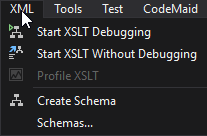
Does VS recognize Avalonia XAML as XML?
CtrlShiftEscape
on 24 Sep 2018
I have same issue. MS VS Community 2017 15.8.7.
I have installed Avalonia for Visual Studio.
 Hary309
on 12 Oct 2018
Hary309
on 12 Oct 2018
Same issue on VS Community 2017 and avalonia for vs 0.7
 PreyK
on 4 Nov 2018
PreyK
on 4 Nov 2018
same issue here i think it has started week or 2 ago, may be when 0.7 was released
 donandren
on 4 Nov 2018
donandren
on 4 Nov 2018
should be fixed in https://github.com/AvaloniaUI/AvaloniaVS/pull/76
look like issue is with 15.8 + version of visual studio https://developercommunity.visualstudio.com/content/problem/319949/icompletionsourceprovider-not-getting-called-anymo.html
donandren
on 5 Nov 2018
I have been playing with Avalonia UI in VS 15.9.4. The completion is rather painful compared to the WPF one at least. Some examples:
- If you use
Spaceto complete a tag name it doesn't insert the space. - If you use
Spaceto complete a property name the carot ends up after the last double quote. - If you use
=to complete a property: it doesn't complete the name it just has whatever you have typed so far; it doesn't close the completion window and the only suggestions is the property name you just selected. - If you type
/to complete a self-closing tag it doesn't insert/>.
 dfkeenan
on 15 Dec 2018
dfkeenan
on 15 Dec 2018
Hello. I'm having this problem in new machines, but my computer from home has auto-complete working fine. Is there any way I can help?
 lock9
on 29 Jan 2019
lock9
on 29 Jan 2019
Hi @lock9 I'm currently working on improving the intellisense completion in a new version of the designer. I'll let you know when I have something you can try out!
 grokys
on 30 Jan 2019
grokys
on 30 Jan 2019
Intellisense should now be greatly improved with more improvements coming. Closing this: if there are any more problems please file them in our VS extension repo: https://github.com/AvaloniaUI/AvaloniaVS
grokys
on 6 Aug 2020
Related issues
 stdcall
·
4Comments
stdcall
·
4Comments
 Suriman
·
3Comments
Suriman
·
3Comments
 akunchev
·
3Comments
akunchev
·
3Comments
 TheColonel2688
·
3Comments
TheColonel2688
·
3Comments
 kekekeks
·
4Comments
kekekeks
·
4Comments