Avalonia: Add support for Auto for Width and Height properties
Repro:
<DockPanel LastChildFill="True" Background="Pink">
    <DockPanel LastChildFill="True" Width="180" DockPanel.Dock="Left">
        <Border Background="Red" Width="180" Height="250" DockPanel.Dock="Top"/>
        <Border Background="Blue" Width="180" Height="Auto" DockPanel.Dock="Bottom"/>
    </DockPanel>
    <DockPanel LastChildFill="True" Width="240" DockPanel.Dock="Right">
        <Border Background="Green" Width="240" Height="250" DockPanel.Dock="Top"/>
        <Border Background="Orange" Width="240" Height="Auto" DockPanel.Dock="Bottom"/>
    </DockPanel>
    <Grid>
        <Border Background="Gray" Width="300" Height="300"/>
    </Grid>
</DockPanel>
Exception:
Portable.Xaml.XamlObjectWriterException
  HResult=0x80131500
  Message=Could not convert object 'Auto' (of type System.String) to {http://schemas.microsoft.com/winfx/2006/xaml}Double: Auto is not a valid value for Double.
  Source=Avalonia.Markup.Xaml
  StackTrace:
   at Portable.Xaml.XamlObjectWriterInternal.GetCorrectlyTypedValue(XamlMember xm, XamlType xt, Object value)
   at Portable.Xaml.XamlObjectWriterInternal.StoreAppropriatelyTypedValue(ObjectState state, MemberAndValue ms, Object obj, Object keyObj)
   at Portable.Xaml.XamlObjectWriterInternal.OnWriteValue(Object value)
   at Portable.Xaml.XamlServices.Transform(XamlReader xamlReader, XamlWriter xamlWriter, Boolean closeWriter)
   at Avalonia.Markup.Xaml.AvaloniaXamlLoader.LoadFromReader(XamlReader reader, AvaloniaXamlContext context, IAmbientProvider parentAmbientProvider)
   at Avalonia.Markup.Xaml.AvaloniaXamlLoader.Load(Stream stream, Assembly localAssembly, Object rootInstance, Uri uri)
   at Avalonia.Markup.Xaml.AvaloniaXamlLoader.Load(Type type, Object rootInstance)
   at Avalonia.Markup.Xaml.AvaloniaXamlLoader.Load(Object obj)
   at Core2D.Avalonia.Views.MainControl.InitializeComponent() in D:\DOWNLOADS\GitHub-Avalonia\Core2D\src\Core2D.Avalonia\Views\MainControl.xaml.cs:line 26
   at Core2D.Avalonia.Views.MainControl..ctor() in D:\DOWNLOADS\GitHub-Avalonia\Core2D\src\Core2D.Avalonia\Views\MainControl.xaml.cs:line 18

Inner Exception 1:
Exception: Auto is not a valid value for Double.

Inner Exception 2:
FormatException: Input string was not in a correct format.
 wieslawsoltes
All 12 comments
In WPF:
In addition to acceptable Double values, this property can also be Double.NaN. This is how you specify auto sizing behavior in code. In XAML you set the value to the string "Auto" (case insensitive) to enable the auto sizing behavior. Auto sizing behavior implies that the element will fill the height available to it. Note however that specific controls frequently supply default values through their default theme styles that will disable the auto sizing behavior unless it is specifically re-enabled.
https://msdn.microsoft.com/en-us/library/system.windows.frameworkelement.height%28v=vs.110%29.aspx?f=255&MSPPError=-2147217396
wieslawsoltes
on 19 May 2018
Wow, I didn't even know this was supported in WPF. Yes we should do this too.
 grokys
on 19 May 2018
grokys
on 19 May 2018
That would be great, I came across this when doing docking control, without Auto (from code you have to set double.NaN) its impossible to position correctly the controls automatically using DockPanel for my docking control.
wieslawsoltes
on 19 May 2018
@grokys Not sure how currently double.NaN is handled for Width and Height in Avalonia across different layouts. The double.NaN seems to be default value: https://github.com/AvaloniaUI/Avalonia/blob/44da9df5d490b4a203740c4c8e906ad03fb2698a/src/Avalonia.Layout/Layoutable.cs#L75-L85
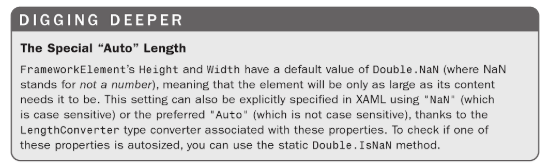
Source: WPF 4.5 Unleashed
So actually Auto is just synonym got NaN when used in Xaml.
wieslawsoltes
on 20 May 2018
@grokys Looks like I don't need Auto to get functionality as this works fine (using NaN instead of Auto):
<DockPanel LastChildFill="True" Background="Pink">
    <DockPanel LastChildFill="True" Width="180" DockPanel.Dock="Left">
        <Border Background="Red" Width="180" Height="250" DockPanel.Dock="Top"/>
        <Border Background="Blue" Width="180" Height="NaN" DockPanel.Dock="Bottom"/>
    </DockPanel>
    <DockPanel LastChildFill="True" Width="240" DockPanel.Dock="Right">
        <Border Background="Green" Width="240" Height="250" DockPanel.Dock="Top"/>
        <Border Background="Orange" Width="240" Height="NaN" DockPanel.Dock="Bottom"/>
    </DockPanel>
    <Grid>
        <Border Background="Gray" Width="300" Height="300"/>
    </Grid>
</DockPanel>
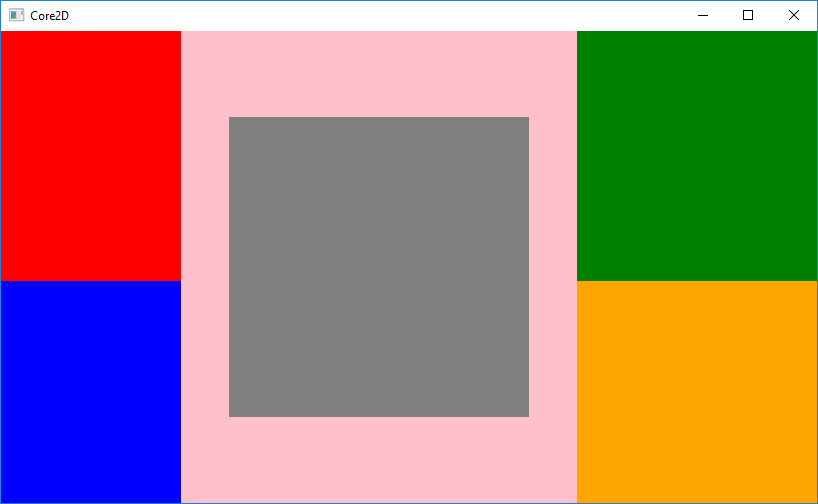
Anyway in the feature implementing support for Auto would be nice.
wieslawsoltes
on 20 May 2018
This would involve adding a DoubleConverter the rest is just straight forward.
 Gillibald
on 26 May 2018
Gillibald
on 26 May 2018
And also something like Width="*"
 Banyc
on 2 Apr 2020
Banyc
on 2 Apr 2020
Is there a workaround for this that already exists?
 derekantrican
on 14 Sep 2020
derekantrican
on 14 Sep 2020
@derekantrican
Is there a workaround for this that already exists?
Width="NaN"
 maxkatz6
on 14 Sep 2020
maxkatz6
on 14 Sep 2020
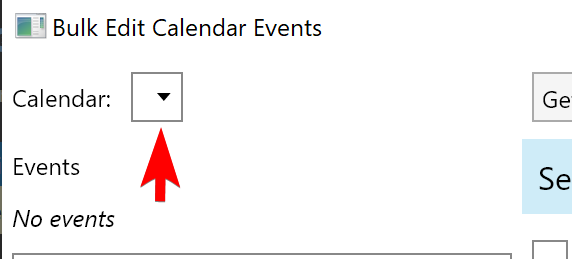
That doesn't seem to work (maybe I'm doing something wrong). I would imagine that my ComboBox should fill the remaining space of the column here, right?
XAML:
  <Grid>
    <Grid.RowDefinitions>
      <RowDefinition Height="Auto"/>
      <RowDefinition Height="*"/>
      <RowDefinition Height="Auto"/>
    </Grid.RowDefinitions>
    <Grid.ColumnDefinitions>
      <ColumnDefinition Width="Auto"/>
      <ColumnDefinition Width="Auto"/>
      <ColumnDefinition Width="*"/>
      <ColumnDefinition Width="Auto"/>
    </Grid.ColumnDefinitions>
    <StackPanel Orientation="Horizontal">
      <TextBlock Text="Calendar:" VerticalAlignment="Center" Margin="5"/>
      <ComboBox Height="25" Width="NaN" VerticalAlignment="Center" Margin="5"/>
    </StackPanel>
    ...
</Grid>
Screenshot:
derekantrican
on 14 Sep 2020
Do you need HorizontalAlignment set to Stretch?
maxkatz6
on 14 Sep 2020
I don't think that was required in the WPF world, but even so - setting HorizontalAlignment="Stretch" doesn't produce any different results for my situation here
derekantrican
on 14 Sep 2020
Related issues
 JonathaN7Shepard
·
4Comments
JonathaN7Shepard
·
4Comments
 CreateLab
·
3Comments
CreateLab
·
3Comments
 stdcall
·
4Comments
stdcall
·
4Comments
 Suriman
·
3Comments
Suriman
·
3Comments
 kekekeks
·
4Comments
kekekeks
·
4Comments
Most helpful comment
Wow, I didn't even know this was supported in WPF. Yes we should do this too.