Autorest: Autorest does not work behinde Corporate Proxy
After installing Autorest npm install -g autorest
when i use autorest command line it can't download file because i am using my corporate proxy the configuration is set on npm but autorest does not work with the same configuration of my npm proxy
 badre429
All 18 comments
Ach!
I have some code that was supposed to do proxy support, but it's not wired up yet.
Does it print the paths where it's trying to download the files from (and where it's trying to unpack them to?)
You should be able to manually download the framework and autorest binaries and unpack them into the target folder:
Download the dotnet framework link and unpack it into C:\Users\USERNAME\.autorest\frameworks\
Download the autorest link and unpack it into C:\Users\USERNAME\.autorest\plugins\autorest\<VERSION> (ie, C:\Users\USERNAME\.autorest\plugins\autorest\1.0.1-20170323-2300-nightly )
 fearthecowboy
on 27 Mar 2017
fearthecowboy
on 27 Mar 2017
I will look into the proxy issue this week.
fearthecowboy
on 27 Mar 2017
This may be somewhat related...beside the fact it won't install through .exe, if you set the npm proxy even though it says it installed there's nothing there...no binaries\files in C:\Users\USERNAME\.autorest subdirectories, but when running it via command line it says Failed to access data at /releases., before finally giving up with Error: ETIMEDOUT (EDIT: I've set proxy through both npm config set proxy and https-proxy and npm install -g autorest seems to do the work returning [email protected] afterwards).
 dimitrijevic
on 4 Apr 2017
dimitrijevic
on 4 Apr 2017
If you unpack latest binaries, in the plugins\autorest subdirectory, it returns this: Failed to access data at /releases/tags/dotnet-runtime-1.0.3., missing framework, right?
Where to unpack that from? Core .NET v1? TIA
EDIT: Nevermind, found it, if anyone needs: https://github.com/Azure/autorest/releases/tag/dotnet-runtime-1.0.3
dimitrijevic
on 4 Apr 2017
I'm getting a similar problem, but a "self signed certificate in certificate chain error". Do you want me to create a separate issue, or keep it here?

 leftside
on 14 Apr 2017
leftside
on 14 Apr 2017
I've obtained the binaries for dotnet-win7-x64.1.0.3.zip and autorest-1.0.1020170412-2300-nightly.zip. Is there a way to tell autorest to use these binaries and not try and download them? If so, this might be a workaround.
Edit 1: you don't need to tell autorest to not try and download these binaries. It detects that they've been downloaded. This works:
Download the dotnet framework link and unpack it into C:\Users\USERNAME.autorest\frameworks\
Download the autorest link and unpack it into C:\Users\USERNAME.autorest\plugins\autorest\
Edit 2: Now autorest gives me the following error:
The Microsoft.Rest.ClientRuntime.2.2.0 nuget package is required to compile the generated code.
This nuget package is installed on my machine. I'll investigate further.
leftside
on 14 Apr 2017
I had to do the following even though the ClientRuntime was installed on my machine:
https://www.nuget.org/packages/Microsoft.Rest.ClientRuntime/
leftside
on 18 Apr 2017
It's not an error, it's just telling you that the runtime is necessary for the generated code.
fearthecowboy
on 18 Apr 2017
Thanks. The workaround works great :)
leftside
on 18 Apr 2017
I can not run autorest in anyway. I've installed it, no issues there, through npm.
Now if I run it, it tells me this:

Not sure what to do next... I'm connecting through a proxy. I have environment variables for it. npm works properly, just autorest isn't working...
 StargazerNC
on 21 Jun 2017
StargazerNC
on 21 Jun 2017
Ah. Yeah; I'm replacing the plugin installation code with one that uses NPM for them as well.
I would have hoped that the proxy support would work.
The straight https requests use the nodejs package for 'request' -- which should support the variables:
Controlling proxy behaviour using environment variables
The following environment variables are respected by request:
HTTP_PROXY / http_proxy
HTTPS_PROXY / https_proxy
NO_PROXY / no_proxy
When HTTP_PROXY / http_proxy are set, they will be used to proxy non-SSL requests that do not have an explicit proxy configuration option present. Similarly, HTTPS_PROXY / https_proxy will be respected for SSL requests that do not have an explicit proxy configuration option. It is valid to define a proxy in one of the environment variables, but then override it for a specific request, using the proxy configuration option. Furthermore, the proxy configuration option can be explicitly set to false / null to opt out of proxying altogether for that request.
request is also aware of the NO_PROXY/no_proxy environment variables. These variables provide a granular way to opt out of proxying, on a per-host basis. It should contain a comma separated list of hosts to opt out of proxying. It is also possible to opt of proxying when a particular destination port is used. Finally, the variable may be set to * to opt out of the implicit proxy configuration of the other environment variables.
However, if those variables don't work you can download the bits and place them in the right folders with a bit of powershell:
$ProgressPreference='silentlycontinue'

iwr https://github.com/Azure/autorest/releases/download/v1.1.0/autorest-1.1.0.zip -o "$env:home\downloads\autorest-1.1.0.zip"
iwr https://aka.ms/dotnet/1.0.5/windows/x64 -o "$env:home\downloads\dotnet-1.0.5.zip"

mkdir -force -ea 0 "$env:home\.autorest"
mkdir -force -ea 0 "$env:home\.autorest\frameworks"
mkdir -force -ea 0 "$env:home\.autorest\plugins"

Expand-Archive  "$env:home\downloads\autorest-1.1.0.zip" -DestinationPath "$env:home\.autorest\plugins\autorest\1.1.0\" -force
Expand-Archive  "$env:home\downloads\dotnet-1.0.5.zip" -DestinationPath "$env:home\.autorest\frameworks" -force
Hello,
After I do as you explain, I did download and copied the files. I now have a diferent error message:
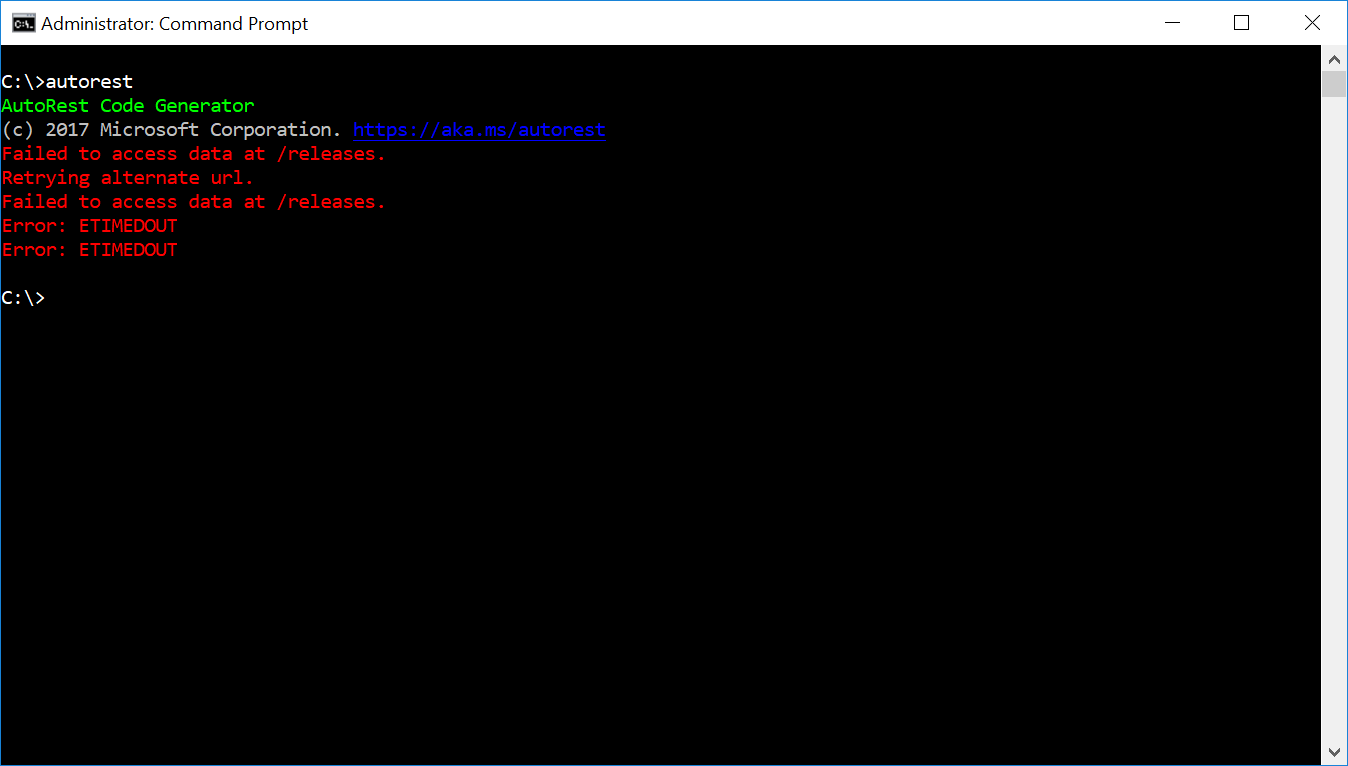
I might be missing something here, as the proper place to put the files? Something else?
StargazerNC
on 22 Jun 2017
Damn. It's still trying to get the list of latest versions from the github releases page.
I wonder if we can just force it not to look at the network at all.
Hack to work around:
find the app.js in the installed module folder for autorest and find:
    static main(networkEnabled) {
        return __awaiter(this, void 0, void 0, function* () {
            try {
and change it to
    static main(networkEnabled) {
        networkEnabled = false; // disable network checks.
        return __awaiter(this, void 0, void 0, function* () {
            try {
We're just integrating and testing the newer packaging stuff that relies on npm for everything (well, except for the dotnet framework). Within a couple weeks this should be less of a problem 😿
fearthecowboy
on 29 Jun 2017
Hi @fearthecowboy just wondering will this issue be fixed in the next release. our team sites behind a coporate firewall and we've managed to get around it by hacking the app.js etc but would be great to just get it working out of the box
 Ricky-G
on 11 Aug 2017
Ricky-G
on 11 Aug 2017
As of the 2.0 Release, AutoRest uses NPM for all of the module aquisition.
I found a post that talks about using npm with a proxy:
http://wil.boayue.com/blog/2013/06/14/using-npm-behind-a-proxy/
Does that solve the problem?
fearthecowboy
on 10 Nov 2017
Hi Garret,
It might actually solve it, yes. I'm occupied with other projects at the
moment, have not much time to test it. As soon as I do, I'll let you know.
Cheers!
2017-11-10 20:41 GMT+00:00 Garrett Serack notifications@github.com:
As of the 2.0 Release, AutoRest uses NPM for all of the module aquisition.
I found a post that talks about using npm with a proxy:
http://wil.boayue.com/blog/2013/06/14/using-npm-behind-a-proxy/Does that solve the problem?
—
You are receiving this because you commented.
Reply to this email directly, view it on GitHub
https://github.com/Azure/autorest/issues/2071#issuecomment-343580465,
or mute the thread
https://github.com/notifications/unsubscribe-auth/AFTk1jHcA8L7DtHENooeX8Ek_AyToOq_ks5s1LUJgaJpZM4Mqm6V
.
--
Com os melhores cumprimentos,
Nuno Coimbra
http://8minutosluz.wordpress.com http://www.8minutosluz.com
http://www.astropt.org
Antes de imprimir este email, pense se tem mesmo de o fazer. O Meio
Ambiente agradece!
StargazerNC
on 15 Nov 2017
@fearthecowboy Via NPM this works fine now, so feel free to close this issue.
Ricky-G
on 11 Jan 2018
I know that you have closed this issue but I also sit behind a corporate firewall..and am haiving a nightmare with this. I can successfully pull down the latest autorest version using the npm configs for proxies, However when I attempt to try and generate a client using autorest it tries to pull down the dependancies and fails i.e. packages autorest.csharp and autorest.core etc. and fails with incorrect framework versions. also It seems to be using Yarn somewhere to get these dependent packages listed above. Any pointers would be great
 madheaduk
on 28 Dec 2018
madheaduk
on 28 Dec 2018
Related issues
 hartmannr76
·
3Comments
hartmannr76
·
3Comments
 akak1977
·
4Comments
akak1977
·
4Comments
 DheerendraRathor
·
7Comments
DheerendraRathor
·
7Comments
 pbolduc
·
7Comments
pbolduc
·
7Comments
 VitaliyKurokhtin
·
6Comments
VitaliyKurokhtin
·
6Comments
Most helpful comment
I know that you have closed this issue but I also sit behind a corporate firewall..and am haiving a nightmare with this. I can successfully pull down the latest autorest version using the npm configs for proxies, However when I attempt to try and generate a client using autorest it tries to pull down the dependancies and fails i.e. packages autorest.csharp and autorest.core etc. and fails with incorrect framework versions. also It seems to be using Yarn somewhere to get these dependent packages listed above. Any pointers would be great