Autoprefixer: Add support for an autoprefixer config in package.json and/or a seperate config file
I am working on a create-react-app project at the moment and I can't figure out how to enable Autoprefixer CSS Grid translations.
I can't use control comments because we are using Material UI CSS in JS. It doesn't really provide a way to add comments to the output CSS
https://material-ui.com/styles/basics/#higher-order-component-api
creat-react-app is intended to be a simple zero config React solution that hides all of the ugly webpack stuff from the author.
It is possible to make all that webpack stuff editable (and thus making it possible to edit the autoprefixer settings) by ejecting the project, but this is not a preferable option.
What I would like to do instead is define my custom autoprefixer settings in a file in the root folder or as an option in the package.json file (think like how Browsers List works).
This would theoretically allow for custom Autoprefixer configurations in projects like create-react-app and Angular that are not built to give their users full configuration control.
 Dan503
All 34 comments
Have the same problem here. I'm using CSS-in-JS solutions to style my components in the project, and I don't really want to eject the project. What I want is to add config to the package.json.
 Chun-Lin
on 21 Oct 2019
Chun-Lin
on 21 Oct 2019
Adding the whole config for one feature could be a tricky thing (especially, because finding config will slow down Autoprefixer for all users).
But I understand that we need a solution for grid: 'autoplace', CSS-in-JS and CRA problem.
Can we use .env file and set the global environment variable?
 ai
on 21 Oct 2019
ai
on 21 Oct 2019
Adding it to a seperate file might be a bit expensive since you would need to look for the file, check it exists, if it does, read the file, parse it, apply the settings from it.
Adding it through package.json wouldn't be that bad though would it? It is basically just a require('../../package.json') statement isn't it? That is pretty efficient and won't cause much slow down.
Dan503
on 21 Oct 2019
It is basically just a require('../../package.json') statement isn't it?
Nope. You need to walk through the path to find project root package.json. Browserslist does it already, but we do not have API to pass it from Browserslist to Autoprefixer (and this API could be hard to make since Browserslist could read config from a different location).
This is why I think the environment variables process.env.AUTOPREFIXER_GRID is the best option. Easy to add and fast to read.
You can set it in your package.json scripts by AUTOPREFIXER_GRID=autoplace react-script build.
Will it work in your case?
ai
on 21 Oct 2019
That might work.
It is possible to set more than one environment variable right?
Something like AUTOPREFIXER_GRID=autoplace environment=development react-script build?
I would prefer the environment variable not be all caps unless it is following a common convention by doing that.
Dan503
on 21 Oct 2019
I would prefer the environment variable not be all caps unless it is following a common convention by doing that.
It seems like to is the UNIX convention to have it uppercases. We already use uppercases variables in Browserslist.
It is possible to set more than one environment variable right?
Yeap.
ai
on 21 Oct 2019
Sounds like a good solution to me then 😊
Dan503
on 21 Oct 2019
Done 24b9aed
I will release it when we will speed up Browserslist https://github.com/postcss/autoprefixer/issues/1256
ai
on 22 Oct 2019
Was this released in 9.6.5 as well?
Maybe add it to the release notes.
Dan503
on 24 Oct 2019
@Dan503 nope. This feature will be in 9.7 today.
ai
on 24 Oct 2019
Released in 9.7
ai
on 24 Oct 2019
I'll give it a try tomorrow morning and see if it works 😁
Dan503
on 24 Oct 2019
I installed the newest browserslist to my project, the version is 9.7.1, and set the build script like "AUTOPREFIXER_GRID=autoplace react-scripts build", but css grid still cannot be prefixed in styled-components. Below is the example codes.
const Grid = styled.div`
  /* autoprefixer grid: autoplace */
  display: grid;
  height: 600px;
  grid-gap: 20px;
  grid-template-columns: 50% 2fr 1fr 1fr;
  grid-template-rows: 1fr 2fr 1fr 1fr;
`
CSS-in-JS solution is working in this version by using environment variables?
Chun-Lin
on 1 Nov 2019
autoprefixer is the npm package that you need to update.
If you are using the environment variable then /* autoprefixer grid: autoplace */ should not be needed.
Dan503
on 1 Nov 2019
I can confirm that the environment variable works
These are the steps I took:
npm i create-react-app -g(not necesary if you have used create-react-app before)create-react-app test-appcd test-app- Added
display: grid;to.App { ... }intest-app/src/App.css - Added
user-select: none;as well to make sure Autoprefixer is actually running npm i autoprefixer@latest -D- Under
"browserslist">"development"in package.json, I added"last 1 ie version" - I updated
"scripts"in package.json to the following:
"scripts": {
    "start": "set AUTOPREFIXER_GRID=autoplace && react-scripts start",
    "build": "set AUTOPREFIXER_GRID=autoplace && react-scripts build",
    "test": "set AUTOPREFIXER_GRID=autoplace && react-scripts test",
    "eject": "react-scripts eject"
},
- run
npm start
It compiles cleanly and it adds the CSS Grid prefixes as expected 😊
Dan503
on 1 Nov 2019
Yeah, add display:grid to App.css works for me, but when I tried to styling App.js by using styled-components, the CSS Grid prefixes are not prefixed.
Chun-Lin
on 1 Nov 2019
It must not be getting the environment variable passed into it :/
You might need to raise this as an issue against Styled Components, I'm not sure there is anything Autoprefixer can do about your use case 🙁
Dan503
on 1 Nov 2019
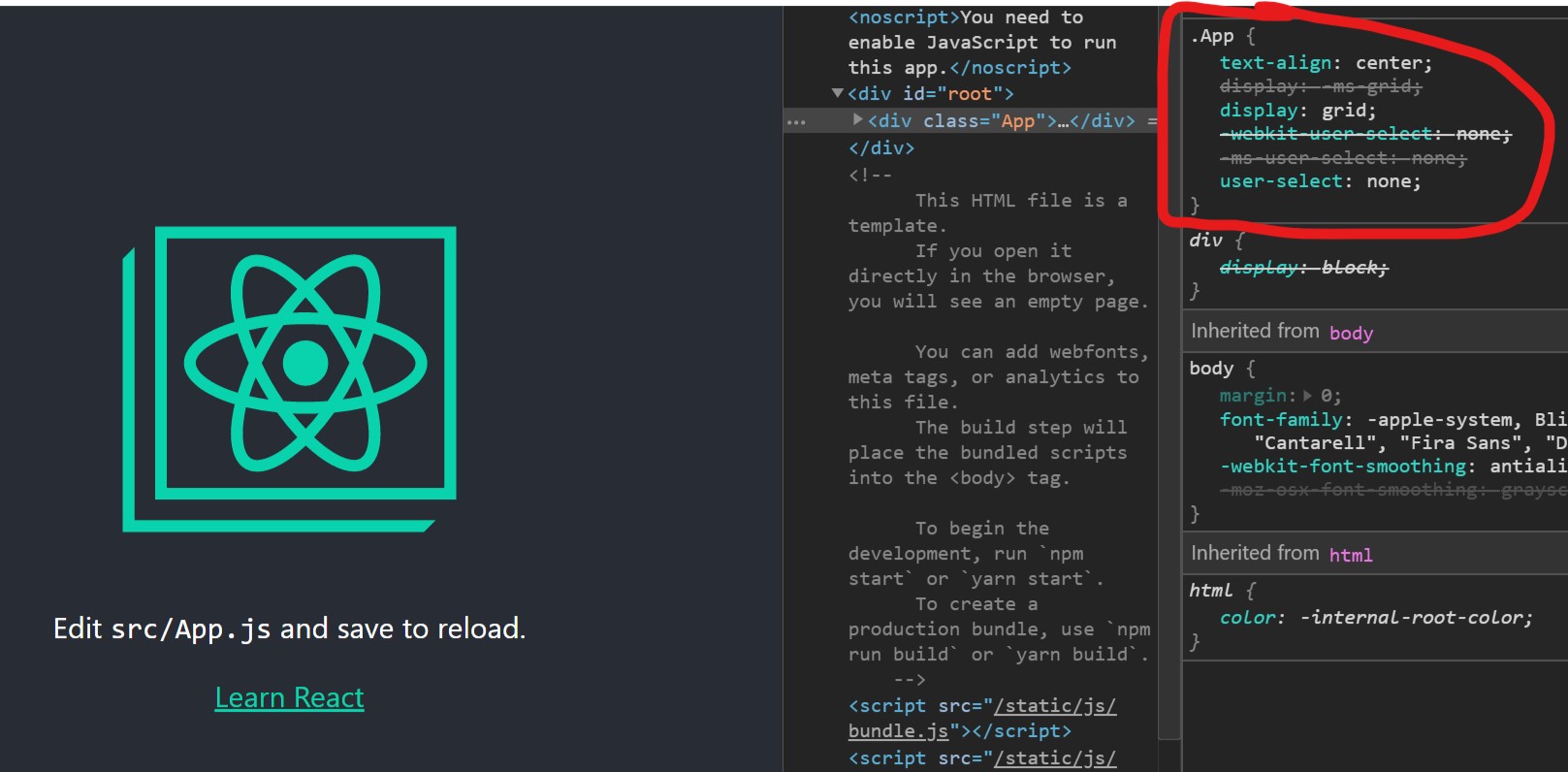
I just found that even in App.css the CSS Grid prefixes are not working.
The steps I took are:
npx create-react-app test-app- cd
test-app - Added display: grid; to .App { ... } in
test-app/src/App.css yarn add autoprefixer@latest -D- Added
user-select: none;as well to make sure Autoprefixer is actually running - Under "browserslist" > "development" and "browserslist" > "production" in package.json, I added "last 1 ie version"
- set "scripts" in
package.jsonlike,"start": "set AUTOPREFIXER_GRID=autoplace && react-scripts start" - run
yarn start
user-select is perfectly prefixed, but CSS Grid cannot be prefixed, unless I add /* autoprefixer grid: autoplace */ on top of App.css, and CSS-in-JS (styled-components) cannot be prefixed in both ways.
Chun-Lin
on 1 Nov 2019
Wierd, I'm not sure why it isn't working for you :/

My package.json file:
{
    "name": "test-app",
    "version": "0.1.0",
    "private": true,
    "dependencies": {
        "autoprefixer": "^9.7.1",
        "react": "^16.11.0",
        "react-dom": "^16.11.0",
        "react-scripts": "3.2.0"
    },
    "scripts": {
        "start": "set AUTOPREFIXER_GRID=autoplace && react-scripts start",
        "build": "set AUTOPREFIXER_GRID=autoplace && react-scripts build",
        "test": "set AUTOPREFIXER_GRID=autoplace && react-scripts test",
        "eject": "react-scripts eject"
    },
    "eslintConfig": {
        "extends": "react-app"
    },
    "browserslist": {
        "production": [
            ">0.2%",
            "not dead",
            "not op_mini all"
        ],
        "development": [
            "last 1 chrome version",
            "last 1 firefox version",
            "last 1 safari version",
            "last 1 ie version"
        ]
    }
}
I'm on Windows. I'm wondering if this is a platform issue 🤔
Dan503
on 1 Nov 2019
I have almost the same package.json as yours, just add "last 1 ie version" to production.
The CSS code

Chrome Devtool

Chun-Lin
on 1 Nov 2019
I don't have Windows to test right now, but I'll try to find a Windows PC to see the result and let you know tomorrow.
Thanks for your help @Dan503 :)
Chun-Lin
on 1 Nov 2019
If this method only works on Windows then it is still a bug, but maybe something that should be opened as a new ticket since the work of applying the actual environment variable to Autoprefixer is done.
Dan503
on 1 Nov 2019
@Dan503, I've tested both Windows and Mac with the same codebase, looks like CSS grid prefixed perfectly in App.css on Windows 10, but it doesn't work on Mac, and styled-components doesn't work on both platforms.
Chun-Lin
on 4 Nov 2019
@Chun-Lin does styled-components has Autoprefixer support?
It takes CSS parser to the client-side bundle (instead of compiling CSS once during deploy).
ai
on 4 Nov 2019
@ai you are right, it was my fault. Looks like it doesn't support autoprefixer because it prefixes codes during runtime. It uses stylis to prefix CSS, butstylis doesn't support CSS grid prefixes for now.
Chun-Lin
on 4 Nov 2019
@Chun-Lin you can try Astroturf or Linaria. It is zero-runtime CSS-in-JS. In addition to full Autoprefixer support, they also have better performance since they compile CSS only once during runtime.
ai
on 4 Nov 2019
I think the problem on Mac is that the environment variables aren't getting passed into React.
If you can figure out how to get React to read the environment variable on Mac then we can update the documentation. I don't have access to a Mac so I'm not much help.
Dan503
on 4 Nov 2019
Thanks @ai, I'll try to promote another CSS-in-JS solution when the team projects need CSS GRID :)
Chun-Lin
on 4 Nov 2019
@Dan503, I used the original script "start": "AUTOPREFIXER_GRID=autoplace react-scripts start", and then it worked in App.css on Mac, but it doesn't work on Windows PC. I think the problem is the differences of cmd environment on both platforms.
An easy solution is to install cross-env and update the script to "start": "cross-env AUTOPREFIXER_GRID=autoplace react-scripts start", then that works on both platforms as I've tested on both of them.
Chun-Lin
on 4 Nov 2019
I'll try to promote another CSS-in-JS solution when the team projects need CSS GRID :)
I think you should log a ticket against styled components asking for Post CSS compatibility support.
Dan503
on 4 Nov 2019
I think you should log a ticket against styled components asking for Post CSS compatibility support.
There is an issue about switching prefixer from stylis to autoprefixer.
styled-components/styled-components#1184
Looks like they choose stylis for better performance, but since autoprefixer 9.7.x performance has been improved, I should highlight it again.
Chun-Lin
on 4 Nov 2019
There is an issue about switching prefixer from stylis to autoprefixer
Don't forget that stylis in SC is slower than Autoprefixer in Astroturf/Linaria. Because of architecture, SC must compile CSS and add prefixes on any style changes on client side. Zero runtime CSS-in-JS does it only once during the deploy.
The main problem of SC, that you need to put all you CSS tools to client side bundle. JS bundle size is very critical for performance (because compiling and executing 100 KB of JS is much slower that downloading the same 100 KB of data and can't be cached). As result, it will be very bar to put Can I Use data to client side bundle. SC can't switch to Autoprefixer because of their architecture.
ai
on 4 Nov 2019
Don't forget that stylis in SC is slower than Autoprefixer in Astroturf/Linaria. Because of architecture, SC must compile CSS and add prefixes on any style changes on client side. Zero runtime CSS-in-JS does it only once during the deploy.
The main problem of SC, that you need to put all you CSS tools to client side bundle. JS bundle size is very critical for performance (because compiling and executing 100 KB of JS is much slower that downloading the same 100 KB of data and can't be cached). As result, it will be very bar to put Can I Use data to client side bundle. SC can't switch to Autoprefixer because of their architecture.
@ai you are right, I think they won't switch to autoprefixer because SC is a runtime CSS-in-JS that bigger bundle size may hurt the performance.
https://github.com/postcss/autoprefixer/issues/1257#issuecomment-549322429
I think for now a workaround way to write CSS grid in styled-components is to use autoprefixer online service to convert the code.
Chun-Lin
on 5 Nov 2019
Related issues
 jens-duttke
·
19Comments
jens-duttke
·
19Comments
 Unknow-max
·
27Comments
Unknow-max
·
27Comments
 bessudnov
·
20Comments
bessudnov
·
20Comments
 bardware
·
24Comments
bardware
·
24Comments
 Dawdre
·
29Comments
Dawdre
·
29Comments
Most helpful comment
Released in 9.7