Auth0-spa-js: Can't createAuth0Client localstorage + rotation refresh tokens and refresh token is invalid
Description
Due to delights of safari's (and soon other browsers following) cookie restrictions, we've moved towards using localstorage + rotating refresh tokens. We're using a custom domain that is not a sub domain of the site using the authentication (to be shared with another site).
We're facing issues where we're unable to get access to the auth0 instance when a refresh token is invalid. As we can't get the instance, we can't even call logout to cleanup the local storage or event assume a user as logged out.
Reproduction
Go to the local storage, and break (add random characters to) the refresh token stored in localstorage. On a page refresh (after expiry so refresh needs to happen) the SDK will throw an error during create.
import createAuth0Client from '@auth0/auth0-spa-js';
createAuth0Client({
    domain,
    audience,
    client_id: clientId,
    redirect_uri: redirectManagerUrl,

    useRefreshTokens: true,
    cacheLocation: 'localstorage',
})
    .then((instance) => {
        console.log('got the auth0 instance', instance);
    })
    .catch((err) => {
        console.log('Could not get auth0 instance', err);
        /*
        Error: Unknown or invalid refresh token.
            at eval (VM69756 auth0-spa-js.production.esm.js:17)
            at eval (VM69756 auth0-spa-js.production.esm.js:17)
            at Object.eval [as next] (VM69756 auth0-spa-js.production.esm.js:17)
        */
    });
Catch is run without the instance, so we can't log out / clean up the user.
In these scenarios, we would like to 'assume' that just the user is not authenticated (isAuthenticated/getAccessToken all still working, but as a non authenticated user).
Environment
- Auth0 SDK "@auth0/auth0-spa-js": "1.7.0"
- All browsers are affected by this.
 darrennolan
All 9 comments
From 1.7 you’re also able to get access to the constructor directly instead of using createAuth0Client. Doing this means that you can do whatever custom error handling you need but for your scenario you will have access to the client object.
Something like this would be equivalent:
import { Auth0Client } from ‘@auth0/auth0-spa-js’;
const auth0 = new Auth0Client(/* your options */);
try {
await auth0.getTokenSilently();
} catch {
// handle invalid_refresh_token
}
This is a scenario we should probably handle so you can still use the factory function, but does this get you unblocked in the meantime?
 stevehobbsdev
on 5 May 2020
stevehobbsdev
on 5 May 2020
We've essentially ended up using a hybrid of the two - attempting to call createAuth0Client and if there's an exception, using the constructor to create a client that we can call logout on. Hopefully that gives the best of both worlds.
let auth0Client;

(async () => {
  const auth0ClientOptions = {
    // ...
  };

  try {
    auth0Client = await createAuth0Client(auth0ClientOptions);
  } catch (e) {
    // Something has gone wrong when the SDK has attempted to create an
    // Auth0 client and have it set up the correct authentication status for
    // the user. In this bad state, there's not much we can do but force a
    // log out on the user so that they can log in again.
    auth0Client = new Auth0Client(auth0ClientOptions);
    auth0Client.logout();
  }
})();
 alistair-brown-songtradr
on 5 May 2020
alistair-brown-songtradr
on 5 May 2020
So we'll try and work around this, but await createAuth0Client shouldn't be throwing like this, should it? Feel it should just clean up and suggest the current user is logged out?
Further to this, I suppose my greatest enquiry is into the actual mechanism of rotating tokens + localstorage, as I believe what's happening to our users is they're browsing in two tabs, where one tab is continuing to refresh the tokens, but the first tab is not getting the newly saved refresh token from the second - after users close the second tab and try to do something back in the first tab, it's no longer valid and a full login must happen again.
The only other edge case I can think users are hitting to get into this state in the first place, is hitting refresh, and closing/refreshing browsers before that transaction is completed and the new token is stored in local storage.
darrennolan
on 6 May 2020
@darrennolan Originally the SDK hid all errors when calling createAuth0Client but was changed to only suppress the login_required error after some feedback received both internally and externally. If you need to do some custom error handling, the way forward is to use the Auth0Client constructor directly and not use createAuth0Client.
If your users are using two tabs and you're also using local storage, then the updated refresh token should be available in both tabs as they'll both be reading from the same store. You're right though in that if the first tab does somehow not receive the updated token, it will try to exchange the _old_ token which will not only fail, it will kick in the re-use detection and will invalidate both refresh tokens.
That's a property of the rotating refresh token system as a whole and nothing to do with this SDK, but the fact that tab 1 might have an old refresh token when using local storage is a problem.
Are you able to come up with a simple repro that we can look at? Or, are you able to demonstrate this with the built-in playground? (clone the repo, then npm i && npm start).
stevehobbsdev
on 6 May 2020
it will kick in the re-use detection and will invalidate both refresh tokens.
Can you explain this? Does that happen for all client apps or just the refresh tokens issued by the client app we are using for web?
I can't accurately reproduce the issue that our users are facing, the only way I can enter the same state users are seeing is to edit local storage and break the refresh token.
Using the playground we can do the same thing with our main app.
If there a 'nicer' way to recover from a broken locally stored refresh token? Vs logout/force sign back in?
darrennolan
on 8 May 2020
It only invalidates the refresh token for that grant, or user session (it's not technically the session but it's fine for the purpose of this conversation).
The only way to get a new refresh token in this case is to get the user back through the interactive flow. i.e. get them to log in again. This is just how refresh tokens in OAuth2 work. There's no way to silently get a new refresh token here if the token you have has been invalidated or corrupted.
So, if you manually corrupt the token, the problem you're seeing is expected and by design. What I'm more interested in is the situation you're describing with your users - if you're able to come up with some repro steps for that that don't involve manually manipulating the token, we can go from there.
stevehobbsdev
on 8 May 2020
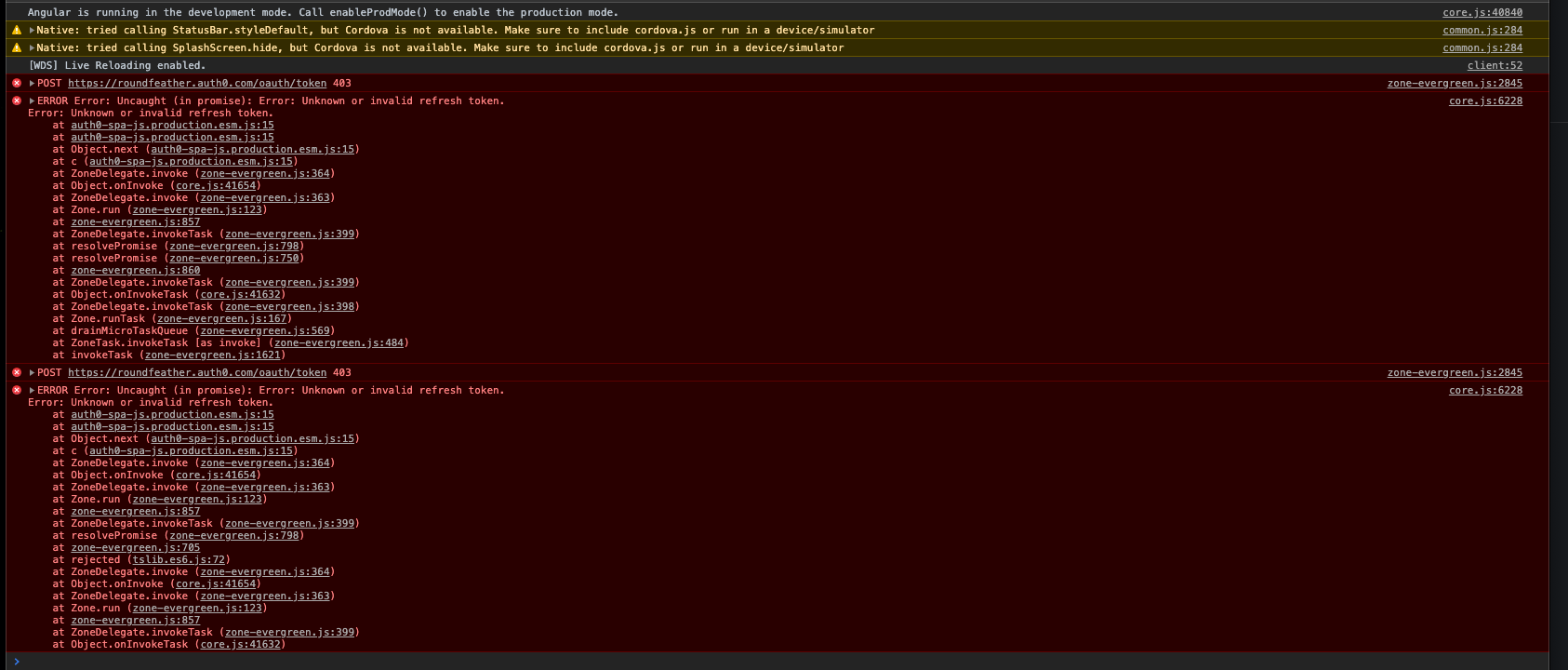
We're facing the same issue now. We use this setup:
    this.auth0 = new Auth0Client({
      domain: environment.auth0Domain,
      client_id: environment.auth0ClientId,
      useRefreshTokens: true,
      redirect_uri: redirectUri,
      cacheLocation: 'localstorage',
    });
After first login, everything works. Then do nothing for 6-9 hours, refresh the tab, boom you get this error. Only workaround is for now to manually reset localStorage.
This happens during development using only one tab and for example Ionic app using https://localhost:420 and with the built&packaged app as well.
 marcj
on 15 Jun 2020
marcj
on 15 Jun 2020
@marcj Thanks for the report. Are you able to reproduce this in the built-in SPA SDK playground?
stevehobbsdev
on 18 Jun 2020
This needs to be reopened. There is simply no provision for clearing an expired refresh token. You cannot create a client, cannot reinitiate login flow, cannot even logout without bypassing the client using alistair's workaround. A couple other community-provided workarounds shown here: https://community.auth0.com/t/rotating-refresh-token-locking-users-out-after-expiry/46203/2
Having no built-in handling of expired refresh tokens seems like a pretty big gap.
 nathan-rapidstash
on 7 Nov 2020
nathan-rapidstash
on 7 Nov 2020
Related issues
 jgbpercy
·
7Comments
jgbpercy
·
7Comments
 Arnaud73
·
7Comments
Arnaud73
·
7Comments
 hidegh
·
5Comments
hidegh
·
5Comments
 alexislucas-toast
·
3Comments
alexislucas-toast
·
3Comments
 szilagyikinga
·
6Comments
szilagyikinga
·
6Comments
Most helpful comment
We've essentially ended up using a hybrid of the two - attempting to call
createAuth0Clientand if there's an exception, using the constructor to create a client that we can calllogouton. Hopefully that gives the best of both worlds.