Auth0-spa-js: SameSite Cookie Warning
Description
- Warning about SameSite cookies
A cookie associated with a cross-site resource at https://auth0.auth0.com/ was set without the `SameSite` attribute. A future release of Chrome will only deliver cookies with cross-site requests if they are set with `SameSite=None` and `Secure`. You can review cookies in developer tools under Application>Storage>Cookies and see more details at https://www.chromestatus.com/feature/5088147346030592 and https://www.chromestatus.com/feature/5633521622188032.
Reproduction
- Login with auth0 domain
- Redirect back to the application

Environment
- Library Version:
1.6.1 - Browser:
Chrome Version 79.0.3945.117
Suggestion
Add sameSite option to
ClientStorageOptions
https://github.com/auth0/auth0-spa-js/blob/488fc3028e8b8d1f9c2ab2276e51ccc5dc64823a/src/storage.ts#L3-L5
Pass the option down to
es-cookiehttps://www.npmjs.com/package/es-cookie#samesite
Default to
SameSite=None; Secureto enforce https
 rkrasiuk
All 12 comments
Hey @rkrasiuk, thanks for raising this. We are aware of the SameSite changes coming into effect and are taking steps. The cookie you're getting the warning about is coming from the auth0.com domain, rather than the cookies we set from the SDK, so I don't believe there's anything to do here except wait for the server changes to roll out.
 stevehobbsdev
on 13 Jan 2020
stevehobbsdev
on 13 Jan 2020
@stevehobbsdev actually the SDK is setting the attributes on the cookie. So every time you call
ClientStorage.save('auth0.is.authenticated', true, { daysUntilExpire: 1 });
and going into the function implementation
export const save = (
  key: string,
  value: any,
  options: ClientStorageOptions
) => {
  Cookies.set(key, JSON.stringify(value), {
    expires: options.daysUntilExpire
  });
};
There are additional options you can pass and I believe it's up to SDK to set a SameSite attribute.
rkrasiuk
on 13 Jan 2020
@stevehobbsdev I can make a PR, if that would be helpful
rkrasiuk
on 13 Jan 2020
@rkrasiuk Can you clarify which cookies you're talking about?
The warning you're getting in the original issue is from auth0.com but this code:
ClientStorage.save('auth0.is.authenticated', true, { daysUntilExpire: 1 });
.. is setting a cookie for your application domain (which is not auth0.com).
The former is something already being addressed by Auth0, and the latter shouldn't be affected by SameSite anyway as you will be able to read such cookies from JavaScript.
stevehobbsdev
on 14 Jan 2020
I've clarified this internally to try and give you some extra detail. The changes required for the cookies set by auth0.com (the ones that the warning is about) have already been done. If you inspect the network traffic from the /authorize call, you should see that the auth0 cookie is already being transmitted with samesite=None, and you should find that getTokenSilently() calls still work with all of the samesite feature flags turned on.
What we can't understand is why Chrome is still showing the warning (I'm getting the warning here too) but everything still seems to work. I've also tried the Canary build (81.0.4027.00) and verified that the SDK still works as normal.
Could be a case of a bad warning message or a bug that is showing the warning in the first place.
stevehobbsdev
on 14 Jan 2020
@stevehobbsdev thank you for a quick response. let me be more clear, pardon for not including the whole screenshot. The issue is I get a set of warnings about SameSite attribute associated with different resources, including my auth0 domain and http://auth0.com/, http(s)://support.auth0.com/,
http(s)://manage.auth0.com/ etc. It adds up to 9 warnings total. Also, this happens only when auth0.is.authenticated is set to true and /oauth/token call happens, not during login/password authentication itself.
This indeed seems weird... Let me know if you find anything out
rkrasiuk
on 14 Jan 2020
Not sure why this was closed, we are seeing the same thing with Chrome.
 knutster
on 16 Jan 2020
knutster
on 16 Jan 2020
It was closed because the original issue doesn't really have anything to do with this SDK. The cookies concerned come from auth0.com and is a server concern. There is nothing that the SDK can do to change this.
We have already changed the server side to set the samesite attribute accordingly - if you inspect the network tab, you should see the auth0 cookie come down with samesite set to None in Chrome. I can verify that I'm getting the warning too, yet cookies seem to be set OK and everything still works. This is why I mentioned above that this may be a Chrome bug.
We have lots of community posts and this one announcing the rollout.
If you are still concerned, please try the following:
- Inspect the actual cookie attributes and verify whether the
samesiteattribute is being set correctly - Enable the samesite flags in Chrome, or download the Canary release of Chrome (which has the flags set by default) and verify that calls to
getTokenSilently()still work
If you are concerned that something isn't working properly as it should, let me know.
stevehobbsdev
on 16 Jan 2020
@stevehobbsdev Thank you for the clarification!
knutster
on 17 Jan 2020
@stevehobbsdev the warning is probably coming from the auth0_compat and did_compat cookies. These cookies are http only and secure but not SameSite=None. It might be useful to pass this to dev.
edit
Nevermind :)
For these cookies, Auth0 will:
Set the sameSite attribute to none, with the cookie requiring the use of HTTPS (regardless of environment).
Set fallback cookies in the event that a legacy browser does not support sameSite being set to None. These fallback cookies are auth0_compat, auth0-mf_compat and did_compat.
https://auth0.com/docs/sessions/concepts/cookie-attributes
I am pretty sure these are triggering the message though.
So, no worries here to whoever is reading this.
 toonvd
on 10 Feb 2020
toonvd
on 10 Feb 2020
Man I'm getting the warning message and I'm not seeing that header being sent from auth0 on neither the authorize nor the token endpoints.
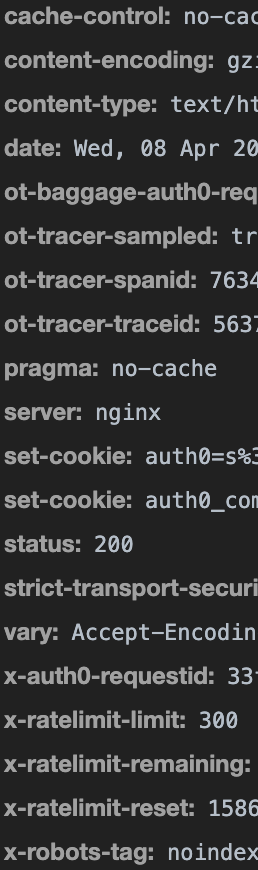
Any suggestions?
 chaseWillden
on 8 Apr 2020
chaseWillden
on 8 Apr 2020
Even though your image is cut off, I can guess that auth0_compat is in your second setCookie. That one is causing the warning. The warning will not go away as they always sent the compat cookies as stated in the docs. However, this doesn't do any harm :-).
toonvd
on 8 Apr 2020
Related issues
 justinhelmer
·
4Comments
justinhelmer
·
4Comments
 Benjathing
·
5Comments
Benjathing
·
5Comments
 chbert
·
5Comments
chbert
·
5Comments
 hidegh
·
5Comments
hidegh
·
5Comments
 jgbpercy
·
7Comments
jgbpercy
·
7Comments
Most helpful comment
Even though your image is cut off, I can guess that auth0_compat is in your second setCookie. That one is causing the warning. The warning will not go away as they always sent the compat cookies as stated in the docs. However, this doesn't do any harm :-).