Auth0-spa-js: Cookie Pollution - still happening to us with latest version
Hello,
We are using auth0-spa-js in our product (perception point X-ray)
And are still encountering the cookie pollution issue reported in:
https://github.com/auth0/auth0-spa-js/issues/217
Even after upgrading auth0-spa-js to latest version and deploying to production every week.
Description
Sometimes our users encounter this error when trying to log in to our web app.
It's hard to determine when and why this happens.
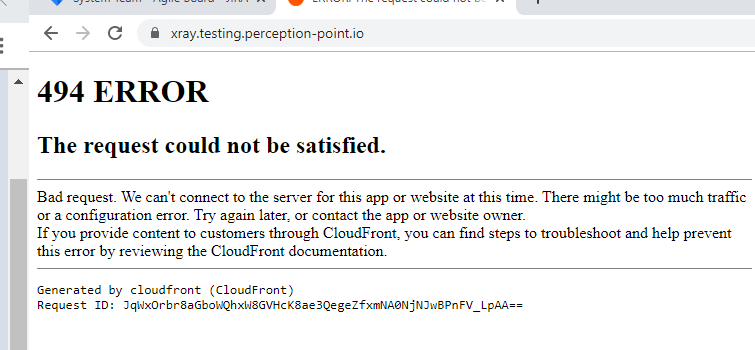
Until the user will not manually clear his cookies for our domain in his browser, he will not be able to log in.
Here is a screenshot of an example for all the cookies stored for our domain on the user's browser when the error was received:
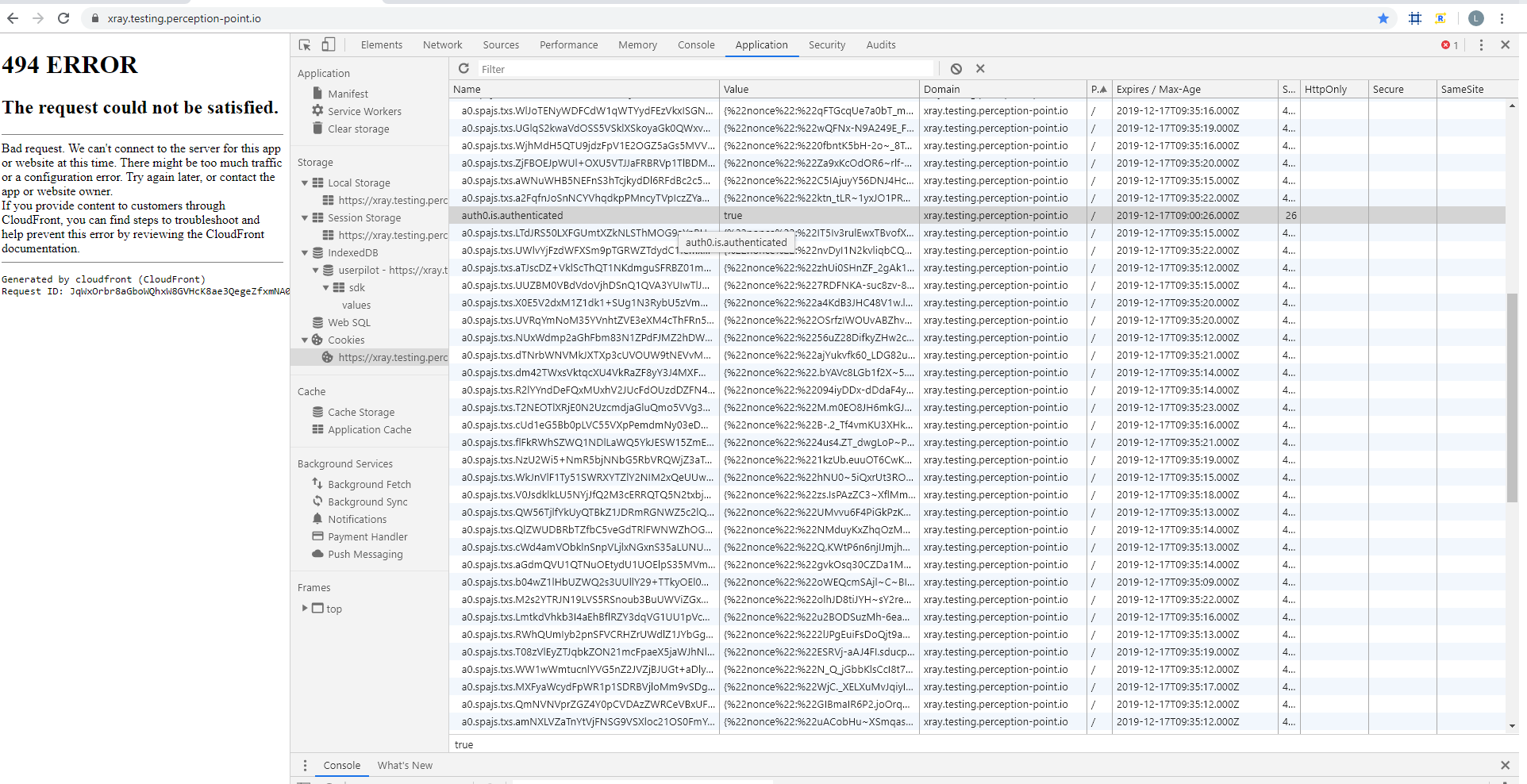
Example cookie:
domain: xray.testing.perception-point.io
name:a0.spajs.txs.LmtkdVhkb3I4aEhBflRZY3dqVG1UU1pVcn5qYmF6MVRfS0RuVXBQNWtRTQ%3D%3D
value: {%22nonce%22:%22s0xI3.u6P30RgR0_H6APyOAS-KOoKh111q1.xrcRCJT%22%2C%22code_verifier%22:%22Ch6GBCJ-naY7pFWa8Mq19yjJ35F0LSwKGzlYwR6wQCG%22%2C%22appState%22:{%22returnPath%22:%22/scans?dateTimeRange=preset-lastDay&freeText=liron&origin=VOID&verdict=VOID%22}%2C%22scope%22:%22openid%20profile%20email%20user_metadata%20app_metadata%20picture%22%2C%22audience%22:%22https://xray.perception-point.io/%22}
expires: 2019-12-17T09:35:16.000Z
Environment
Domain:
https://xray.testing.perception-point.io/
OS:
Windows 10
Browser:
Google Chrome Version 79.0.3945.79
Library version:
1.5.0
 Roeefl
All 48 comments
I'd just like to note that this is really urgent for us and we are quite desperate to resolve it.
We've been getting constant complaints from clients that this arbitrarily happens to them once a week or two, and from many of them.
Thank you
Roeefl
on 19 Dec 2019
I'd need to know more about the usage of the SDK in your case. A couple of things from the previous issue:
- Apps were experiencing errors and the SDK wasn't clearing the transaction cookie when an error was encountered (this is the issue that was fixed)
- Some apps weren't calling
handleLoginRedirectafter the login step completed, which deletes the transaction cookie. This was an application-level detail outside of the SDK
Is there anything you can tell me about the flow of steps from login -> auth0 -> callback and how you're using the SDK? Are you getting any errors in any of those steps, either in the console or error responses from Auth0 in the network log? Note that Auth0 may return a 200 response where the content contains an error code, so it's worth checking any responses from /authorize and /token just to make sure.
FWIW I've logged into the app you've provided and can't get it to generate a build-up of cookies at all, it looks like they're being deleted at the right time.
 stevehobbsdev
on 19 Dec 2019
stevehobbsdev
on 19 Dec 2019
Just something else to point out; the cookies are set to expire after a day. Do you have a flow in your application where users are required to log in and out frequently? That could contribute to the build up too.
stevehobbsdev
on 19 Dec 2019
Hey @stevehobbsdev and thank you for the quick and detailed response.
First I'd just like to note that I don't currently see a call to handleLoginRedirect in our codebase.
Please lemme know if this is something that might be cause for issues still.
Regarding the flow of steps, I'd have to look into it again the next time it happens to someone in our team that I'd have access to his browser at the time of the error.
It makes sense you wouldn't be able to see it happen since it seems to happens arbitrarily once every few weeks for the users it does happen to, so 95% of the time they don't encounter this problem as well. But thank you for trying.
Regarding the last question - YES: we have a sort of a watchInactivity background process that we are required to run by regulations that logs users out and asks them to log back in after a period of time of inactivity defined by their organization. The default is 60 minutes.
I am guessing like you said this has to do with the build up but unsure how to investigate it further.
Thanks steve
Roeefl
on 20 Dec 2019
First I'd just like to note that I don't currently see a call to
handleLoginRedirectin our codebase.
Please lemme know if this is something that might be cause for issues still.
I do apologise - the actual name of the function is handleRedirectCallback, sorry for misleading.
we have a sort of a
watchInactivitybackground process that we are required to run by regulations that logs users out and asks them to log back in after a period of time of inactivity defined by their organization
I'm almost certain this is what your problem is. Since the user is being required to log in and out multiple times over the course of the day, you may see a build-up of transaction cookies and cause the issue you're seeing. The cookies do expire after a day but perhaps in your case the older cookies aren't falling off quickly enough depending on how often your users are logging back in.
Right now the lifespan of that cookie is hardcoded to one day, I wonder if we could make that configurable so that in your case you can reduce that value right down to something more aligned with your user's usage patterns. Do you think that might work?
stevehobbsdev
on 20 Dec 2019
I can confirm we just run into this issue on 1.6.0. Causes Safari to completely crash and then not load further because of the cookie limit. Events are all triggered in the same page load. We are calling handleRedirectCallback on redirect. This lib needs to avoid creating tons of tx cookies. Even in cases of dev error, we can't be in a situation where cookie stores are overrun.
 alexisvincent
on 13 Jan 2020
alexisvincent
on 13 Jan 2020
Can you tell me know about your user's usage patterns? Do they align with what @Roeefl describe above?
stevehobbsdev
on 13 Jan 2020
In general we haven’t encountered this issue. It’s sporadic. At the moment it’s happening consistently on one of our production deployments when trying to login with Safari. So no one can get in if they use Safari. We’re also unable to get any diagnostic information, since the page doesn’t get a chance to load. A separate environment, at a different domain that has exactly the same deployment on it functions however.
Additionally, we observed that if we (in a private tab) first browsed to an unauthenticated route, then in the same private session but different tab, loaded the authenticated site, everything worked. However directly browsing to the authenticated page in a fresh private tab would fall over after the redirect flow.
alexisvincent
on 13 Jan 2020
@alexisvincent I'm having a lot of trouble reproducing this given the sporadic nature of the issue. Do you feel that being able to specify a shorter expiry time on the transaction cookie might help here? Then the cookies will fall off quicker and you might not run into this again.
@Roeefl any update on your situation?
stevehobbsdev
on 30 Jan 2020
@stevehobbsdev Thats not going to work. In the case that the browser gets into a reload loop. It will overflow and break things.
Can you not just make sure theres never more then a single transaction cookie? If there is, delete it before creating another.
alexisvincent
on 30 Jan 2020
@alexisvincent We do try and clean up the transaction cookie on handleRedirectCallback but that obviously doesn't help if you're _already_ in the situation where you have too many cookies.
We couldn't make it the default, but we could add an option that would allow you to clear out all the transaction cookies at the point where you start authentication.
stevehobbsdev
on 30 Jan 2020
@Roeefl @alexisvincent Please let me know if you're still experiencing issues with this or have found a workaround.
stevehobbsdev
on 28 Feb 2020
We get this issue as soon as the user session expires. Our "workaround" is to clear all cookies. Using beta version with storageLocation="localstorage", so not sure why cookies are created at all, but I am sure there is a good reason.
 submarines-and
on 28 Feb 2020
submarines-and
on 28 Feb 2020
Same. We clear all tx cookies whenever we load relevant pages
On Fri, 28 Feb 2020 at 13:25, Johannes Sörensen notifications@github.com
wrote:
We get this issue as soon as the user session expires. Our "workaround" is
to clear all cookies.—
You are receiving this because you were mentioned.
Reply to this email directly, view it on GitHub
https://github.com/auth0/auth0-spa-js/issues/319?email_source=notifications&email_token=AAOPRLMMWVU7MD6WP4YEAHTRFEGF7A5CNFSM4J5CZGU2YY3PNVWWK3TUL52HS4DFVREXG43VMVBW63LNMVXHJKTDN5WW2ZLOORPWSZGOENIQDVA#issuecomment-592511444,
or unsubscribe
https://github.com/notifications/unsubscribe-auth/AAOPRLPHCNSI3PTNOP5C53DRFEGF7ANCNFSM4J5CZGUQ
.
alexisvincent
on 28 Feb 2020
@submarines-and Thanks for your input here. The local storage feature and the transaction cookie are for two completely separate things, but you make a good implication here that those two things _could_ be unified in a later version.
@alexisvincent thanks for letting me know. Sounds like that is the way forward.
stevehobbsdev
on 28 Feb 2020
@stevehobbsdev this, combined with https://github.com/auth0-samples/auth0-react-samples/issues/190 is guaranteed to break after a few reloads.
Any workarounds?
 clehene
on 14 Apr 2020
clehene
on 14 Apr 2020
@clehene The workaround is to clear the transaction cookies manually before redirecting. I agree this is in no way ideal and I have something in our backlog that we're going to bring in very, very shortly to give you an option to do this clearing automatically through the SDK. Apologies for the delay.
stevehobbsdev
on 14 Apr 2020
@stevehobbsdev thank you, no worries, was asking for a workaround and we'll try to implement this.
Would deleting all a0.spajs.txs.* be ok?
I only looked briefly, but it looks like this https://github.com/auth0/auth0-spa-js/blob/master/src/transaction-manager.ts#L24 is already trying to do that? Am I missing something, is there a bug here, or is this not called in this scenario?
clehene
on 15 Apr 2020
Hi all—
I've noticed that this is also overwhelming our web server too. Could we perhaps discuss a few of the following options, and I'll be happy to upstream a fix.
Opt 1. Limit the number of transactions stored by transaction manager
In this option, we will append a creation date to the object stored by transaction manager here. When the constructor is initialised, it will sort by date and only keep the latest values — removing the rest.
Questions:
- How many recent transactions should be stored?
- Should this be configurable via the
Auth0Clientconstructor?
Opt 2. Reduce the cookie expiry to minutes not days
Reducing the cookie expiry to minutes (~15) should help in cleaning up cookies that are lasting up to the default 24 hours. I understand that while developing you could still amass many cookies, but this should clear up any issues where users are signing in multiple times throughout the day.
es-cookie can take a Date object as an expiry which can be added here.
Questions:
- Is 15 minutes sufficient to complete sign-in transactions like the password-less flows?
- Could we perhaps shorten this even more for
localhost?
Opt 3. Replace the transaction cookie with localStorage
Seeing as the transaction is only needed by the client to handle the PKCE exchange, is it possible these login-initiated transactions could be stored in localStorage as they are not necessary in transit.
I might be missing some use cases here, but I believe the only value that should be in cookies is the auth0.is.authenticated value.
If the purpose of using cookies is to automatically expire the existing transactions after a day, then I would simply suggest adding a Date to the localStorage values & using the constructor to clear older values when initialised.
Please let me know your thoughts.
We'd like to get this resolved as soon as possible.
Thanks,
Will
 willhackett
on 16 Apr 2020
willhackett
on 16 Apr 2020
Thanks @willhackett.
I've noticed that this is also overwhelming our web server too
This is an issue with cookies in the browser client. Are you seeing this somewhere else that you're running, integration tests for example?
There is a workaround where you can manually delete these transaction cookies, it's just we'd like to bring this into the SDK. This is next on our list to tackle. The option we'd like to explore is the following:
- Reducing the expiry time on the cookies to much less than a day
- Adding an opt-in to just remove all transaction cookies before starting an authorization flow
stevehobbsdev
on 16 Apr 2020
@willhackett that sounds great. TBH I don't know how a0.spajs.txs are being used, so I don't understand the implications, hence can't chime in. @stevehobbsdev are these documented somewhere, I'd be glad to give some input.
clehene
on 16 Apr 2020
I guess the core issue is that the cookies are overwhelming web servers and proxies that have a limit on the header payload.
If you'd like to discuss further I can organise a Zoom session through our account manager.
willhackett
on 17 Apr 2020
@willhackett That could be an option.
However, let me know if you think our proposed mitigations for this might work for you:
- Reducing the expiry time on the cookies to much less than a day
- Adding an opt-in to just remove all transaction cookies before starting an authorization flow
stevehobbsdev
on 17 Apr 2020
I'd prefer the opt-in to remove all transaction cookies before initiating a new authorization flow — do you have a time-frame on this fix?
willhackett
on 24 Apr 2020
It's on my list next after #389 - I think having that PR in place will set us in good stead to have another advanced option for clearing cookies. Working on this today.
stevehobbsdev
on 24 Apr 2020
@willhackett Working on a solution for this now. I have https://github.com/auth0/auth0-spa-js/pull/436/commits/8b92a978ac6ef515bc67474389822386071d8b92 which looks like it should solve this issue, hopefully will be merged next week.
stevehobbsdev
on 24 Apr 2020
@stevehobbsdev you the man! Thanks heaps.
willhackett
on 27 Apr 2020
@willhackett We're processing the fix now but it's generating some internal conflict about why we need it. I'm keen to understand more about your case.
The transaction cookies behave like this:
- Just before you start auth, we generate a transaction cookie and store a few values (nonce, redirect, etc) and is keyed by
state - When auth redirects back to your callback endpoint, you should be calling
handleRedirectCallback handleRedirectCallbackwill take thestatevalue from the URL, look up the transaction cookie and do some validation with the ID token. The transaction cookie is then deleted.- If an error occurs in this step, the transaction cookie is deleted there too
Given that we actively remove the transaction cookie on successful processing of the authentication callback, we're still trying to understand how you (and the other members here) are getting a build-up of these cookies.
For example, are you sure that handleRedirectCallback is being called at the right time to process this transaction cookie?
We had a bug in our React sample recently where users would get stuck in a redirect loop because it wasn't waiting for the SDK to be initialized properly before determining that the user was logged in before calling loginWithRedirect to get out of it.
It would be useful to understand your interaction flow with the SDK, if you can simplify it down. We're just being careful to add a property like this, because any configuration switch we add becomes difficult to remove once it's in.
stevehobbsdev
on 29 Apr 2020
@stevehobbsdev it's probably worth a greater discussion.
As far as I can tell, the transaction cookies are not cleaned up properly.
Could you reach out to me on Slack and I'll organise a demo.
willhackett
on 29 Apr 2020
Will do - also check out @adamjmcgrath's comment on the PR.
stevehobbsdev
on 29 Apr 2020
I'm running into this error with my dev server. My react app reloads on save and when Im in an authenticated session the cookies build up and the app crashes.
 Ethan-Arrowood
on 30 May 2020
Ethan-Arrowood
on 30 May 2020
@stevehobbsdev
I think I found a repeatable repro for this issue.
1) Log out of your site
2) Load a url that does a loginWithRedirect
3) Once the *.auth0.com/u/login page comes up, abandon and load the same URL as in step 2.
4) Repeat a few times, then go through the login form (Login with Google in my case)
5) When completing the login, call handleRedirectCallback
6) handleRedirectCallback appears to clear the state from the last started transaction, and not all the abandoned ones, leaving several a0.spajs.txs cookies around. If you do this enough times, you exceed cookie size limits and the app is broken.
Does this reproduce for you?
 joshzana
on 12 Jun 2020
joshzana
on 12 Jun 2020
@joshzana I would absolutely expect that to reproduce the issue as you're not matching a call to loginWithRedirect with a subsequent call to handleRedirectCallback, which is the required flow. The problem is that we don't know if all those other transactions are in fact abandoned (they might be being used by other tabs).
stevehobbsdev
on 15 Jun 2020
I believe this may be related, we're now seeing a lot of these errors in Firefox & Chromium Edge:

I'm not sure how best to drill down into what's causing this particular error though.
willhackett
on 19 Jul 2020
I’m no longer using this lib, but thought I’d just drop my 2 cents here.
The core of the issue is that this lib, when misused, or in the face of an error, causes chrome (and maybe other browsers) to break in a completely unrecoverable way. No amount of refreshes or reloads fixes it.
IMO, this is the responsibility of the library. I get that “proper flow” shouldn’t cause this issue (it still did when I used it, in the case of error), but people will misuse your API or there can be bugs in client side redirect logic. Especially when it’s dealing with routing, redirection and conditional rendering.
Sure, these are not really the fault of this lib. But, IMO, the API lends itself to this kind of error.
I recommend performing a garbage collection before creating new cookies. Don’t ever be in a situation where you break the user experience. Warm in console rather. I get that you can’t tell if a token is for another tab. However simultaneous auth flows is an obscure case to optimise for. And there are other ways to deal with this. How about a maximum on the amount of tokens, defaulting to 1. Or adding differentiating information in the cookie data itself?
alexisvincent
on 20 Jul 2020
You can’t assume loginWithRedirect will always be followed by a subsequent call to handleRedirectCallback.
alexisvincent
on 20 Jul 2020
It is a SUPER-BAD and incorrect assumption on the part of the library that every call to loginWithRedirect is followed by a matched call to handleRedirectCallback. It is a perfectly acceptable and quite common scenario that a user clicks the "login" button or otherwise navigates to a protected page, is shown the login form, decides they don't want to sign in after all, and then _CLICKS THE BACK BUTTON_. Every time that happens, a really large cookie is left dangling on the domain. If the user does that a few times before those cookies expire, the browser stops working or the server balks because the request headers are too large. Either way: application stops and the business loses money. The only way out is for the user to manually delete all their cookies or wait for them to expire -- and unacceptable remediation for an actual production commercial website.
This design flaw makes the library _entirely_ unusable. Please rethink that requirement and fix this problem.
 ronklogan
on 22 Jul 2020
ronklogan
on 22 Jul 2020
Thanks for the feedback @ronklogan and everyone else. Rest assured that we are actively discussing this internally as to how to solve this issue for the relatively small number of customers who are struggling with this. The problem is that, while we are not short of options (using local storage, session storage, just using one cookie, using a round-robin strategy, etc), they _all_ have trade-offs that we need to consider. So it's not a simple choice. It may be that we offer a few options so that _you_ may choose which one is best for you.
The only way out is for the user to manually delete all their cookies or wait for them to expire
If you're experiencing this issue, is it possible for you to write code that would delete these cookies on behalf of the user prior to login (any a0.spajs.txs.* cookie)? Other people on this thread are using such a workaround in the meantime, just bear in mind that it may effect customers trying to go through the login flow on multiple tabs). I absolutely agree this is not ideal but should get you unblocked.
In the meantime, as mentioned we are discussion options and will update here when I know something further.
stevehobbsdev
on 23 Jul 2020
I think the average/75th/95th percentile successful login process time would be an interesting metric. The cookie lasts for a day -- how many users really take _24 hours_ to sign into their account after the loginWithRedirect method is called and the browser window returns to the SPA's callback URL? Can that expiration be shortened? What percentage of people take more than, say, an hour to successfully sign in? Shortening the duration to a time better matching the actual 75% percentile login-process times might help things a bit by expiring orphaned cookies quicker (unless 24 hours really is a valid period for needing that cookie).
ronklogan
on 24 Jul 2020
@stevehobbsdev I haven't really looked to much into this issue yet, however, I can confirm we are having the same problem.
Is a possible solution to utilize sessionStorage? If I'm not wrong sessionStorage should be separate for each tab, and available for the entire tab lifetime.
 ggjersund
on 28 Jul 2020
ggjersund
on 28 Jul 2020
@ggjersund We're looking into a few options, one of them being sessionStorage. It doesn't appear to be a great solution either as there are other vendors who report issues (particularly when used in conjunction with iframes).
We're doing some investigation internally now as to what path we'll take here, and I will report back once I have more info. Reducing the expiry time on the cookies could be a good option as @ronklogan says.
stevehobbsdev
on 30 Jul 2020
I'm also experiencing this (headers get polluted with too many cookies, causing my nginx ingress server to reject the traffic). In my case, I do think it's primarily an artifact of the development process as I'm working on aspects of my application, but I spent quite a while investigating why the server started rejecting my requests until I eventually landed here.
Would love to see a library-level mitigation; I think a much shorter expiration time would be a very reasonable improvement if using something like session storage isn't a viable option.
 bandrews
on 31 Jul 2020
bandrews
on 31 Jul 2020
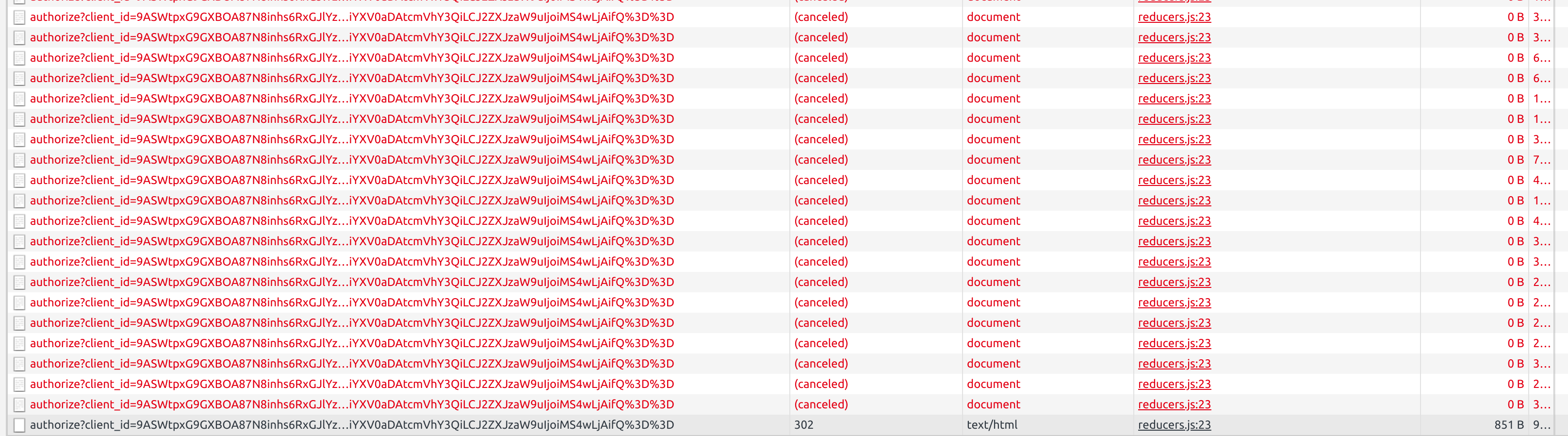
I am encountering this issue as well. I have noticed, that my client does many /authorize requests, that fail. Maybe in my case the cookie pollution is caused by this error?
I am using:
├─┬ @auth0/[email protected]
│ └─┬ @auth0/[email protected]
[Solved]
I have used a template, that made several login requests at once. by doing so, the redirects were not handled correctly and cookies not deleted.
 mgsgde
on 3 Aug 2020
mgsgde
on 3 Aug 2020
A simple way to recreate this using the Auth0 Vue SPA sample app is to logout then repeatedly go to:
http://localhost:3000/profile
http://localhost:3000/profile
http://localhost:3000/profile
You'll see the cookies pile up.
We have an issue with ios_saf 12 and redirects w/auth0 that is causing this issue right now.
 mprevdelta
on 3 Aug 2020
mprevdelta
on 3 Aug 2020
This same issue is causing a slightly different issue in our application as well. As the unused cookies are not deleted they get sent in every request to our API. As our API is using Azure Front Door these cookies trigger a SQL injection threat and all requests get blocked (see #462 for more details)
 cwmrowe
on 14 Aug 2020
cwmrowe
on 14 Aug 2020
I have had cookie pollution occurring accompanied by multiple cancelled requests to /authorize.
Situation:
- React with @auth0/auth0-spa-js 1.11.0
- developed prior to @auth0/auth0-react, with
AuthProvidercode closely copied from an Auth0 blog.
- developed prior to @auth0/auth0-react, with
- Multiple Protected routes
- ProtectedRoute component has a useEffect with multiple dependencies
- Only testing on Chrome
Problem:
- multiple "auth0.spa.txs..." cokies were being created
- this was causing my nginx server to error
- I also noticed multiple calls to
/authorize, one of these would succeed, but the rest (~8) would have status cancelled.
Solution:
- Debounce calls to
loginWithRedirect:
// AuthProvider.tsx
let redirectPromise

const loginWithRedirect: Auth0Client["loginWithRedirect"] = (...p) => {
  if (!redirectPromise) {
    redirectPromise = auth0Client
      ? auth0Client.loginWithRedirect(...p)
      : defaultAuthContext.loginWithRedirect()
  }
  return redirectPromise
}
Discussion:
I suspect that my code was making multiple concurrent calls to loginWithRedirect. This created a race where the other calls would write an unnecessary cookie moments before the app was redirected to /authorize by the winning call.
Strangely a console.log just _before_ loginWithRedirect does not seem to log multiple times. I am unable to explain this, which makes me wonder about whether my theory of racing loginWithRedirect can be correct. Debouncing loginWithRedirect however does seem to fix the problem completely.
A potential explanation is that when Chrome handles location.assign, it disconnects the console from receiving logs before all async code may have finished executing. This could leave the code that writes the unwanted cookies to do so while unable to log.
I believe this is potentially still a problem when using @auth0/auth0-react, but I haven't tested that closely.
Request:
- The Auth0 library could debounce calls to
loginWithRedirect.
 jacknewberry
on 20 Aug 2020
jacknewberry
on 20 Aug 2020
Thanks all for the discussion here. After some discovery, we've decided to modify the internal transaction mechanism to take advantage of session storage, which would alleviate this problem by way of the fact that we will no longer use cookies to store transactional information.
Linked the PR above ☝️ , it would be great to hear of anyone trying it out if they are affected by this.
stevehobbsdev
on 27 Aug 2020
Thanks @stevehobbsdev this should work for us. It will break our cypress e2e tests which stub out the oauth/token requests, but nothing we can't fix I am sure 😄
cwmrowe
on 27 Aug 2020
Related issues
 devuxer
·
7Comments
devuxer
·
7Comments
 justinhelmer
·
4Comments
justinhelmer
·
4Comments
 stupidSheep
·
4Comments
stupidSheep
·
4Comments
 Benjathing
·
5Comments
Benjathing
·
5Comments
 alvarocjunq
·
4Comments
alvarocjunq
·
4Comments
Most helpful comment
It is a SUPER-BAD and incorrect assumption on the part of the library that every call to
loginWithRedirectis followed by a matched call tohandleRedirectCallback. It is a perfectly acceptable and quite common scenario that a user clicks the "login" button or otherwise navigates to a protected page, is shown the login form, decides they don't want to sign in after all, and then _CLICKS THE BACK BUTTON_. Every time that happens, a really large cookie is left dangling on the domain. If the user does that a few times before those cookies expire, the browser stops working or the server balks because the request headers are too large. Either way: application stops and the business loses money. The only way out is for the user to manually delete all their cookies or wait for them to expire -- and unacceptable remediation for an actual production commercial website.This design flaw makes the library _entirely_ unusable. Please rethink that requirement and fix this problem.