Auth0-spa-js: PWA loginWithPopup blocked
Description
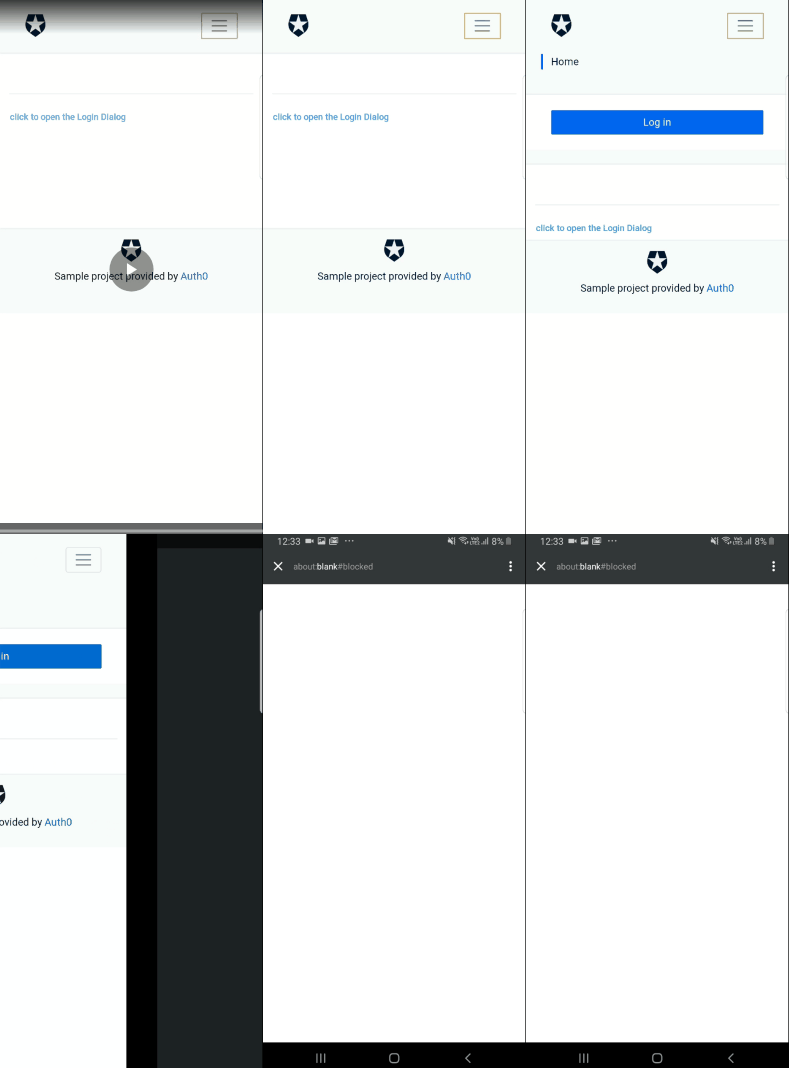
Android pwa can't popup login. I can login in chrome browser on Android. But this app add to home screen can't login with popup. My manifest.json is "display": "standalone".
Popup is about:blank#blocked.
Reproduction
On Android version 9
- App add to home screen.
- Login with Popup.
about:blank#blocked
Environment
Android version 9
"@auth0/auth0-spa-js": "^1.2.3"
 dennougorilla
All 23 comments
dennougorilla
on 5 Dec 2019
Is using a popup necessary? What happens when you use loginWithRedirect?
 stevehobbsdev
on 5 Dec 2019
stevehobbsdev
on 5 Dec 2019
I can use loginWithRedirect. But I want to keep app state(ex. dialog is open). If I use loginWithRedirect I need state management in localstorage or something.
dennougorilla
on 7 Dec 2019
I think a small reproducable sample would help here; if you can supply us with that, I can take a look.
stevehobbsdev
on 12 Dec 2019
Closing this for now. If a small repro is provided that enables us to debug the issue, we can re-open.
stevehobbsdev
on 14 Jan 2020
Hey there @stevehobbsdev. Here's a sample, I've just experienced the same issue today on Droid.
The sources are available here, more specifically the registration part
 zewa666
on 30 Jan 2020
zewa666
on 30 Jan 2020
Thanks for the sample @zewa666
stevehobbsdev
on 30 Jan 2020
@stevehobbsdev I think I figured out something. If I set a breakpoint here, while inspecting via remote debug in DevTools, and now single step over the window.open, it will open the popup. Now after a few secs the next step over and a run continue makes the popup successfully open.
So it could be that this is related to a timing issue. I'll try to clone the repo and try it out with a simple setTimeout fix to see whether this helps.
zewa666
on 1 Feb 2020
Modiyfing the openPopup helper like this for the return fixed it for me. Of course this is not a nice way, there should be something better in place then just randomly waiting for a given time.
export const openPopup = () => {
  const popup = window.open(
    '',
    'auth0:authorize:popup',
    'left=100,top=100,width=400,height=600,resizable,scrollbars=yes,status=1'
  );
  if (!popup) {
    throw new Error('Could not open popup');
  }

  return new Promise((resolve) => setTimeout(() => resolve(popup), 2000));
};
I do see first the about:blank popup and after 2 secs it redirects to the Auth0 login page
zewa666
on 1 Feb 2020
Hey @stevehobbsdev, did you have a chance to take a look at this?
zewa666
on 3 Feb 2020
@zewa666 @stevehobbsdev The fix is to not open the popup with a blank url and then change the url, just open the popup with the required url. Here's the runPopup function from our customized version of auth0-spa-js which works with PWA:
export const runPopup = (authorizeUrl: string, config: PopupConfigOptions) => {
    const popup = window.open(
        authorizeUrl,
        'auth0:authorize:popup',
        'left=100,top=100,width=400,height=600,resizable,scrollbars=yes,status=1'
    );
    if (!popup) {
        throw new Error('Could not open popup');
    }
    return new Promise<AuthenticationResult>((resolve, reject) => {
        const timeout = (config.timeoutInSeconds || DEFAULT_AUTHORIZE_TIMEOUT_IN_SECONDS) * 1000 + Date.now();
        const timeoutId = setInterval(() => {
            if (popup.closed) {
                clearInterval(timeoutId);
                reject({ ...CANCELED_ERROR, popup });
                return;
            }
            if (Date.now() > timeout) {
                clearInterval(timeoutId);
                reject({ ...TIMEOUT_ERROR, popup });
                return;
            }
        }, 1000);

        const popupEventHandler = function(e: MessageEvent) {
            if (!e.data || e.data.type !== 'authorization_response') {
                return;
            }
            clearInterval(timeoutId);
            window.removeEventListener('message', popupEventHandler, false);
            popup.close();
            if (e.data.response.error) {
                return reject(e.data.response);
            }
            resolve(e.data.response);
        };
        window.addEventListener('message', popupEventHandler, false);
    });
};
 charsleysa
on 15 Feb 2020
charsleysa
on 15 Feb 2020
@charsleysa Well sure changing the default opener would be a way, but looking at the current code it seems like there was an intention in not doing so on purpose (see distinct openPopup vs runPopup). Dunno perhaps some specific side-effects on specific browsers or environments (cordova ...). Another reason could be for unit tests, not sure haven't yet looked properly into it.
So without knowing the intention of the split I'd personally prefer the short timeout (my 2k ms was just for testing purposes, far less is enough as well). But then again if the intention is clear, there might be also better solutions, like waiting for the ready event.
Since this seems to be of lower prio I'll go with patch-package until we see some progress.
zewa666
on 15 Feb 2020
Seems like MS is having a similar issue https://github.com/AzureAD/microsoft-authentication-library-for-js/issues/1006
zewa666
on 15 Feb 2020
Apologies for the radio silence here. I'm not familiar with the history as to why it behaves like this, so that would be one thing to look into.
Let me have a look this week and see if I can get what you want without having to use a timeout.
stevehobbsdev
on 25 Feb 2020
@zewa666 I've been looking into this by applying the suggestion above of removing the openPopup call and just doing everything in runPopup. It mostly appears to work in everything except Safari on iPhone. In that case, the popup gets blocked and the user doesn't see anything at all. Turning off the pop-up blocked in Safari settings does fix it but prompts the user to open it, which isn't nice UX.
@charsleysa Did you see this issue in your implementation?
stevehobbsdev
on 28 Feb 2020
@stevehobbsdev yup! We managed to solve it by adding an optional parameter to the loginWithPopup config options (alongside the optional timeout setting) called popupWindow which accepts an already opened popup.
Safari on iOS has a security restriction that pop-ups must be opened in synchronous contexts, not asynchronous contexts, for onclick events. We call the loginWithPopup method inside the onclick method (which must not be marked as async) and if we detect the platform is iOS then we open a popup and pass it to loginWithPopup using config options.
If you want to see a live implementation you can take a look at https://app.mymahi.co.nz
charsleysa
on 28 Feb 2020
@charsleysa Sounds like a good solution, thanks. Are you in a position to raise a PR into this repo with that change?
@zewa666 does something like this sound like it would work for you?
stevehobbsdev
on 28 Feb 2020
I'm not 100% sure I followed the explanation by @charsleysa, especially the part about sync vs async, but I'd definitely be willing to take a look if you create a PR. If it contains a sample or unit test, even better. Please ping/request review from me.
Also tbh I haven't checked it with an iPhone since I currently have none available, but thanks for the input, definitely should give it a try as well.
zewa666
on 28 Feb 2020
@zewa666 I think the essence of it is that loginWithPopup is changed so that it can accept an instance of a popup window that you have created yourself and use that instead of building its own. If the platform is iOS, you can make use of this option so that it behaves correctly with Safari's built-in security restrictions around popups.
Would be great to see some code, but I think I get the gist of it.
stevehobbsdev
on 28 Feb 2020
While this works it would hurt the DX of the Api in my opinion. I mean right now all I do is call loginWithPopup and I'm good to go. If there is no other way around ok but at least it feels a bit dirty. Nevertheless lets first see some code.
zewa666
on 28 Feb 2020
@zewa666 It feels to me like a decent solution to get around the security restrictions. I'm not sure what else you could do to get this working.
It might be worth checking your solution too to see what impact it has when on iOS.
stevehobbsdev
on 28 Feb 2020
@zewa666 Please could you evaluate this PR and see if it meets your needs? https://github.com/auth0/auth0-spa-js/pull/368
There's an example of usage to fix the iOS problem where you can pass in your own popup window. I've tested it on iOS and it appears to work.
stevehobbsdev
on 2 Mar 2020
@stevehobbsdev this is probably outside of scope for the PR you created but the popup should have a cancel listener alongside the timeout listener as it is quite a negative PWA experience if you click login then for whatever reason the popup is closed, the UI is unable to determine that the popup was closed until the timeout occurs so if a "spinner" is displayed until the timeout occurs the user could be faced with waiting up to 60 seconds (at which point they probably will no longer be using the app).
In my code snippet further up in this issue you can see how I solved it.
charsleysa
on 4 Mar 2020
Related issues
 Dig-Doug
·
5Comments
Dig-Doug
·
5Comments
 patrickcorrigan
·
3Comments
patrickcorrigan
·
3Comments
 alvarocjunq
·
4Comments
alvarocjunq
·
4Comments
 Arnaud73
·
7Comments
Arnaud73
·
7Comments
 devuxer
·
7Comments
devuxer
·
7Comments
Most helpful comment
@zewa666 Please could you evaluate this PR and see if it meets your needs? https://github.com/auth0/auth0-spa-js/pull/368
There's an example of usage to fix the iOS problem where you can pass in your own popup window. I've tested it on iOS and it appears to work.