Auth0-spa-js: Getting an uncaught error in the react quick start example
I am getting the following error in the download sample that you guys have provided for the react quick start of auth0
Uncaught (in promise) TypeError: Cannot read property 'split' of undefined
at auth0-spa-js.production.js:685
 mcyleung
All 20 comments
do you have a code snippet? what lib version is this?
 luisrudge
on 15 Jul 2019
luisrudge
on 15 Jul 2019
I think this bug has something to do with authorization from what I got from the logs and I am using "@auth0/auth0-spa-js": "^1.0.2".
I don't really have a code snippet for you because this is straight from the quick start example. But I can DM you my domain and ClientID for you to try on the react quick-start sample.
What I have tried:
- It works fine when I have a fresh SPA application.
- It breaks on my old SPA application. I don't have any rules.
mcyleung
on 15 Jul 2019
do you have a HAR file I can take a look? You can send it to luis.rudge at auth0.com
luisrudge
on 15 Jul 2019
@mcyleung just sent me an e-mail with a log and with the following text:
Unfortunately, I cannot reproduce it anymore and therefore I don't have a HAR file for you to look at.
The authentication was a success, but the authorization failed.
If anyone hits this again, please open a new issue so we can investigate. Thanks @mcyleung for following up by email!
luisrudge
on 15 Jul 2019

Getting the same issue. Trying to login using gmail. Login is succesful but on Approving access to the application, the page redirects to http://localhost:3000/?code=YpqazoJ6B_RazjFx&state=Mm05b19LSlZSekxaTGpnZGR1aHhBNnF%2BSkhiczZneHI3dm91anI3NEF5RA%3D%3D and gives the error in console. Check attached screeenshot
Kindly help resolve.
 mkmuduli
on 25 Jul 2019
mkmuduli
on 25 Jul 2019
Can you inspect why your oauth/token http request is failing? This will help you solve this issue. Maybe it's a rule or something?
luisrudge
on 25 Jul 2019
I'm having this issue as well. I cannot figure out why the token request is getting a 401. In the Auth0 logs it shows a "Failed Exchange" due to "Unauthorized". Is there anything specific I should look into to understand what's causing it? I have no rules FWIW.
Thanks
 zuercherm
on 25 Jul 2019
zuercherm
on 25 Jul 2019
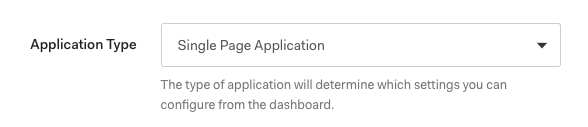
@zuercherm Can you check if your client was created as an SPA client? I saw this happening with clients that weren't configured as SPA.
luisrudge
on 26 Jul 2019
I just tested it here and if I have my client setup as a Regular Web Application, it fails. So, make sure your client is the correct type.

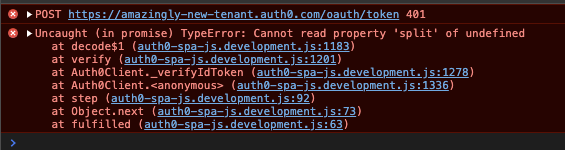
I also opened https://github.com/auth0/auth0-spa-js/pull/116 to improve the developer experience when facing those types of errors 🎉
luisrudge
on 26 Jul 2019
Yep – that fixed it. Thank you.
From: Luís Rudge notifications@github.com
Reply-To: auth0/auth0-spa-js reply@reply.github.com
Date: Friday, July 26, 2019 at 2:39 PM
To: auth0/auth0-spa-js auth0-spa-js@noreply.github.com
Cc: Michael Zuercher michael@zuerchermail.com, Mention mention@noreply.github.com
Subject: Re: [auth0/auth0-spa-js] Getting an uncaught error in the react quick start example (#70)
I just tested it here and if I have my client setup as a Regular Web Application, it fails. So, make sure your client is the correct type.
[image]https://user-images.githubusercontent.com/941075/61975132-b5304f80-afbe-11e9-9d71-6acad1c167b3.png
[image]https://user-images.githubusercontent.com/941075/61975141-b95c6d00-afbe-11e9-973f-ca4bd2cfe8f9.png
I also opened #116https://github.com/auth0/auth0-spa-js/pull/116 to improve the developer experience when facing those types of errors 🎉
—
You are receiving this because you were mentioned.
Reply to this email directly, view it on GitHubhttps://github.com/auth0/auth0-spa-js/issues/70?email_source=notifications&email_token=AFUAZHF2CAL3Y5MWBWLNFJ3QBNHG5A5CNFSM4IDSEJZKYY3PNVWWK3TUL52HS4DFVREXG43VMVBW63LNMVXHJKTDN5WW2ZLOORPWSZGOD25Q37I#issuecomment-515575293, or mute the threadhttps://github.com/notifications/unsubscribe-auth/AFUAZHH5Z3RJQTXR4U2YCR3QBNHG5ANCNFSM4IDSEJZA.
zuercherm
on 27 Jul 2019
I am still encountering this error following the Angular quick start guide.
My application is configured as a single page application.
I am using @auth0/auth0-spa-js version 1.1.1
I am able to sign in and hit the callback page. The token comes back without error, but I get this message when calling handleRedirectCallback on the client generated by createAuth0Client

 BenjaminRichardson
on 5 Aug 2019
BenjaminRichardson
on 5 Aug 2019
@BenjaminRichardson sorry, I missed this. Did you fix it? Can you check your tenant logs? Other users were having this when you have a custom rule or when the token exchange fails for some reason. This would appear in the tenant logs.
luisrudge
on 8 Aug 2019
@luisrudge The tenant logs say the authorization code for access token was successful.
I will verify if we have any custom rules and report back. I suspect we do.
BenjaminRichardson
on 9 Aug 2019
Ok we do have custom rules in place.
Does this library just not support custom rules at all, or is one of our rules adding something unexpected to the response objects?
I've looked through the documentation and cannot find an answer.
BenjaminRichardson
on 9 Aug 2019
There's an issue that happens when the code exchange fails (which is what is happening). We have a fix in place https://github.com/auth0/auth0-spa-js/pull/116. This will be out in the next release, targeted at next week.
luisrudge
on 9 Aug 2019
@luisrudge Thanks for info and the quick follow up. I'll follow up after trying with the next release.
BenjaminRichardson
on 9 Aug 2019
Hello @luisrudge ,
I'm hitting this issue too.
This is the error I get:
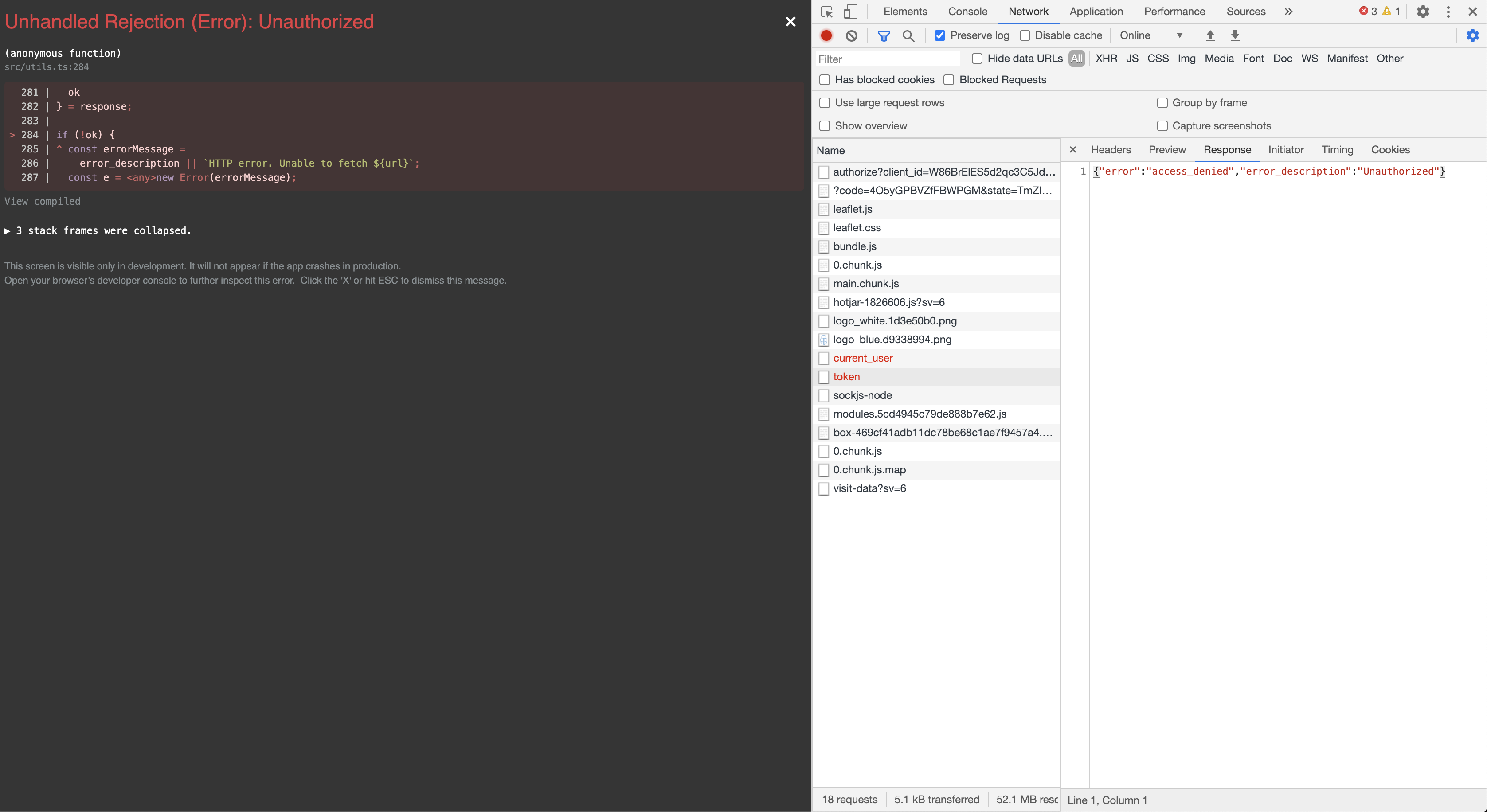
I get the same error in the logs Failed exchange and description: Unauthorized after a successful login. I have checked and my application has the correct type.
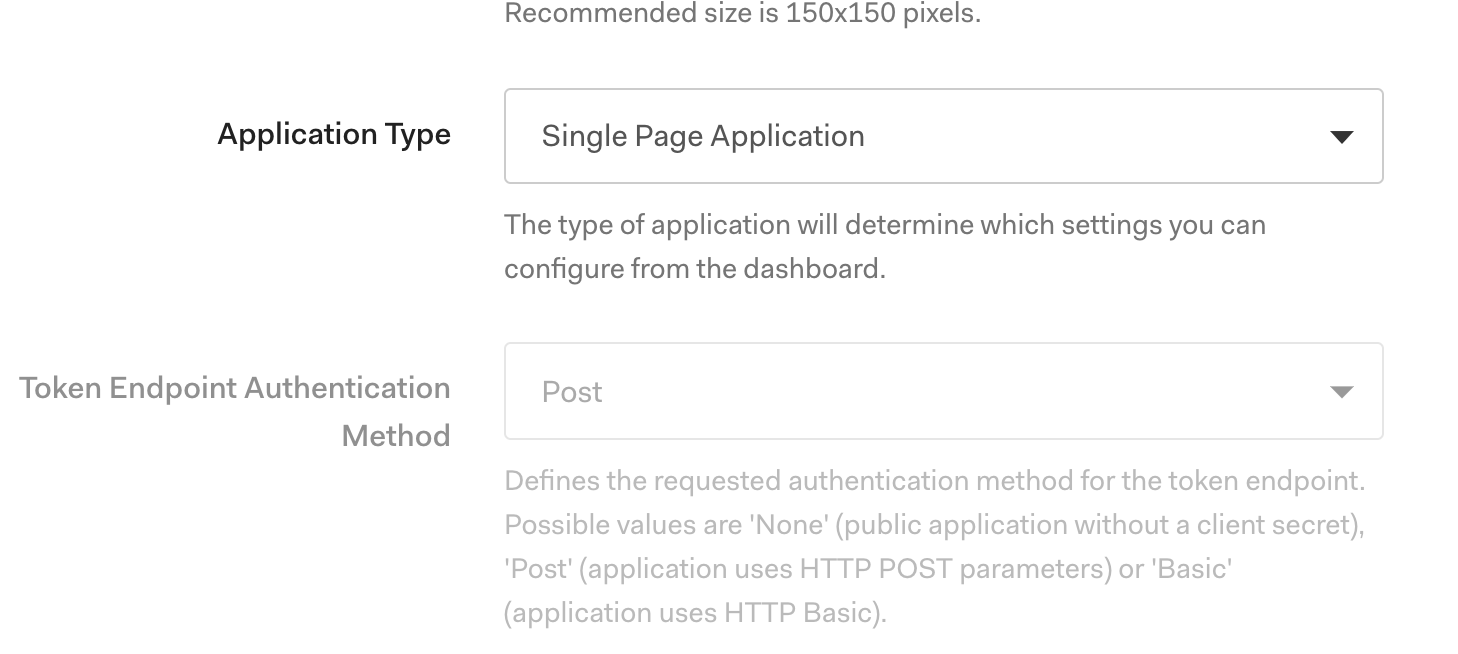
I'm using "@auth0/auth0-spa-js": "1.8.1".
I also have an API setup as I authorise people to my API via the retrieved token in the SPA.
Thank you in advance
 afrancht
on 12 Jun 2020
afrancht
on 12 Jun 2020
@afrancht I'm having the same issue. Did you figure this out?
 alanzino11
on 18 Jun 2020
alanzino11
on 18 Jun 2020
For anyone else having issues here - I had exactly the same problem when configuring for a React SPA. The settings were correct, but I swapped the Application type to Regular Web Application - saved (this failed as expected). I then swapped the Application type back to SPA, and it all worked as expected.
 mattorton
on 22 Jun 2020
mattorton
on 22 Jun 2020
Quick follow up, the issue in my situation was that we had a rule in place which modified the scope of the token. This caused issues when using the token in further authentication steps.
After we removed the rule and everything worked smoothly.
BenjaminRichardson
on 22 Jun 2020
Related issues
 yirenlu92
·
4Comments
yirenlu92
·
4Comments
 devuxer
·
7Comments
devuxer
·
7Comments
 Hawxy
·
7Comments
Hawxy
·
7Comments
 jackoliver
·
5Comments
jackoliver
·
5Comments
 Hopchenko
·
6Comments
Hopchenko
·
6Comments
Most helpful comment
I am still encountering this error following the Angular quick start guide.
My application is configured as a single page application.
I am using @auth0/auth0-spa-js version 1.1.1
I am able to sign in and hit the callback page. The token comes back without error, but I get this message when calling
handleRedirectCallbackon the client generated bycreateAuth0Client