Auth0-spa-js: Export TypeScript types
Hi there,
I'm trying to integrate Auth0 into my SPA and I want to augment the react-auth0-spa sample code with better typing information (in this case using JSDoc in a plain JS project in VSCode) and it would be really helpful if Auth0Client and Auth0ClientOptions types were exported out of this package's typescript definition files (there might be other types that could be useful as well, but the two aforementioned ones are necessary to correctly type the interface of the react hook).
That way I could write something like
/** @typedef { import("@auth0/auth0-spa-js").Auth0Client } */
/** @type { [Auth0Client, (Auth0Client) => void ] } */
const [auth0Client, setAuth0] = useState();
See the Typescript JSDoc support documentation for details on the type syntax.
 mdobosz-isp
All 21 comments
we'll release the react-auth0 wrapper in the near future with typescript support. I built a version of it with types if you're interested:
import React, { useState, useEffect, useContext } from "react";
import createAuth0Client from "@auth0/auth0-spa-js";
import Auth0Client from "@auth0/auth0-spa-js/dist/typings/Auth0Client";

interface Auth0Context {
  isAuthenticated: boolean;
  user: any;
  loading: boolean;
  popupOpen: boolean;
  loginWithPopup(options: PopupLoginOptions): Promise<void>;
  handleRedirectCallback(): Promise<RedirectLoginResult>;
  getIdTokenClaims(o?: getIdTokenClaimsOptions): Promise<IdToken>;
  loginWithRedirect(o: RedirectLoginOptions): Promise<void>;
  getTokenSilently(o?: GetTokenSilentlyOptions): Promise<string | undefined>;
  getTokenWithPopup(o?: GetTokenWithPopupOptions): Promise<string | undefined>;
  logout(o?: LogoutOptions): void;
}
interface Auth0ProviderOptions {
  children: React.ReactElement;
  onRedirectCallback?(result: RedirectLoginResult): void;
}

const DEFAULT_REDIRECT_CALLBACK = () =>
  window.history.replaceState({}, document.title, window.location.pathname);

export const Auth0Context = React.createContext<Auth0Context | null>(null);
export const useAuth0 = () => useContext(Auth0Context)!;
export const Auth0Provider = ({
  children,
  onRedirectCallback = DEFAULT_REDIRECT_CALLBACK,
  ...initOptions
}: Auth0ProviderOptions & Auth0ClientOptions) => {
  const [isAuthenticated, setIsAuthenticated] = useState(false);
  const [user, setUser] = useState();
  const [auth0Client, setAuth0] = useState<Auth0Client>();
  const [loading, setLoading] = useState(true);
  const [popupOpen, setPopupOpen] = useState(false);

  useEffect(() => {
    const initAuth0 = async () => {
      const auth0FromHook = await createAuth0Client(initOptions);
      setAuth0(auth0FromHook);

      if (window.location.search.includes("code=")) {
        const { appState } = await auth0FromHook.handleRedirectCallback();
        onRedirectCallback(appState);
      }

      const isAuthenticated = await auth0FromHook.isAuthenticated();

      setIsAuthenticated(isAuthenticated);

      if (isAuthenticated) {
        const user = await auth0FromHook.getUser();
        setUser(user);
      }

      setLoading(false);
    };
    initAuth0();
    // eslint-disable-next-line
  }, []);

  const loginWithPopup = async (o: PopupLoginOptions) => {
    setPopupOpen(true);
    try {
      await auth0Client!.loginWithPopup(o);
    } catch (error) {
      console.error(error);
    } finally {
      setPopupOpen(false);
    }
    const user = await auth0Client!.getUser();
    setUser(user);
    setIsAuthenticated(true);
  };

  const handleRedirectCallback = async () => {
    setLoading(true);
    const result = await auth0Client!.handleRedirectCallback();
    const user = await auth0Client!.getUser();
    setLoading(false);
    setIsAuthenticated(true);
    setUser(user);
    return result;
  };
  return (
    <Auth0Context.Provider
      value={{
        isAuthenticated,
        user,
        loading,
        popupOpen,
        loginWithPopup,
        handleRedirectCallback,
        getIdTokenClaims: (o: getIdTokenClaimsOptions | undefined) =>
          auth0Client!.getIdTokenClaims(o),
        loginWithRedirect: (o: RedirectLoginOptions) =>
          auth0Client!.loginWithRedirect(o),
        getTokenSilently: (o: GetTokenSilentlyOptions | undefined) =>
          auth0Client!.getTokenSilently(o),
        getTokenWithPopup: (o: GetTokenWithPopupOptions | undefined) =>
          auth0Client!.getTokenWithPopup(o),
        logout: (o: LogoutOptions | undefined) => auth0Client!.logout(o)
      }}
    >
      {children}
    </Auth0Context.Provider>
  );
};
You can find the exported types here: @auth0/auth0-spa-js/dist/typings/
 luisrudge
on 26 Jun 2019
luisrudge
on 26 Jun 2019
This is not ideal since it takes a dependency on the internal layout of the package.
For other's interesting in getting this to work with TS-flavored JSDoc, the following syntax worked for me
/**
 * @typedef { import("@auth0/auth0-spa-js/dist/typings/Auth0Client").default } Auth0Client
*/
I agree it's not ideal, but it's what we have now. What's your suggestion? export the types directly from our files? I'm not sure I understand what you're asking.
luisrudge
on 26 Jun 2019
Sorry for the poorly worded title, but yeah, I guess you could export the public interface of Auth0Client (assuming you don't want to actually export the whole class with the implementation) out of index.ts, plus whatever other interfaces from global.ts Auth0Client depends on.
mdobosz-isp
on 26 Jun 2019
so, basically, import types in index.ts and export them?
luisrudge
on 26 Jun 2019
Yes, though you might want to create an interface for Auth0Client if you don't want to expose the actual implementation (other than through the default factory method)
mdobosz-isp
on 27 Jun 2019
Can you send a PR with what you think would be the best practice in this scenario? If you could point to some docs with the reasoning, that would be great as well. I followed this doc, which says adding the types property is enough. But I get what you're saying, though: types is enough to consume the package with types, but you can't easily reference the types we have inside the project - that's why we need to export those types. Is that it?
luisrudge
on 27 Jun 2019
@luisrudge do you have a sample of PrivateRoute in TypeScript to go along with the code above? Having a bit problem with the type signature here...
 andrejohansson
on 28 Jun 2019
andrejohansson
on 28 Jun 2019
@andrejohansson I don't :( what issues are you having?
luisrudge
on 28 Jun 2019
@andrejohansson @luisrudge fyi, I've tested the following in our app:
import React, { useEffect, Component } from "react";
import { Route, RouteComponentProps } from "react-router-dom";
import { Auth } from "../../utils/auth"

interface IPrivateRouteOptions {
  component: React.FC,
  path: string,
}

type PrivateRouteOptions = IPrivateRouteOptions;

const PrivateRoute = ({
  component,
  path,
  ...rest
}: PrivateRouteOptions) => {

  const { loading, isAuthenticated, loginWithRedirect } = Auth();

  useEffect(() => {
    const fn = async () => {
      if (loading || !loginWithRedirect) {
        return
      }

      if (!isAuthenticated) {
        await loginWithRedirect({
          redirect_uri: "",
          appState: { targetUrl: path }
        });
      }
    };
    fn();
  }, [isAuthenticated, loginWithRedirect, path]);

  const render = (props: RouteComponentProps<{}>) =>
    <Component {...props} />;

  return <Route path={path} render={render} component={component} {...rest} />;
};

export default PrivateRoute;
 jonmc12
on 29 Jun 2019
jonmc12
on 29 Jun 2019
Thank you for your replies, I got it working with the following (I'm quite new to both typescript and auth0 so comments on weird looking things are welcome):
import React, { useEffect } from "react";
import PropTypes from "prop-types";
import {Route, RouteProps} from "react-router-dom";
import { useAuth0 } from "../../react-auth0-spa";

const PrivateRoute = ( routeProps: RouteProps ) => {
  const { isAuthenticated, loginWithRedirect } = useAuth0();

  useEffect(() => {
    const fn = async () => {
      if (!isAuthenticated) {
        let params = {
          redirect_uri: window.location.origin,
          appState: { targetUrl: routeProps.path }
        };

        await loginWithRedirect(params);
      }
    };
    fn();
  }, [isAuthenticated, loginWithRedirect, routeProps.path]);

  if (!isAuthenticated)
  {
    return null;
  }

  return <Route {...routeProps} />
};

PrivateRoute.propTypes = {
  component: PropTypes.oneOfType([PropTypes.element, PropTypes.func])
    .isRequired,
  path: PropTypes.oneOfType([
    PropTypes.string,
    PropTypes.arrayOf(PropTypes.string)
  ]).isRequired
};

export default PrivateRoute;
I'm getting
Property 'isAuthenticated' does not exist on type 'Auth0Context | null'. TS2339
When I use the useAuth0 hook.
const { isAuthenticated, loginWithRedirect, logout } = useAuth0();
I used @luisrudge answer https://github.com/auth0/auth0-spa-js/issues/39#issuecomment-505901626
 iamchathu
on 18 Sep 2019
iamchathu
on 18 Sep 2019
@iamchathu this is because the return value from useAuth() (the context object) is possibly null, and null doesn't have those properties on it. Try this:
const authContext = useAuth0();

if (!authContext) {
  // do whatever makes sense here
  return null
}

const { isAuthenticated, loginWithRedirect, logout }  = authContext;

// ...rest of your component
[edited for better code formatting]
 mdboop
on 30 Oct 2019
mdboop
on 30 Oct 2019
I'm getting
Property 'isAuthenticated' does not exist on type 'Auth0Context | null'. TS2339When I use the
useAuth0hook.const { isAuthenticated, loginWithRedirect, logout } = useAuth0();I used @luisrudge answer #39 (comment)
You can also use useAuth()!.
 coder2000
on 31 Oct 2019
coder2000
on 31 Oct 2019
@luisrudge why was this closed? it's almost 2020 now and there are still no exported types
 tommedema
on 1 Dec 2019
tommedema
on 1 Dec 2019
@tommedema We have a PR to fix this (see #234) but unfortunately the author has abandoned it. We're just trying to fit it in around our workload. Thanks for your patience
 stevehobbsdev
on 2 Dec 2019
stevehobbsdev
on 2 Dec 2019
I have not been able to get any of the variations on PrivateRoute here to work with React/Typescript on Auth0. I keep getting "TypeError: instance.render is not a function" if I navigate to the /profile route. It's being thrown here in react-dom.development.js:
18467 | } else {
18468 | {
18469 | setCurrentPhase('render');
18470 | nextChildren = instance.render();
| ^ 18471 |
18472 | if (debugRenderPhaseSideEffectsForStrictMode && workInProgress.mode & StrictMode) {
18473 | instance.render();
The code looks to me like it clearly has a render method. Does anyone have any suggestions as to what I might be doing wrong? I'm a comparative Typescript lightweight, trying to learn more and integrate a new React app with Auth0, but I'm dead in the water without a working example.
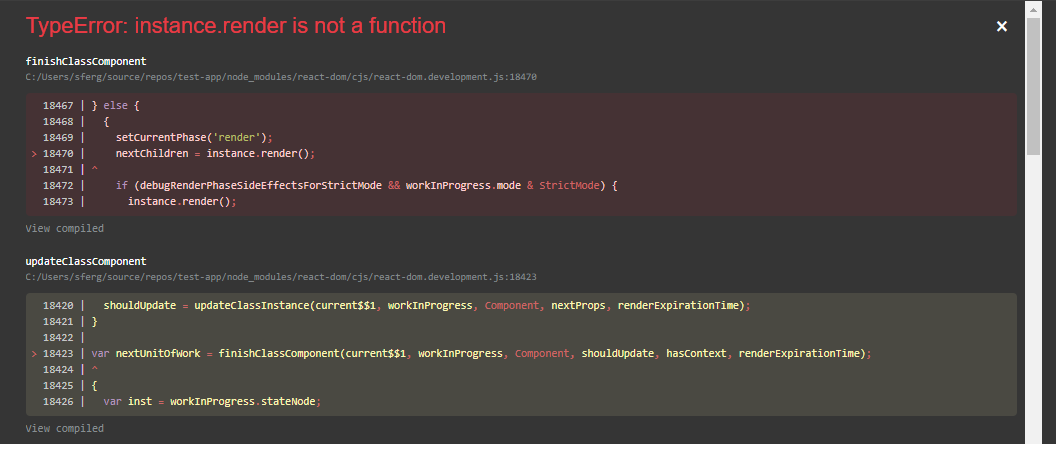
I've posted a repo of my WIP at https://github.com/sferguson12/auth0-typescript-react.
 sferguson12
on 12 Dec 2019
sferguson12
on 12 Dec 2019
@stevehobbsdev with all due respect, the least you could do is share an ETA. The "thanks for your patience" doesn't seem very credible when people have been waiting half a year already for what can be done in half a day or less by any experienced Typescript developer in your organization
tommedema
on 12 Dec 2019
@tommedema Thanks for the feedback. We are actively working on this now in #310, so please follow the discussion there. Unfortunately it's not as straight-forward as we hoped without introducing breaking changes.
stevehobbsdev
on 18 Dec 2019
we'll release the react-auth0 wrapper in the near future with typescript support. I built a version of it with types if you're interested:
You can find the exported types here:@auth0/auth0-spa-js/dist/typings/
Thanks for your efforts on getting the TypeScript situation sorted out @luisrudge! I just tried out your snippet and it saved me some time, obrigada.
Today I ran into a slightly weird issue, something that seems like it shouldn't matter but for whatever reason did, and wanted to share a simple solution I landed on in case it helps someone else also making the JSX->TSX migration.
For whatever reason splitting the context's Provider and the value prop into two lines like so:
<Auth0Context.Provider
  value={{
caused this error:

I guess Babel/TypeScript's JSX lexer gets confused about components with a . in the name, not sure.
The solution in my case was bringing the component and the prop onto the same line:
<Auth0Context.Provider value={{
  isAuthenticated,
Those of you guys with Prettier/etc might have to suppress it for this line.
This is using a vanilla Create React App w/ TypeScript, package.json
 onpaws
on 15 Apr 2020
onpaws
on 15 Apr 2020
I had a similar issue to @onpaws in attempting to use the second comment from this issue to migrate from JS to TS. I apologize for the abuse of the intended purpose of GH issues, but I think it's useful to have a potential solution here because this is likely where everyone ends up in a similar situation.
It turns out, my issue was caused by naming the file with a .ts extension instead of .tsx. It was good motivation to also refactor the functions and generally change file name (why is snake-case suggested in the docs, i.e. react-auth0-wrapper.js anyway? kinda bizarre/out of left field).
Side note: I find it a bit odd that this Auth0Provider component isn't exported from the library itself -- what's the reasoning behind that? Do people just end up customizing it fairly quickly? I haven't found a need to yet, but maybe I'm missing something.
 Californian
on 2 May 2020
Californian
on 2 May 2020
Related issues
 philipp-tailor
·
4Comments
philipp-tailor
·
4Comments
 justinhelmer
·
4Comments
justinhelmer
·
4Comments
 Dig-Doug
·
5Comments
Dig-Doug
·
5Comments
 Benjathing
·
5Comments
Benjathing
·
5Comments
 Arnaud73
·
7Comments
Arnaud73
·
7Comments
Most helpful comment
we'll release the react-auth0 wrapper in the near future with typescript support. I built a version of it with types if you're interested:
You can find the exported types here:
@auth0/auth0-spa-js/dist/typings/