Auth0.js: IE11 checkSession always return login_required
- Code snippet or sample project that reproduces the bug
I'm using your sample app from this article - Auth0.js version 9.1.3
- Browser & OS: IE11 & Windows 7 Professional Service Pack 1
Application works as designed when using Chrome. However IE11 does not. With IE11, I can get logged in fine. But if I click the Renew button the checkSession() call always return login_required.
The only thing changed in the code is changes to settings to point to my Auth0 client and I had to turn on all the polyfills in polyfills.ts so IE11 would load the app.
 critchie
All 26 comments
did you try outside of the example itself?
 luisrudge
on 1 Feb 2018
luisrudge
on 1 Feb 2018
I'm not sure I'm following... The issue appeared in the app I'm developing for my client. To make sure it wasn't something I was doing I pulled the Auth0 example app down and got it working with Chrome and then tried it with IE11 and the same thing happened with it as the application I'm developing. So I'm at a loss as to what is going wrong.
critchie
on 1 Feb 2018
Yeah, I'm trying to rule out any issues with the sample itself. Can you please clone this repo and run:
npm install
npm start
Then go to https://localhost:3000/example, click the login button and then click the check session button. With that, we can pinpoint where the error is happening. THanks!
luisrudge
on 1 Feb 2018
With IE11, I used "Login with /authorize:" using [email protected]/1234 which was successful. Then I clicked Renew button and get:
{"error":"login_required","errorDescription":"Logi{
    "error": "login_required",
    "errorDescription": "Login required",
    "state": "YoIkUa2G8IxOGgMQxbuRNBgOYaSiIY~F"
}
I performed the same steps with Chrome and all was successful.
critchie
on 1 Feb 2018
Ok thanks. I'll investigate.
luisrudge
on 1 Feb 2018
Any updates on this investigation?
critchie
on 6 Feb 2018
Hi, sorry! Not yet. I'll fix an IE issue this week, so I'll dig into this issue as well.
luisrudge
on 6 Feb 2018
Sorry to keep hounding you on this... any updates?
critchie
on 20 Feb 2018
Hi @critchie. So, what's not working for you is that you're logging in with the Universal Login Page (former Hosted Login Page) and checkSession is not working. Is this the case?
Does it work if you use the Login with username and password: button?
luisrudge
on 20 Feb 2018
I followed your instructions from a few weeks ago and ran the Auth0.js playground example.
My results were:
With IE11, I used "Login with /authorize:" using [email protected]/1234 which was successful (using the "Hosted login page"). Then I clicked Renew button and get:
{"error":"login_required","errorDescription":"Logi{
    "error": "login_required",
    "errorDescription": "Login required",
    "state": "xQkdnbcAuaNnHT8~c-vVzQmG6XF3J5C0"
}
I performed the same steps with Chrome and all was successful.
critchie
on 20 Feb 2018
Yeah, but you said you tried the login with /authorize, which calls the Universal Login Page. I want to know if this still happens when you try the "login with username and password" button.
luisrudge
on 20 Feb 2018
In IE11...
The version I have doesn't have an option worded exactly like "login with username and password".
I do have a "Login with database connection:" and that gives me:
{"error":"access_denied","errorDescription":"Unkno{
    "error": "access_denied",
    "errorDescription": "Unknown or invalid login ticket.",
    "state": "rt6LoQFOxfg0LrSwRIQzXYiN8JHvzDQ6"
}
So I can't even get logged in to even hit the Renew button.
critchie
on 20 Feb 2018
In IE11...
"Login with database connection (client login):" works and when using that login with the Renew button works.
critchie
on 20 Feb 2018
ok so it's a combo: IE11 + Universal Login Page Login + checkSession fails. Correct?
Are you clicking the renew button? or the check session one?
luisrudge
on 20 Feb 2018
I'll have to take your word for it. :-) To me all I see is checkSession returns login required all the time when using IE11.
I'm clicking the Renew button.
critchie
on 20 Feb 2018
try the check session button
luisrudge
on 20 Feb 2018
I logged in with "Login with /authorize:" and then click CheckSession button.
CheckSession button returned:
{"accessToken":"lW2NoRkc7nLo34sRfzjs8BTDNPCRUTzh",{
    "accessToken": "lW2NoRkc7nLo34sRfzjs8BTDNPCRUTzh",
    "idToken": null,
    "idTokenPayload": null,
    "appState": "SaLO0ydiQ04asCzTtHMJ6~TDhs0Ug85h",
    "refreshToken": null,
    "state": "SaLO0ydiQ04asCzTtHMJ6~TDhs0Ug85h",
    "expiresIn": "7200",
    "tokenType": "Bearer",
    "scope": null
}
So this appears to work.
critchie
on 20 Feb 2018
cool! This is the checkSession method. The renewAuth method is a bit different and requires a callback page etc. Go with checkSession which is the best way moving forward.
luisrudge
on 20 Feb 2018
Hmmm... that is what I'm doing in my code. And in my code I always get login required which is why I opened this issue. I will take a look at your code and see if I'm missing something in my code. But my code is already using checkSession.
critchie
on 20 Feb 2018
See if you can spot anything that stands out from the example code I showed you. If you can't, paste your code here so I can take a look
luisrudge
on 20 Feb 2018
This will be like comparing apples to walnuts. Your code is straight up simple javascript demo app and I'm in an angular 4 app using Typescript. :-)
Here is my webauth setup:
            this._auth0 = new Auth0.WebAuth({
                clientID: clientId,
                domain: domain,
                responseType: 'token id_token',
                redirectUri: redirectUri,
                audience: audience,
                scope: `openid profile loginApplicationId-${loginApplicationId}`
            });
Then I do this:
                    this._auth0.checkSession({}, (err, result) => {
                        if (err) {
                            // redirect to our in-house SSO system that does lots of account stuff for the app and logs the user in to Auth0
                        } else {
                            let expiresAt = JSON.stringify((result.expiresIn * 1000) + Date.now());

                            localStorage.setItem('access_token', result.accessToken);
                            localStorage.setItem('token', result.idToken);
                            localStorage.setItem('expires_at', expiresAt);
                        }
When the app starts it immediately calls this code that calls checkSession. If it fails (which it should on the first time through) the app redirects to our in-house SSO application that does a lot of accounts work for the app (authorization and roles type things... can this user use the app type things) and of course logs the user into Auth0. After successful login it redirects back to the calling the app. The checkSession is immediately hit again but this time it should pass. This second call to checkSession passes in Chrome and FireFox but not in IE11.
It is hard for me to take our real world app and explain all its working parts and compare it to a simple demo app. Do you see anything out of the ordinary?
critchie
on 20 Feb 2018
how is your sso app doing the auth? auth0.js?
luisrudge
on 20 Feb 2018
Our developer for that app says they are using "lock control 10.19.0" found here
He said "its not the hosted page in auth0 but a local page with the lock control."
Does that help?
critchie
on 20 Feb 2018
do you have the config used for lock? Also, we're in [email protected], so you might want to update that before testing this
luisrudge
on 20 Feb 2018
I'm having the same issue. checkSession works fine in Chrome but always seems to return a 'login_required' error in IE11
 bmingles
on 16 Dec 2018
bmingles
on 16 Dec 2018
Update: My issue was specifically showing up when testing on localhost. It seems that it was being caused by how IE classifies localhost in the intranet zone by default. This post clued me in: https://community.auth0.com/t/ie-11-doesnt-redirect-on-successful-login-when-using-cross-origin-authentication/8705
I was able to fix my issue by unchecking a box in the local intranet zone settings.
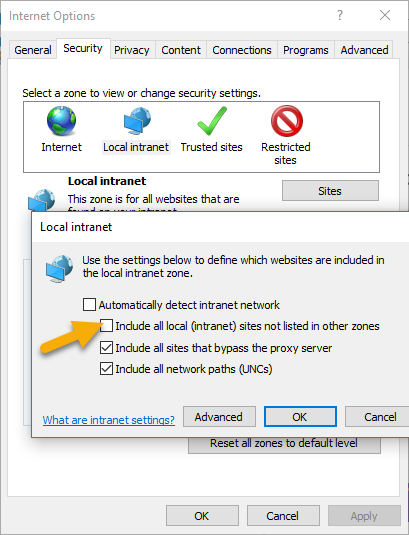
I suspect there may be similar issues not restricted to localhost usage if IE is classifying something in a non-internet zone trying to access auth0.
bmingles
on 16 Dec 2018
Related issues
 MaksSlesarenko
·
3Comments
MaksSlesarenko
·
3Comments
 javiercejudo
·
5Comments
javiercejudo
·
5Comments
 analytik
·
6Comments
analytik
·
6Comments
 sh4ka
·
7Comments
sh4ka
·
7Comments
 StefH
·
5Comments
StefH
·
5Comments
Most helpful comment
Update: My issue was specifically showing up when testing on
localhost. It seems that it was being caused by how IE classifies localhost in the intranet zone by default. This post clued me in: https://community.auth0.com/t/ie-11-doesnt-redirect-on-successful-login-when-using-cross-origin-authentication/8705I was able to fix my issue by unchecking a box in the local intranet zone settings.
I suspect there may be similar issues not restricted to localhost usage if IE is classifying something in a non-internet zone trying to access auth0.