Auth-module: Login with google issue
I am having problem with setup login with google. With basic config which looks like this.
            google: {
                clientId: env.parsed.GOOGLE_CLIENT_ID,
            }
I am getting this error
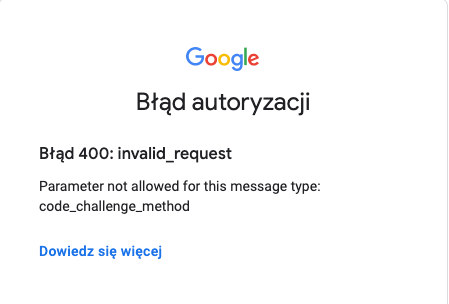
Setting this key codeChallengeMethod to false or any value doesn't help :/
EDIT: I am using nuxt-auth v5
 dawidpstrak
All 11 comments
I'm also having some issues concerning google auth, but if you check the oauth2 spec: https://github.com/nuxt-community/auth-module/blob/dev/src/schemes/oauth2.ts and see line #60 codeChallengeMethod: 'implicit' | 'S256' | 'plain' you can see the values it takes. Also check here > https://developers.google.com/identity/protocols/oauth2/native-app Code Challenge Generation Methods S256 (recommended)
Setting your CodeChallengeMethod: 'S256 should resolve the error.
 alucardu
on 4 Feb 2021
alucardu
on 4 Feb 2021
@alucardu yes, i tried all of these options. Actually i did this workaround.
            google: {
                clientId: env.parsed.GOOGLE_CLIENT_ID,
                codeChallengeMethod: '',
                responseType: 'code'
            }
and set up redirect url into white list in google console.
Now i am able to see google accounts list, but user after request is null for now.
Have not time to dive into this for now, but ill let know here if i will find solution
dawidpstrak
on 4 Feb 2021
@dawidpstrak Do you have solution for user null when using google auth?
 ponnex
on 6 Feb 2021
ponnex
on 6 Feb 2021
Nope. It seems to be problem here.
    if (opts.response_type.includes('token')) {
      opts.nonce = _opts.nonce || randomString(10)
    }
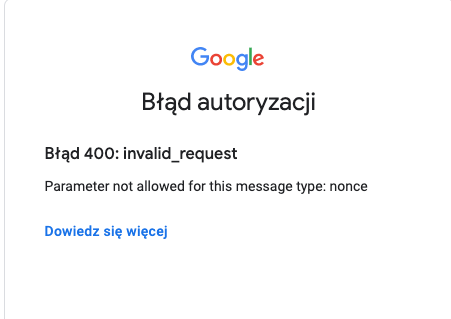
While responseType: 'token' and disabling this option which is not allowed by google codeChallengeMethod: ''
This part of source code setting this nonce option which is not allowed by google auth same as codeChallengeMethod, but we can't disable this nonce option
dawidpstrak
on 7 Feb 2021
I reverted back to version 4 because in that version CodeChallengeMethod is not introduced for the google method...
alucardu
on 7 Feb 2021
Same here, all working fine for me on v4.0.0
dawidpstrak
on 7 Feb 2021
google: {
clientId:
'............................................apps.googleusercontent.com',
scope: ['profile', 'email'],
codeChallengeMethod: '',
responseType: 'token id_token',
},
this config worked for me
 maharjankiri
on 8 Feb 2021
maharjankiri
on 8 Feb 2021
@maharjankiri I can confirm this one works thanks a lot!
ponnex
on 8 Feb 2021
google: {
clientId:
'............................................apps.googleusercontent.com',
scope: ['profile', 'email'],
codeChallengeMethod: '',
responseType: 'token id_token',
},
this config worked for me
This worked for me too. Thanks for your work.
 author31
on 17 Feb 2021
author31
on 17 Feb 2021
google: {
clientId:
'............................................apps.googleusercontent.com',
scope: ['profile', 'email'],
codeChallengeMethod: '',
responseType: 'token id_token',
},
this config worked for me
Hi there!
I've tried this solution on "@nuxtjs/auth-next" : "5.0.0-1617968180.f699074"
The redirect callback is something like that:
http://localhost:3000/dashboard#state=7kSmuKe1d3&access_token=ya29.a0AfH6SM
...LoNEqm3Zfibp&token_type=Bearer&expires_in=3599&scope=email%20profile%20https:/www.googleapis.com/auth/userinfo.profile%20https:/www.googleapis.com/auth/userinfo.email%20openid&id_token=eyJhbGciOiJSUz
...
&authuser=0&prompt=consent
in the localStorage and in cookie there is auth.google.state: 7kSmuKe1d3 but the user is still null and loggedIn: false.
Someone else with this issue?
Any advice is appreciated.
Thank you!
 mscalessio
on 15 Apr 2021
mscalessio
on 15 Apr 2021
Does anyone know how to save user information in a database after logging in with google?
 GuasaPlay
on 15 Apr 2021
GuasaPlay
on 15 Apr 2021
Related issues
 roosht3
·
3Comments
roosht3
·
3Comments
 yuwacker
·
3Comments
yuwacker
·
3Comments
 eatyrghost
·
3Comments
eatyrghost
·
3Comments
 pi0
·
3Comments
pi0
·
3Comments
 weijinnx
·
3Comments
weijinnx
·
3Comments
Most helpful comment
google: {
clientId:
'............................................apps.googleusercontent.com',
scope: ['profile', 'email'],
codeChallengeMethod: '',
responseType: 'token id_token',
},
this config worked for me