Auth-module: autoFetchUser: false, but auth-module is still trying to fetch user in endless loop
Version
Reproduction link
https://codesandbox.io/s/nuxt-auth-autofetchuser-not-working-eqdnq
Steps to reproduce
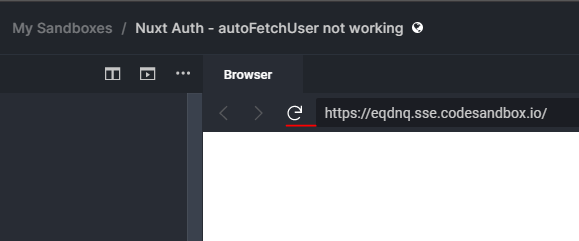
- Press Login Button.

- Reload Page inside codesandbox
What is expected ?
When autoFetchUser: false, auth-module should not try to load user.
When fetching user fails, should fail once and not retry in an endless loop.
What is actually happening?
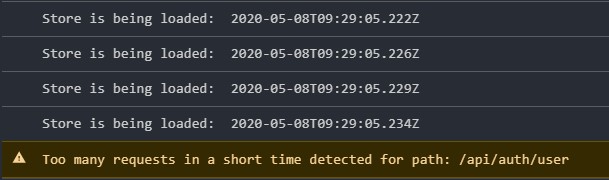
Atuh-module tries to fetch user. It fails, because it wasn't suppoosed to fetch user. This failure starts an endless loop of fetching user and reloading store.
Additional comments?
I previously attributed this behaviour to a faulty cookie.
https://github.com/nuxt-community/auth-module/issues/665
 sugoidesune
All 13 comments
Hi @sugoidesune! autoFetchUser only disables user fetch after login. That way you can manually set the user if the login response already have it. But it still fetching the user on reload the page because user data don't persist in the storage.
EDIT: If you don't want to fetch user, then set user endpoint to false.
 JoaoPedroAS51
on 8 May 2020
JoaoPedroAS51
on 8 May 2020
I will update the docs about autoFetchUser for a clearer understanding :)
JoaoPedroAS51
on 8 May 2020
The perils of learning a new module framework.
I think the biggest misunderstanding was, that setting user is not optional.
The user has to be set always!
Otherwise things break, like the endless loop to fetch user server side and like the loggedIn property.
Still, the endless server side user fetch behaviour, is a very hard to catch bug, and i wish this didn't happen and simply threw an error after the first try.
sugoidesune
on 8 May 2020
Still, the endless server side user fetch behavior, is a very hard to catch bug, and i wish this didn't happen and simply threw an error after the first try.
@sugoidesune It shouldn't be happening. I'll try to fix this :)
JoaoPedroAS51
on 8 May 2020
Hi, @JoaoPedroAS51 do you know, is there a way to inject to auto fetching process some custom user object transformation? If for example api data structure differs from app model user.
 bravik
on 19 May 2020
bravik
on 19 May 2020
Hi @bravik! I believe you can achieve your goal by creating a custom scheme. You can extend the scheme you are currently using and override the fetchUser method :)
Create a new file in ~/schemes/myCustomScheme.js
import LocalScheme from '@nuxtjs/auth/lib/schemes/local'

export default class MyCustomScheme extends LocalScheme {
  async fetchUser (endpoint) {
    // Token is required but not available
    if (this.options.tokenRequired && !this.$auth.getToken(this.name)) {
      return
    }

    // User endpoint is disabled.
    if (!this.options.endpoints.user) {
      this.$auth.setUser({})
      return
    }

    // Try to fetch user and then set
    const user = await this.$auth.requestWith(
      this.name,
      endpoint,
      this.options.endpoints.user
    )

    // Transform your user object here
    // Then set the user using `this.$auth.setUser(user)`
    this.$auth.setUser(user)
  }
}
Then in your config:
auth: {
  strategies: {
    myCustomStrategy: {
      _scheme: '~/schemes/myCustomScheme',
      ...
    }
  }
},

build: {
  transpile: ['@nuxtjs/auth']
}
Fantastic, would be great to include this in the docs!
Two errors,
- import statement
import LocalScheme from '@nuxtjs/auth/lib/schemes/local' async fetchUser (endpoint) {
EDIT:
@JoaoPedroAS51
I am still having problems with importing the LocalScheme.
as soon as i add the import statement i get hte following error:
SyntaxError
Unexpected token 'export'
sugoidesune
on 20 May 2020
@sugoidesune Ok, thank you for letting me know :)
I'll test and update the comment above.
JoaoPedroAS51
on 20 May 2020
I copy pasted the whole class from LocalScheme, and extending the class works, with the fixes mentioned above.
So the one thing i cant figure out is importing 🤦♂️😅
sugoidesune
on 20 May 2020
@sugoidesune I updated the comment above.
- Added missing async to
fetchUser - Added missing
endpointparam tofetchUser - Added
@nuxtjs/authto transpile innuxt.config.js
Can you test and see if it works now? :)
JoaoPedroAS51
on 20 May 2020
Awesome!, Yup, the transpile part fixed it and it works.
nuxt.config.js
build: {
    transpile: [
      '@nuxtjs/auth'
    ]
}
the import statement is missing a c in LocalSheme.
this was a crucial feature, since we convert google tokens, and provide single sign on to other services. And all other approaches ment having the code for autorization split into pieces.
sugoidesune
on 20 May 2020
@sugoidesune I'm happy to know it worked! 😃
I'm gonna improve the docs to show how to create a custom scheme #692
JoaoPedroAS51
on 20 May 2020
Closing here, as this is an old issue and has already been answered :)
JoaoPedroAS51
on 18 Dec 2020
Related issues
 aaronhuisinga
·
3Comments
aaronhuisinga
·
3Comments
 DougHayward
·
4Comments
DougHayward
·
4Comments
 nikkanetiya
·
3Comments
nikkanetiya
·
3Comments
 amjadkhan896
·
3Comments
amjadkhan896
·
3Comments
 pi0
·
3Comments
pi0
·
3Comments
Most helpful comment
@sugoidesune I updated the comment above.
fetchUserendpointparam tofetchUser@nuxtjs/authto transpile innuxt.config.jsCan you test and see if it works now? :)