Auth-module: How install dev branch on nuxt?
How install dev branch on nuxt?
 radudiaconu0
All 26 comments
Hi @radudiaconu0! @pi0 will add CI/CD script to publish nightly versions.
 JoaoPedroAS51
on 28 Apr 2020
JoaoPedroAS51
on 28 Apr 2020
Thanks :)
radudiaconu0
on 28 Apr 2020
Hi @radudiaconu0! Now you can use @nuxtjs/auth-next to install dev branch :)
JoaoPedroAS51
on 28 Apr 2020
Thanks dude. I will mention you when I become millionaire
radudiaconu0
on 28 Apr 2020
@JoaoPedroAS51
i get this error;( when run npm run dev
Error: Template src not found: /home/radu/Desktop/logintest/node_modules/@nuxtjs/auth-next/templates/plugin.js │
radudiaconu0
on 28 Apr 2020
@JoaoPedroAS51 you must put the template folder in npm.this solved the issue
radudiaconu0
on 28 Apr 2020
@radudiaconu0 Done. Just wait a sec to CI publish.
JoaoPedroAS51
on 28 Apr 2020
@JoaoPedroAS51 i have a big problem. after successfully login end redirect to home (ith middleware:auth set) after refresh i cant acces home route anymore it keeps redirect me to login. what should i do?=(
radudiaconu0
on 29 Apr 2020
@radudiaconu0 Can you show me your config?
Ah, don't forget to use $auth.loggedIn instead of $auth.check, because we reverted this change.
JoaoPedroAS51
on 29 Apr 2020
@JoaoPedroAS51 I have just middleware auth all routes and guest on login . I have just /login and /home and / routes . I have set redirects in auth config.am I doing something wrong?
radudiaconu0
on 29 Apr 2020
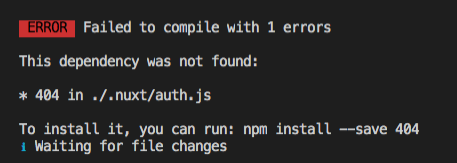
How to fix this error?
 srxa
on 29 Apr 2020
srxa
on 29 Apr 2020
@srxa This means that the strategy doesn't have a scheme. Can you show me your auth config?
JoaoPedroAS51
on 29 Apr 2020
I'll make it throw an error if this happens :)
JoaoPedroAS51
on 29 Apr 2020
auth: {
    //plugins: ['~/plugins/auth.js'],
    redirect: {
      home: '/',
      login: '/',
      callback: '/callback',
      logout: 'http://auth.tambex.com/auth/realms/tambex.com/protocol/openid-connect/logout?redirect_uri=http%3A%2F%2Fdev.tambex.com'
    },
    localStorage: false,
    resetOnError: true,
    strategies: {
      local: {
        token: {
          property: 'token',
          // required: true,
          // type: 'Bearer'
        },
        user: {
          property: 'user',
          // autoFetch: true
        },
        endpoints: {
          login: {
            url: '/api/auth/login',
            method: 'post'
          },
          logout: {
            url: '/api/auth/logout',
            method: 'post'
          },
          user: {
            url: '/api/auth/user',
            method: 'get'
          }
        }
      },
      tambex: {
        _scheme: 'oauth2',
        endpoints: {
          authorization: `http://auth.tambex.com/auth/realms/tambex.com/protocol/openid-connect/auth`,
          token: `http://auth.tambex.com/auth/realms/tambex.com/protocol/openid-connect/token`,
          userInfo: `auth.tambex.com/auth/realms/tambex.com/protocol/openid-connect/userinfo`
        },
        responseType: 'code',
        token: {
          property: 'access_token',
          type: 'Bearer',
          maxAge: 1500
        },
        scope: '*',
        grantType: 'authorization_code',
        clientId: 'tambex-site',
        state: 'UNIQUE_AND_NON_GUESSABLE'
      },
      fusion: {
        _scheme: 'oauth2',
        endpoints: {
          authorization: `http://192.168.77.60:9011/oauth2/authorize`,
          token: `http://192.168.77.60:9011/oauth2/token`,
          userInfo: `http://192.168.77.60:9011/oauth2/userinfo`
        },
        responseType: 'code',
        token: {
          property: 'access_token',
          type: 'Bearer',
          maxAge: 1500
        },
        scope: '[offline_access]',
        accesssType: 'offline',
        grantType: 'authorization_code',
        clientId: 'someID',
        clientSecret: 'someSecret',
        state: 'UNIQUE_AND_NON_GUESSABLE'
      }
    }
  },
Ok, I see where is the error. Now to set schemes we use scheme instead of _scheme. Change to scheme: 'oauth2'
JoaoPedroAS51
on 29 Apr 2020
OK, Thanks
srxa
on 29 Apr 2020
@radudiaconu0 I'm testing here and I have the same issue. I'll work on a fix. :)
JoaoPedroAS51
on 29 Apr 2020
@radudiaconu0 I'm testing here and I have the same issue. I'll work on a fix. :)
Thanks bro
radudiaconu0
on 29 Apr 2020
@JoaoPedroAS51 how the fix works?
radudiaconu0
on 30 Apr 2020
@radudiaconu0 Seems that Laravel Sanctum requires referer header in SSR request to authorize the request. The fix will set referer header on mount. #654
JoaoPedroAS51
on 30 Apr 2020
Still doesn't work @JoaoPedroAS51
radudiaconu0
on 30 Apr 2020
@radudiaconu0 It wasn't merged yet.
JoaoPedroAS51
on 30 Apr 2020
@JoaoPedroAS51 ok thanks
radudiaconu0
on 30 Apr 2020
@JoaoPedroAS51 do you have any idea how i can use sanctum with laravel echo? i get error 419.... i use laravel echo module for nuxt
radudiaconu0
on 1 May 2020
Thanks dude. I will mention you when I become millionaire
Just a mention? 🤣
 StanleyMasinde
on 22 Jun 2020
StanleyMasinde
on 22 Jun 2020
Dev branch is available as @nuxtjs/auth-next so closing this out
 bmulholland
on 4 Dec 2020
bmulholland
on 4 Dec 2020
Related issues
 roosht3
·
3Comments
roosht3
·
3Comments
 ishitatsuyuki
·
4Comments
ishitatsuyuki
·
4Comments
 varna
·
4Comments
varna
·
4Comments
 amjadkhan896
·
3Comments
amjadkhan896
·
3Comments
 nilskoppelmann
·
3Comments
nilskoppelmann
·
3Comments
Most helpful comment
Thanks dude. I will mention you when I become millionaire