Auth-module: Setting JWT Refresh Token from login endpoints
What problem does this feature solve?
Hello, I have a feature request and i need help from anyone who can help
What I have::
please i'm making use of JWT setting the access token in the property name... the problem is access token expires after some minutes and becomes invalid throwing a 401 (Unauthorized) error and this will make the application to logout.
What I want to acheive::
A way to set the refresh token so when access token expires and throws such error, I should intercept to use refresh token to fetch a new access token and then repeat request.
I'm using DRF for backend.
I really need your help as this app deploys in few days and i need to fix it up
Thanks
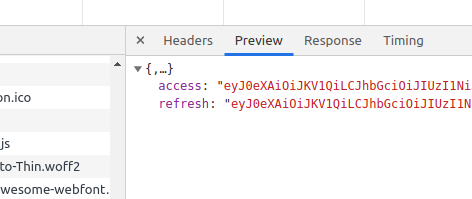
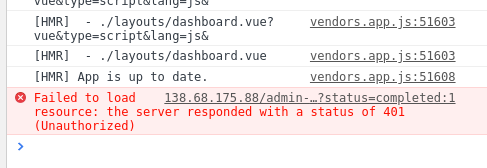
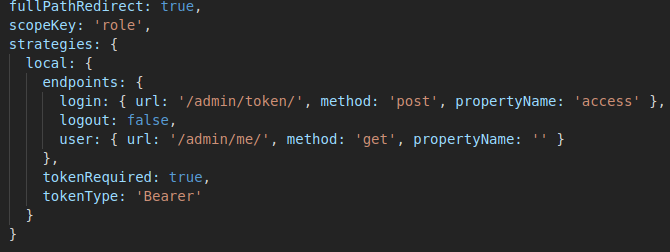
What does the proposed changes look like?
Please add another optional field to login endpoint that sets refresh token.... I already see the auth module has the function to set it. An axios interceptor will take care of the rest feature of having to fetch a new access token once expired using the refresh token in payload.
Also a new endpoint to specify what url is called using this refresh token to fetch access
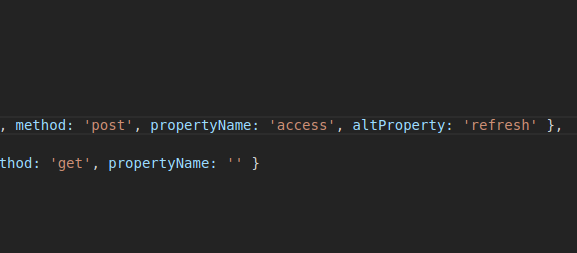
To look something like this
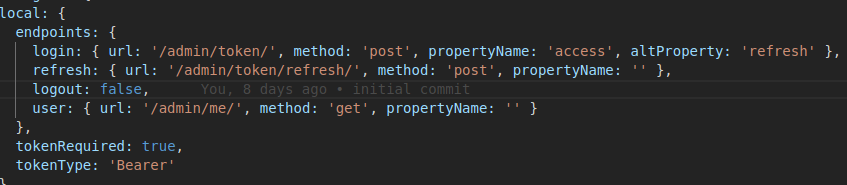
and then a $auth.tokenRefresh function.
Thanks
 rikoz
rikoz
All 43 comments
I also waiting this features to be merged, for short term solution, I set the jwt token expire time to 8 hour
 geoffreylzf
on 7 Jul 2019
geoffreylzf
on 7 Jul 2019
Hi @rikoz, we are working on refresh support. Check this out #361
We haven't finished yet, but at the meantime you can use the new branch (feat/refresh).
You can find the docs in the PR.
 JoaoPedroAS51
on 11 Jul 2019
JoaoPedroAS51
on 11 Jul 2019
Okay, I will check it out now.
Let me know when it's updated into the main branch so i can update my node package. I will be waiting
Can you give me a direct link to docs
thanks I appreciate.
rikoz
on 14 Jul 2019
@rikoz I'll let you know when we merge it.
Docs can be found here #361
JoaoPedroAS51
on 14 Jul 2019
Okay thanks, seen
rikoz
on 15 Jul 2019
Any updates?
 mckraemer
on 20 Feb 2020
mckraemer
on 20 Feb 2020
@rikoz I'll let you know when we merge it.
Docs can be found here #361
Hey Joao, do you have any news?
I think this is a feature many people need :)
Is there a way I can help?
 danielmoeck
on 23 Feb 2020
danielmoeck
on 23 Feb 2020
Hey Joao, do you have any news?
I think this is a feature many people need :)Is there a way I can help?
Hi @danielmoeck, I'm sorry, I don't have any news about it. I had to stop working a few months ago due to personal problems.
But yeah I agree, many people need this feature! Actually, I use this branch in my project in production! For me it works fine and stable.
I guess is up to @pi0 to make the final reviews and merge it.
JoaoPedroAS51
on 23 Feb 2020
@danielmoeck @mckraemer
I just released a new update, the branch feat/refresh is up-to-date now ;)
JoaoPedroAS51
on 23 Feb 2020
@danielmoeck @mckraemer
I just released a new update, the branch feat/refresh is up-to-date now ;)
Thank you! I will try the branch you mentioned :)
danielmoeck
on 23 Feb 2020
oh damn @JoaoPedroAS51
When I call the /users/me route the auth-module will send Authorization: JWT undefined.
It worked with master. Do you have a hint? :)
danielmoeck
on 25 Feb 2020
Hey @danielmoeck! Let's find out together!
Can you show me your auth config in nuxt.config.js and send me a screenshot of the error?
JoaoPedroAS51
on 25 Feb 2020
Yes that sounds great @JoaoPedroAS51
I expected the basic login to work in the way it did before just with the refresh token.
Or did I understand this wrong?
The errorcode is basically 401
The header to the /users/me route sends
Authorization: JWT undefined
At the moment I'm using this version of the auth-module
"@nuxtjs/auth": "github:nuxt-community/auth-module#feat/refresh",
auth: {
    localStorage: false,
    strategies: {
      local: {
        endpoints: {
          login: { url: '/api/v1/auth/jwt/create/', method: 'post', propertyName: 'access' },
          user: { url: '/api/v1/auth/users/me/', method: 'get', propertyName: false },
          logout: false
        },
        tokenRequired: true,
        tokenType: 'JWT'
      }

    }
  },
Hi @danielmoeck, I guess the problem is in your config. We refactored the config in the feat/refresh branch. You can check the docs here https://github.com/nuxt-community/auth-module/pull/361#issue-282213943
Try changing to this and tell me what happens:
auth: {
    localStorage: false,
    strategies: {
      local: {
        _scheme: 'refresh',
        token: {
          property: 'access'
        },
        refreshToken: {
          property: 'refresh_token' // change to your refresh token property
        },
        user: false,
        endpoints: {
          login: { url: '/api/v1/auth/jwt/create/', method: 'post' },
          refresh: { url: '/api/v1/auth/jwt/refresh/', method: 'post' }, // change to your refresh token url
          user: { url: '/api/v1/auth/users/me/', method: 'get' },
          logout: false
        },
        tokenRequired: true,
        tokenType: 'JWT'
      }
    }
  }
Wow thank you so much for your fast reply, thats really cool!
I think everything works, I get my access and refresh token 👍 yeah!
I'm just wondering why my auth/users/me call returns "Authentication credentials were not provided.". Do you know where I could've made a mistake?
danielmoeck
on 25 Feb 2020
@danielmoeck I'm happy to know it worked! :)
About "Authentication credentials were not provided", try to use tokenType: 'Bearer'
JoaoPedroAS51
on 25 Feb 2020
@JoaoPedroAS51 I am very happy that you helped me! Awesome! 💯
(it works)
Thank you so much!
danielmoeck
on 25 Feb 2020
@danielmoeck Yay! And if you face any other problem, don't hesitate to contact me! I'll be happy to help! ;)
JoaoPedroAS51
on 25 Feb 2020
Hi, Help Please!! How can i set the refresh token manually????? Just as I set the token with "setUserToken (token)", I want to set the refreshToken in that way, maybe with a setRefreshToken() function. There is already a way to do that?
 Dav3rs
on 23 Jul 2020
Dav3rs
on 23 Jul 2020
Hi @Dav3rs! Just pass the refresh token as second parameter setUsetToken(token, refreshToken) :)
I presume you are using the dev version (@nuxtjs/auth-next), as refresh support wasn't released yet.
JoaoPedroAS51
on 23 Jul 2020
Thanks @JoaoPedroAS51 !!! Maybe that parameter could be updated in the docs in
https://dev.auth.nuxtjs.org/api/auth.html#setusertoken-token
Dav3rs
on 23 Jul 2020
@Dav3rs Yes, you're right. I'll update it.
JoaoPedroAS51
on 23 Jul 2020
@JoaoPedroAS51 I tried but checking cookie, refreshtoken is false.
Is this working on 4.9.1?
auth: {
    localStorage: false,
    strategies: {
      local: {
        _scheme: 'refresh',
        token: {
          property: 'access'
        },
        refreshToken: {
          property: 'refresh_token' // change to your refresh token property
        },
        user: false,
        endpoints: {
          login: { url: '/api/v1/auth/jwt/create/', method: 'post' },
          refresh: { url: '/api/v1/auth/jwt/refresh/', method: 'post' }, // change to your refresh token url
          user: { url: '/api/v1/auth/users/me/', method: 'get' },
          logout: false
        },
        tokenRequired: true,
        tokenType: 'JWT'
      }
    }
  }
EDIT: tried it with "@nuxtjs/auth-next" instead and it is working. "@nuxtjs/auth-next" and "@nuxtjs/auth" got me confused. Thank you :)
 stephenjason89
on 7 Oct 2020
stephenjason89
on 7 Oct 2020
Hi @stephenjason89! I'm happy to know it worked! :)
You should make some refactors to ensure that your config works in @nuxtjs/auth-next.
auth: {
    localStorage: false,
    strategies: {
      local: {
        scheme: 'refresh', // `_scheme` is now `scheme`
        token: {
          property: 'access',
          type: 'Bearer', // `tokenType` is now `token.type`
          required: true // `tokenRequired` is now `token.required`
        },
        refreshToken: {
          property: 'refresh_token' // change to your refresh token property
        },
        user: {
          property: false,  // `user` property is now `user.property`
          autoFetch: true
        },
        endpoints: {
          login: { url: '/api/v1/auth/jwt/create/', method: 'post' },
          refresh: { url: '/api/v1/auth/jwt/refresh/', method: 'post' },  // change to your refresh token url
          user: { url: '/api/v1/auth/users/me/', method: 'get' },
          logout: false
        }
      }
    }
  }
@JoaoPedroAS51 Thank you for replying to me.
However, I am using laravel passport and issue arises whenever it tries to refresh the token
I get Unauthenticated error message from laravel passport.
I believe i should follow this format
        'grant_type' => 'refresh_token',
        'refresh_token' => 'the-refresh-token',
        'client_id' => 'client-id',
        'client_secret' => 'client-secret',
        'scope' => '',
But currently it is just passing refresh_token
How can i add this?
Currently my config is this
auth: {
        redirect: {
            login: '/login',
            logout: '/',
            callback: '/login',
            home: '/',
        },

        localStorage: false,
        strategies: {
            local: {
                scheme: 'refresh',
                token: {
                    property: 'access_token',
                    maxAge: 60, // Just set this at 1 minute to try the auto refresh
                    type: 'Bearer',
                },
                refreshToken: {
                    property: 'refresh_token',
                    maxAge: 60 * 60 * 24 * 30, // same as refresh_ttl but in seconds
                },
                user: {
                    property: '',
                    autoFetch: true,
                },
                endpoints: {
                    login: { url: '/oauth/token', method: 'post' },
                    refresh: {
                        url: '/oauth/token/refresh',
                        method: 'post',
                        headers: {
                            'X-Requested-With': 'XMLHttpRequest',
                            'Content-Type': 'application/json',
                        },
                        data: { //Failed attempt to add the additional params here
                            grant_type: 'refresh_token',
                            client_id: '2',
                            client_secret: 'EKZWv2BF9A3I2VXZZ1x0LMu50nHxkcseCvk7BT8U',
                            scope: '',
                        },
                    },
                    user: { url: '/api/user', method: 'get' },
                    logout: { url: '/api/logout', method: 'post' },
                },
            },
        },
    },
Thank you so much


stephenjason89
on 7 Oct 2020
@stephenjason89 Laravel Passport it's pretty easy to configure. Just use laravel/passport provider :)
Documentation: https://dev.auth.nuxtjs.org/providers/laravel-passport
JoaoPedroAS51
on 7 Oct 2020
@JoaoPedroAS51 How can i use the laravel/passport provider with a username and password?
I believe the docs uses client ID and client secret alone to get a token?
Or maybe i might be doing this the wrong way?
What I am trying to achieve is for users to be able to login using username and password which will be passed to my backend (passport) that will issue a token and a refresh token.
Thank you
stephenjason89
on 7 Oct 2020
@stephenjason89 It works with password grant, just need to set grantType to password
nuxt.config
auth: {
  laravelPassport: {
    name: 'laravelPassportPassword',
    provider: 'laravel/passport',
    endpoints: {
      user: {
        url: '/api/auth/user'
      }
    },
    token: {
      maxAge: 1800
    },
    refreshToken: {
      maxAge: 60 * 60 * 24 * 30
    },
    clientId: 'client-id',
    clientSecret: 'client-secret',
    grantType: 'password'
  }
}
Then to login:
this.$auth.loginWith('laravelPassport', {
  data: {
    username: '[email protected]',
    password: '12345678'
  }
})
You can check the demo from the repo: https://github.com/nuxt-community/auth-module/tree/dev/demo
Laravel Passport documentation for Password Grant flow: https://laravel.com/docs/8.x/passport#password-grant-tokens
JoaoPedroAS51
on 7 Oct 2020
@JoaoPedroAS51 You are awesome. I am trying it now. Sorry I was editing my previous question when you replied.
The same challenge is what i am facing with social login.
I have laravel socialite and the current implementation on the docs for facebook is
auth: {
  strategies: {
    facebook: {
      endpoints: {
        userInfo: 'https://graph.facebook.com/v2.12/me?fields=about,name,picture{url},email,birthday'
      },
      clientId: '...',
      scope: ['public_profile', 'email', 'user_birthday']
    },
  }
}
This works only half way. I will have a token from facebook but I won't be able to verify on my server if this is already registered and if it is, issue a token from passport.
Thank you :)
stephenjason89
on 7 Oct 2020
I might be missing something, i copied the config on the repo you linked me.
here's my nuxt
    axios: {
        proxy: true,
    },
    proxy: {
        '/api': 'http://localhost',     //localhost is my laravel and localhost:3000 is my nuxt
        '/laravel': {
            target: 'http://localhost',
            pathRewrite: { '^/laravel': '/' },
        },
    },
   auth: {
        cookie: {
            secure: false,
        },
        localStorage: false,

        strategies: {
            laravelPassportPasswordGrant: {
                name: 'laravelPassportPassword',
                provider: 'laravel/passport',
                url: '/laravel',
                endpoints: {
                    user: {
                        url: '/api/auth/user',
                    },
                },
                token: {
                    maxAge: 1800,
                },
                refreshToken: {
                    maxAge: 60 * 60 * 24 * 30,
                },
                clientId: '2',
                clientSecret: 'EKZWv2BF9A3I2VXZZ1x0LMu50nHxkcseCvk7BT8U',
                grantType: 'password',
            },
        },
    },
Then i called it like this
        async passwordGrantLogin() {
            await this.$auth.loginWith('laravelPassportPasswordGrant', {
                data: {
                    username: this.user.username,
                    password: this.user.password,
                },
            })
        },
Everytime i try to login, the only thing i see in my network tab is index.js
EDIT: i actually went ahead and copied the whole Auth block and used
laravelPassportPasswordGrant: {
                name: 'laravelPassportPassword',
                provider: 'laravel/passport',
                url: '/laravel',
                endpoints: {
                    user: {
                        url: '/api/auth/user',
                    },
                },
                token: {
                    maxAge: 1800,
                },
                refreshToken: {
                    maxAge: 60 * 60 * 24 * 30,
                },
                clientId: '2',
                clientSecret: 'EKZWv2BF9A3I2VXZZ1x0LMu50nHxkcseCvk7BT8U',
                grantType: 'password',
            },
But there were no errors nor were there network traffic to my laravel endpoint. I only see index.js and my default error handler.
stephenjason89
on 7 Oct 2020
@stephenjason89 I think your laravel target should be http://localhost:8000
Sorry for the delay. I'm not used to laravel socialite. I'm doing some research.
JoaoPedroAS51
on 7 Oct 2020
@JoaoPedroAS51 I changed mine to port 80
stephenjason89
on 7 Oct 2020
ok
JoaoPedroAS51
on 7 Oct 2020
Thank you for helping me, I will try to do something about the laravel socialite and will report back once i figure it out.
stephenjason89
on 7 Oct 2020
@stephenjason89 About the facebook I think you should set the userInfo to your laravel app like http://localhost/api/auth/facebook/user then in your controller add something like this:
public function user ()
{
    $user = Socialite::driver('facebook')->userFromToken(request()->bearerToken());

    return response()->json($user)
}
@JoaoPedroAS51 I will try that now.
Btw, I am still having troubles with passportpasswordgrant and i copied everything from the repo :(
stephenjason89
on 7 Oct 2020
For facebook:
```js
auth: {
strategies: {
facebook: {
endpoints: {
userInfo: 'http://localhost/api/auth/facebook/user'
},
clientId: '...'
},
}
}
````
Btw, I am still having troubles with passportpasswordgrant and i copied everything from the repo :(
Ok, I'll see if I find where is the error.
JoaoPedroAS51
on 7 Oct 2020
@JoaoPedroAS51 Thank you so much. You reply so fast. I'm so grateful for your help.
stephenjason89
on 7 Oct 2020
I'm happy to help! :)
JoaoPedroAS51
on 7 Oct 2020
@stephenjason89 Can you add me on discord? Joao Pedro AS51#1284
JoaoPedroAS51
on 7 Oct 2020
I will add you now :)
stephenjason89
on 7 Oct 2020
Thank you so much for helping me @JoaoPedroAS51 I really appreciate it.
stephenjason89
on 8 Oct 2020
I have similar issue to one above and its solution doesn't work for my case... (Authorization: JWT undefined)
Client send login request and get response like below
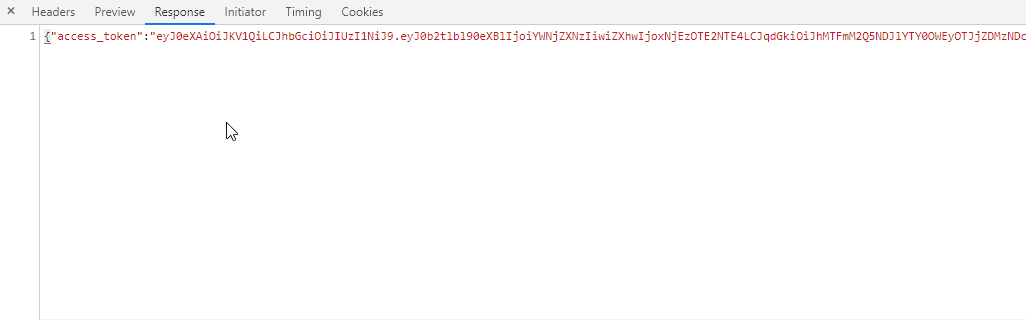
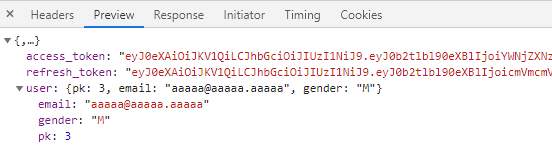
But if I try this.$auth.loggedIn , it gives false
and /user request doesn't contain Authorization header


this is my auth setting
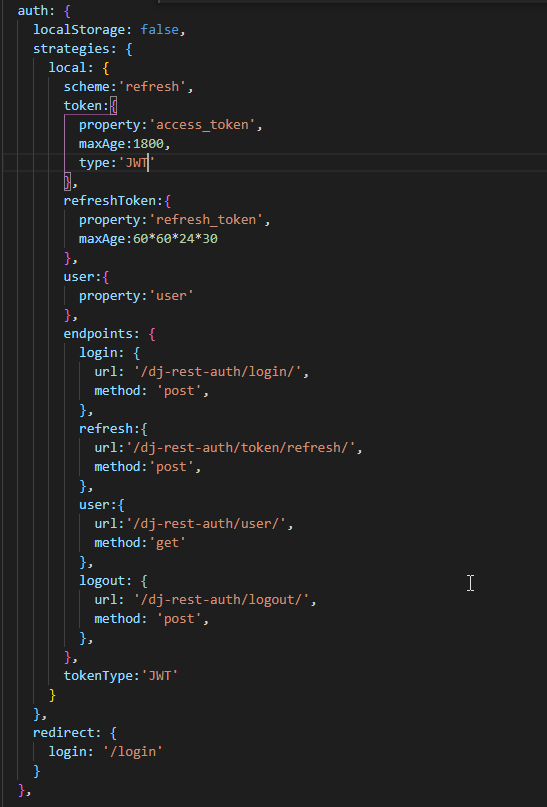
Please help me....
 sunnykan314
on 21 Feb 2021
sunnykan314
on 21 Feb 2021
Related issues
 varna
·
4Comments
varna
·
4Comments
 eatyrghost
·
3Comments
eatyrghost
·
3Comments
 essamamdani
·
3Comments
essamamdani
·
3Comments
 weijinnx
·
3Comments
weijinnx
·
3Comments
 amjadkhan896
·
3Comments
amjadkhan896
·
3Comments
Most helpful comment
@danielmoeck @mckraemer
I just released a new update, the branch feat/refresh is up-to-date now ;)