Auth-module: nuxt-auth module not setting loggedIn and user value
Hello I have a question this is my code when logging in
this.$auth.loginWith('local', {
data: {
"email": this.username,
"password": this.password
}
})
and this is my auth config
axios: {
baseURL: 'http://api.foodpaket.com/api/v1'
},
auth: {
strategies: {
local: {
endpoints: {
login: {
url: '/auth/login',
method: 'POST',
propertyName: 'access_token',
},
logout: {
url: '/auth/logout',
method: 'POST'
},
user: {
url: '/web/user',
method: 'get'
}
}
}
}
Am I missing something because it sets the token in both session and local storage but loggedIn still false and user is undefined
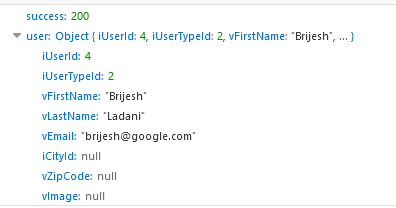
this is the result of fetching logged in user

 jeck5895
All 24 comments
This issue as been imported as question since it does not respect auth-module issue template. Only bug reports and feature requests stays open to reduce maintainers workload.
If your issue is not a question, please mention the repo admin or moderator to change its type and it will be re-opened automatically.
Your question is available at https://cmty.app/nuxt/auth-module/issues/c164.
![cmty[bot] picture](https://avatars.githubusercontent.com/in/6210?v=4&s=40) cmty[bot]
on 28 Jun 2018
cmty[bot]
on 28 Jun 2018
duplicate
 benoitemile
on 1 Jul 2018
benoitemile
on 1 Jul 2018
@jeck5895 Hi ~ Have you find a solution?
@benoitemile I don't understand your "duplicate", where's is it?
Here's my code at store/index;js:
`
export const getters = {
isAuthenticated(state){
return state.auth.loggedIn
},
loggedUser(state){
return state.auth.user
}
};
`
...and at pages/login.vue i used loginWith in a first place (don't work) then i used login, but still i also have user=undefined and auth.loggedIn at false.
for loginWith:
try {
await this.$auth.loginWith('local', {
data: {
email: this.email,
password: this.password,
},
});
} catch (e) {
this.error = e.message;
}
for login:
try {
await this.$auth.login({email: this.email, password: this.password})
} catch (e) {
this.error = e.message;
}
 Chahinaz
on 14 Sep 2018
Chahinaz
on 14 Sep 2018
hi @Chahinaz
I was talking about that issue : https://cmty.app/nuxt/hare/issues/c39 because OP created this twice.
benoitemile
on 14 Sep 2018
I'm still getting this issue as well. Any ideas on fixes?
 hashinteractive
on 4 Oct 2018
hashinteractive
on 4 Oct 2018
This should be fixed by setting the propertyName: ''
hashinteractive
on 4 Oct 2018
@Chahinaz Ive fixed this issue with the following config in nuxt.config.js
auth: {
    strategies: {
      local: {
        endpoints: {
          login: {
            url: '/api/v1/web/auth/login',
            method: 'POST',
            propertyName: 'access_token',
          },
          logout: {
            url: '/api/v1/web/logout',
            method: 'POST'
          },
          user: {
            url: '/api/v1/web/user',
            method: 'get',
            propertyName: false
          }
        }
      }
    }
  }
jeck5895
on 5 Oct 2018
Then on login.vue
this.$auth.loginWith('local', {
data: {
"email": this.username,
"password": this.password
}
})
jeck5895
on 5 Oct 2018
@Chahinaz you dont need to create store for auth as it handles automatically
jeck5895
on 5 Oct 2018
user: {url: 'admin/auth/user', method: 'get', propertyName: false}
propertyName: false did the trick for me
 Edmund-M
on 8 Dec 2018
Edmund-M
on 8 Dec 2018
I have a similar issue.
I've inspected the Vuex Mutations and whats happening is that the
this.$auth.loginWith('local', ...) is setting the user and the loggedIn values to an Object coming from the API and true.
The problem comes immediately after this mutations.
It appears that this module (at least on my case) is reseting everything to false after setting it to the results coming from the API.
Is/has anyone experiencing/experienced this issue?
If so, can you point me in the right direction?
I've already setted user propertyName to false (as you can see on my config below) and didn't solved my issue.
My nuxt.config.js file looks like this
auth: {
redirect: {
home: '/',
logout: '/',
login: '/login',
callback: '/callback',
},
watchLoggedIn: true, // When enabled (default) user will be redirected on login/logouts.
refresh_token: {
prefix: '_refresh_token.',
},
token: {
prefix: '_token.', // Default prefix used in building a key for token storage across all storage providers.
},
localStorage: false,
// The Auth token will be stored in a cookie named by default as: auth.token.{provider}.
cookie: {
prefix: 'auth.', // Default token prefix used in building a key for token storage in the browser's localStorage.
options: {
path: '/', // Path where the cookie is visible. Default is '/'.
expires: 5, // Can be used to specify cookie lifetime in Number of days or specific Date. Default is session only.
// domain: '', // Domain (and by extension subdomain/s) where the cookie is visible. Default is domain and all subdomains.
// secure - false, // Sets whether the cookie requires a secure protocol (https). Default is false, should be set to true if possible.
},
},
resetOnError: false, // If enabled, user will be automatically logged out if any error happens. (For example when token expired)
rewriteRedirects: true, // If enabled, user will redirect back to the original guarded route instead of redirect.home.
fullPathRedirect: false, // If true, use the full route path with query parameters for redirect
vuex: {
namespace: 'auth', // Vuex store namespace for keeping state.
},
scopeKey: 'scope', // User object property used for scope checking (hasScope). Can be either an array or a object.
defaultStrategy: undefined, // Will be auto set at module level
strategies: {
local: {
endpoints: {
logout: false,
login: {
method: 'post',
propertyName: 'jwt',
url: '/auth/local',
},
user: {
method: 'get',
propertyName: false,
url: '/users/me',
},
},
tokenRequired: true,
tokenType: 'Bearer',
},
facebook: {
client_id: '277918070246312462',
userinfo_endpoint:
'https://graph.facebook.com/v2.12/me?fields=about,name,picture{url},email,birthday',
scope: ['public_profile', 'email', 'user_birthday'],
},
},
}


 RafaelMLMacedo
on 6 Jan 2019
RafaelMLMacedo
on 6 Jan 2019
My code is working fine on my desktop ubuntu. But when I put code into remote server (ubuntu too) it didn't set loggedIn and user just like write above.
I set my user propertyName to false, but it still didn't work.
Any suggestions?
 siberiadev
on 26 Apr 2019
siberiadev
on 26 Apr 2019
Same problem here...
I asked at StackOverflow: https://stackoverflow.com/questions/55986158/how-to-save-jwt-token-in-vuex-with-nuxt-auth-module
 jakobkuehne
on 4 May 2019
jakobkuehne
on 4 May 2019
Hello, I have a feature request and i need help from anyone who can help
What I have::
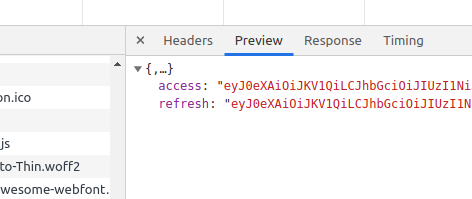
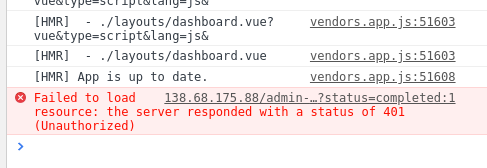
please i'm making use of JWT setting the access token in the property name... the problem is access token expires after some minutes and becomes invalid throwing a 401 (Unauthorized) error and this will make the application to logout.
What I want to acheive::
A way to set the refresh token so when access token expires and throws such error, I should intercept to use refresh token to fetch a new access token and then repeat request.
Feature Request::
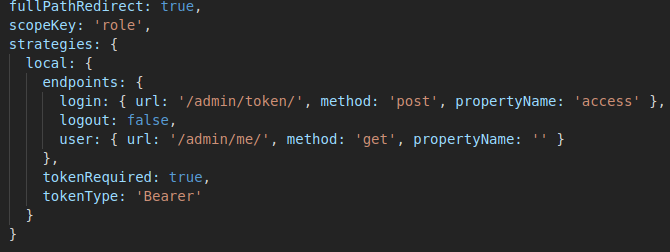
Please add another optional field to login endpoint that sets refresh token.... I already see the auth module has the function to set it. An axios interceptor will take care of the rest.
I'm using DRF for backend.
I really need your help as this app deploys in few days and i need to fix it up
Thanks
 rikoz
on 30 Jun 2019
rikoz
on 30 Jun 2019
I had this issue w/ SSR Mode.
I solved this by making sure the BASE_URL is included in the paths to my API endpoints for authentication.
login: {
url: ${process.env.BASE_URL}/api/auth/local,
method: 'post',
propertyName: 'token'
},
logout: {
url: ${process.env.BASE_URL}/api/auth/logout,
method: 'post'
},
user: {
url: ${process.env.BASE_URL}/api/users/me,
method: 'get',
propertyName: ''
}
Without the base URL in place, the server side can't call the URL. In my case, I set-up a Proxy for /api/ to call to an API_URL set-up for my backend.
 stevenraines
on 9 Apr 2020
stevenraines
on 9 Apr 2020
After two days, I finally found the solution.
If the response from the login request doesn't have the (user information object), and user information needs to obtained from another api request, your case is looks like mine.
- My nuxt.config.js :
strategies: {
local: {
token: {
property: 'access_token',
},
user: {
property: 'data',
autoFetch: false,
},
endpoints: {
login: {
url: '/auth/login',
method: 'post',
},
logout: {
url: '/auth/logout',
method: 'get',
},
user: {
url: '/user/info',
method: 'get',
propertyName: false,
},
},
* NOTE the (autoFetch) property of (user) object
My login request:
async login() {
await this.$auth
.loginWith('local', {
data: {
username: data.phone,
password: data.password,
...
},
})
.then((response) => {
...
dispatch('getUserInfo')
...
})
.catch((error) => {...})
},
* The response of login request is set as (token)
* Then the (getUserInfo) function is called
- My getUserInfo function:
getUserInfo({ commit }) {
return this.$axios
.$get(${process.env.baseUrl}/user/info)
.then((response) => {
this.$auth.setUser(response.data)
...
.catch((err) => {... })
},
* The response of getUserInfo request is set as ($auth.user) object in store
--------------------------------------------------------------------------------
Now ($auth.loggedIn) is true and ($auth.user) is ready to use, also after reloading the page, these information are not lost and disappeared.
I hope I was able to help at least one person
 meeman
on 27 Sep 2020
meeman
on 27 Sep 2020
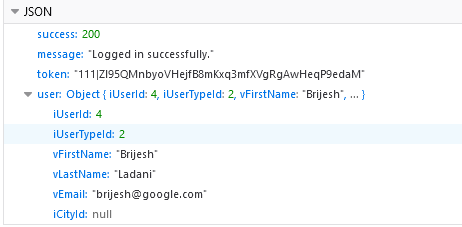
Hello after messing whole day i find a solution hope your code will works with the same.
strategies: {
local: {
token: {
property: 'token'
},
user: {
propertyName: 'user',
autoFetch: true
},
endpoints: {
login: {
url: '/api/login',
method: 'post'
},
logout: {
url: '/api/logout',
method: 'post'
},
user: {
url: '/api/user',
method: 'get',
}
},
},
laravelSanctum:{
provider: 'laravel/sanctum',
url: baseURL,
endpoints: EndPoints
},
google: {
clientId: ''
},
}
when you call login (like: api/login) method then token property will be same as token: {
property: 'token'
},
and with the same response (api/login) you have to send user data in user property as same as user: {
propertyName: 'user',
autoFetch: true
},
when you call user call (api/user) then all user data will be in user property as same as user: {
propertyName: 'user',
autoFetch: true
},
find out login and user response as i attached.
 br57
on 1 Jan 2021
br57
on 1 Jan 2021
This problem messed me up too. Just want to share my solution here to prevent others from searching for hours.
The most solutions I found online suggested to just set the endpoint.user.propertyName to false or give it a name.
To give it a name worked for me, but only by changing the api response so that the user would be wrapped in an extra object. I did not want to change the api just for this purpose.
By just setting propertyName to false, user and loggedIn was not set after login.
What solved the problem for me was to set the strategies.user.property to false additionally.
auth config:
auth: {
strategies: {
local: {
token: {
property: 'accessToken',
maxAge: 1800
},
user: {
property: false <--- THIS ---
},
endpoints: {
login: { url: '/login', method: 'post', propertyName: 'accessToken' },
logout: false,
user: { url: '/users/me', method: 'get', propertyName: false <--- AND THIS --- }
}
}
},
...
}
Cheers. I hope this helps.
 jduesentrieb
on 16 Jan 2021
jduesentrieb
on 16 Jan 2021
Hi @jduesentrieb! Thank you for sharing your solution.
I would just like to add a small note: propertyName is for auth v4 and user.property is for auth v5 (auth-next). Same for token.property. So you just need to set the configuration according to the version you're using :)
If you're using auth v5, you can safely remove the propertyName. You can see the new docs here: https://auth.nuxtjs.org/schemes/local
 JoaoPedroAS51
on 16 Jan 2021
JoaoPedroAS51
on 16 Jan 2021
@JoaoPedroAS51 and @jduesentrieb, I just wanted to say thanks so much for your responses and the work you did in figuring out what the problem was! I've been struggling with this issue for half a day now, and you were exactly right - I was following a tutorial that covered using auth v4, and because of the changes in syntax for v5, I wasn't able to log in.
The broken code (from v4, I presume):
strategies: {
local: {
endpoints: {
login: {
url: 'auth/local',
method: 'post',
propertyName: 'jwt',
},
user: {
url: 'users/me',
method: 'get',
propertyName: false,
},
logout: false,
},
},
},
What worked for me in the end (using auth-next):
strategies: {
local: {
token: {
property: 'jwt',
},
user: {
property: false,
},
endpoints: {
login: {
url: 'auth/local',
method: 'post',
},
user: {
url: 'users/me',
method: 'get',
},
logout: false,
},
},
},
It's such a relief to finally get a solution for this!
 eaang
on 16 Jan 2021
eaang
on 16 Jan 2021
@eaang I'm happy to know everything is working now! :)
JoaoPedroAS51
on 16 Jan 2021
Hi @JoaoPedroAS51, thanks for the explanation.
Just removed propertyName and it works :)
jduesentrieb
on 17 Jan 2021
This problem messed me up too. Just want to share my solution here to prevent others from searching for hours.
The most solutions I found online suggested to just set the
endpoint.user.propertyNametofalseor give it a name.
To give it a name worked for me, but only by changing the api response so that the user would be wrapped in an extra object. I did not want to change the api just for this purpose.By just setting
propertyNametofalse,userandloggedInwas not set after login.
What solved the problem for me was to set thestrategies.user.propertytofalseadditionally.auth config:
auth: { strategies: { local: { token: { property: 'accessToken', maxAge: 1800 }, user: { property: false <--- THIS --- }, endpoints: { login: { url: '/login', method: 'post', propertyName: 'accessToken' }, logout: false, user: { url: '/users/me', method: 'get', propertyName: false <--- AND THIS --- } } } }, ... }Cheers. I hope this helps.
Works!! Thank you!
 giovannefc
on 21 Jan 2021
giovannefc
on 21 Jan 2021
amazing dude... it really works with user: { propertyName: false } perfection
 acatzk
on 5 Feb 2021
acatzk
on 5 Feb 2021
Related issues
 javialon26
·
3Comments
javialon26
·
3Comments
 roosht3
·
3Comments
roosht3
·
3Comments
 AhmedAtef07
·
3Comments
AhmedAtef07
·
3Comments
 eatyrghost
·
3Comments
eatyrghost
·
3Comments
 Amoki
·
3Comments
Amoki
·
3Comments
Most helpful comment
@Chahinaz Ive fixed this issue with the following config in nuxt.config.js
auth: {
    strategies: {
      local: {
        endpoints: {
          login: {
            url: '/api/v1/web/auth/login',
            method: 'POST',
            propertyName: 'access_token',
          },
          logout: {
            url: '/api/v1/web/logout',
            method: 'POST'
          },
          user: {
            url: '/api/v1/web/user',
            method: 'get',
            propertyName: false
          }
        }
      }
    }
  }