I don't have any issues with this app.
I just want to know if it you guys could add support for Gigabyte's RGB Fusion.
Here's the SDK:
https://www.gigabyte.com/mb/rgb/sdk
 wanildopneto
All 68 comments
Will this ever be compatible? I’m sure plenty others are anticipating this as well.
 Cheddaz
on 27 May 2018
Cheddaz
on 27 May 2018
@Cheddaz I'm going to be working on big changes after my exams which will allow for control of devices other than keyboards & mice
 simon-wh
on 27 May 2018
simon-wh
on 27 May 2018
any news on this ?
 vincentoliviers
on 6 Nov 2018
vincentoliviers
on 6 Nov 2018
The Gigabyte Fusion SDK also provides support for their laptop keyboards
I recently got one and could provide testing and debugging.
Due to my lack of knowlegde in C# and of the Project, I cannot do the initial implementation and the native DLL-wrapper, though.
 Alia5
on 10 Nov 2018
Alia5
on 10 Nov 2018
The Gigabyte Fusion SDK also provides support for their laptop keyboards
I recently got one and could provide testing and debugging.Due to my lack of knowlegde in C# and of the Project, I cannot do the initial implementation and the native DLL-wrapper, though.
@Alia5 Do you know, whether the SDK supports laptop keyboards like those of the AERO-15-Series?
 wlanowski
on 14 Nov 2018
wlanowski
on 14 Nov 2018
I have an Aero-15 here ;)
Afaik it does.
Alia5
on 22 Nov 2018
I wrote to the support of GIGABYTE. The answer was, that it is not supported...
But maybe they even dont know their own tool. In the documentation of the SDK i can't find anything about our Aeros.
wlanowski
on 22 Nov 2018
What sections of this code should I look over to try and see if integrating the Gigabyte SDK is easily done? The quickest way to implement support would be to us another open-source project, https://github.com/tylerszabo/RGB-Fusion-Tool
I guess it would be best to make it follow the mouse color?
 zybeon
on 31 Jan 2019
zybeon
on 31 Jan 2019
I would also like to request Gigabyte RGB support, especially to be able to use Razer Chroma to Control Gigabyte motherboard RGB
 Wontell
on 2 Mar 2019
Wontell
on 2 Mar 2019
I want RGB fusion support too.
 KmuTech
on 20 Mar 2019
KmuTech
on 20 Mar 2019
Any news on this?
 Jnss98b
on 24 Apr 2019
Jnss98b
on 24 Apr 2019
Unfortunately I do not believe, that GIGABYTE SDK is compatible with AERO-keyboards. I cant find any hints on keyboard-support in the SDK-documentary and examples. Additionaly the linked RGB fusion tool can not find my AERO-keyboard.
I have no idea about configure the AERO-keyboards through terminal/command line...
wlanowski
on 26 Apr 2019
Damn it Gigabyte! You had one job.
Jnss98b
on 26 Apr 2019
I am more interested in linking my motherboard to my Razer keyboard and mouse.
 SuperSandro2000
on 26 Apr 2019
SuperSandro2000
on 26 Apr 2019
Well, the RGB Fusion sdk does cover motherboards so you should be fine when Aurora utilizes the sdk
Jnss98b
on 26 Apr 2019
Please add this feature so I can use Razer Synapse with my motherboard and ram
 MaxPainNL
on 10 May 2019
MaxPainNL
on 10 May 2019
I'm stopping in to voice support for RGB Fusion support! The AORUS eGPU box would look neat synchronized with my Razer Orochi on my win 10 tablet gaming rig
 ScottNorton
on 14 May 2019
ScottNorton
on 14 May 2019
Also stopping by to support the addition of RGB Fusion. Would be an awesome feature. Would even like to donate to the project if it helps developers. You're doing what no brand is doing properly. Unified RGB all the way
 brugvp
on 7 Jun 2019
brugvp
on 7 Jun 2019
Try this
https://github.com/Cheerpipe/RGBFusion390SetColor
Working on a Z390 Aorus Master. Should work on any RGBFusion compatible hardware.
 Cheerpipe
on 25 Oct 2019
Cheerpipe
on 25 Oct 2019
+1 on this!
 Tavisco
on 2 Nov 2019
Tavisco
on 2 Nov 2019
+1
RGB Fusion is pretty trash, I would love to see another open sourced tool get integrated into Aurora so that i could finally get my gigabyte motherboard to sync with the rest of my RGB and would gladly donate to get this going.
 mikedmor
on 21 Nov 2019
mikedmor
on 21 Nov 2019
+1
RGB Fusion is pretty trash, I would love to see another open sourced tool get integrated into Aurora so that i could finally get my gigabyte motherboard to sync with the rest of my RGB and would gladly donate to get this going.
Try https://github.com/Cheerpipe/RGBFusion390SetColor
Working pretty well with a scripted device.
Cheerpipe
on 21 Nov 2019
Sorry I'm a total noob. I don't know how to use it with aurora. My Aurora folder don't have a scripts/devices, so I've created it and placed the script there but it didn't show up in device manager... Am I doing something wrong?
brugvp
on 21 Nov 2019
Sorry I'm a total noob. I don't know how to use it with aurora. My Aurora folder don't have a scripts/devices, so I've created it and placed the script there but it didn't show up in device manager... Am I doing something wrong?
You have to put RGBFusion390Sender.dll in Aurora folder.

Cheerpipe
on 22 Nov 2019
I gave that a try myself but it doesnt seem to appear in the Device Manager. I just placed RGBFusion390Sender.dll in my Aurora folder, then restarted Aurora. Is there something else i need to do?
mikedmor
on 22 Nov 2019
Put RGBFusion390Sender.dll in Aurora folder and RgbFusionNative.cs in AuroraScriptsDevices
If Aurora does not show RGB Fusion in Device Manager, upload your aurora log files.
Cheerpipe
on 22 Nov 2019
That worked for me, I now see the RGB Fusion MB Direct. It doesn't seem to work reliably though. After getting it working and playing around for a minute it stopped and returned back to its defaults. Definitely seems like progress though!
mikedmor
on 22 Nov 2019
Figured i would share some more info. I found out that after reboot i was able to reliably getting it to start working again by running
RGBFusion390SetColor --areas
After that Aurora began to sync with my x570 Gigabyte motherboard and all the RGB attached to it. Hopefully that helps out some, let me know if you need anything else. Thank you @Cheerpipe!
mikedmor
on 22 Nov 2019
Very noob question²: RGB Fusion is appearing as a device on Aurora, but, how to use it? By default it only turned off all LEDS.
Tavisco
on 23 Nov 2019
Oooh, analysing the code was able to determine that all motherboards LEDS are bound to G1 key, so, applying effects to it affects the board color. Neat!
Tavisco
on 23 Nov 2019
Figured i would share some more info. I found out that after reboot i was able to reliably getting it to start working again by running
RGBFusion390SetColor --areasAfter that Aurora began to sync with my x570 Gigabyte motherboard and all the RGB attached to it. Hopefully that helps out some, let me know if you need anything else. Thank you @Cheerpipe!
Forget to mention that my tool have to be running in background and Gigabyte rgbfusion should be opened at least one time to build areas database.
You can load RGBFusion390SetColor without any command line parameter.
Cheerpipe
on 23 Nov 2019
I added the file to the startup
Hkey_Local_Machine → SoftWare → Microsoft →Windows → Current Version → Run
"C:Program Files (x86)GIGABYTERGBFusionRGBFusion390SetColor.exe"
 sashayohan
on 28 Nov 2019
sashayohan
on 28 Nov 2019
What about this?
 csutorasr
on 4 Jan 2020
csutorasr
on 4 Jan 2020
I've made a self-extracting archive of the tool written by @Cheerpipe for anyone who needs it.
It includes the files which are still compatible with the AUROS X570 Master (the new CS file doesn't work for me).
 XenHat
on 29 Feb 2020
XenHat
on 29 Feb 2020
Hi there,
I have an issue when using RGBFusion390SetColor. When it sets a color to the motherboard, for instance with the default profile from desktop, I've got many error messages like this:
"Wrong --setarea: command in GetLedCommands: {ex.Message)"
In Device Manager tab I have this:
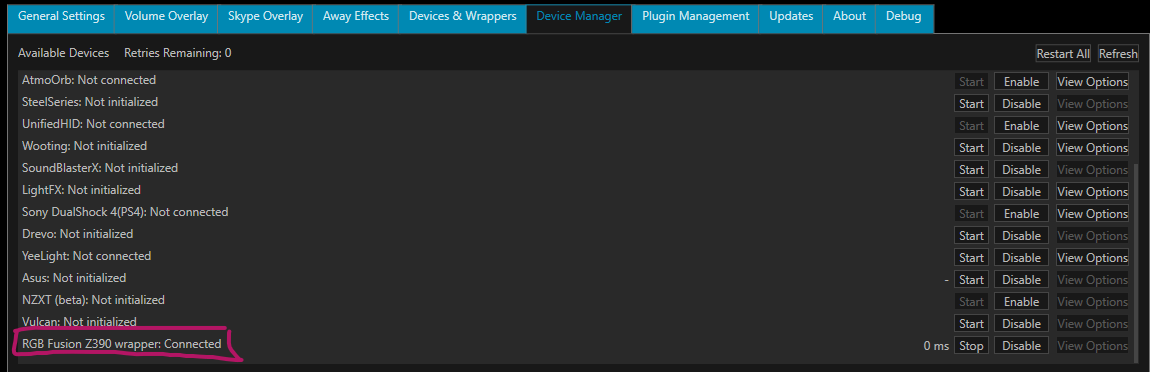
Does anyone got the same issue? SetColor works fine in command line.
 JonathanSamelson
on 22 Mar 2020
JonathanSamelson
on 22 Mar 2020
Hi there,
I have an issue when using RGBFusion390SetColor. When it sets a color to the motherboard, for instance with the default profile from desktop, I've got many error messages like this:
"Wrong --setarea: command in GetLedCommands: {ex.Message)"In Device Manager tab I have this:
Does anyone got the same issue? SetColor works fine in command line.
This error is caused when the modeIntegrated, modeAnalog and modeDigital goes to a value above what is supposed to, and that happens when Aurora assigns a color to the G6 key. If you see in the RgbFusionNative.cs script, the G6 key is used to pass the values so you can choose the mode. If you, for example, assign a color R=1, G=1 and B=1, you will be passing the mode "Breath" to the integrated, analog and digital pins.
To make it work with the other profiles that assign the G6 key to some color by default I edit the lines where it assign the G6 key to this:
else if(key.Key == DeviceKeys.G6)
                {
                    modeIntegrated = key.Value.R;
                    if (modeIntegrated > 11)
                        modeIntegrated  = 0;
                    modeAnalog = key.Value.G;
                    if (modeAnalog > 11)
                        modeAnalog  = 0;
                    modeDigital = key.Value.B;
                    if (modeDigital > 11)
                        modeDigital  = 0;
                }
Hope it helps.
 DunKalevra
on 4 Apr 2020
DunKalevra
on 4 Apr 2020
To make it work with the other profiles that assign the G6 key to some color by default I edit the lines where it assign the G6 key to this:
Thanks, i reworked the scripted device for better compatibility. It should out of the box now.
There is a new version too.
Cheerpipe
on 20 Apr 2020
What about this?
It is a good command line tool but won't work with newer mainboards like aorus z390. Won't work either with aurora and animated modes.
Cheerpipe
on 20 Apr 2020
I don't see RGB Fusion in the Device Manager. I put RGBFusion390Sender.dll in the Aurora Folder and RGBFusion390SetColor.exe in the RGBFusion Folder.
Am I doing something wrong?
 TheRealBrownie
on 27 Apr 2020
TheRealBrownie
on 27 Apr 2020
I don't see RGB Fusion in the Device Manager. I put RGBFusion390Sender.dll in the Aurora Folder and RGBFusion390SetColor.exe in the RGBFusion Folder.
Am I doing something wrong?
You also need to put RgbFusionNative.cs in AuroraScriptsDevices
DunKalevra
on 27 Apr 2020
I don't see RGB Fusion in the Device Manager. I put RGBFusion390Sender.dll in the Aurora Folder and RGBFusion390SetColor.exe in the RGBFusion Folder.
Am I doing something wrong?You also need to put RgbFusionNative.cs in AuroraScriptsDevices
Now i did that aswell, but still not seeing it in the Device Manager...
TheRealBrownie
on 27 Apr 2020
Post your log files
Usually on C:Users
Cheerpipe
on 27 Apr 2020
TheRealBrownie
on 27 Apr 2020
Hi everyone - the tool works in powershell for me and the device manager shows both the z390 version and the .cs posted in this thread as connected if i add them. However, i can't find where i can control the device in aurora - it still only shows mouse and keyboard.
 lewinernst
on 12 May 2020
lewinernst
on 12 May 2020
Hi everyone - the tool works in powershell for me and the device manager shows both the z390 version and the .cs posted in this thread as connected if i add them. However, i can't find where i can control the device in aurora - it still only shows mouse and keyboard.
Hi.
My scripted device takes color from G1 key (i am using Logitech G910 profile profile with a G915 and ude G6 key to set the color of the mainboard).
            foreach (KeyValuePair<DeviceKeys, Color> key in keyColors)
            {
                //Iterate over each key and color and send them to your device
                if(key.Key == DeviceKeys.G1) // <== Change your control key here!!!
                {
                    //For example if we're basing our device color on Peripheral colors
                    SendColorToDevice(key.Value, forced);
                }
            }
You can change this to whatever key you want) or use DeviceKeys.Peripheral_Logo to sync your motherboard with your mouse.
Cheerpipe
on 12 May 2020
You can change this to whatever key you want) or use DeviceKeys.Peripheral_Logo to sync your motherboard with your mouse.
Awesome-it's working now. One thing i noticed though is that when setting 255 0 255 for example it matters what color was previously set. If it comes from one color it will be purple, from another pink.
Also - have you tried assigning each zone to one key to enable mobo-wide effects yet? What about about setting a wave effect from aurora - is that possible?
If youre interested i would be up for some dms and integrating that functionality.
lewinernst
on 14 May 2020
You can change this to whatever key you want) or use DeviceKeys.Peripheral_Logo to sync your motherboard with your mouse.
Awesome-it's working now. One thing i noticed though is that when setting 255 0 255 for example it matters what color was previously set. If it comes from one color it will be purple, from another pink.
Also - have you tried assigning each zone to one key to enable mobo-wide effects yet? What about about setting a wave effect from aurora - is that possible?
If you’re interested i would be up for some dms and integrating that functionality.
Yes, you can bind different keys to different zones using the first parameter of the --sa command:
--sa:1:{3}:{0}:{1}:{2} == zone 1 of your mainboard
--sa:2:{3}:{0}:{1}:{2} == zone 2 of your mainboard
--sa:n:{3}:{0}:{1}:{2} == zone n of your mainboard
Just use different keys for different zones.
I recommend you to create a buffer with keys you want to use and create a single request to RGBFusion with all color changes instead of create multiple scripted devices because it uses SMBus and is not very fast and don’t play well with simultaneous calls
Cheerpipe
on 14 May 2020
I recommend you to create a buffer with keys you want to use and create a single request to RGBFusion with all color changes instead of create multiple scripted devices because it uses SMBus and is not very fast and don’t play well with simultaneous calls
Guess you were entirely right about this one, it goes completely horrific but if i don't create separate devices i can only check if one of the colors has changed since device_color only allows for a single value. Have you looked into integrating it as its own device with multiple "keys" yet?
Thanks so much for your help btw.
lewinernst
on 15 May 2020
I recommend you to create a buffer with keys you want to use and create a single request to RGBFusion with all color changes instead of create multiple scripted devices because it uses SMBus and is not very fast and don’t play well with simultaneous calls
Guess you were entirely right about this one, it goes completely horrific but if i don't create separate devices i can only check if one of the colors has changed since
device_coloronly allows for a single value. Have you looked into integrating it as its own device with multiple "keys" yet?Thanks so much for your help btw.
Yes, i want to implement some kind of transaction feature to set color for diffetent areas but with just one command.
I already have this feature working in my NZXT HUE Ambient led strip. My idea is to have some like his.
Controller.TransactionStart();
Controller.TransactionSet(zone1,color1) ;
Controller.TransactionSet(zone2,color2) ;
Controller.TransactionSet(zone3,color3) ;
Controller.TransactionSet(zone4,color4) ;
Controller.TransactionCommit();
So you can set bind different keys to different zones and commit the led transaction with the last key.
I will also check if leds are really changed and apply new colors only to those leds with new colors to speedup the wrapper.
The truth is i am not a real developer. Sorry if my software is not perfect or developed slowly.
Cheerpipe
on 15 May 2020
Hi, i actually made a small tweak which allows for the motherboard to do a full rainbow effect running through the different zones of the mobo - working on a pull request to your repo right now, but struggling with the spanish 😅😅
lewinernst
on 19 May 2020
Transaction mode is ready. It allows you set colors per area with just one setcolor operation and decent tramerste. Did you use it?
What a have to dig in is figure out how to control individual lights on the argb strips.
Cheerpipe
on 19 May 2020
I did submit a pull request based on your latest commit, maybe we can continue this talk on the pull request https://github.com/Cheerpipe/RGBFusionCli/pull/10
lewinernst
on 19 May 2020
Is the rgb fusion compatible with the aurora project?
 DonavanElian
on 27 May 2020
DonavanElian
on 27 May 2020
I tried to install but I'm not getting
DonavanElian
on 27 May 2020
Where can I get RGBFusion390Sender.dll?
 Mitonix
on 31 May 2020
Mitonix
on 31 May 2020
I use the Gigabyte Z370 Aorus Gaming 5, but I can't change the colors of the motherboard. In addition, a connection to RGB Fusion is displayed in the Device Manager. What could be the reason for this?
Mitonix
on 1 Jun 2020
Can you try this build?
https://ci.appveyor.com/project/antonpup/aurora/builds/33231558
Cheerpipe
on 1 Jun 2020
I have already tested this build.


Mitonix
on 1 Jun 2020
Hi. Thanks for your bravery :D.
Is it working for you? If not, pls upload your logs. (the 13ms delay doesn't look good)
What motherboard are you using?
How are working yor leds?
Is there any artifact or glitch in your lights?
Changes are slow or fast? Dis you try some animated mode?
Are colors for separate areas working.
Can you post your findings here https://github.com/antonpup/Aurora/pull/2057?
Thanks again.
Cheerpipe
on 1 Jun 2020
Hello, I don't know how to install the software?
Motherboard: H370 AORUS GAMING 3
 Ashudu
on 3 Aug 2020
Ashudu
on 3 Aug 2020
Try installing this versión and report back.
https://ci.appveyor.com/project/antonpup/aurora/builds/33980785/artifacts
Cheerpipe
on 3 Aug 2020

Just click start, right?
Ashudu
on 3 Aug 2020
First, select a keyboard and mouse in "Device & Wrappers" Tab, then Start RGBFusion Device in "Device Manager" tab.
It is important to note than RGB Fusion must be installed but not running so kill any instance of RGBFusion.exe.
Cheerpipe
on 3 Aug 2020

It worked !
Motherboard: N370 AORUS GAMING 3
Leds: are working
Defect: none
Thank you very much
Ashudu
on 3 Aug 2020
Is this working with Aorus X570? Where can I find RGBFusion390Sender.dll?
csutorasr
on 9 Aug 2020
It almost works like a charm, but my XPG SSD and RAM are not lightning. TBH, the RAM module is on just one led. I'll try to understand the code to see how can I help. But, if anyone faced this issue and have tips to give, I'll accept :D
EDIT: Nevermind, I found out an way. For those who wants to know how to fix, you have to set up a different profile for each hardware on RGB Fusion Software. If you setup a single profile that updates everything (i.e., game) it will not work.
 ReeSilva
on 16 Aug 2020
ReeSilva
on 16 Aug 2020
Hello, I have a B450 AORUS ELITE and tried my best (pasting files) and got nothing.
I want to use aurora with my MB and other stuff and cant find the proper files (dll and others).
Tks in advance
 Iahrons
on 15 Oct 2020
Iahrons
on 15 Oct 2020
Hey, tried 3 differents builds that I found on this issue (and reinstalled the rgbfusion version provided here too) and can't get it working with my mobo. I have an aorus z370 gaming 5. Would be really happy to make this work just as @Ashudu managed to make the gaming 3 work ! Also, thing to note is that on latest build, if I enable rgbfusion, I get like 300ms reported of delay !
 enlight3d
on 16 Nov 2020
enlight3d
on 16 Nov 2020
Related issues
 leopupin
·
7Comments
leopupin
·
7Comments
 Pandry
·
8Comments
Pandry
·
8Comments
 OttoWerse
·
4Comments
OttoWerse
·
4Comments
 kekkokk
·
8Comments
kekkokk
·
8Comments
 IrealiTY
·
7Comments
IrealiTY
·
7Comments
Most helpful comment
I want RGB fusion support too.