Aurora eating ram on start up and displaying no interface or lighting effects
What are you experiencing an issue with?
- [x] Aurora
- [ ] Aurora supported game, (Fill in the game)
- [ ] Aurora Wrapper
- [ ] Aurora Profile
- [ ] Aurora supported device, (Fill in problematic devices)
- [ ] Aurora Scripts
- [ ] Aurora Updater
- [x] Aurora Lighting issue
- [ ] Other, (Fill in another issue here)
What kind of an issue is it?
- [ ] Crash
- [x] Performance problems
- [ ] Visual bug
- [ ] Localization issue
- [ ] Enhancement suggestion
- [ ] Device issue
- [ ] Other, (Fill in another type of issue here)
Expected behavior:
Aurora should start up with Windows and load lighting profile without eating ram.
Actual behavior:
Aurora loads without any interface and starts to hog ram, lighting stays black.
How often does this problem occur?
This problem occurs... (Every start up. Ending task and restarting aurora fixes problem)
Please describe the steps to reproduce this issue:
The issue can be reproduced by doing following steps:
- At start up
2.
3.
What is the version of Aurora you are experiencing this issue with?
My version is... (0.6.1-dev2)
Does the previous version of Aurora have this issue?
The previous version, (0.6.0b), did not have this issue.
Please include any logs, screenshots, or files that are related to this issue:
For logs, you can use: http://pastebin.com/
For screenshots, you can use: http://imgur.com/
For files, you can use: http://www.tinyupload.com/ , https://www.dropbox.com/ , or attach them to the issue.
 JmLykins
All 32 comments
Got the exact same problem too.
Logs: https://pastebin.com/zgCX5PPk
 dfg260
on 18 Aug 2017
dfg260
on 18 Aug 2017
Same problem too.
Even loading the program manually sometimes the process start hogging ram and fails to load the ui.
Logs: https://pastebin.com/4sfaf5Hz
 NeoDaemon
on 18 Aug 2017
NeoDaemon
on 18 Aug 2017
For me this only happens when aurora starts with windows, if I start it manually it works fine
 lucasvanhalst
on 19 Aug 2017
lucasvanhalst
on 19 Aug 2017
Could it be connected to the fact that aurora requires administrator privileges during startup?
I have the same problem btw.
The logs show that it seems to be connected to the SteelSeries initialization that fails to find the coreprops file (probably due to privilege issues when it starts up without administrator privileges and thus can't access the ProgramData folder)
 FHeilmann
on 25 Aug 2017
FHeilmann
on 25 Aug 2017
@JmLykins @dfg260 @NeoDaemon @lucasvanhalst @FHeilmann Has anyone experienced this while using v0.6.1-dev3?
 simon-wh
on 26 Aug 2017
simon-wh
on 26 Aug 2017
@simon-wh Aurora v0.6.1-dev3 now starts and loads my keyboard lighting configuration but still no ui and starts to eat ram. Restarting Aurora fixes the problem most of the time. UPDATE: Seems to use about 2gb of ram and stops there. Also, it seems like my Corsair m65 pro isn't recognized sometimes when start with windows is enabled. I'll test if this is an Actual Aurora issue.
JmLykins
on 26 Aug 2017
@simon-wh yep, same issue. Even got windows to say 'Close some programs to free up memory' because it ate all of my available ram and swap space.

My light effects do work now, but the UI icon isn't visible in the taskbar and I can't open it unless I kill it in task manager and restart manually.
Using a G910 + razer deathadder elite.
lucasvanhalst
on 27 Aug 2017
My last sync also happened post 0.6.1-dev3 (I self-compile). I saw that some changes were made to the autostart-with-windows code so I'll sync and retest today.
FHeilmann
on 28 Aug 2017
I haven't been able to recreate this issue again recently but I have experienced it before using dev builds. If anyone who is self-compiling like @FHeilmann could try and figure out why it is happening when it happens again I'd appreciate it.
simon-wh
on 2 Sep 2017
Freshly synced just now.
unfortunately issue still persists.
Here is my log:
if I kill the process and restart from a shortcut, Windows asks for admin privileges, but aurora successfully runs.
Heres the log of the successful run:
FHeilmann
on 4 Sep 2017
Addendum: Just booted my PC again and everything started up as it should've. So it seems the issue only occurs sometimes.
FHeilmann
on 5 Sep 2017
Has anyone experienced this while using v0.6.1-dev3?
I updated it and sadly nothing changed.
Aurora still starts eating ram even if its manually started.
 dfg260
on 7 Sep 2017
dfg260
on 7 Sep 2017
Could everyone with this issue try this build? I've had this running on a few bootups and haven't had the issue again yet. It could still be present as I wasn't experiencing the issue consistently.
simon-wh
on 12 Sep 2017
I've just tried that build and sadly the problem remains. No UI and no tray icon.
Edit: did manage to get it to work after launching it repeatedly.
 Iruberiam
on 13 Sep 2017
Iruberiam
on 13 Sep 2017
@lruberiam Could you post your log file?
simon-wh
on 13 Sep 2017
I can confirm that it still has the leak in that build. Where can I find the logs? in the aurora folder there's a folder named 'logs' but it's empty
Edit, found them. It seems like there's an exception happening every few milliseconds https://pastebin.com/qpip27yy
lucasvanhalst
on 13 Sep 2017
Where can I find the logs? in the aurora folder there's a folder named 'logs' but it's empty
%appdata%\Aurora\Logs
 brainbug89
on 13 Sep 2017
brainbug89
on 13 Sep 2017
@simon-wh log posted at https://pastebin.com/jU5SPxXm
Iruberiam
on 13 Sep 2017
So, have you been able to take a look yet?
It's kinda bad still 
lucasvanhalst
on 19 Sep 2017
@lucasvanhalst I've taken plenty of looks but I still haven't been able to figure out the cause. It isn't helped by the fact that I can't consistently replicate the issue.
simon-wh
on 19 Sep 2017
For me, Dev3 has been stable, excluding the initial issues with the missing interface.
Iruberiam
on 19 Sep 2017
Could everyone with this issue try this build? I've had this running on a few bootups and haven't had the issue again yet. It could still be present as I wasn't experiencing the issue consistently.
It still eats lots of ram but, for me, it stops at ~8,5 - 9,5 GB and then it starts to decrease slowly . It also runs normally so u dont notice it doing that if you have enough ram.
so i guess its partialy fixed!
Logs: https://pastebin.com/Ssrw2VUh
dfg260
on 8 Oct 2017
@dfg260 most likely windows just starts using swap space instead of ram so it doesn't report correctly.
lucasvanhalst
on 8 Oct 2017
@lucasvanhalst you were right. it filled both ram & swap. but you still don't notice it until your pc bluescreens with a system service exception.

dfg260
on 8 Oct 2017
So no luck in reproducing this yet? I've build a new pc in the meantime and it also happens on that one. Perhaps it has to do something with the layers I'm using? https://i.imgur.com/t0LjKAI.png
lucasvanhalst
on 9 Nov 2017
@lucasvanhalst I haven't been able to, no, I'm on a new windows install so I'm going to try and see if I can reproduce it.
simon-wh
on 12 Nov 2017
I think it's somehow related to the Equalizer Layer (so NAudio), but need to look more into it.
Just had this problem when I had music enabled and started Aurora.
 ghost
on 13 Nov 2017
ghost
on 13 Nov 2017
I'm guessing it's related to the audio indeed. It still happened without the eq layer, but when I tried to restart aurora, it wouldn't properly start if I didn't turn off the audio playing in the background first.
lucasvanhalst
on 15 Nov 2017
I've set up Visual Studio and done some digging. Fortunately (somewhat), the issue is reproducible with a fresh setup and a clean build of the v0.6.1-dev3 tag on my machine. I've upgraded to the v141 toolchain instead of the v140 one which was originally mentioned in the project files, though that seems to only affect the C++ wrappers and not the C# code. I also tried checking out the current HEAD of the NAudio subrepo (v1.8.4-5-g1a99d54), which did not change a thing.
The funny thing about this is, that it seems to not be audio-related at all:
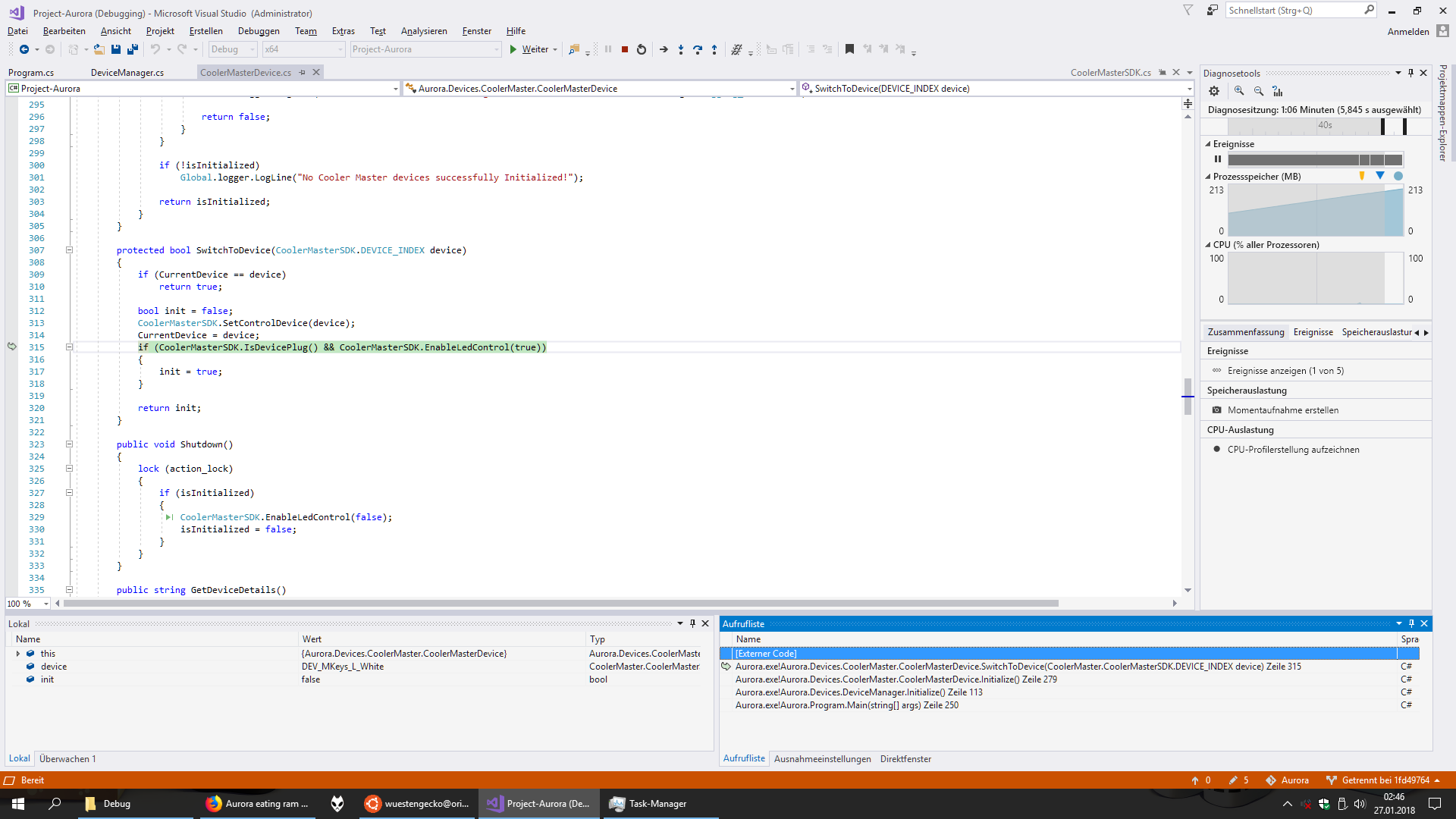
The green background marks the line of code where it'll return to after completing the "external code" (which I can't find any more info about - external SDK dll it seems). When pressing the resume button, waiting some time and breaking again, the IDE will return to this very state again, so it seems that this external code is actually the reason.
After having done all this already, I realized that there have been 50 more commits to the dev branch, and apparently one of those has fixed this issue. It started successfully 10 out of 10 times consecutively.
I've also gone ahead and zipped those built files up, you can download them here: release_v0_6_1-dev3-50-g2b358db.zip
Note that I didn't do any in-depth tests on this, and it might be unstable in other areas. Also, this has not (yet) been approved by a dev. Use at your own risk.
I won't blame you for uploading this to Virustotal, in fact I'd congratulate you on being sensible and cross-checking stuff from that person you just met on the Interwebs. ;)
 Wuestengecko
on 27 Jan 2018
Wuestengecko
on 27 Jan 2018
For everyone experiencing this issue could you try v0.6.1-dev4 which seems to fix the issue, according to @Wuestengecko
simon-wh
on 28 Jan 2018
@Wuestengecko @simon-wh Thanks for the efffort, it has worked without issues so far.
lucasvanhalst
on 28 Jan 2018
Guess this can be closed, haven't had this issue since then
lucasvanhalst
on 8 May 2018
Related issues
 TheFacelessOne
·
3Comments
TheFacelessOne
·
3Comments
 alasharim
·
3Comments
alasharim
·
3Comments
 Mitonix
·
3Comments
Mitonix
·
3Comments
 IrealiTY
·
7Comments
IrealiTY
·
7Comments
 Dagda52
·
5Comments
Dagda52
·
5Comments