Audiokit: Xcode 12 + AudioKit 4.11 Problems
Hi. I just wanted to ask if there is a planned support for v4 of AudioKit in Xcode 12? Or if there is a documentation for the v5 beta version which works in Xcode 12.
I cannot compile my app in Xcode 12 and hence cannot prepare it for the iOS 14 which is now already released. I have went into detail in this stackoverflow post.
https://stackoverflow.com/questions/63860545/implementing-microphone-analysis-with-audiokit-v5
Thank you.
 vojtabohm
All 82 comments
Yeah, well I just compiled AudioKit for Xcode 12, it was easy, but as long as @megastep is cool with it, we'll make an AudioKit 4.11 release for Xcode 12 shortly.
 aure
on 17 Sep 2020
aure
on 17 Sep 2020
https://github.com/AudioKit/AudioKit/releases/tag/v4.11 will be updated with frameworks etc soon, and hopefully cocoapods as well.
aure
on 17 Sep 2020
Just pushed the v4.11 pod for Xcode 12 - let me know if it works for you!
If you want to play with v5, we do have an experimental pod version 5.0.b2 - though you should consider using SPM instead.
 megastep
on 17 Sep 2020
megastep
on 17 Sep 2020
Hi, we have multiple errors:
for instance:
"Failed to build module 'AudioKit' from its module interface; it may have been damaged or it may have triggered a bug in the Swift compiler when it was produced"
Using last version:
- AudioKit (4.11):
- AudioKit/Core (= 4.11)
- AudioKit/UI (= 4.11)
- AudioKit/Core (4.11)
- AudioKit/UI (4.11):
- AudioKit/Core
 fvonk
on 17 Sep 2020
fvonk
on 17 Sep 2020
Mmh, I did remove a bit of script that I thought was no longer needed, fixing the Swift module interfaces. I might have to turn that back on...
megastep
on 17 Sep 2020
OK, I just updated the zip file. Please clean your pod cache and try again with a clean install...
megastep
on 17 Sep 2020
How does one know if they are installing the New 4.11 or the Old 4.11 ?
I just updated but I seem to be getting the same errors mentioned by fvonk. Which makes me think I didn't _really_ update the pod. ;)
 ryangenz
on 17 Sep 2020
ryangenz
on 17 Sep 2020
I would do pod cache clean --all, then just delete your Pods directory and do a new pod install
megastep
on 17 Sep 2020
Ok, but now we have
"Cannot find 'output' in scope"
"Cannot find 'midi' in scope"
errors...
fvonk
on 17 Sep 2020
Yes same errors here
ryangenz
on 17 Sep 2020
Same erreur here
 brizzly
on 17 Sep 2020
brizzly
on 17 Sep 2020
I should have checked here before jump into the Xcode 12 :-/ (my mistake).
 trevor-sonic
on 17 Sep 2020
trevor-sonic
on 17 Sep 2020
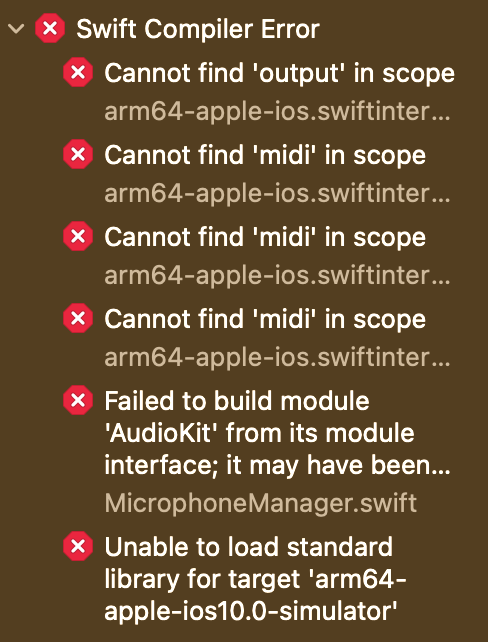
Yes, I can also confirm I have the same errors. On the bright side - before the updates I had 2567 errors and now I only have 6 of them 😄
vojtabohm
on 18 Sep 2020
Thanks for the updated builds @aure. However, I'm running into this issue when archiving my app (see screenshot). Any ideas? I used the 4.11 framework from the link https://github.com/AudioKit/AudioKit/releases/tag/v4.11

.
 meilers
on 18 Sep 2020
meilers
on 18 Sep 2020
@meilers are you on Xcode 11 still? These new frameworks include ARM64 slices for the simulator for the new Macs with Apple Silicon. I thought these would be simply ignored by previous versions.
megastep
on 18 Sep 2020
@megastep Nope. On Xcode 12 since yesterday.

meilers
on 18 Sep 2020
uh, that is odd - is it only happening when archiving your app?
megastep
on 18 Sep 2020
@megastep Correct. I can run the app just fine in the simulator.
meilers
on 18 Sep 2020
Maybe that's a limitation because you can't submit apps for Apple Silicon yet? Did you override any architecture settings in your project/target?
It makes little sense to me because this is an XCFramework and when you archive for a device the simulator stuff should just be completely ignored.
megastep
on 18 Sep 2020
@megastep I agree it is weird. What do the simulators have to do with archives? And no, I didn't override any architecture settings. It's a pretty vanilla project. Let me try with a new project and I'll let you know.
meilers
on 18 Sep 2020
One of the biggest problems with publishing universal binary frameworks with Xcode 12 is because of this Apple Silicon slice - so you end up having arm64 slices for both the iOS and Mac architectures. Pretty much have to rely only on XCFrameworks at this point as we can't splice together these same-CPU slices anymore.
At the same time AK4 was triggering some bugs in LLVM because of the AudioKit class, and it appears that is still the case. That doesn't necessarily mean that we can't ship functioning frameworks for CocoaPods here, but it might take more work than anticipated.
If you can't wait you can checkout the v5-develop branch which fully supports the Swift Package Manager.
megastep
on 18 Sep 2020
@megastep Thanks for the clarification. That makes sense.
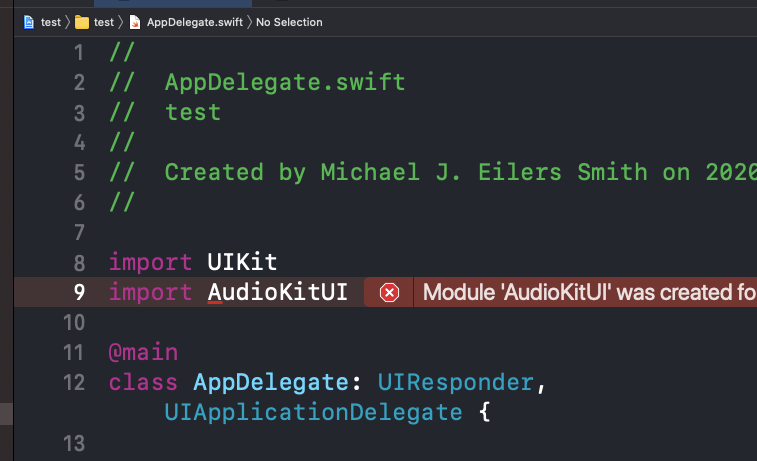
By the way, just tested on a brand new project. Dumped the frameworks from the previous link. and same error when archiving.
meilers
on 18 Sep 2020
@megastep Are you sure that SPM works for AudioKitUI? It works for AudioKit, but not for AudioKitUI. I'm getting the "No such module AudioKitUI" error.
meilers
on 18 Sep 2020
@meilers No more AudioKitUI in AudioKit5.
aure
on 18 Sep 2020
Mostly its in there, just don't have to import a separate framework anymore.
aure
on 18 Sep 2020
@aure Not sure I understand. If I remove "import AudioKitUI" I get plenty more reference errors like "Cannot find type AKNodeOutputPlot in scope". Am I missing something here?
meilers
on 18 Sep 2020
@meilers are you saying that you're using SPM with AudioKit 4.11? I was under the impression it only worked with v5. @megastep ?
aure
on 18 Sep 2020
@meilers If you are using v5, try dropping the AK prefix on the classes it says it can't find. Most of those have been dropped, except a few like AKMIDI.
aure
on 18 Sep 2020
@aure Yes, I should be. I'm pointing to the v5-develop branch.
meilers
on 18 Sep 2020
@aure Dropping the AK prefix did the trick. Thanks!
meilers
on 18 Sep 2020
@meilers Don't rely on anything about v5 remaining very stable. Its still in a bit of a state of flux. Making great progress, but really not ready for people to be relying on it. Proceed with caution and don't expect many answers from us along the way. :)
aure
on 18 Sep 2020
@aure @megastep Yeah I think I'm gonna have to wait for that Xcode 12 Cocoapods fix then, and stick to AudioKit 4. Thanks for all your support.
meilers
on 18 Sep 2020
@aure thanks a lot for the quick update.
I'm also getting the following errors while building:
"Cannot find 'output' in scope"
"Cannot find 'midi' in scope"
...
Can you reproduce these issues as well or is it likely to be an issue on our side?
 corentingurtner
on 18 Sep 2020
corentingurtner
on 18 Sep 2020
These errors are coming from AKNodeRecorder, AKMIDISampler, AKMIDIInstrument and AKMIDINode
Below is a screenshot of the first issue, in AKNodeRecorder :

corentingurtner
on 18 Sep 2020
@aure Dropping the AK prefix did the trick. Thanks!
Could you explain please?
I get 10 errors like many else, and I don't really understand how to work around it
Thanks in advance!
brizzly
on 18 Sep 2020
@brizzly and everyone. You have to let us know which version of AudioKit you are trying to run. 4.11 is very different from 5 (and 5 is not out yet, so it is still in a constantly changing state).
aure
on 18 Sep 2020
Also, everyone here who is expecting "support" from this free and open-source project, please consider sponsoring stephane and I here:
https://github.com/sponsors/aure
https://github.com/sponsors/megastep
aure
on 18 Sep 2020
@brizzly and everyone. You have to let us know which version of AudioKit you are trying to run. 4.11 is very different from 5 (and 5 is not out yet, so it is still in a constantly changing state).
I am having the
Cannot find 'output' in scope
Cannot find 'midi' in scope
Failed to build module 'AudioKit' from its module interface; it may have been damaged or it may have triggered a bug in the Swift compiler when it was produced
errors with 4.11
 abinop
on 18 Sep 2020
abinop
on 18 Sep 2020
Similar issue using 4.11 via CocoaPods 10 minutes ago in a virgin xCode 12 Project. Cleaned CocoaPods cache before installing. In other words, this problem exists with the CocoaPod available 10 minutes ago.
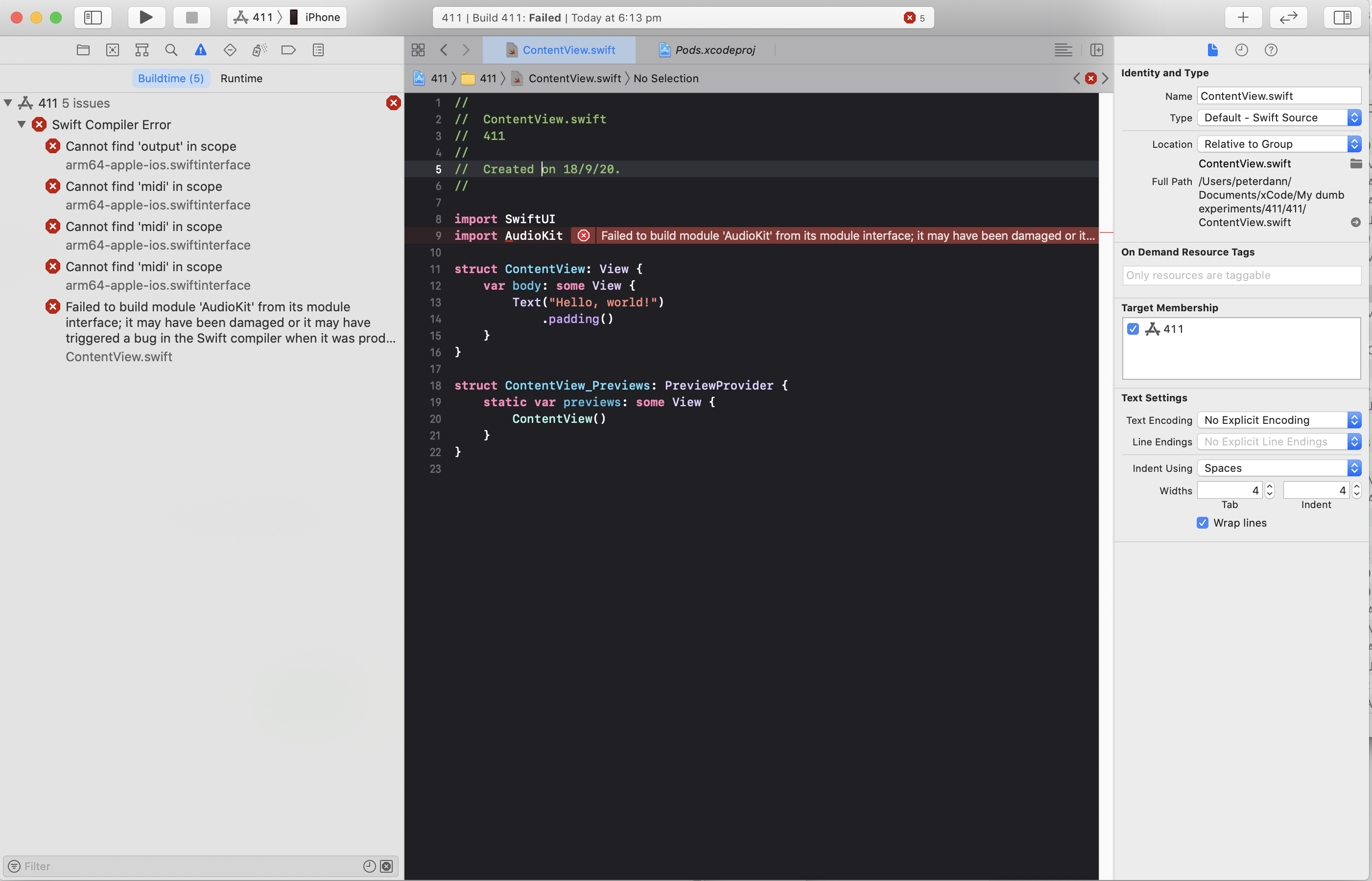
Greatly respect @aure call above re sponsorship. Very fair, I think.
 peterjdann
on 18 Sep 2020
peterjdann
on 18 Sep 2020
I am changing the name of the issue to include 4.11. For those who want to know more about v5, I am willing to set up a zoom call for everyone to watch me talk about where we are going and how to set up a project for AKv5. Email me aure @ at AudioKit dot io or are at audiokitpro dot com to be invited.
aure
on 18 Sep 2020
@brizzly and everyone. You have to let us know which version of AudioKit you are trying to run. 4.11 is very different from 5 (and 5 is not out yet, so it is still in a constantly changing state).
Sorry, I talk about AK 4.11 with xCode 12 and iOS 14
brizzly
on 18 Sep 2020
Thanks @aure for your willingness.
In my case however I would also wait for a 4.11 fix and stay on the stable version.
vojtabohm
on 18 Sep 2020
Same issues :), waiting for stable 4.11 version. Thanks
 xieliweiparkman
on 18 Sep 2020
xieliweiparkman
on 18 Sep 2020
When I install like this: pod 'AudioKit', :git => 'https://github.com/AudioKit/AudioKit.git', :tag => 'v4.11'it produces : [!] Unable to find a specification for 'AudioKit'. any idea? I already made a pod cache clean --all and deleted pods folder.
 fattalgazi
on 18 Sep 2020
fattalgazi
on 18 Sep 2020
Same issues here too. Eagerly waiting for a stable 4.11. Thanks guys!
 Jackstone92
on 18 Sep 2020
Jackstone92
on 18 Sep 2020
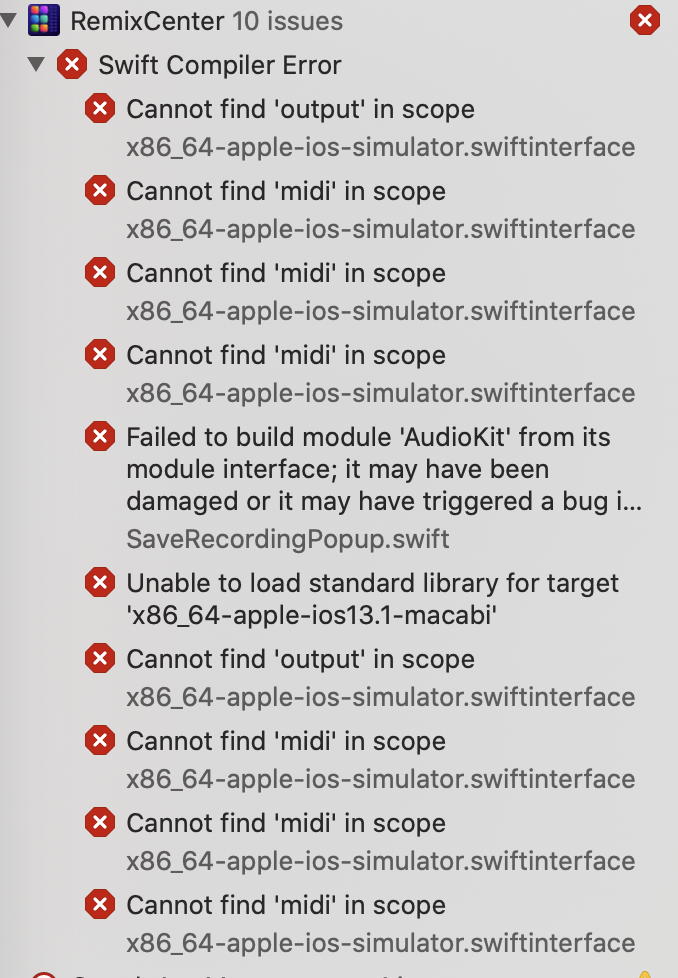
Okey, I changed the podfile line to origin => pod 'AudioKit', I made pod update, now everything is ok. 4.11 is installed.
Edit again: now I got those errors (like everyone)
fattalgazi
on 18 Sep 2020
App was 'ready to submit' using 4.9.5 - then updated to Xcode 12.0, now using the 4.11 xcframework - I get the same errors for sim and 'any iOS device' target. - hopefully that can help narrow down the bug?? sorry if I'm only repeating what you already know.
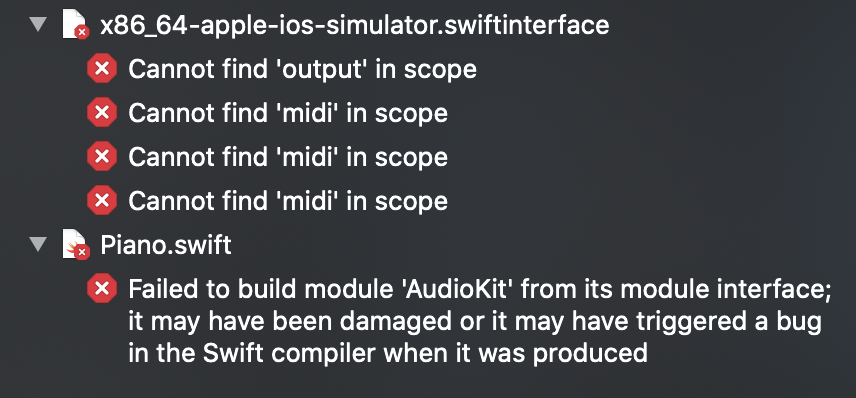
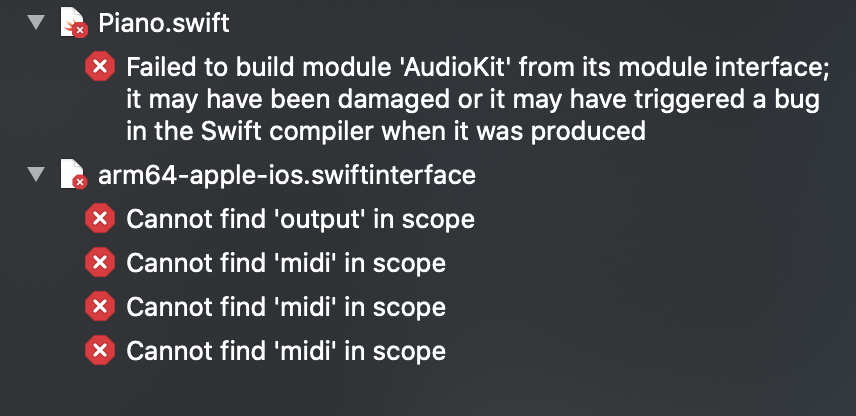
Cannot find 'output' in scope:
AKNodeReader line 1771:
@objc public init(node: AKNode? = output, file: AKAudioFile? = nil, bus: Swift.Int = 0) throws
Cannot find 'midi' in scope:
AKMIDISampler line 3116:
open func enableMIDI(_ midiClient: CoreMIDI.MIDIClientRef = midi.client, name: Swift.String = "MIDI Sampler")
AKMIDIInstrument line 5171:
open func enableMIDI(_ midiClient: CoreMIDI.MIDIClientRef = midi.client, name: Swift.String = "AudioKit MIDI Instrument")
AKMIDINode line 7105:
open func enableMIDI(_ midiClient: CoreMIDI.MIDIClientRef = midi.client, name: Swift.String = "Unnamed")
 PQKelly
on 19 Sep 2020
PQKelly
on 19 Sep 2020
The root case of all this is the AudioKit class - there's a restriction/shortcoming/bug with Swift modules and class names that match the module - I'm trying a few more tricks to see if we can make it work unchanged, but there's a good chance we'll have to rename it to something else to make this work. For a while in v5 it was renamed to AKManager so I might just do that.
megastep
on 19 Sep 2020
We tested the version of v5 where it was renamed to AKManager, and the transition was pretty painless. This solution would work for us 👍
ryangenz
on 19 Sep 2020
We tested the version of v5 where it was renamed to AKManager, and the transition was pretty painless. This solution would work for us 👍
How did you install version 5.0 ? I can't install via pod 'AudioKit', '~> 5.0'
Getting this error:
[!] CocoaPods could not find compatible versions for pod "AudioKit":
  In Podfile:
    AudioKit (= 5.0)
There is no pod for v5.0 since it hasn't been officially released yet. You can install via SPM though by pointing it to our v5-develop branch.
megastep
on 19 Sep 2020
FYI I should have version 4.11.1 out later today that should fix these issues (with a new AKManager class)
megastep
on 19 Sep 2020
v4.11.1 is now out and the pod was pushed; let me know if this fixes your issues (it should). You will have to update your code to replace all references to the AudioKit class to AKManager instead. In most cases this should just be a 2-3 line code change.
megastep
on 20 Sep 2020
There is no pod for v5.0 since it hasn't been officially released yet. You can install via SPM though by pointing it to our
v5-developbranch.
When I tried like: pod 'AudioKit/Core', :git=>'https://github.com/AudioKit/AudioKit/', :branch => 'v5-develop'
I got this error:
Analyzing dependencies

Pre-downloading: `AudioKit` from `https://github.com/AudioKit/AudioKit/`, branch `v5-develop`

[!] Unable to find a specification for 'AudioKit'.
v4.11.1 is now out and the pod was pushed; let me know if this fixes your issues (it should). You will have to update your code to replace all references to the
AudioKitclass toAKManagerinstead. In most cases this should just be a 2-3 line code change.
I missed that comment, now everything is working, thank you so much for your amazing effort.
edit: sorry for that but when I install v4.11.1 into simulator, everything is working fine, success built, but when I try to run on my real device which has ios 14, I got those errors:
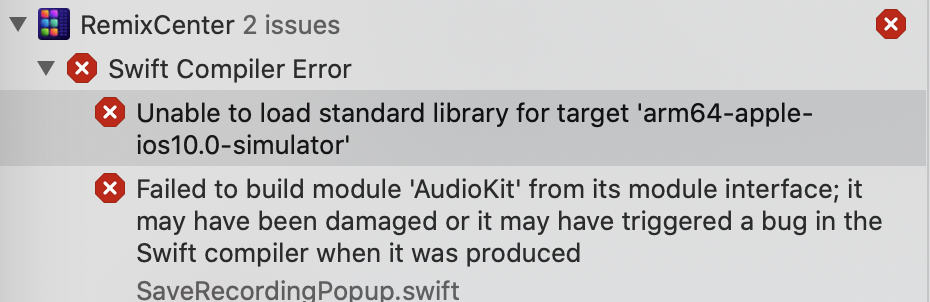
I have tried to change import AudioKit to import AKManager also, but it produces: No such module 'AKManager'. I have also done a clean build folder, pod cache clean and deleted Pods folder.
fattalgazi
on 20 Sep 2020
Well that is interesting, it should definitely work the same for devices as the simulator. The target error is weird though - why would it be looking for ARM64 simulator unless you are on an Apple Silicon Mac?
megastep
on 20 Sep 2020
FYI I don't get any of these errors with the new frameworks, compiling for devices or archiving. If you are actually on Apple Silicon, you'd be better off actually switching to v5.
megastep
on 20 Sep 2020
I'm having the exact same issues as @fattalgazi, and I'm on a 16 inch Intel. Currently running through a list of possible fixes and will get back to this thread if I find one that works.
 mocman
on 20 Sep 2020
mocman
on 20 Sep 2020
What's your iOS SDK target version in your project? You might need to raise it to something more recent.
megastep
on 20 Sep 2020
What's your iOS SDK target version in your project? You might need to raise it to something more recent.
12.4
Which is weird that they're looking for the "arm64-apple-ios10.0-simulator"
Edit: I raised it to 13 with a clean build and it still didn't get rid of any of the errors.
mocman
on 20 Sep 2020
Not happening for me with my own project using the pod, and I'm targeting iOS 10. I would guess that maybe CocoaPods might be responsible for this... I am using the latest beta of 1.10.
megastep
on 20 Sep 2020
Updating CocoaPods from 1.9.3 to 1.10.0.rc.1 got rid of the "unable to load standard library" errors when running on a device for me.
 b-hutchison
on 20 Sep 2020
b-hutchison
on 20 Sep 2020
Good to hear. Sounds like something they needed to address for Xcode 12.
megastep
on 20 Sep 2020
Brilliant effort in getting this far this fast. Well done.
Have installed 4.11.1 from pod. Target is iOS 13.6.
For me, the line micReverb_03 = AKReverb()
triggers the following runtime error when running app on my phone:
Fatal error: Use of unimplemented initializer 'init()' for class 'AudioKit.AKReverb'
Kind regards,
Peter Dann
On 20 Sep 2020, at 10:01 am, Stéphane Peter notifications@github.com wrote:
v4.11.1 is now out and the pod was pushed; let me know if this fixes your issues (it should). You will have to update your code to replace all references to the AudioKit class to AKManager instead. In most cases this should just be a 2-3 line code change.
—
You are receiving this because you commented.
Reply to this email directly, view it on GitHub https://github.com/AudioKit/AudioKit/issues/2267#issuecomment-695368956, or unsubscribe https://github.com/notifications/unsubscribe-auth/APUJ53CWLAQDVTAAWP6ZS7DSGVA5NANCNFSM4RPLFCNQ.
peterjdann
on 20 Sep 2020
I have a similar new runtime error too. Mine occurs both on simulator and device. For the line:
var drums = AKMIDISampler()
I get the error:
Fatal error: Use of unimplemented initializer 'init()' for class 'AudioKit.AKMIDISampler'
b-hutchison
on 20 Sep 2020
Sounds like something else to do with the generated Swift interfaces - I suggest opening a different issue for this.
megastep
on 20 Sep 2020
@fattalgazi
I have tried to change
import AudioKittoimport AKManageralso, but it produces:No such module 'AKManager'. I have also done a clean build folder, pod cache clean and deleted Pods folder.
You don't need to change the import, you keep import AudioKit. You have to change where AudioKit is used, for example, change
AudioKit.output = to AKManager.output =
AudioKit.start() to AKManager.start()
etc
abinop
on 20 Sep 2020
Running pod update does not update to 4.11.1. What am I doing wrong? On cocoapods.org it also shows that 4.11 is the latest release.
vojtabohm
on 20 Sep 2020
Manually downloading the package from the "releases" tab and inserting it into the /Pods folder did the trick though.
vojtabohm
on 20 Sep 2020
@vojtabohm > Running pod update does not update to 4.11.1. What am I doing wrong? On cocoapods.org it also shows that 4.11 is the latest release.
pod 'AudioKit' , '~> 4.11.1'
abinop
on 20 Sep 2020
Ok updating cocopods solves all problems. Thank you.
sudo gem install cocoapods --pre
fattalgazi
on 20 Sep 2020
I'm running a MacOS project and was having trouble getting rid of all the errors with the new 4.11.1 build.
pod cache clean -all wasn't quite working
Turns out a complete pod reset fixed it.
rm -rf ~/Library/Caches/CocoaPods
rm -rf Pods
rm -rf ~/Library/Developer/Xcode/DerivedData/*
pod deintegrate
pod setup
pod install
 coryl
on 20 Sep 2020
coryl
on 20 Sep 2020
@megastep on Xcode Version 12.0 (12A7209) I still get these two issues with 4.11.1. I tried deleting derived data, cleaning pod cache, de-integrating and installing pods again but nothing fixed it.
# At `import AudioKit`
Unable to load standard library for target 'arm64-apple-ios10.0-simulator'
Failed to build module 'AudioKit' from its module interface; it may have been damaged or it may have triggered a bug in the Swift compiler when it was produced
The only AudioKit references I have are these lines:
var options = AKConverter.Options()
let converter = AKConverter(inputURL: URL(), outputURL: URL(), options: options)
converter.start { /* ... */ }
 bojanstef
on 21 Sep 2020
bojanstef
on 21 Sep 2020
Updating CocoaPods to 1.10.0.rc.1 got rid of the "unable to load standard library" errors for me.
b-hutchison
on 21 Sep 2020
Thank you @aure @megastep for your amazing work. Now it works on 4.11.1 for me. Just had to change de pod ios platform from 9.0 to 11.0.
Thank you guys. I stay here to help if needed.
Best,
@elcitrovmtgrande
 elcitrovmtgrande
on 21 Sep 2020
elcitrovmtgrande
on 21 Sep 2020
Building ok with 4.11.1 and Xcode12 and a few AudioKit.* renames.
Crash when I run my app though
Fatal error: Use of unimplemented initializer 'init()' for class 'AudioKit.AKMIDISampler'
New issue added here : https://github.com/AudioKit/AudioKit/issues/2276
Thanks a lot
brizzly
on 21 Sep 2020
I confirm everything working with 4.11.1 for me. Thank you @aure @megastep.
vojtabohm
on 21 Sep 2020
Building ok with 4.11.1 and Xcode12 and a few AudioKit.* renames.
Crash when I run my app though
Fatal error: Use of unimplemented initializer 'init()' for class 'AudioKit.AKMIDISampler'New issue added here : #2276
Thanks a lot
Hi @brizzly, just replace AudioKit by AKManager.ADMIDISampler, I guess...
elcitrovmtgrande
on 21 Sep 2020
Building ok with 4.11.1 and Xcode12 and a few AudioKit.* renames.
Crash when I run my app though
Fatal error: Use of unimplemented initializer 'init()' for class 'AudioKit.AKMIDISampler'
New issue added here : #2276
Thanks a lotHi @brizzly, just replace AudioKit by AKManager.ADMIDISampler, I guess...
It was not enough , but another work around did the trick, to know more about it have a look at the issue 2276
brizzly
on 21 Sep 2020
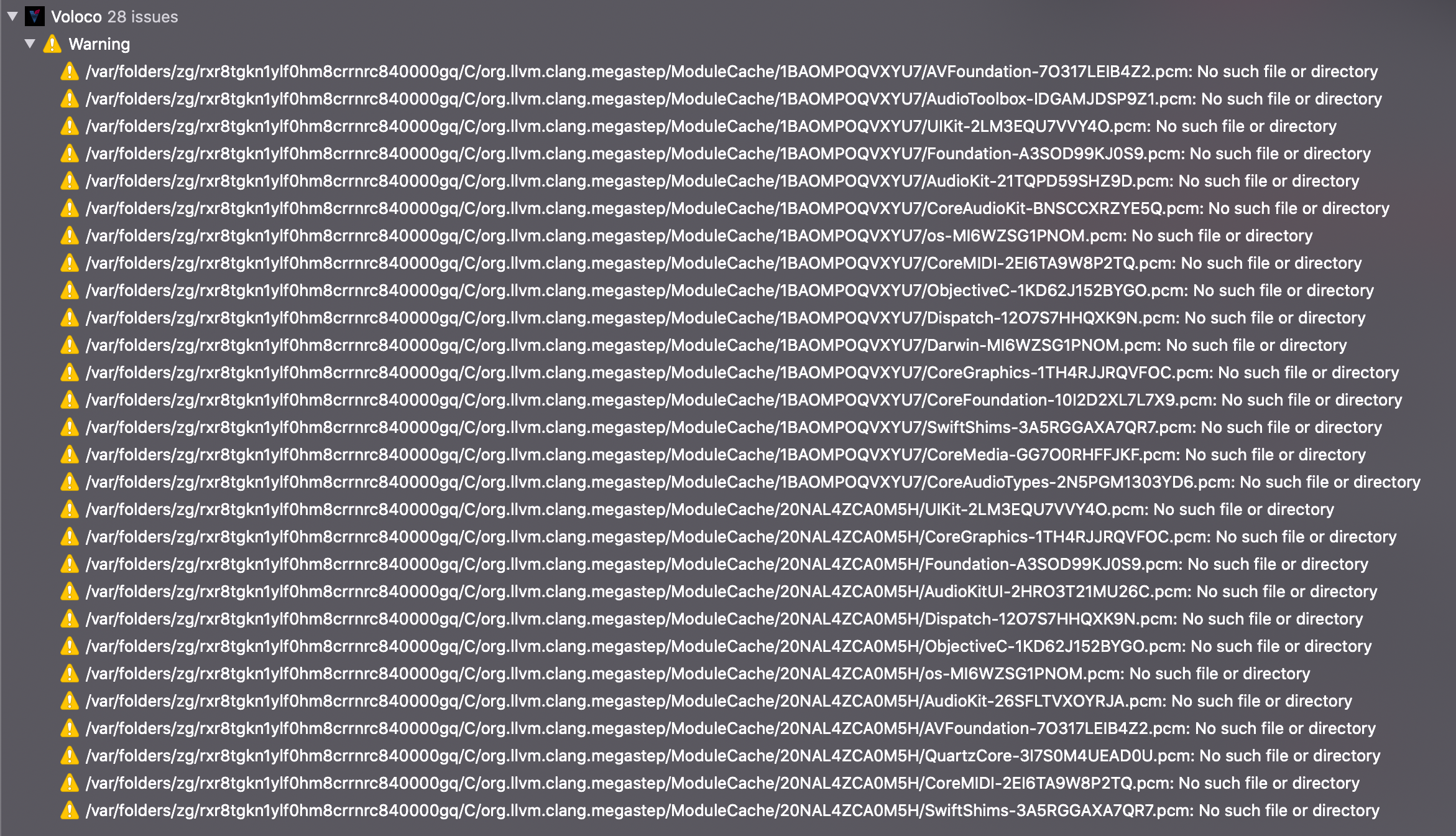
Updated to v4.11.1, updated cocoapods to 1.10.0.rc.1, removed derived data, and the build is working again. However now I am seeing missing PCM files, the same issue that was reported on https://github.com/AudioKit/AudioKit/issues/1247 and https://github.com/AudioKit/AudioKit/issues/1325:
warning: /var/folders/zg/rxr8tgkn1ylf0hm8crrnrc840000gq/C/org.llvm.clang.megastep/ModuleCache/1BAOMPOQVXYU7/AVFoundation-7O317LEIB4Z2.pcm: No such file or directory
note: while processing /var/folders/zg/rxr8tgkn1ylf0hm8crrnrc840000gq/C/org.llvm.clang.megastep/ModuleCache/1BAOMPOQVXYU7/AVFoundation-7O317LEIB4Z2.pcm
note: Linking a static library that was built with -gmodules, but the module cache was not found.  Redistributable static libraries should never be built with module debugging enabled.  The debug experience will be degraded due to incomplete debug information.
 tehsven
on 21 Sep 2020
tehsven
on 21 Sep 2020
Looks like these are referencing files that are on my Mac since I'm the one who built the binaries... :/
megastep
on 23 Sep 2020
I could install AudioKit 4.11 by get riding off Pod then adding AudioKit into the workspace.
For me, every time using Pods I ended up return back to manual integration, slower but clean and safe.
V5 is coming with SPM thanks a lot. I wish to be able to use SPM for V4 as well _(but this is already answered somewhere here that was not possible)_
trevor-sonic
on 27 Sep 2020
Related issues
 NadirBertolasi
·
10Comments
NadirBertolasi
·
10Comments
 minayko
·
4Comments
minayko
·
4Comments
 JerrySQian
·
6Comments
JerrySQian
·
6Comments
 socialvanana
·
7Comments
socialvanana
·
7Comments
 impmaarten
·
5Comments
impmaarten
·
5Comments
Most helpful comment
Ok, but now we have
"Cannot find 'output' in scope"
"Cannot find 'midi' in scope"
errors...