Audiokit: [macOS] Recurring Bug: AudioKit.setInputDevice() and AKMicrophone.setDevice() change the System Input Device
First of all, want to say that I am amazed by how much work has been put in into AudioKit and that the framework is MIT Licensed, thank you, thank you, THANK YOU!
Onto the bug:
This bug was first reported in #546 and fixed in 6d4b74b8e5ca1fef2732582d096a747833115ff8
Then the fix was reverted back in 67f17006d829cffaf189d92984eab610a7d50f28 as it appeared to be fixed internally.
I'm using AudioKit v4.0.4 on Latest macOS 10.13 SDK and when I try to set AudioKit to use any Input Device, it actually switches the OS to use that device globally.
 nodeful
All 25 comments
Not even sure if the setting of Input/Output is standardised because:
If you look at the Input setting method: https://github.com/AudioKit/AudioKit/blob/f99e45103f42b02f995df7271264828d9d3e1dc1/AudioKit/Common/Internals/AudioKit.swift#L136-L143
You are changing the Input device globally on the whole system.
But if you look at the equivalent Output setter:
https://github.com/AudioKit/AudioKit/blob/f99e45103f42b02f995df7271264828d9d3e1dc1/AudioKit/Common/Internals/AudioKit.swift#L186-L193
It is setting the preferred output device to the Output node of the AVEngine (which doesn't work in my case anyway, but that's another issue)
I noticed that this frameworks main focus is iOS, so if you need any help with macOS I can poke around and see if I can make it work and make a PR
nodeful
on 27 Dec 2017
Hi, thanks for submitting this. @aure and I were discussing problems related to this yesterday. I'm probably one of the only macOS focused folks on here, so keen to resolve this as well. That said, this code also has issues with iOS.
 ryanfrancesconi
on 27 Dec 2017
ryanfrancesconi
on 27 Dec 2017
Thanks for the reply @ryanfrancesconi
Let me go on a bit of a rant here...
What I'm trying to achieve:
Route Audio from Microphone to ANY output audio device (without that device being selected) on macOS
How do I know it's possible?
In my eqMac app I am able to route audio to any output device even when the Driver (based on Soundflower) device is selected. But I am using AUGraph for this, rather than AVAudioEngine. Here's the code (bit messy) I'm using to set the output device:
https://github.com/nodeful/eqMac2/blob/24b3f847026c789988f4a59d4717a29aa880d03f/eqMac2/Source/EQEngine/EQEngine.mm#L199-L228
What problem am I having?
When I do this:
input = AKMicrophone()
AudioKit.output = input
AudioKit.start()
And the default output device is selected... I can hear the passthrough of my Mic.
When I try to force the output to go through the built-in device (while some other device is selected for output):
        input = AKMicrophone()
        AudioKit.output = input

        var id = 42 // Built-in Output ID
        checkErr(AudioUnitSetProperty(AudioKit.engine.outputNode.audioUnit!,
                     kAudioOutputUnitProperty_CurrentDevice,
                     kAudioUnitScope_Global, 0,
                     &id,
                     UInt32(MemoryLayout<DeviceID>.size)))

        AudioKit.start()
I get an OSStatus error code -10851 kAudioUnitErr_InvalidPropertyValue and this in the console
2017-12-27 19:22:13.724708+0000 eqMacAudio[68555:13441906] [AudioHAL_Client] AudioHardware.cpp:578:AudioObjectGetPropertyDataSize:  AudioObjectGetPropertyDataSize: no object with given ID 0
2017-12-27 19:22:13.724737+0000 eqMacAudio[68555:13441906] [AudioHAL_Client] AudioHardware.cpp:666:AudioObjectGetPropertyData:  AudioObjectGetPropertyData: no object with given ID 0
2017-12-27 19:22:13.724759+0000 eqMacAudio[68555:13441906] [AudioHAL_Client] AudioHardware.cpp:3446:AudioDeviceSetProperty:  AudioDeviceSetProperty: no device with given ID
2017-12-27 19:22:13.724775+0000 eqMacAudio[68555:13441906] 1599:  ca_verify_noerr: [AudioDeviceSetProperty(mDeviceID, NULL, 0, isInput, kAudioDevicePropertyIOProcStreamUsage, theSize, theStreamUsage), 560227702]
2017-12-27 19:22:13.724788+0000 eqMacAudio[68555:13441906] [AudioHAL_Client] AudioHardware.cpp:578:AudioObjectGetPropertyDataSize:  AudioObjectGetPropertyDataSize: no object with given ID 0
2017-12-27 19:22:13.724799+0000 eqMacAudio[68555:13441906] [AudioHAL_Client] AudioHardware.cpp:666:AudioObjectGetPropertyData:  AudioObjectGetPropertyData: no object with given ID 0
2017-12-27 19:22:13.724969+0000 eqMacAudio[68555:13441906] [AudioHAL_Client] AudioHardware.cpp:3446:AudioDeviceSetProperty:  AudioDeviceSetProperty: no device with given ID
2017-12-27 19:22:13.724980+0000 eqMacAudio[68555:13441906] 1599:  ca_verify_noerr: [AudioDeviceSetProperty(mDeviceID, NULL, 0, isInput, kAudioDevicePropertyIOProcStreamUsage, theSize, theStreamUsage), 560227702]
2017-12-27 19:22:13.725986+0000 eqMacAudio[68555:13441906] [avae] AVAEInternal.h:69:_AVAE_Check: required condition is false: [AVAudioEngineGraph.mm:1265:Initialize: (IsFormatSampleRateAndChannelCountValid(outputHWFormat))]
2017-12-27 19:22:13.726163+0000 eqMacAudio[68555:13441906] required condition is false: IsFormatSampleRateAndChannelCountValid(outputHWFormat)
But it works with files:
If I don't have any input device in AudioKit chain and use a Player to produce audio:
 do {
            file = try AKAudioFile(readFileName: "drumloop.wav")
            player = try AKAudioPlayer(file: file)
        } catch {
            print("could not start player")
            return
        }

        player.looping = true

        AudioKit.output = player

        var id = 42 // Built-in Output ID
        checkErr(AudioUnitSetProperty(AudioKit.engine.outputNode.audioUnit!,
                     kAudioOutputUnitProperty_CurrentDevice,
                     kAudioUnitScope_Global, 0,
                     &id,
                     UInt32(MemoryLayout<DeviceID>.size)))

        AudioKit.start()
        player.start()
Everything working as it should and I hear the track, through the Built-in speaker, even if my Bluetooth headphones are currently my default output device.
Do I have any other info about what can cause this?
As I mentioned before in my app I am using AUGraph based on an example provided by Apple (CAPlaythrough) you can find a Swift based port of that here:
https://github.com/jasminlapalme/caplaythrough-swift
In it you can find this piece of information:
https://github.com/jasminlapalme/caplaythrough-swift/blob/1f95734a91d1f9cf281c4743f27781e39e3a38f4/CAPlayThroughSwift/CAPlayThrough.swift#L140-L144
So I guess the problem still persists even in AVAudioEngine, you can't have multiple output units (input is also considered an output unit) within the same engine...
I guess to achieve what I want I would have to yet again, create a Buffer to store the generated Microphone audio data with one AVAudioEngine and then pull it with another instance of AVAudioEngine.
Maybe there's some other way? I would love to use AudioKit as much as possible!
Before I had to write 100 lines of code just to do 1 node in AUGraph, and you have so many other effects abstracted to a very high level. It's amazing!
nodeful
on 27 Dec 2017
I made a little sketch of the setup I'm trying to achieve:
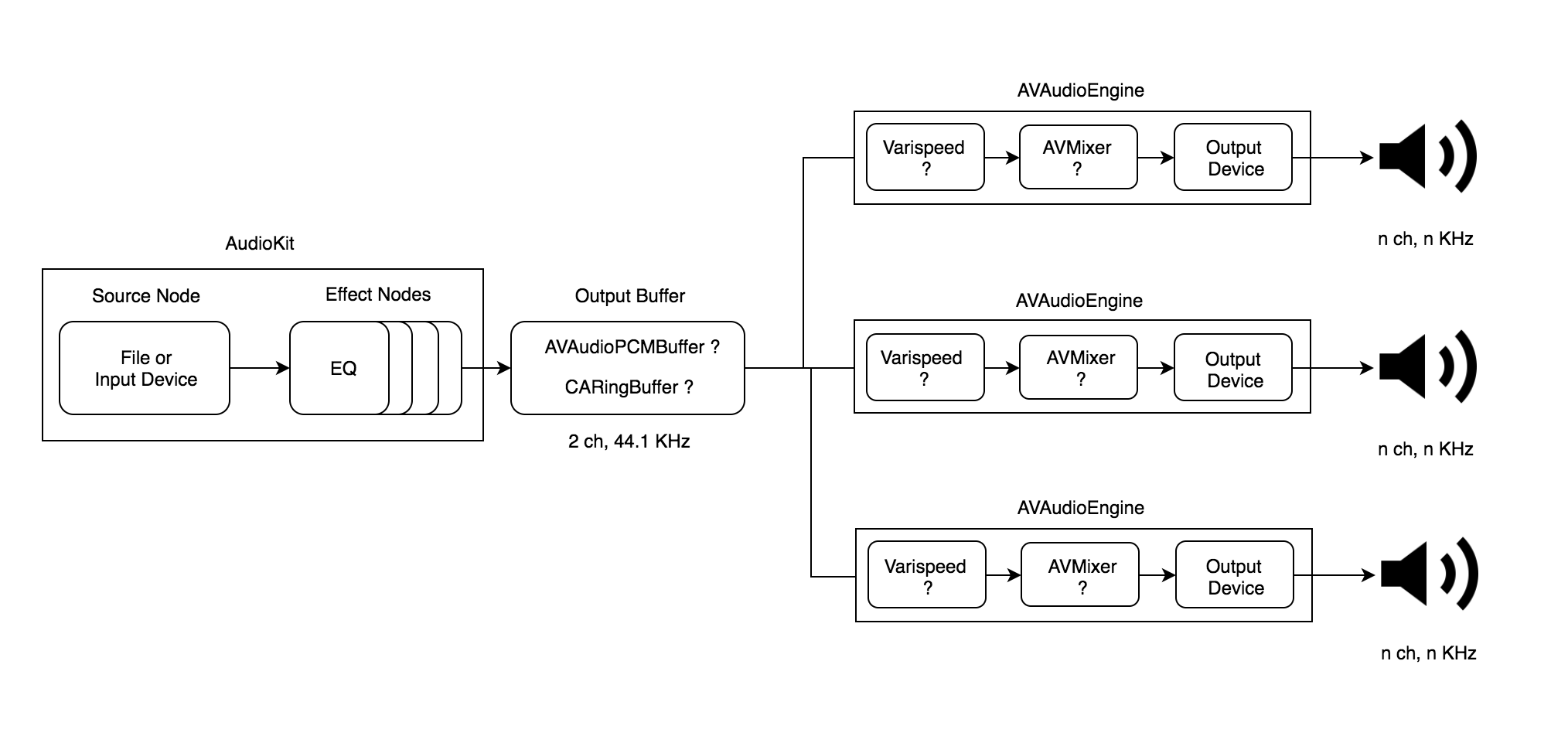
Do you guys think this would work?
Especially curious about the sections with the question mark. I know it's not a support forum, but maybe this can lead to some features / fixes added to AudioKit.
And excuse me if I'm making some newbie mistakes in my understanding of this Library and/or CoreAudio.
Cheers guys!
nodeful
on 6 Jan 2018
Ok I managed to implement my design.
Had to add a AVAudioUnitReverb to the end of AudioKit engines node chain, just before the mainMixerNode.
Set the mixer volume to 0.
Add Post Render Render Notify (not sure how realtime it is compared to a normal RenderCallback) to the Reverb AudioUnit and store the processed audio in a CARingBuffer (MIT).
Then I just spawn as many AVAudioEngines as I need. Set the output device and set a render callback on the Varispeed unit and read from the CARingBuffer on each proc.
You guys can close the issue or keep open for reference.
Just a suggestion, would be nice if the internal AVAudioNodes inside each AKNode would be exposed as public variables.
This way people can inject their own Render Callbacks into their AudioUnits.
Keep up the good work @aure and the team :)
nodeful
on 21 Jan 2018
the avAudioNode in AKNode is open.
ryanfrancesconi
on 21 Jan 2018
Sorry I mean the AVAudioUnit. For example:
https://github.com/AudioKit/AudioKit/blob/f99e45103f42b02f995df7271264828d9d3e1dc1/AudioKit/Common/Nodes/Effects/Reverb/Apple%20Reverb/AKReverb.swift#L12
The AVAudioNode exposes only the AUAudioUnit, which for some reason in my case, requires deployment target to be OSX 10.13+, as I described here
Not sure if that's a bug in SDK 10.13 or my XCode settings are broken
nodeful
on 21 Jan 2018
avAudioNode is reverbAU:
self.avAudioNode = reverbAU
Is that what you are asking?
ryanfrancesconi
on 21 Jan 2018
Yeah, it is an AVAudioNode. Very sorry for the confusion, this AU vs AV naming convention is making me a bit dizzy.
Why I can't access the .audioUnit variable then? Keep in mind the .auAudioUnit is not what I want.
nodeful
on 21 Jan 2018
I think you just need to cast it to an AVAudioUnit, then you can access .audioUnit. Yep, the AVFoundation naming is a continuous source of pain :/
if let avAudioUnit = akNode.avAudioNode as? AVAudioUnit {
    let cAudioUnit = avAudioUnit.audioUnit
}
 dave234
on 21 Jan 2018
dave234
on 21 Jan 2018
Thanks @dave234 ! Didn't know you can cast it like that.
nodeful
on 22 Jan 2018
@nodeful I was wondering if there's anything you can add to AudioKit via pull request from all that you've learned. Is there anything I can do for you for this issue anymore?
 aure
on 7 Apr 2018
aure
on 7 Apr 2018
@aure as soon as I will have more time and feel a bit more confident in my Swift skills I will definitely consider contributing :) For the moment, I'm not sure how can I help with this issue
nodeful
on 7 Apr 2018
@nodeful I'd love to see your multiple AVAudioEngine setup. Is there any way you could share this with me?
aure
on 25 Nov 2018
@aure sure I will try to assemble an example in the next week. I will post it here.
nodeful
on 25 Nov 2018
@nodeful In the meantime, could you let me know if you were using AVAudioEngine in manual rendering mode with the multiple AVAudioEngines? I think that would be a really useful set up. I'm trying to do that for AudioKit but having some issues, and of course there aren't many resources/examples online. Google ends up sending me back to AudioKit. :)
aure
on 25 Nov 2018
@aure No, I just hook up an Output render callback of the output device I'm using. When the callback gets called I just read the audio data from the Ring Buffer. If there is no data then I just write a silent buffer to the output device. Basically, the "multiple" output engines are independent of each other and work on a Pull basis. Not sure if this helps
nodeful
on 25 Nov 2018
I'm still curious.
aure
on 25 Nov 2018
@aure I've added a small example in a PR: #1591
nodeful
on 1 Dec 2018
@nodeful I accepted the PR but I haven't had a chance to check it out. Is it meant to address this issue or just point out the difficulties?
aure
on 4 Dec 2018
@aure has nothing to do with this issue, unfortunately. I'm not sure if this issue needs to be opened still as I'm not using AudioKits device handling logic. This example was a response to your request on how to run a multi-AVAudioEngine setup and pipe audio to different devices.
nodeful
on 4 Dec 2018
oh of course, sorry just getting back in to the swing of things after my travels
aure
on 4 Dec 2018
I'm trying to close down the really old issues. If there's a way to create smaller bite size addressable issues that would be great. For now I'll close this and refer to it here: https://github.com/AudioKit/AudioKit/issues/891 as a placeholder for the task to rebuild the hardware interface layers for both macOS and iOS. I also hope @dave234 will push us in the right directions during this next month. 🙏
aure
on 16 May 2019
I've switched to using the nice AMCoreAudio in my application for device handling. That's a good option for other macOS users until AudioKit catches up.
ryanfrancesconi
on 16 May 2019
How about we just catch up?
aure
on 16 May 2019
Related issues
 bluenucleus
·
5Comments
bluenucleus
·
5Comments
 blerchy
·
7Comments
blerchy
·
7Comments
 gm3197
·
10Comments
gm3197
·
10Comments
 trevor-sonic
·
5Comments
trevor-sonic
·
5Comments
 socialvanana
·
7Comments
socialvanana
·
7Comments
Most helpful comment
How about we just catch up?