Audio_service: MediaStyle Notification Seek Bar is Black.
Describe the bug
The seek bar that was introduced with Android 10 is black with no progress circle-bubble and timestamp duration. Tested on a Samsung Note 10 Plus and the seek bar is black. Tested on a OnePlus 6T and the seek bar shows perfectly with the proper color match, progress circle-bubble, timestamp duration.
However on the Samsung Note 10 Plus using other apps which use MediaStyle notifications, their seek bars are perfectly fine. So it can't be the device as other apps have perfectly fine seek bar setups.
To Reproduce
Use on Samsung Device?
https://developer.samsung.com/remote-test-lab
Error messages
N/A
Expected behavior
The MediaStyle notification should display the Seek Bar with a progress circle-bubble, have the timestamp duration, and should be properly colored like the other information in the MediaStyle notification
Screenshots

Runtime Environment (please complete the following information if relevant):
- Device: Samsung Galaxy Note 10 Plus
- OS: Android 10
Flutter SDK version
Doctor summary (to see all details, run flutter doctor -v):
[✓] Flutter (Channel master, v1.18.0-8.0.pre.9, on Mac OS X 10.14.6 18G103, locale en-US)
[✓] Android toolchain - develop for Android devices (Android SDK version 29.0.2)
[✓] Xcode - develop for iOS and macOS (Xcode 11.3.1)
[✓] Android Studio (version 3.6)
[✓] VS Code (version 1.44.2)
[✓] Connected device (1 available)

• No issues found!
 YaarPatandarAA
All 26 comments
AudioService.start(
        backgroundTaskEntrypoint: _backgroundTaskEntrypoint,
        androidNotificationChannelName: 'Audio Service',
        notificationColor: 0x00000000,
        androidNotificationIcon: 'mipmap/ic_launcher',
        enableQueue: false,
        androidStopOnRemoveTask: true,
      )
AudioServiceBackground.setState(
      controls: getControls(state),
      systemActions: [MediaAction.seekTo],
      basicState: state,
      position: position,
    );
  List<MediaControl> getControls(BasicPlaybackState state) {
    if (state == BasicPlaybackState.playing) {
      return [
        skipToPreviousControl,
        pauseControl,
        skipToNextControl
      ];
    } else {
      return [
        skipToPreviousControl,
        playControl,
        skipToNextControl
      ];
    }
  }
I might be able to borrow a Samsung device, although do you know if it works on a particular virtual device?
 ryanheise
on 25 Apr 2020
ryanheise
on 25 Apr 2020
I tested on a Google Pixel 3 emulator with Android 10 and it works fine no issues as such as the black bar I see. I also just tested on a Samsung Galaxy S10 Plus with Android 10 and I see the same issues as on my Note 10 Plus with Android 10. So it is definitely a Samsung Android 10 thing, sucks...
YaarPatandarAA
on 25 Apr 2020
P.S. I had used the following plugin: https://github.com/gaucidaniel/native-audio
before switching to this one, that plugin worked fine for my device. Might be worth it to look at it to see what he is doing different than this plugin. I tried to decipher the two codes and I couldn't figure it out. If someone has time could you please try and see what is different?
YaarPatandarAA
on 25 Apr 2020
That's a good lead, thanks. Ideally I also will need to reproduce it on my end, though.
ryanheise
on 25 Apr 2020
Here is something I found just now.
https://developer.samsung.com/remote-test-lab
You can reserve real Samsung devices for testing apps, they are somewhere remote but using remote debug bridge they can be connected to your PC as if they where connected via a USB. You can reserve for a max amount of 2 hours, but only 30 minutes for new devices. They give you a limited amount of credits each day so its not an unlimited amount of time you take up, also be sure to select a device in a region closest to you for faster connections.
SeekBar was introduced in Android 10, so if anyone is going to test/debug that is what OS version they should pick for whichever device they want to use.
P.S. I tired my app on their remote devices and still a black seek bar, idk what else I was expecting.
YaarPatandarAA
on 25 Apr 2020
That's cool. Fortunately, it looks like I will be able to get my hands on an actual device.
ryanheise
on 25 Apr 2020
I tested on a Google Pixel 3 emulator with Android 10 and it works fine no issues as such as the black bar I see. I also just tested on a Samsung Galaxy S10 Plus with Android 10 and I see the same issues as on my Note 10 Plus with Android 10. So it is definitely a Samsung Android 10 thing, sucks...
I have honor 10, and have this issue with Huawei.
 mohammadne
on 25 Apr 2020
mohammadne
on 25 Apr 2020
I tested on a Google Pixel 3 emulator with Android 10 and it works fine no issues as such as the black bar I see. I also just tested on a Samsung Galaxy S10 Plus with Android 10 and I see the same issues as on my Note 10 Plus with Android 10. So it is definitely a Samsung Android 10 thing, sucks...
I have honor 10, and have this issue with Huawei.
Well that’s not good news.
YaarPatandarAA
on 26 Apr 2020
@YaarPatandarAA @ryanheise I don't think this issue is specifically related to Samsung devices. This open source podcast player - Tsacpod shows proper controls and is using audio_service under hood.
Tscadop - https://github.com/stonega/tsacdop
I tested Tsacdop and the example app on Samsung A30, The control pane for example app is having this issue while Tsacdop is working fine.
 VarmaMSP
on 11 Jun 2020
VarmaMSP
on 11 Jun 2020
@YaarPatandarAA @ryanheise I don't think this issue is specifically related to Samsung devices. This open source podcast player - Tsacpod shows proper controls and is using audio_service under hood.
Tscadop - https://github.com/stonega/tsacdop
I tested Tsacdop and the example app on Samsung A30, The control pane for example app is having this issue while Tsacdop is working fine.
Yes you are right. I installed Tsacdop and it does show the bar properly. Thank you for sharing this, I will take some time and go through their code to try and decipher what they did.
YaarPatandarAA
on 11 Jun 2020
Any clue on how to fix it? Got the same issue on my Samsung Galaxy S9.
 fdaprano
on 20 Aug 2020
fdaprano
on 20 Aug 2020
Edit: Disregard the below, it's still an issue on Galaxy S9+, but is fine on Nexus emulator.
So, tsacdop is using a fork of just_audio, and something in that fork is what fixes the notification seek bar color on Android. Not sure what in there is actually fixing the issue. If you use https://github.com/stonega/just_audio.git instead, the color will work.
 kpockell
on 3 Nov 2020
kpockell
on 3 Nov 2020
It seems you need to add a non-transparent color to the playback notification in order to fix this. VLC has this bug too on my device, a Honor 9X running EMUI 10 (bug report), and when adding the black color to the notification (by using .setColor(Color.BLACK) method), it works. See on the screenshot below the difference between my debug test APK (at the top) and the VLC release (at the bottom):
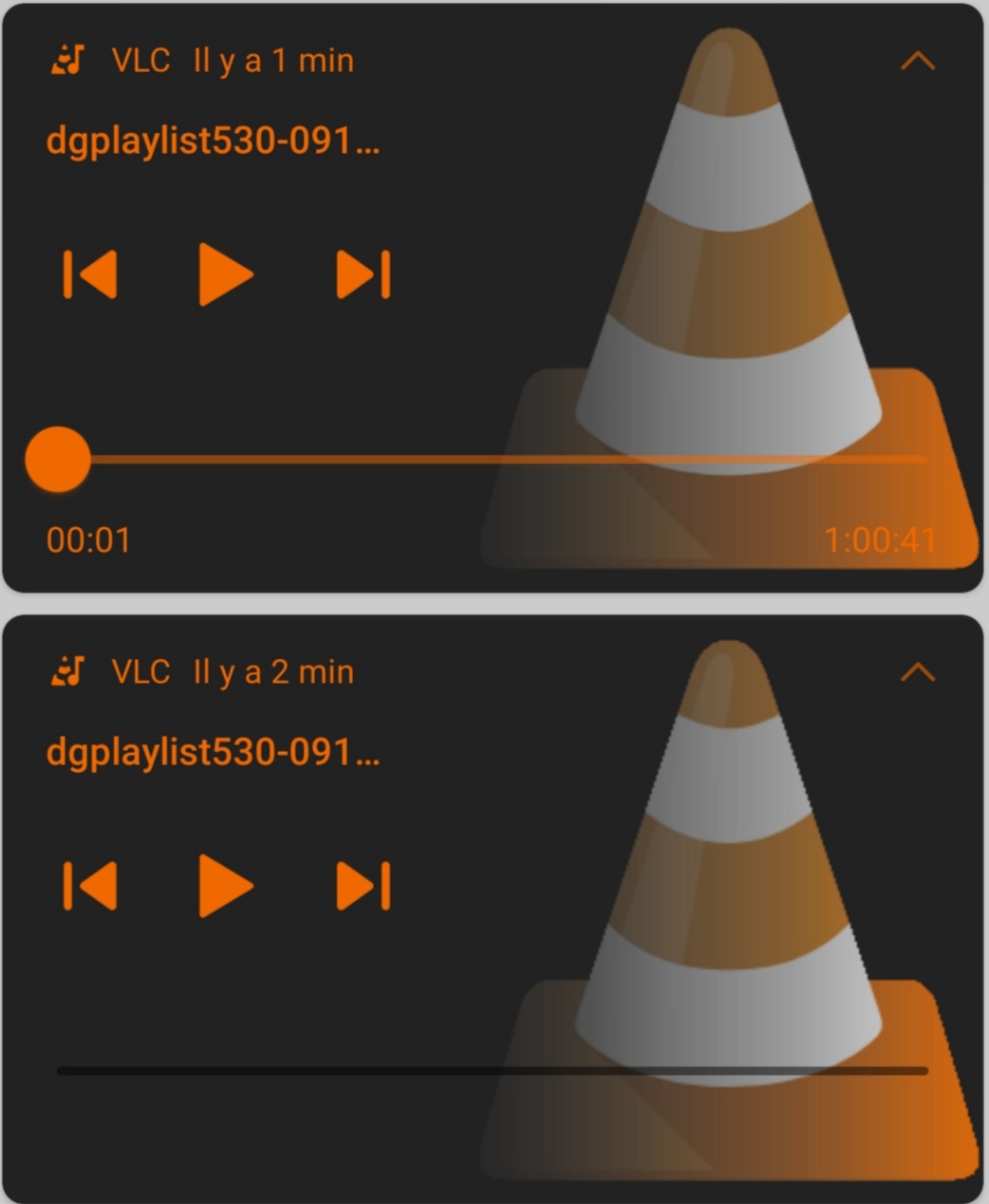
Hope this help you.
 TiA4f8R
on 30 Nov 2020
TiA4f8R
on 30 Nov 2020
Thanks for sharing that @TiA4f8R . @YaarPatandarAA can you confirm this fixes your issue?
ryanheise
on 30 Nov 2020
@ryanheise I have since updated my device to Android 11 and the Media Notifications are handled very differently than previous Android versions. For my build with this issue on Android 10 it is not present on Android 11. I will have to try and test it on a friends device which is still on Android 10.
YaarPatandarAA
on 30 Nov 2020
I tested this on my physical device. I was able to get it working correctly, but not by using setColor(Color.BLACK). Setting this still had the same issue. However, by using a png other than mipmap/ic_launcher (I just used builder.setSmallIcon(R.drawable.audio_service_stop)) I was able to get the seek bar to show up correctly. Hope that helps!

On further investigation, if I set androidNotificationIcon: 'mipmap/ic_action_pause', in AudioService.start(), this also corrects the issue. This leads me to believe there is something about the ic_launcher this doesn't like. For reference, we use a custom ic_launcher in our app, and it still has this problem, as does the default flutter ic_launcher png.
kpockell
on 1 Dec 2020
@ryanheise I've discovered the issue. As per Google's Material Design guidelines, the small icon in the notification should be monochrome white, and have a transparent background. If you follow those guidelines, the slider displays correctly. Since our app icon and the default flutter icon are both not monochrome white, this causes the slider to display without a handle, and only black. Setting androidNotificationIcon in AudioService.start to an icon that meets the Android small icon recommendation solves this issue. Therefore, I believe this isn't a bug in audio_service per se, but actually a misconfiguration on the developer's part. Perhaps you could just call this out in the audio_service documentation?
kpockell
on 3 Dec 2020
@kpockell thanks for researching this and sharing the solution.
Can others confirm this solution? If it works, let's up-vote the answer given here.
I agree it would definitely be worth pointing this out in the documentation if it has such an impact on the seek bar.
ryanheise
on 3 Dec 2020
@kpockell That's right but some devices still have this bug if they aren't setting a color to the notification (it was VLC's case but not NewPipe which set a dark color).
@ryanheise So, in order to have a seekbar which is colored, it seems you need to document that app's icon notification must be monochrome white, have a transparent background, and to be functional on some devices, a background color using setColor method with a non transparent color, at least on Android 10 devices.
TiA4f8R
on 3 Dec 2020
Thanks, @TiA4f8R .
I will add this to the documentation and example for the next release (probably on the one-isolate branch since all effort is currently going into that version). Until then, hopefully the discussion in this issue will help others who are searching for a solution to this issue.
(I'll also leave this issue open until I actually update the documentation.)
ryanheise
on 3 Dec 2020
Hi guys, I have the same issue, can someone explain the solution. I tied a lot of things stuck here for days. this is mt code
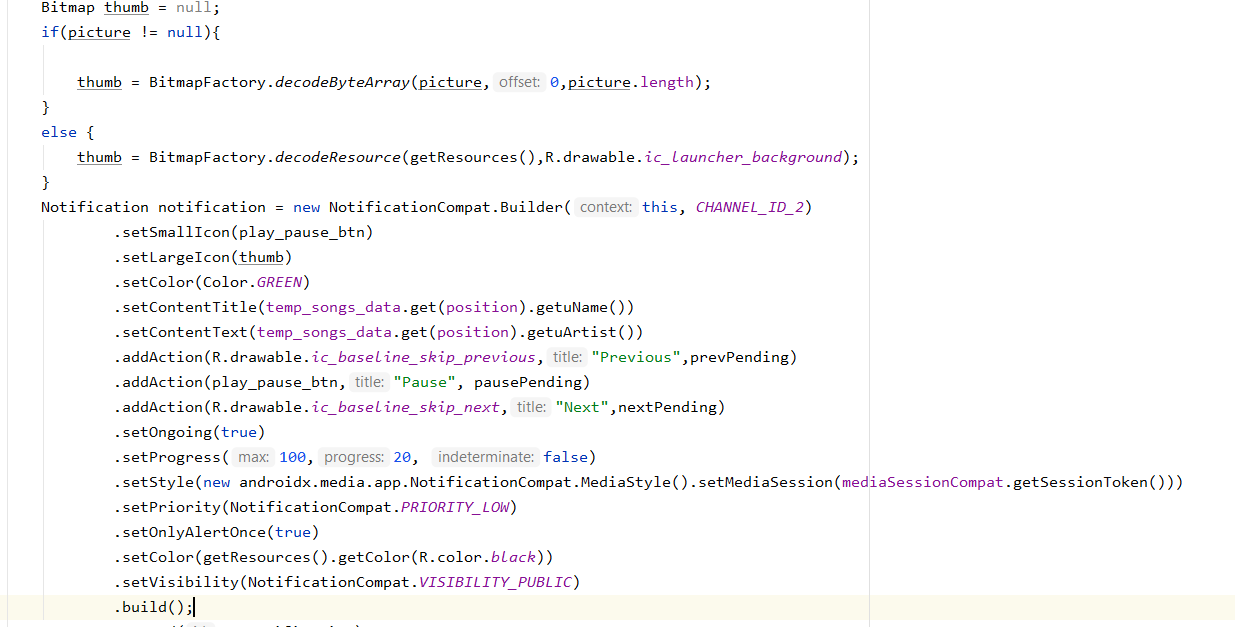
 SreeHarsha1
on 12 Mar 2021
SreeHarsha1
on 12 Mar 2021
I have (finally) updated the FAQ to explain this color requirement, and also updated the relevant documentation in the one-isolate branch.
ryanheise
on 14 Mar 2021
@SreeHarsha1 This is the issues page for a Flutter package so this is probably not the place to ask. It would be best to ask the followup question on the StackOverflow post, and hopefully the clarifications you seek can be answered by someone on StackOverflow.You should make sure you comment on what your icon is as just writing code doesn't reveal whether your icon is actually monochrome white.
ryanheise
on 14 Mar 2021
Sorry, i am working on a project where I need seekbar in notification. And I have the same issue like the picture attached above (Notice black seek bar) and I searched for days and still struck there are same questions pending in StackOverFlow with no working answers. I am not able to see seekbar progress and also not sure of how to keep a white icon or anything to track the seek(icon on seekbar) . If possible provide me an answer if anyone can. Thanks.

SreeHarsha1
on 17 Mar 2021
The issue is now locked as "resolved" (from the perspective of the audio_service flutter plugin) but if someone would like to help @SreeHarsha1 with this general Android programming question please consider writing an answer on StackOverflow.
ryanheise
on 18 Mar 2021
Related issues
 alexelisenko
·
4Comments
alexelisenko
·
4Comments
 hpuriamanesh
·
7Comments
mohammadne
·
7Comments
hpuriamanesh
·
7Comments
mohammadne
·
7Comments
 hemalmoradiya
·
4Comments
hemalmoradiya
·
4Comments
 austinbyron
·
4Comments
austinbyron
·
4Comments
Most helpful comment
@ryanheise I've discovered the issue. As per Google's Material Design guidelines, the small icon in the notification should be monochrome white, and have a transparent background. If you follow those guidelines, the slider displays correctly. Since our app icon and the default flutter icon are both not monochrome white, this causes the slider to display without a handle, and only black. Setting androidNotificationIcon in AudioService.start to an icon that meets the Android small icon recommendation solves this issue. Therefore, I believe this isn't a bug in audio_service per se, but actually a misconfiguration on the developer's part. Perhaps you could just call this out in the audio_service documentation?