Atrium: Codecov migration to marketplace app
Hi, Tom from Codecov here.
We noticed that you are using Codecov with fairly high frequency, and we’re so excited to see that! However, because you are not using our app, you may have experienced issues with uploading reports or viewing coverage information. This is due to rate-limiting issues from GitHub.
In order to prevent any future outages, we ask that you move over to our GitHub app integration.
The process is extremely simple and shouldn’t require more than a few clicks, and you should not expect any downtime. By moving to our app, you will no longer need an admin or separate account to manage the relationship with GitHub as the team bot.
Let me know if you have any questions, or if I can help at all with this process.
 thomasrockhu
All 31 comments
@thomasrockhu is the upload mechanism still the same? If not, are there any migration guides?
 robstoll
on 27 May 2020
robstoll
on 27 May 2020
@robstoll the upload mechanism will be the same! This is meant to be least invasive as possible.
thomasrockhu
on 27 May 2020
Sorry, not going to do it, you want the permission to read deployment keys -- why the hack?
robstoll
on 27 May 2020
@thomasrockhu the rights you want for installing the app is kind of OK but registering on codecov.io is not.
robstoll
on 27 May 2020
@robstoll, I'd like to understand a little more about the complaint here with registering on codecov.io. Why does it feel so wrong?
thomasrockhu
on 27 May 2020
So far it was not necessary to share this information with codecov.io
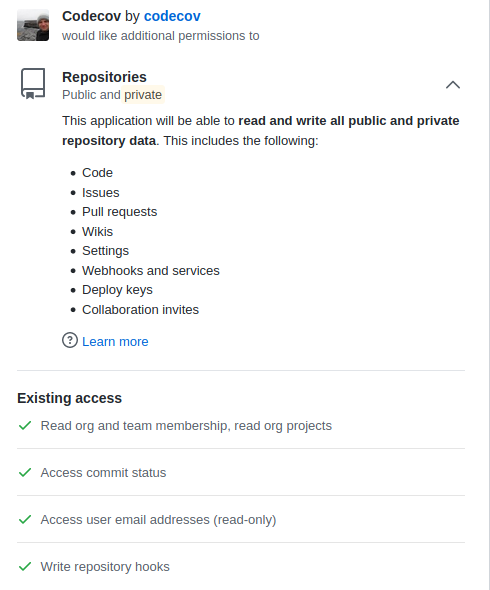
E.g. why do you need collaboration invites and the said deploy keys
robstoll
on 27 May 2020
@robstoll, unfortunately, those are not separate permissions that we are individually requesting. The GitHub app permissions are not that granular, but this is the full extent of the permissions we require
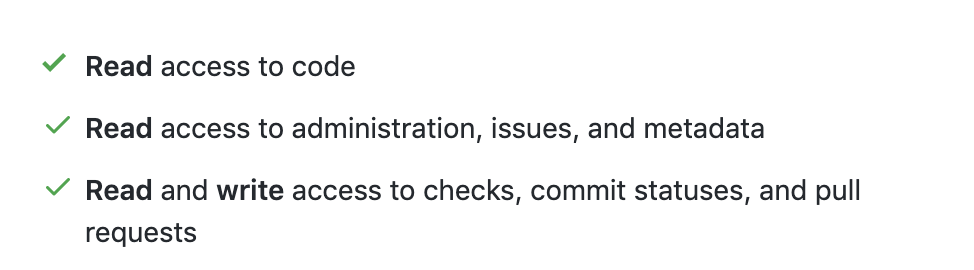
I'm still digging in to see how deploy keys maps, but collaboration invites is part of metadata documented here: https://developer.github.com/v3/apps/permissions/#metadata-permissions
thomasrockhu
on 27 May 2020
Maybe the text of GitHub is poor as well, it sounds like you would have access to write collaboration invites (I created a feature request for more granular permissions)
robstoll
on 27 May 2020
That looks like the permissions for the App, not for the log in to codecov.io
robstoll
on 27 May 2020
Thanks for working with me here @robstoll, the big takeaway here is that we clearly need to do a better job describing why we request the permissions that we do.
Those are the permissions for the app, let me check for codecov.io for you
thomasrockhu
on 27 May 2020
@robstoll these are the permissions I'm seeing from codecov.io
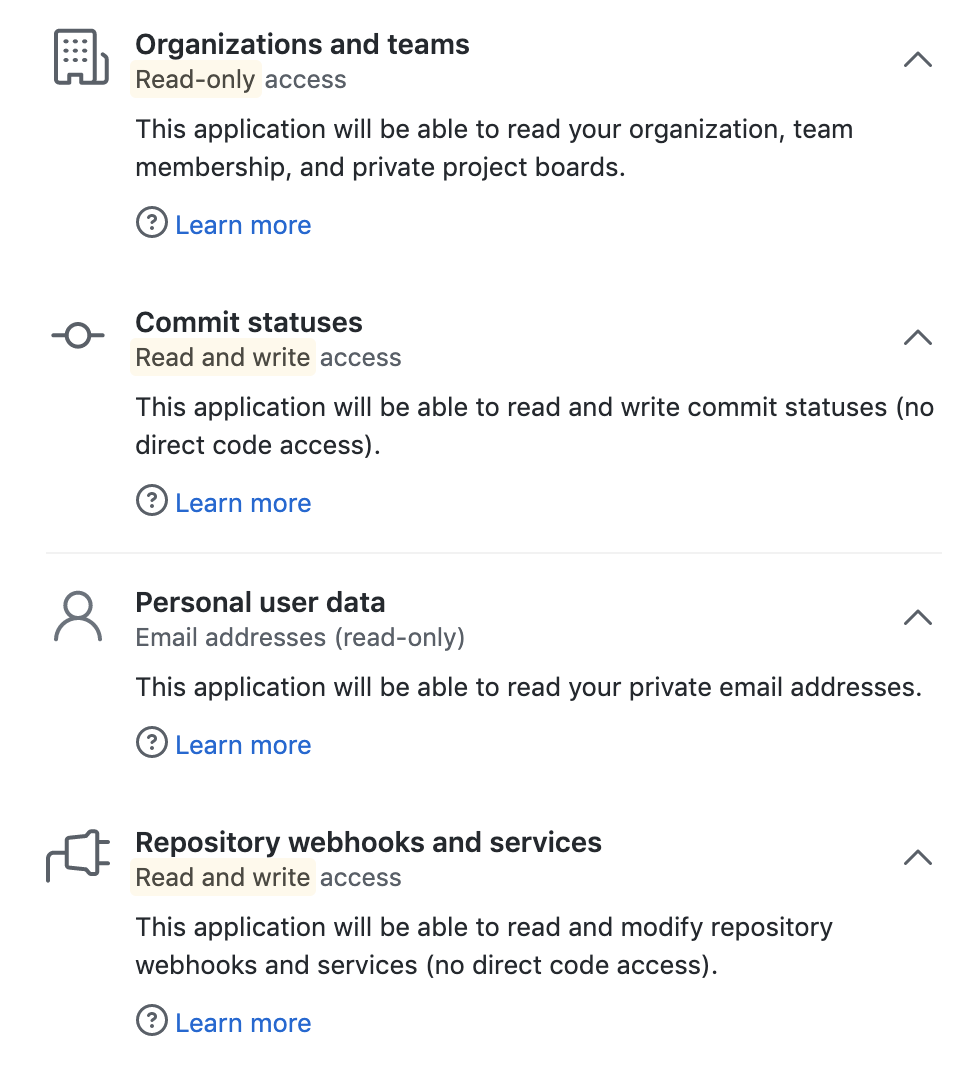
thomasrockhu
on 27 May 2020
I have revoked access to codecov.io so that you can see what permissions are requested on a fresh account:
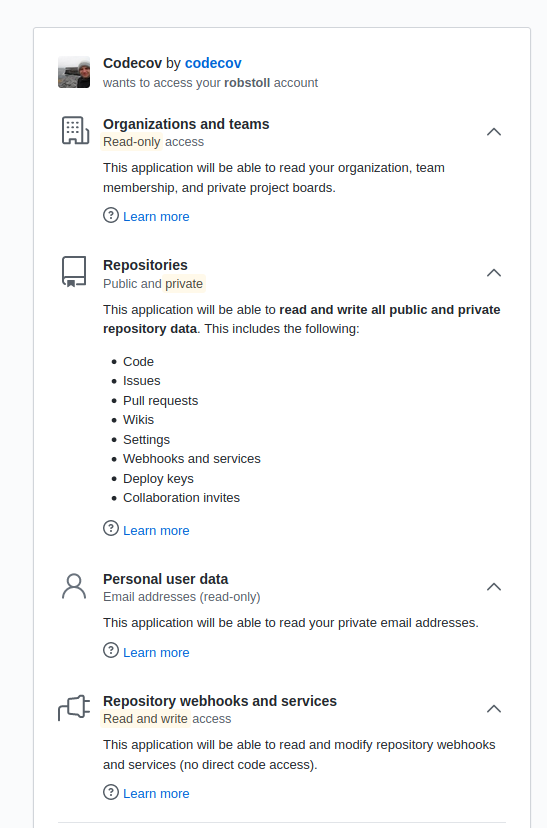
so there is a mismatch between yours and mine. Let me know once it is fixed and I re-consider to open this issue and move to the app
robstoll
on 28 May 2020
One thing to note here @robstoll, is that you don't need to oauth into codecov.io in order to move to the app.
thomasrockhu
on 28 May 2020
true, but the installation process takes me to this site:
https://codecov.io/gh?installation_id=xxxx2xx7&setup_action=install
So, this step is not required to finish the installation successfully?
robstoll
on 28 May 2020
@robstoll these are the permissions I'm seeing from
codecov.io
@thomasrockhu those look like the old permissions codecov.io wanted from me as well. Have you tried to revoke access and gain again access to codecov.io?
robstoll
on 30 May 2020
I have installed the app, closing the issue.
robstoll
on 30 May 2020
@thomasrockhu since I have installed the app, the code-coverage dropped. It seems like the coverage from travis is no longer uploaded correctly. The log in the CI seems normal:
https://travis-ci.com/github/robstoll/atrium/jobs/341746356#L1960
Any hint?
OK must have been a glitch by coincidence:
$ bash <(curl -s https://codecov.io/bash) -F current

curl: (60) SSL certificate problem: certificate has expired

More details here: http://curl.haxx.se/docs/sslcerts.html

curl performs SSL certificate verification by default, using a "bundle"

 of Certificate Authority (CA) public keys (CA certs). If the default

 bundle file isn't adequate, you can specify an alternate file

 using the --cacert option.

If this HTTPS server uses a certificate signed by a CA represented in

 the bundle, the certificate verification probably failed due to a

 problem with the certificate (it might be expired, or the name might

 not match the domain name in the URL).

If you'd like to turn off curl's verification of the certificate, use

 the -k (or --insecure) option.
Hi @robstoll, sorry about the wait here. We had an issue this weekend due to an intermediate cert in our cert chain expiring. This seems to be a more wide-sweeping internet issue shown here. We have since patched this our side, and you shouldn't be receiving that error anymore.
thomasrockhu
on 1 Jun 2020
@thomasrockhu no worries, that was only a glitch no problem at all.
However, I have no idea if it is due to the app installation or not but I cannot longer look at individual files on codecov :cry:
Try e.g. a file here
https://codecov.io/gh/robstoll/atrium/tree/master/core/api/atrium-core-api-common/src/main/kotlin/ch/tutteli/atrium/core
I always get a 500 server error
robstoll
on 1 Jun 2020
@robstoll I'll dig into this, but right now I'm able to access files both logged in and logged out. e.g. https://codecov.io/gh/robstoll/atrium/src/master/core/api/atrium-core-api-common/src/main/kotlin/ch/tutteli/atrium/core/Either.kt
thomasrockhu
on 1 Jun 2020
@thomasrockhu hm... so again a glitch, I am able to access it on the latest commit as well.
I have at least one other issue currently, the ignore in the codecov.yaml does not work any more.
I read here (https://docs.codecov.io/docs/codecov-yaml#can-i-name-the-file-codecovyml) that one can also move the codecov.yml to .github - I tried that in the hope that it would help, the contrary is the case, it is not recognised any more (https://codecov.io/gh/robstoll/atrium/commit/b0f54ab485f61b7175ba7e452e34cb25e8f024ad/build).
Any hint?
robstoll
on 1 Jun 2020
@robstoll strange, the yaml is actually found, but it is shown as invalid. I'm not seeing in any documentation the against: parent parameter here
If you remove it, the yaml appears to be valid.
thomasrockhu
on 1 Jun 2020
OK, going to try it, nothing new I have added though and it was valid with against: parent when it was in the root of the project:
https://codecov.io/gh/robstoll/atrium/commit/31ff629f5e728a3b198e19e20d42c77b391042b7/build
robstoll
on 1 Jun 2020
@robstoll, looking at our logs, we did mark this as invalid, but we have made changes on our side to be more strict about invalid yamls. I'm guessing that's why it doesn't show up in the UI now, but I am surprised if there was a change in behavior. Let me know if you see that.
thomasrockhu
on 1 Jun 2020
Must be a change in behaviour, if you look at https://codecov.io/gh/robstoll/atrium/commit/1994aad85e7d4ab9da3cfea6a59313bda6c1b722/build which was uploaded ~45min ago, it finds the yaml and does not complain.
But in any case, I am totally fine with removing it - had added this a long time ago because it was necessary back then.
robstoll
on 1 Jun 2020
@thomasrockhu does not seem like it helped to remove against: parent for the UI but at least the ignore pattern works again (not sure if it related to removing against: parent though). So despite the fact that https://codecov.io/gh/robstoll/atrium/commit/f48c695189b89e5cc9bbe111a72081caf79e27a2/build shows no yaml found it seems to work :man_shrugging: weird stuff is going on over there :laughing:
ps: Might it be that the UI is not aware of that .codecov.yaml can also be under .github?
robstoll
on 1 Jun 2020
Thanks for checking up on that, I forwarded it over to the product team to see why that might be. But just confirming that everything else seems to be working properly for you?
thomasrockhu
on 2 Jun 2020
Just wanted to update you that we indeed found a strange issue here, and the product team has added it to the roadmap. Thanks for the help here @robstoll!
thomasrockhu
on 2 Jun 2020
@thomasrockhu glad I could be of help.
There are two issue open for me:
- translations does not show up https://codecov.io/gh/robstoll/atrium/tree/master/ - it is something which does not work for a while (so has nothing to do with the app) and since the impact for me is not significant I ignored it but it would be nice if it shown. The uploaded reports.xml contains corresponding data. For instance, /apis/fluent-en_GB/atrium-api-fluent-en_GB-jvm/build/reports/jacoco/report.xml contains i.a.:
xml <class name="ch/tutteli/atrium/translations/DescriptionFloatingPointAssertion" sourcefilename="DescriptionFloatingPointAssertion.kt"> <method name="<clinit>" desc="()V" line="11"> <counter type="INSTRUCTION" missed="0" covered="38"/> <counter type="LINE" missed="0" covered="3"/> <counter type="COMPLEXITY" missed="0" covered="1"/> <counter type="METHOD" missed="0" covered="1"/> </method> <method name="getValue" desc="()Ljava/lang/String;" line="10"> <counter type="INSTRUCTION" missed="0" covered="3"/> <counter type="LINE" missed="0" covered="1"/> <counter type="COMPLEXITY" missed="0" covered="1"/> <counter type="METHOD" missed="0" covered="1"/> </method> <method name="<init>" desc="(Ljava/lang/String;ILjava/lang/String;)V" line="10"> <counter type="INSTRUCTION" missed="0" covered="8"/> <counter type="LINE" missed="0" covered="1"/> <counter type="COMPLEXITY" missed="0" covered="1"/> <counter type="METHOD" missed="0" covered="1"/> </method> <method name="getId" desc="()Ljava/lang/String;" line="10"> <counter type="INSTRUCTION" missed="3" covered="0"/> <counter type="LINE" missed="1" covered="0"/> <counter type="COMPLEXITY" missed="1" covered="0"/> <counter type="METHOD" missed="1" covered="0"/> </method> <method name="getDefault" desc="()Ljava/lang/String;" line="10"> <counter type="INSTRUCTION" missed="0" covered="3"/> <counter type="LINE" missed="0" covered="1"/> <counter type="COMPLEXITY" missed="0" covered="1"/> <counter type="METHOD" missed="0" covered="1"/> </method> <counter type="INSTRUCTION" missed="3" covered="52"/> <counter type="LINE" missed="0" covered="4"/> <counter type="COMPLEXITY" missed="1" covered="4"/> <counter type="METHOD" missed="1" covered="4"/> <counter type="CLASS" missed="0" covered="1"/> </class> - I would like to access codecov.io without the need to grant all kind of rights. Basically authentication via github would suffice for me (I am fine if it requires the same rights as the App)
ps: A :star: for Atrium would be appreciated in case it helps to improve codecov :wink:
robstoll
on 2 Jun 2020
@robstoll, thanks for dealing with us here and really appreciate your patience.
- Sorry, I think you'll need to spell this out one for me a little bit more. I'm not particularly familiar with translations, but what would a solution look like?
- Just to clarify, and apologies if we've gone over this. I want to be sure I get the right answer for you here, which permissions do we ask of you on
codecov.iothat are above and beyond the app permissions? What would the right solution here look like for you? - Ask and you shall receieve

thomasrockhu
on 3 Jun 2020
It's just a regular directory: https://github.com/robstoll/atrium/tree/master/translations
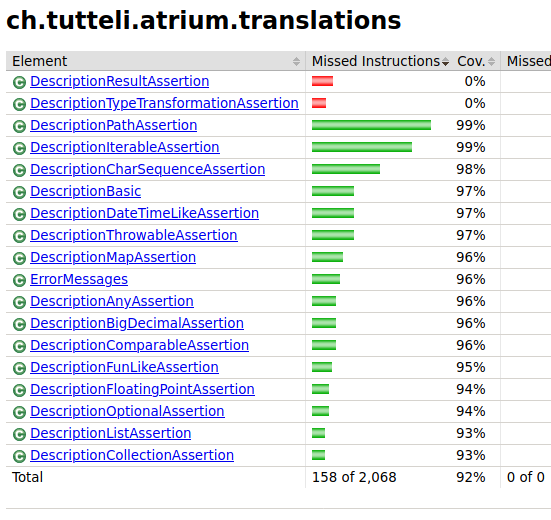
As you can see abovech/tutteli/atrium/translations/DescriptionFloatingPointAssertionis one class resulting from this path. However, this class does not show up in codecov (even though report contains it as you can see in the above xml). If I generate a html report with jacoco in addition to the report.xml then I see i.a. the following:
codecov.io requests: https://github.com/robstoll/atrium/issues/511#issuecomment-635123652
IMO it would be enough if it request the same as the app, i.e.
https://github.com/robstoll/atrium/issues/511#issuecomment-634927635Thanks :smiley:
robstoll
on 3 Jun 2020
Related issues
robstoll
·
5Comments
robstoll
·
7Comments
robstoll
·
6Comments
robstoll
·
3Comments
robstoll
·
4Comments