Atom: Toggle line comments on blank line indents with spaces instead of tabs
Prerequisites
- [x] Put an X between the brackets on this line if you have done all of the following:
- Reproduced the problem in Safe Mode: http://flight-manual.atom.io/hacking-atom/sections/debugging/#using-safe-mode
- Followed all applicable steps in the debugging guide: http://flight-manual.atom.io/hacking-atom/sections/debugging/
- Checked the FAQs on the message board for common solutions: https://discuss.atom.io/c/faq
- Checked that your issue isn't already filed: https://github.com/issues?utf8=✓&q=is%3Aissue+user%3Aatom
- Checked that there is not already an Atom package that provides the described functionality: https://atom.io/packages
Description
After the fix of the #15850, I guess, editor:toggle-line-comments works incorrectly in tab-indented file on empty indented lines.
Steps to Reproduce
- Open file with tab-based indentation
- Go to the empty line
- Indent
- Run
editor:toggle-line-comments(ctrl-/)
Expected behavior: Line indented by tabs (like the rest of the file) and starts with comment symbol(s).
» » foo
» » #·
Actual behavior: Indentation becomes by spaces.
» » foo
····#·
Reproduces how often: 100%
Versions
$ atom --version
Atom    : 1.22.0
Electron: 1.6.15
Chrome  : 56.0.2924.87
Node    : 7.4.0

$ apm --version
apm  1.18.8
npm  3.10.10
node 6.9.5 x64
python 2.7.14
git 2.15.0
Additional Information
No.
 AlexWayfer
All 2 comments
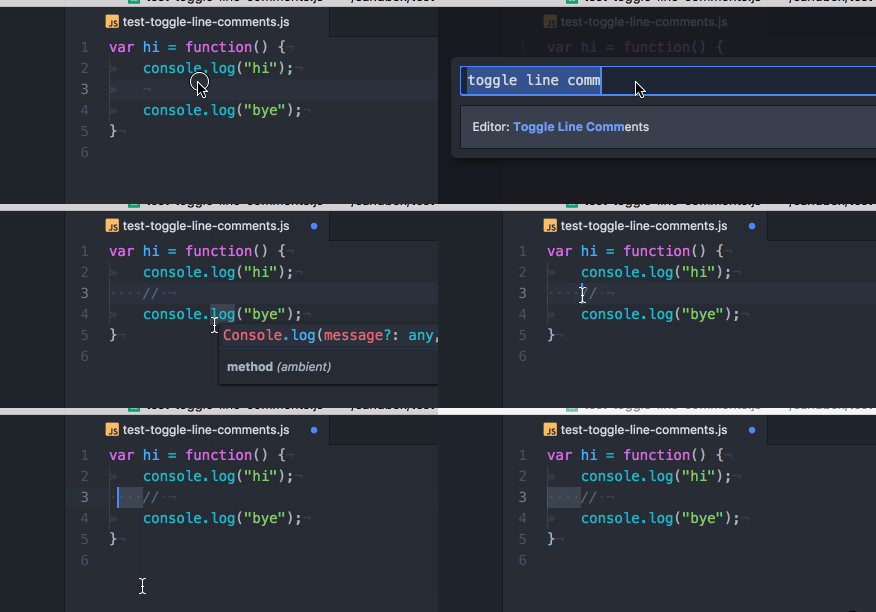
Thanks for the report, I can reproduce on Atom 1.22.1 with macOS 10.12.6 - with this snippet indented by tabs and Settings > Editor > Tab Type set to hard:
var hi = function() {
    console.log("hi");

    console.log("bye");
}
On 1.22.1:
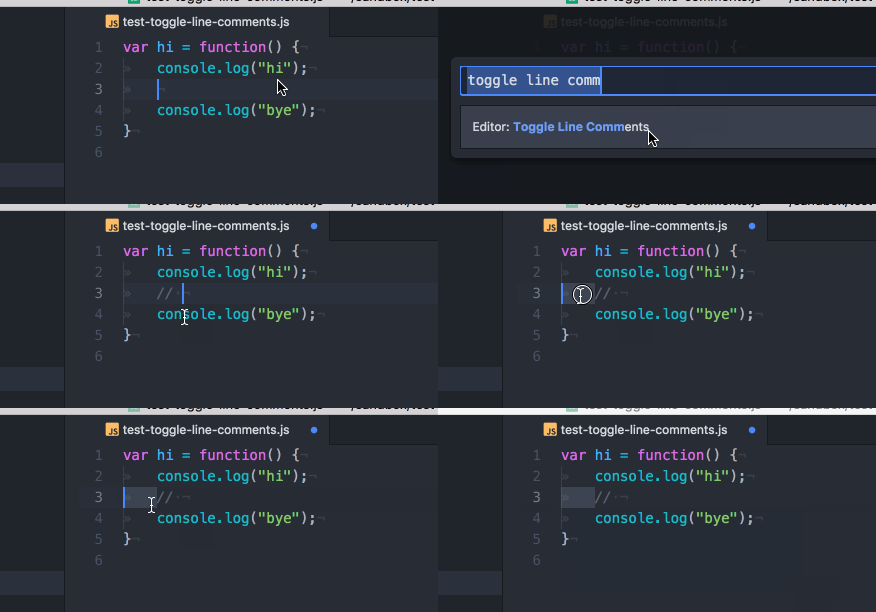
Previous behavior in 1.21.1:
 rsese
on 16 Nov 2017
rsese
on 16 Nov 2017
This issue has been automatically locked since there has not been any recent activity after it was closed. If you can still reproduce this issue in Safe Mode then please open a new issue and fill out the entire issue template to ensure that we have enough information to address your issue. Thanks!
![lock[bot] picture](https://avatars1.githubusercontent.com/in/6672?v=4&s=40) lock[bot]
on 3 Jun 2018
lock[bot]
on 3 Jun 2018
Related issues
 stefan-baumann
·
3Comments
stefan-baumann
·
3Comments
 Aevyz
·
3Comments
Aevyz
·
3Comments
 RonItelman
·
3Comments
RonItelman
·
3Comments
 mmase
·
3Comments
mmase
·
3Comments
 adjl
·
3Comments
adjl
·
3Comments
Most helpful comment
Thanks for the report, I can reproduce on Atom 1.22.1 with macOS 10.12.6 - with this snippet indented by tabs and
Settings > Editor > Tab Typeset tohard:On 1.22.1:
Previous behavior in 1.21.1: