Atom-script: Uncaught TypeError: Cannot read property 'remove' of undefined
[Enter steps to reproduce:]
- ...
- ...
Atom: 1.45.0 x64
Electron: 4.2.7
OS: Mac OS X 10.15.2
Thrown From: script package 3.25.0
Stack Trace
Uncaught TypeError: Cannot read property 'remove' of undefined
At /Users/bytedance/.atom/packages/script/node_modules/atom-message-panel/lib/MessagePanelView.js:189

TypeError: Cannot read property 'remove' of undefined
    at ScriptView.MessagePanelView.remove (/packages/script/node_modules/atom-message-panel/lib/MessagePanelView.js:189:30)
    at ScriptView.detach (/packages/atom-beautify/node_modules/jquery/dist/jquery.js:5357:15)
    at ScriptView.removePanel (/packages/script/lib/script-view.js:89:10)
    at Object.closeScriptViewAndStopRunner (/packages/script/lib/script.js:161:21)
    at HTMLElement.scriptCloseView (/packages/script/lib/script.js:94:39)
    at CommandRegistry.handleCommandEvent (/Users/bytedance/Downloads/devApp/Atom.app/Contents/Resources/app/static/<embedded>:11:349290)
    at CommandRegistry.dispatch (/Users/bytedance/Downloads/devApp/Atom.app/Contents/Resources/app/static/<embedded>:11:347765)
    at ScriptView.close (/packages/script/lib/script-view.js:99:19)
    at /packages/atom-beautify/node_modules/space-pen/lib/space-pen.js:220:36)
    at HTMLDivElement.dispatch (/packages/atom-beautify/node_modules/jquery/dist/jquery.js:4435:9)
    at HTMLDivElement.elemData.handle (/packages/atom-beautify/node_modules/jquery/dist/jquery.js:4121:28)
Commands
     -3:30 core:save (input.hidden-input)
  4x -3:17.2.0 script:run (input.hidden-input)
  2x -2:38.3.0 script:close-view (atom-workspace.workspace.scrollbars-visible-when-scrolling.theme-one-dark-syntax.theme-one-dark-ui)
     -2:17.2.0 script:run (input.hidden-input)
  2x -1:56.7.0 editor:toggle-line-comments (input.hidden-input)
     -1:53.8.0 core:save (input.hidden-input)
     -1:51.8.0 script:run (input.hidden-input)
     -1:44.1.0 core:backspace (input.hidden-input)
     -1:43.1.0 core:save (input.hidden-input)
  2x -1:42.3.0 script:run (input.hidden-input)
     -1:15.9.0 core:backspace (input.hidden-input)
     -1:14.9.0 core:save (input.hidden-input)
     -1:12.5.0 script:run (input.hidden-input)
     -1:10.6.0 script:close-view (atom-workspace.workspace.scrollbars-visible-when-scrolling.theme-one-dark-syntax.theme-one-dark-ui)
     -0:26.9.0 script:run (input.hidden-input)
  2x -0:25.3.0 script:close-view (atom-workspace.workspace.scrollbars-visible-when-scrolling.theme-one-dark-syntax.theme-one-dark-ui)
Non-Core Packages
atom-beautify 0.33.4
atom-ide-ui 0.13.0
autocomplete-clang 0.13.1
go-debug 1.7.0
go-plus 6.1.0
go-signature-statusbar 1.2.3
script 3.25.0
 LigthRain
All 25 comments
same issue
 cqlc94
on 8 Apr 2020
cqlc94
on 8 Apr 2020
same issue
 jerry1346
on 8 Apr 2020
jerry1346
on 8 Apr 2020
same issue
 surajburman
on 8 Apr 2020
surajburman
on 8 Apr 2020
same issue
 varunsingh87
on 8 Apr 2020
varunsingh87
on 8 Apr 2020
same issue
 Phoenix537
on 9 Apr 2020
Phoenix537
on 9 Apr 2020
same issue
 zyi103
on 9 Apr 2020
zyi103
on 9 Apr 2020
[Enter steps to reproduce:]
- ...
- ...
Atom: 1.45.0 x64
Electron: 4.2.7
OS: Ubuntu Focal
Thrown From: script package 3.25.0
Stack Trace
Uncaught TypeError: Cannot read property 'remove' of undefined
At /home/jim/.atom/packages/script/node_modules/atom-message-panel/lib/MessagePanelView.js:189

TypeError: Cannot read property 'remove' of undefined
    at ScriptView.MessagePanelView.remove (/packages/script/node_modules/atom-message-panel/lib/MessagePanelView.js:189:30)
    at ScriptView.detach (/packages/script/node_modules/jquery/dist/jquery.js:5357:15)
    at ScriptView.removePanel (/packages/script/lib/script-view.js:89:10)
    at Object.closeScriptViewAndStopRunner (/packages/script/lib/script.js:161:21)
    at HTMLElement.coreClose (/packages/script/lib/script.js:93:32)
    at CommandRegistry.handleCommandEvent (/snap/atom/248/usr/share/atom/resources/app/static/<embedded>:11:349290)
    at KeymapManager.dispatchCommandEvent (/snap/atom/248/usr/share/atom/resources/app/static/<embedded>:11:1254747)
    at KeymapManager.handleKeyboardEvent (/snap/atom/248/usr/share/atom/resources/app/static/<embedded>:11:1250881)
    at WindowEventHandler.handleDocumentKeyEvent (/snap/atom/248/usr/share/atom/resources/app/static/<embedded>:11:284496)
Commands
  3x -2:04.2.0 core:move-down (input.hidden-input)
     -2:03.3.0 core:cut (input.hidden-input)
     -2:03.0 editor:move-line-up (input.hidden-input)
  4x -2:02.7.0 core:move-up (input.hidden-input)
  3x -2:01.0 core:cut (input.hidden-input)
     -1:59.8.0 snippets:next-tab-stop (input.hidden-input)
     -1:59.8.0 snippets:expand (input.hidden-input)
     -1:59.8.0 editor:indent (input.hidden-input)
     -1:25.2.0 core:undo (input.hidden-input)
  2x -1:23.6.0 core:move-up (input.hidden-input)
     -1:22.8.0 core:move-down (input.hidden-input)
 11x -1:22.5.0 core:delete (input.hidden-input)
     -1:18.9.0 autocomplete-plus:confirm (input.hidden-input)
  9x -0:21.1.0 core:backspace (input.hidden-input)
     -0:17.2.0 core:save (input.hidden-input)
     -0:16.3.0 core:close (input.hidden-input)
Non-Core Packages
linter-pylint 2.1.1
script 3.25.0
same issue
 MenschMarcus
on 9 Apr 2020
MenschMarcus
on 9 Apr 2020
same issue
 robert-cronin
on 11 Apr 2020
robert-cronin
on 11 Apr 2020
Same Issue
 wilsonowilson
on 11 Apr 2020
wilsonowilson
on 11 Apr 2020
Had the same issue.
solved it by going to: C:\Users\username.atom\packages\scriptnode_modules\atom-message-panel\lib
Then removed from line 187 to 190
MessagePanelView.prototype.remove = function (index) {
  this.messages.splice(-index, 1);
  this.body.children()[index].remove();
};
worked for me
 zurachf
on 12 Apr 2020
zurachf
on 12 Apr 2020
[
 kakamihai
on 12 Apr 2020
kakamihai
on 12 Apr 2020
Had the same issue.
solved it by going to: C:\Users\username.atom\packages\scriptnode_modules\atom-message-panel\lib
Then removed from line 187 to 190
MessagePanelView.prototype.remove = function (index) {
this.messages.splice(-index, 1); this.body.children()[index].remove();
};
worked for me
Worked like a charm
 shakeelansari63
on 12 Apr 2020
shakeelansari63
on 12 Apr 2020
I have a problem with Atom script package.The script isn't running.Can someone to live a comment about this problem.
kakamihai
on 12 Apr 2020
That seems like a bit of a hack rather deep in the functionality of the script module. Are you sure that this is a good idea?
On 12 April 2020 16:23:02 CEST, Shakeel Ansari notifications@github.com wrote:
Had the same issue.
solved it by going to:
C:\Users\username.atom\packages\scriptnode_modules\atom-message-panel\lib
Then removed from line 187 to 190
MessagePanelView.prototype.remove = function (index) { this.messages.splice(-index, 1); this.body.children()[index].remove(); };worked for me
Worked like a charm
--
You are receiving this because you commented.
Reply to this email directly or view it on GitHub:
https://github.com/rgbkrk/atom-script/issues/2093#issuecomment-612623089
--
Sent from my Android device with K-9 Mail. Please excuse my brevity.
MenschMarcus
on 12 Apr 2020
same issue after running python script and clicking [ESC] or [X] in Script dialog below
[Enter steps to reproduce:]
- run python script via [CMD+I]
- Click [ESC]
Atom: 1.45.0 x64
Electron: 4.2.7
OS: Mac OS X 10.15.3
Thrown From: script package 3.25.0
Stack Trace
Uncaught TypeError: Cannot read property 'remove' of undefined
At /Users/jihadalmofadda/.atom/packages/script/node_modules/atom-message-panel/lib/MessagePanelView.js:189

TypeError: Cannot read property 'remove' of undefined
    at ScriptView.MessagePanelView.remove (/packages/script/node_modules/atom-message-panel/lib/MessagePanelView.js:189:30)
    at ScriptView.detach (/packages/autocomplete-python/node_modules/jquery/dist/jquery.js:5357:15)
    at ScriptView.removePanel (/packages/script/lib/script-view.js:89:10)
    at Object.closeScriptViewAndStopRunner (/packages/script/lib/script.js:161:21)
    at HTMLElement.coreCancel (/packages/script/lib/script.js:92:33)
    at CommandRegistry.handleCommandEvent (/Applications/Atom.app/Contents/Resources/app/static/<embedded>:11:349290)
    at KeymapManager.dispatchCommandEvent (/Applications/Atom.app/Contents/Resources/app/static/<embedded>:11:1254747)
    at KeymapManager.handleKeyboardEvent (/Applications/Atom.app/Contents/Resources/app/static/<embedded>:11:1250881)
    at WindowEventHandler.handleDocumentKeyEvent (/Applications/Atom.app/Contents/Resources/app/static/<embedded>:11:284496)
Commands
     -1:14.5.0 editor:consolidate-selections (input.hidden-input)
     -1:14.5.0 core:cancel (input.hidden-input)
     -1:13.7.0 editor:consolidate-selections (input.hidden-input)
     -1:13.7.0 core:cancel (input.hidden-input)
     -1:11.5.0 editor:consolidate-selections (input.hidden-input)
     -1:11.5.0 core:cancel (input.hidden-input)
  2x -0:18.8.0 script:run (input.hidden-input)
     -0:15.7.0 editor:consolidate-selections (input.hidden-input)
     -0:15.7.0 core:cancel (input.hidden-input)
     -0:12.4.0 script:close-view (atom-workspace.workspace.scrollbars-visible-when-scrolling.theme-one-dark-syntax.theme-one-dark-ui)
Non-Core Packages
atom-beautify 0.33.4
autocomplete-python 1.16.0
busy-signal 2.0.1
ide-html 0.6.0
ide-swift 0.1.8
intentions 1.1.5
kite 0.178.0
language-slim 1.0.1
language-swift 0.5.0
linter 2.3.1
linter-ui-default 1.8.1
python-autopep8 0.1.3
ruby-slim 0.2.0
script 3.25.0
slim-language 2.2.0
 Jihad
on 13 Apr 2020
Jihad
on 13 Apr 2020
same when clicking on the x or pressing ctrl+w
 domiplayer
on 13 Apr 2020
domiplayer
on 13 Apr 2020
That seems like a bit of a hack rather deep in the functionality of the script module. Are you sure that this is a good idea?
…
On 12 April 2020 16:23:02 CEST, Shakeel Ansari @.*> wrote: > Had the same issue. > solved it by going to: C:\Users\username.atom\packages\scriptnode_modules\atom-message-panel\lib > Then removed from line 187 to 190 > >MessagePanelView.prototype.remove = function (index) { this.messages.splice(-index, 1); this.body.children()[index].remove(); };> > worked for me Worked like a charm -- You are receiving this because you commented. Reply to this email directly or view it on GitHub: #2093 (comment)
-- Sent from my Android device with K-9 Mail. Please excuse my brevity.
thanks, that worked for me too
domiplayer
on 13 Apr 2020
Same issue. Occurs after running and clicking "X" on the "script" package window, or esc on keyboard.
 nslagambina
on 15 Apr 2020
nslagambina
on 15 Apr 2020
[Enter steps to reproduce:]
- I accidentally pressed CTRL-SHIFT-B which apparently runs package Script, run script. (I'm working on a JS project).
- Error occurs when I try to close that script panel that pops up because of that shortcut I accidentally used.
Atom: 1.45.0 x64
Electron: 4.2.12
OS: "Manjaro Linux"
Thrown From: script package 3.25.0
Stack Trace
Uncaught TypeError: Cannot read property 'remove' of undefined
At /home/bassam/.atom/packages/script/node_modules/atom-message-panel/lib/MessagePanelView.js:189

TypeError: Cannot read property 'remove' of undefined
    at ScriptView.MessagePanelView.remove (/packages/script/node_modules/atom-message-panel/lib/MessagePanelView.js:189:30)
    at ScriptView.detach (/packages/atom-beautify/node_modules/jquery/dist/jquery.js:5357:15)
    at ScriptView.removePanel (/packages/script/lib/script-view.js:89:10)
    at Object.closeScriptViewAndStopRunner (/packages/script/lib/script.js:161:21)
    at HTMLElement.scriptCloseView (/packages/script/lib/script.js:94:39)
    at CommandRegistry.handleCommandEvent (/usr/lib/atom/src/command-registry.js:405:43)
    at CommandRegistry.dispatch (/usr/lib/atom/src/command-registry.js:292:17)
    at ScriptView.close (/packages/script/lib/script-view.js:99:19)
    at /packages/atom-beautify/node_modules/space-pen/lib/space-pen.js:220:36)
    at HTMLDivElement.dispatch (/packages/atom-beautify/node_modules/jquery/dist/jquery.js:4435:9)
    at HTMLDivElement.elemData.handle (/packages/atom-beautify/node_modules/jquery/dist/jquery.js:4121:28)
Commands
Non-Core Packages
/home/bassam/.atom/packages/script/node_modules/atom-message-panel/lib/MessagePanelView.js:189
atom-beautify 0.33.4
atom-live-server 2.3.0
atom-python-run 0.9.7
ide-python 1.5.0
p5js-snippet 0.3.2
p5js-snippets 0.4.4
p5js-toolbar 0.2.1
psychopy 0.1.1
python-tools 0.6.9
script 3.25.0
 bassamanator
on 15 Apr 2020
bassamanator
on 15 Apr 2020
i've got the same error on pop!_os, using the 1.45.0 x64 version of Atom.
please fix this
 juanCortelezzi
on 20 Apr 2020
juanCortelezzi
on 20 Apr 2020
Had the same issue.
solved it by going to: C:Usersusername.atompackagesscriptnode_modulesatom-message-panellib
Then removed from line 187 to 190
MessagePanelView.prototype.remove = function (index) { this.messages.splice(-index, 1); this.body.children()[index].remove(); };worked for me
Hi, I tried as you wrote but not working for me. Do you have any other idea how to fixed it, please?
 balage112
on 22 Apr 2020
balage112
on 22 Apr 2020
@balage112 did you after saving restart atom?
zurachf
on 23 Apr 2020
@balage112 did you after saving restart atom?
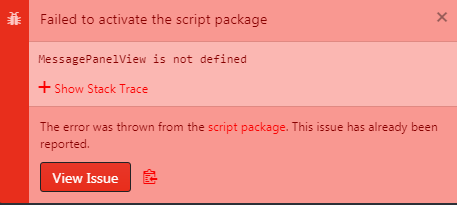
Yes I did but still not working. If I want to press Ctrl + B or press Packages - Script - Run Script - nothing is happening.
balage112
on 23 Apr 2020
Sorry - new update
balage112
on 23 Apr 2020
Related issues
 adamabernathy
·
5Comments
adamabernathy
·
5Comments
 chenkangcrack
·
5Comments
chenkangcrack
·
5Comments
 stwykd
·
6Comments
stwykd
·
6Comments
 wookiist
·
3Comments
wookiist
·
3Comments
 JohnnyUrosevic
·
5Comments
JohnnyUrosevic
·
5Comments
Most helpful comment
Same issue. Occurs after running and clicking "X" on the "script" package window, or esc on keyboard.