Atom-script: Java - Cannot find file
When I try to compile my Java file using atom-script I get javac: file not found.
If I set Atoms-scripts Current Working Directory to the folder where my Java file is it finds the file. I obviously don't want to have to keep doing this for every file I need to compile otherwise there wouldn't be a point at all in using Atom.
I use Sublime Text 3 and Textpad and they can all compile from any working directory without having to specify paths.
Is there any way to configure atom-script so I can just compile my Java from anywhere?
 Ninja2k
All 11 comments
I'm struggling to understand the use case in which this issue exists. Have you tried adding the containing folder as a project folder File -> Add Project Folder?
 andyrichardson
on 6 Nov 2016
andyrichardson
on 6 Nov 2016
My Java files are contained at C:Users%USER%DesktopJava
Inside here I have a folder for each of my Java projects, HelloWorld, Calculator etc
If I try to build using Atom-Script I get an error
javac: file not found: Hello.java
Usage: javac <options> <source files>
use -help for a list of possible options
So I need to configure Scripts "Current Working Directory" to point at the exact directory every time I want to build something so for example I have to set my "Current Working Directory" to
C:\Users\%USER%\Desktop\Java\HelloWorld
C:\Users\%USER%\Desktop\Java\Calculator
I don't need to do any of this in Textpad or Sublime Text 3, I just had to set my systems PATH to C:Program FilesJavajdk1.8.0_101bin and it knew what to do.
Ninja2k
on 6 Nov 2016
I think atom only uses the main project folder as the path, if I were to run a file from a subdirectory in the project folder
|----Sub_Dir
|    |----File_One.java
|----File_Two.java
I will only be able to compile File_Two.java but not File_One.java.
 mammothb
on 8 Nov 2016
mammothb
on 8 Nov 2016
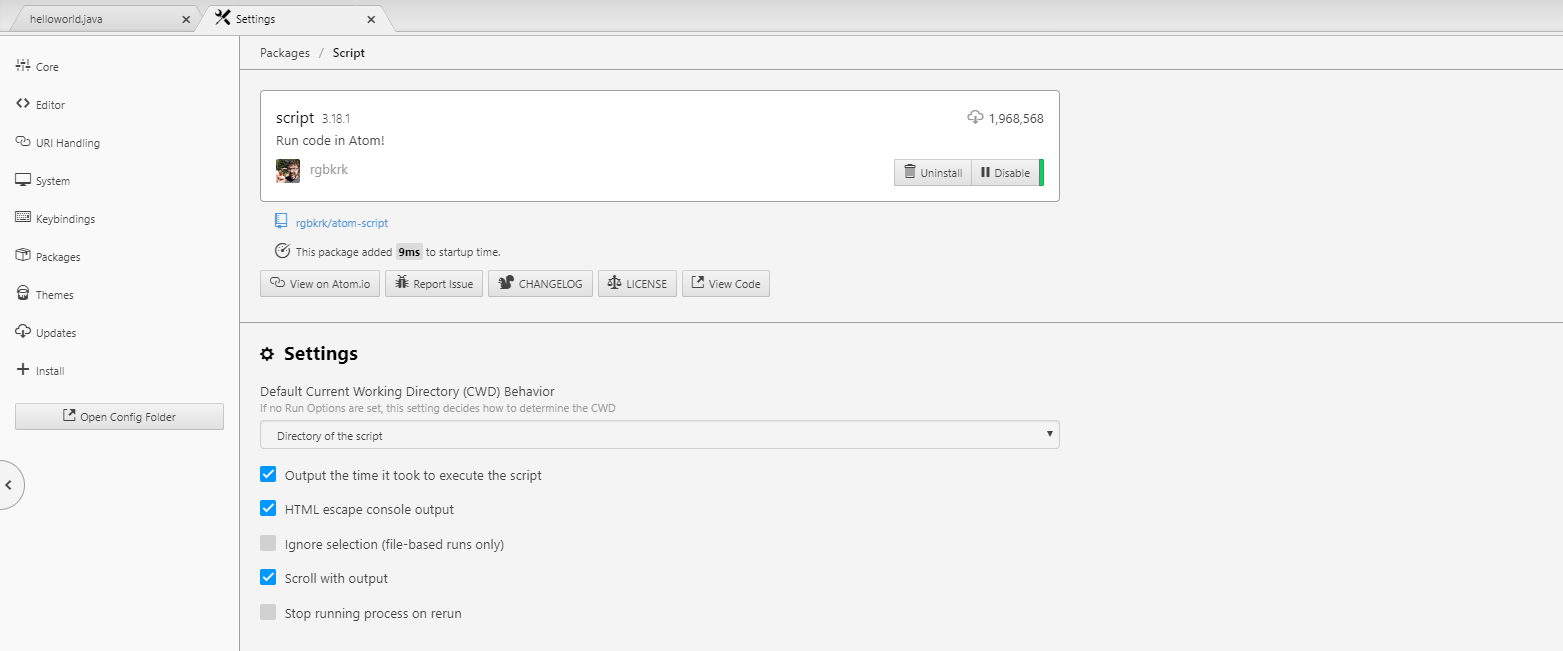
Latest version of script package have a new setting in settings tab - you can choose, how the CWD is calculated. Try to change it, one of them should suit your needs
 nixel2007
on 8 Nov 2016
nixel2007
on 8 Nov 2016
Yes I was able to compile by setting the "Default CWD Behavior" to "Directory of the script".
mammothb
on 8 Nov 2016
Sublimes Java build command looks something like this
{ "cmd":["javac","$file_name","&&","java","$file_base_name"], "file_regex": "^[ ]file \"(...?)\", line ([0-9]*)", "path":"C:\\Program Files\\Java\\jdk1.8.0_77\\bin\\", "selector": "source.java", "shell":true }
I don't see it being an advantage if I have to keep changing my directory for every compile. I think that is a much better way to do things.
Ninja2k
on 8 Nov 2016
@Ninja2k change the CWD behavior in package settings, as I noticed above
nixel2007
on 9 Nov 2016
I was looking in the wrong place, I was looking at the Current Working Directory in Packages -> Script -> Settings but in the module settings there is a drop down where you can set the behaviour to execute the Java from the current working directory. All new to this!
Ninja2k
on 9 Nov 2016
@Ninja2k
but in the module settings there is a drop down where you can set the behaviour to execute the Java from the current working directory
sorry but where are the "module settings"?
 WiliTest
on 14 Apr 2018
WiliTest
on 14 Apr 2018
@Ninja2k
Please explain where the 'module settings' are?
 metadoz
on 1 Aug 2019
metadoz
on 1 Aug 2019
Packages=>Settings View=>open=>packages
 OnePunchMan34
on 18 Aug 2019
OnePunchMan34
on 18 Aug 2019
Related issues
 kevinpulido89
·
8Comments
kevinpulido89
·
8Comments
 GrantTarbell
·
4Comments
GrantTarbell
·
4Comments
 ghost
·
9Comments
ghost
·
9Comments
 ChenZhongPu
·
3Comments
ChenZhongPu
·
3Comments
 cmdshorty
·
5Comments
cmdshorty
·
5Comments
Most helpful comment
Yes I was able to compile by setting the "Default CWD Behavior" to "Directory of the script".