Atom-script: Unable to run - is what in your PATH?
On trying to use this, I get the below message. I did indeed run atom from the command line with 'atom .' but have no idea what "Is it in your PATH?" means. Can you advise what I should do to put 'it' in my path please? Ruby? Atom? and how would I do that? Google was not my friend on this. I don't find this message helpful. I'm using Linux Mint.
Thanks.
Tim.
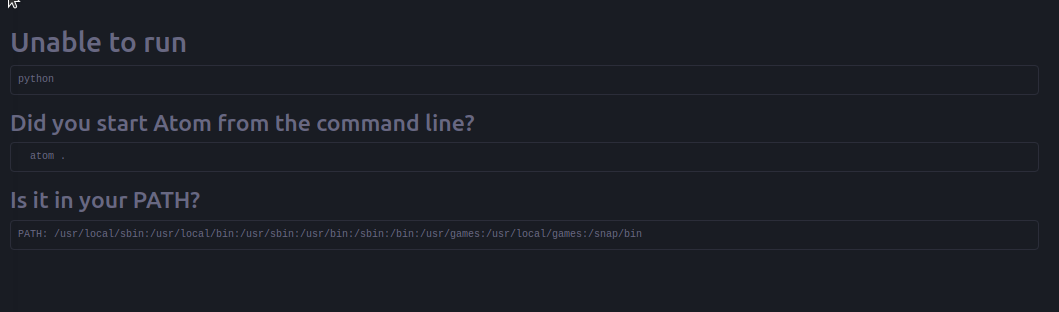
Unable to run
ruby
Did you start Atom from the command line?
atom .
Is it in your PATH?
PATH: /usr/local/sbin:/usr/local/bin:/usr/sbin:/usr/bin:/sbin:/bin:/usr/games:/usr/local/games
 STRAYKR
All 7 comments
Ahh, I found out how to update Ruby to the latest stable version (2.2.3) using RVM, and it seems to have resolved the issue. I don't know if it added Ruby or some other location to the PATH? This might help someone else.
Update: Check your Ruby version. Thought that updating Ruby had resolved and it was working fine yesterday, however created a new folder (couple of folders deep in my 'Home' folder), moved into it from command line, ran "atom ." created a file.rb, wrote some code, tried CTRL+SHFT+B and got the same error as above. Turns out after a reboot Ruby version defaulted back to 1.8. I hadn't set the default version to use in RVM. Appears to be working again.
STRAYKR
on 6 Dec 2015
You should read this. It's in the script's README. After the Setting.
Atom can't find node | ruby | python | my socks
Make sure to launch Atom from the console/terminal. This gives atom all your useful environment variables. Additionally, make sure to run it with the project path you need. For example, use
atom .
to get it to run with the current directory as the default place to run scripts from.
If you really wish to open atom from a launcher/icon, see this issue for a variety of workarounds that have been suggested.
 Joeliqq
on 7 Jan 2016
Joeliqq
on 7 Jan 2016
Hello, i have problem with Atom!
help me, please!

 ProVadimir
on 3 Oct 2017
ProVadimir
on 3 Oct 2017
Same problem here, @ProVadimir @TimHandy
Unable to run Python. Searched the web, but can't find any relevant solution. I think there might be an issue with the atom path, as the same problem occurring with Ruby, JS & Python. The atom community must look forward to this problem, as it's a genuine one.
Must add that I am using Atom 1.26.1 x64 in Ubuntu 16.04
 shubhajitml
on 8 May 2018
shubhajitml
on 8 May 2018
Script works great for me on Windows but stopped working on Ubuntu. Even running from terminal with:
atom .
Making sure I have a shebang at the top of each python file reading:
!/usr/bin/env python3
ensures I don't get the unable to run python messages and it executes within Atom.
 ddaahk
on 31 Jul 2018
ddaahk
on 31 Jul 2018
python is installed on the path usr/local/bin/python3
now you just need to change the name af the python3 for python
the path need become usr/local/bin/python
if you are using the atom-python-run plugin on ATOM the terminal will run when you press the F5 or F6
if you are using the script plugin it will work when press CTRL + SHIFT + B
_"I asked for hours looking for a solution, until I stopped to see the way and it worked, I hope I have helped"_
by google translator :)
Vai Brasil :)
 ramarqes
on 28 Feb 2019
ramarqes
on 28 Feb 2019
same issue ! please help to sovlve this error
Issue - https://github.com/atom-community/atom-script/issues/2529
 mukundoff07
on 29 Jul 2021
mukundoff07
on 29 Jul 2021
Related issues
 ghost
·
9Comments
ghost
·
9Comments
 CHOW1997
·
7Comments
CHOW1997
·
7Comments
 JohnnyUrosevic
·
5Comments
JohnnyUrosevic
·
5Comments
 GrantTarbell
·
4Comments
GrantTarbell
·
4Comments
 bhishanpdl
·
7Comments
bhishanpdl
·
7Comments
Most helpful comment
Script works great for me on Windows but stopped working on Ubuntu. Even running from terminal with:
atom .
Making sure I have a shebang at the top of each python file reading:
!/usr/bin/env python3
ensures I don't get the unable to run python messages and it executes within Atom.