Atom-beautify: Could not find 'rubocop'. The program may not be installed
Description
The results of beautification are not what I expect.
I'm work with rbenv and I did gem install robucop and it did not work.
Input Before Beautification
This is what the code looked like before:
class BookInStock
def initialize(isbn, price)
@isbn = isbn
@price = Float(price)
end
def to_s
"ISBN: #{@isbn}, price: #{@price}"
end
end
Expected Output
The beautified code should have looked like this:
class BookInStock
  def initialize(isbn, price)
    @isbn = isbn
    @price = Float(price)
  end

  def to_s
    "ISBN: #{@isbn}, price: #{@price}"
  end
end
Actual Output
The beautified code actually looked like this:
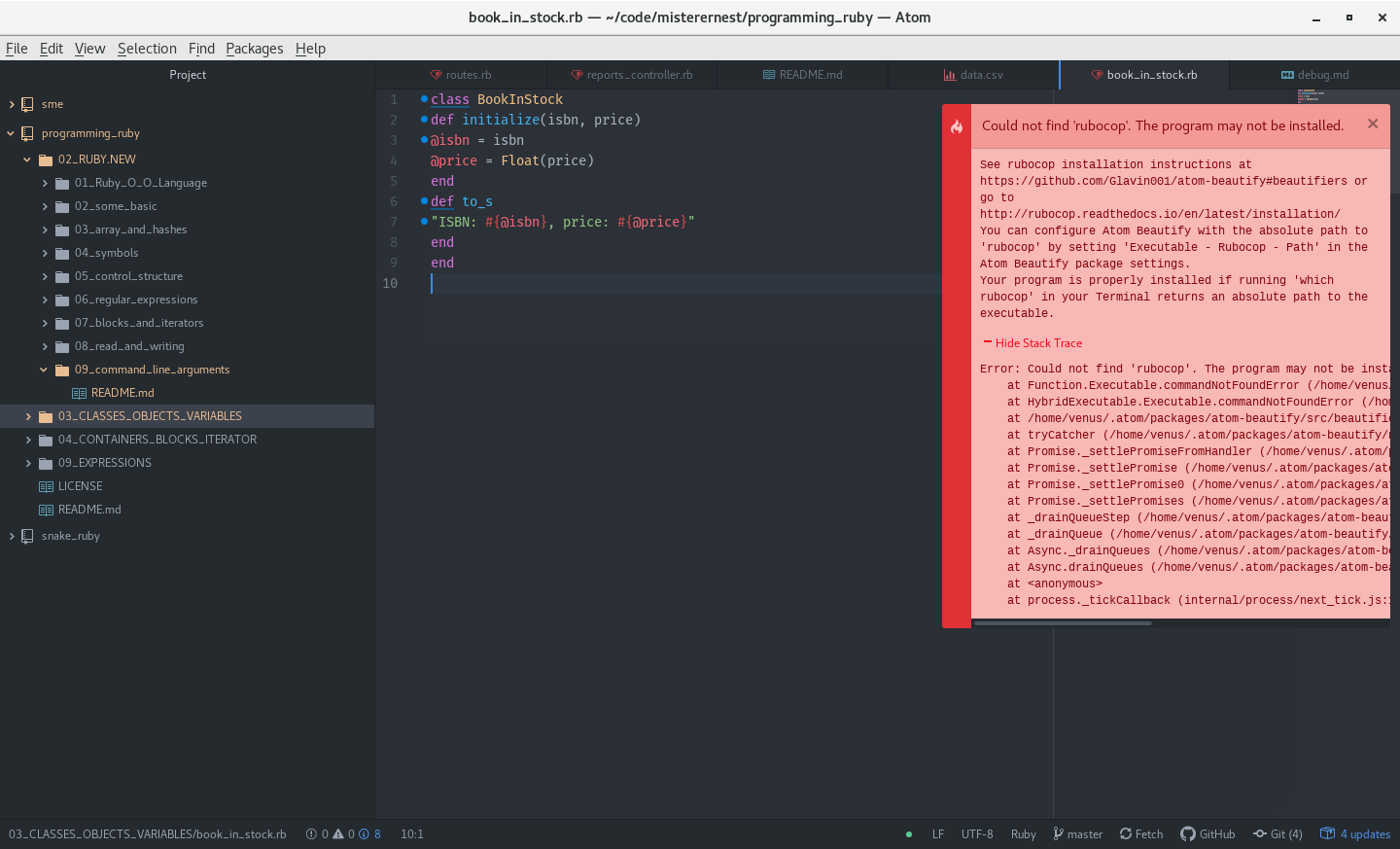
Could not find 'rubocop'. The program may not be installed.
Steps to Reproduce
- Add code to Atom editor
- Run command
Atom Beautify: Beautify Editor - This beautified code does not look right!
Debug
Here is a link to the debug.md Gist:
GIST
Checklist
I have:
- [ ] Tried uninstalling and reinstalling Atom Beautify to ensure it installed properly
- [ ] Reloaded (or restarted) Atom to ensure it is not a caching issue
- [x] Searched through existing Atom Beautify Issues at https://github.com/Glavin001/atom-beautify/issues
so I know this is not a duplicate issue - [ ] Filled out the Input, Expected, and Actual sections above or have edited/removed them in a way that fully describes the issue.
- [x] Generated debugging information by executing
Atom Beautify: Help Debug Editorcommand in Atom and added link fordebug.mdGist to this issue
stale
 misterernest
👍1
All 3 comments
having the same issue. When I try and run
gem install rubocop
I get the following:
// ♥ gem install rubocop
Building native extensions. This could take a while...
ERROR:  Error installing rubocop:
    ERROR: Failed to build gem native extension.

    current directory: /Users/rogerperez/.rvm/gems/ruby-2.5.3/gems/jaro_winkler-1.5.2/ext/jaro_winkler
/Users/rogerperez/.rvm/rubies/ruby-2.5.3/bin/ruby -r ./siteconf20190201-95719-di5gax.rb extconf.rb
creating Makefile

current directory: /Users/rogerperez/.rvm/gems/ruby-2.5.3/gems/jaro_winkler-1.5.2/ext/jaro_winkler
make "DESTDIR=" clean
xcrun: error: invalid active developer path (/Library/Developer/CommandLineTools), missing xcrun at: /Library/Developer/CommandLineTools/usr/bin/xcrun

current directory: /Users/rogerperez/.rvm/gems/ruby-2.5.3/gems/jaro_winkler-1.5.2/ext/jaro_winkler
make "DESTDIR="
xcrun: error: invalid active developer path (/Library/Developer/CommandLineTools), missing xcrun at: /Library/Developer/CommandLineTools/usr/bin/xcrun

make failed, exit code 1

Gem files will remain installed in /Users/rogerperez/.rvm/gems/ruby-2.5.3/gems/jaro_winkler-1.5.2 for inspection.
Results logged to /Users/rogerperez/.rvm/gems/ruby-2.5.3/extensions/x86_64-darwin-17/2.5.0/jaro_winkler-1.5.2/gem_make.out
 rogerprz
on 2 Feb 2019
rogerprz
on 2 Feb 2019
A SOLUTION:
xcode-select --install
Then try running
gem install rubocop
rogerprz
on 2 Feb 2019
🚀1
🎉1
👍1
This issue has been automatically marked as stale because it has not had recent activity. If this is still an issue, please add a comment. It will be closed if no further activity occurs. Thank you for your contributions.
![stale[bot] picture](https://avatars.githubusercontent.com/in/1724?v=4&s=40) stale[bot]
on 3 Apr 2019
stale[bot]
on 3 Apr 2019
Was this page helpful?
0 / 5 - 0 ratings
Related issues
 maximsch2
·
5Comments
maximsch2
·
5Comments
 physcocode
·
3Comments
physcocode
·
3Comments
 jcollum
·
4Comments
jcollum
·
4Comments
 seanoldfield
·
5Comments
seanoldfield
·
5Comments
 bartocc
·
5Comments
bartocc
·
5Comments
Most helpful comment
A SOLUTION:
xcode-select --installThen try running
gem install rubocop